
1. Introduction
This manual provides essential information for the safe and efficient use of your TECLAST F7 Plus3 14-inch Laptop. Please read this manual thoroughly before operating the device and retain it for future reference.

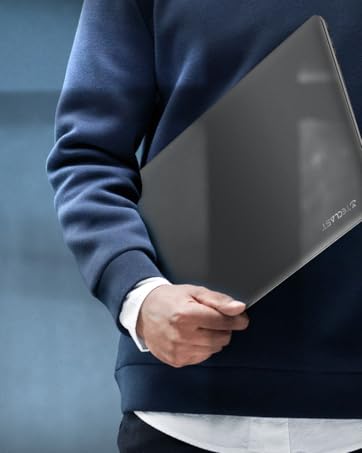
The TECLAST F7 Plus3 14-inch laptop in a closed position, showcasing its sleek design.

An overview of the TECLAST F7 Plus3 laptop's key features, including Intel N4120 processor, 2.4G+5G WiFi, 38000mWh battery, 14-inch FHD IPS display, full-size keyboard, 8GB RAM, and 256GB SSD.
2. Setup
2.1 Unpacking and Initial Charge
Carefully remove the laptop and all accessories from the packaging. Before first use, connect the power adapter to the laptop and a power outlet. It is recommended to charge the device for at least 30 minutes before powering it on for the first time.
Included in the Box:
- TECLAST F7 Plus3 Laptop
- Power Adapter
- Keyboard
- Power Cable
2.2 Powering On and Initial Windows Setup
- Press and hold the power button located on the top right of the keyboard until the screen illuminates.
- Follow the on-screen instructions to complete the Windows 10 (or Windows 11 if upgraded) initial setup. This includes selecting your region, language, and creating a user account.
- Connect to a Wi-Fi network when prompted to enable internet access and download necessary updates.
3. Operating Instructions
3.1 Laptop Overview

The TECLAST F7 Plus3 14-inch laptop with its screen open, showing a high-resolution display.
3.2 Ports and Connectors
The TECLAST F7 Plus3 laptop is equipped with various ports for connectivity. Refer to the image below for port locations.
This image illustrates the various ports on the TECLAST F7 Plus3 laptop, including Micro Card slot, Headphone Jack, USB 2.0, USB 3.0, DC Power input, and Mini-HDMI output.
- Micro Card Slot: For expanding storage with a MicroSD card.
- Headphone Jack: Connect headphones or external speakers.
- USB 2.0 Port: For connecting USB devices.
- USB 3.0 Port: For connecting high-speed USB devices.
- DC Power Input: Connect the power adapter for charging.
- Mini-HDMI Output: Connect to an external display or projector.

The TECLAST F7 Plus3 laptop connected to multiple external monitors via its USB 3.0 and Mini-HDMI ports, demonstrating its expandability.
3.3 Keyboard and Touchpad
The laptop features a full-size keyboard and a large, sensitive touchpad for efficient input.

Detailed view of the full-size keyboard and large touchpad (97mm x 64mm), indicating 20mm key spacing and built-in stereo speakers.
- Keyboard: Full-size layout with 20mm key spacing for comfortable typing.
- Touchpad: Large 97mm x 64mm sensitive touchpad for precise navigation.
3.4 Display
The 14-inch Full HD (1920x1080) IPS display offers clear visuals and wide viewing angles with narrow 6mm bezels.

The laptop screen highlighting its narrow 6mm bezels and IPS display technology for wide viewing angles and 1920x1080 resolution.
3.5 Wireless Connectivity
- Wi-Fi: Supports 2.4G and 5G dual-band Wi-Fi for stable and fast internet connections.
- Bluetooth 4.2: For connecting wireless peripherals such as headphones, mice, and keyboards.

An illustration highlighting the laptop's 2.4G+5G Wi-Fi, Bluetooth 4.2, 867Mbps maximum speed, and 45.6Wh battery for reliable wireless connections and long battery life.
3.6 Operating System
The laptop comes with Windows 10 pre-installed and is upgradeable to Windows 11. Ensure your system is updated regularly for optimal performance and security.
4. Maintenance
4.1 Cleaning
- Screen: Use a soft, lint-free cloth slightly dampened with water or a screen cleaner. Avoid harsh chemicals.
- Keyboard and Chassis: Use a soft, dry cloth. A can of compressed air can help remove dust from between keys.
4.2 Battery Care
The laptop is equipped with a 45600mWh battery. To prolong battery life:
- Avoid extreme temperatures.
- Do not fully discharge the battery frequently.
- If storing the laptop for an extended period, charge it to about 50-60%.

The TECLAST F7 Plus3 laptop is designed for a longer work-life balance, featuring Intel 9th UHD Graphics 600 for 4K video playback and a 45600mAh safe design battery.
4.3 Storage Management
The laptop includes a 256GB SSD and supports expansion up to 1TB via an SSD slot or TF Card slot. Regularly manage your files and uninstall unused applications to maintain performance.
5. Troubleshooting
This section addresses common issues you might encounter with your TECLAST F7 Plus3 laptop.
| Problem | Possible Solution |
|---|---|
| Laptop does not turn on. | Ensure the power adapter is securely connected and the laptop has been charged for at least 30 minutes. Try pressing and holding the power button for 10-15 seconds. |
| Charger is not charging the laptop. | Verify the power adapter and cable are not damaged. Ensure the power outlet is functional. Try a different outlet if available. |
| Wi-Fi connection issues. | Restart your router and modem. Check if other devices can connect to the Wi-Fi. Ensure Wi-Fi is enabled on the laptop (often via a function key or Windows settings). |
| Slow performance. | Close unnecessary applications. Check for background processes. Ensure sufficient free space on the SSD. Run a system scan for malware. |
If these solutions do not resolve the issue, please contact customer support.
6. Specifications
Below are the technical specifications for the TECLAST F7 Plus3 14-inch Laptop:
| Feature | Detail |
|---|---|
| Model Name | F7 Plus3 |
| Screen Size | 14 Inches |
| Screen Resolution | 1920 x 1080 pixels (FHD IPS) |
| Processor | Intel N4120 (up to 2.6 GHz) |
| RAM | 8 GB DDR4 SDRAM |
| Hard Drive | 256 GB SSD (1TB Extensible) |
| Graphics Card | Integrated Intel UHD Graphics 600 |
| Operating System | Windows 10 (Windows 11 Upgradeable) |
| Wireless Type | 2.4G+5G WiFi, Bluetooth 4.2 |
| Ports | USB 3.0, USB 2.0, Mini-HDMI, Headphone Jack, Micro Card Slot, DC Power |
| Item Weight | 2.86 pounds (approx. 1.3 kg) |
| Product Dimensions | 12.6 x 8.6 x 0.8 inches |
| Battery | 45600mWh Lithium Polymer |
7. Warranty and Support
7.1 Product Warranty
Your TECLAST F7 Plus3 laptop is covered by a 1-year warranty from the date of purchase. This warranty includes a 1-year unconditional replacement service for eligible issues.
7.2 Customer Support
For any questions, concerns, or technical assistance, please contact TECLAST customer service. Our professional staff will respond within 1 working day.

TECLAST offers reliable support before and after purchase, with professional staff available to assist with any issues.
7.3 Official Product Video
Watch the official product video for a visual overview of the TECLAST F7 Plus3 laptop's features and design.
An official product video showcasing the TECLAST F7 Plus3 14-inch laptop's design, features, and connectivity options.