1. Product Overview
The Real HD iDS-7216HUHI-M2/S is a 16-channel HD CCTV DVR with additional support for IP cameras, offering 4K HDMI output. This hybrid recorder supports full channel recording at up to 8MP@8fps resolution and is designed for comprehensive surveillance solutions.
Key Features:
- Support Phone App for remote viewing.
- Supports up to 8MP HD-TVI, 4MP AHD, 2MP HD-CVI, 6MP IP CAMERAS (8ch), and regular analog cameras.
- Self-adaptive HD-TVI/HD-CVI/AHD/CVBS input.
- 4 RCA Audio Input for the first 4 Channel Recording.
- HDMI and VGA Output up to 3840 x 2160.
2. Product Components
The DVR unit is designed for robust performance and ease of integration into existing surveillance systems. Below are visual representations of the device.
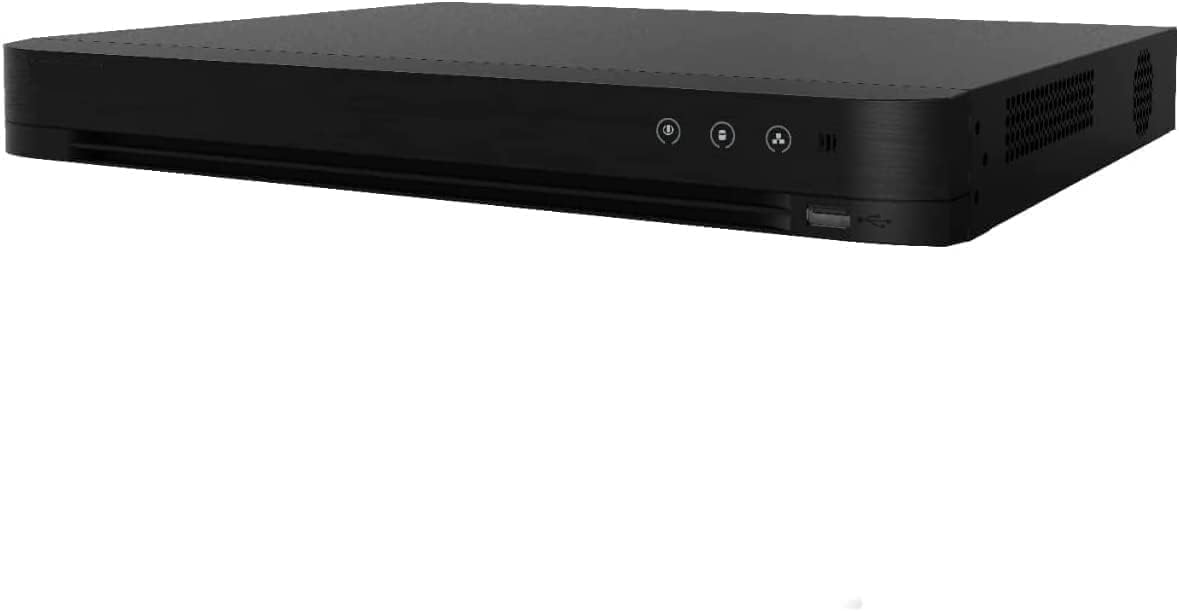
Figure 2.1: Front view of the Real HD iDS-7216HUHI-M2/S DVR unit, showcasing its sleek black design and front panel indicators.

Figure 2.2: Rear panel of the DVR, displaying various input and output ports including BNC video inputs, HDMI, VGA, audio, and network ports.
3. Setup and Installation
3.1 Connecting the DVR
Follow these steps to connect your DVR to your surveillance system and network:
- Connect your cameras to the BNC video input ports on the rear panel of the DVR.
- Connect a monitor to the DVR using either the HDMI or VGA output port.
- For remote access, connect the DVR to your network router using an Ethernet cable.
- Connect the power adapter to the DVR and plug it into a power outlet.

Figure 3.1: Illustration of the DVR connected to a network router and various camera types, including HD-TVI, AHD, HD-CVI, and IP cameras.
4. Operation
4.1 Live View and Playback
Once connected, you can view live feeds and playback recorded footage through the connected monitor or the mobile application.

Figure 4.1: Screenshot of the HVR 4.0 software interface, displaying multiple live camera feeds from various surveillance points.

Figure 4.2: Screenshot of the HVR 4.0 software interface, illustrating the video playback function with a timeline for reviewing recorded footage.
4.2 Remote Access via Mobile App
The DVR supports remote access through a dedicated phone application. Follow the on-screen instructions in the DVR's network settings to connect your mobile device.

Figure 4.3: Screenshot of the HVR 4.0 network settings menu, featuring QR codes for downloading the mobile application and establishing remote access.

Figure 4.4: A visual guide detailing three simple steps to set up remote access to the DVR via a mobile application, including connecting to the internet, downloading the app, and adding the device.

Figure 4.5: A smartphone screen showing the mobile application's interface with multiple live camera feeds, demonstrating remote viewing capabilities.
5. Troubleshooting
5.1 No Video Display
If your cameras are not displaying video on the DVR, consider the following:
- Check Camera Connections: Ensure all camera cables are securely connected to the correct BNC input ports on the DVR.
- Verify Camera Compatibility: The DVR supports up to 8MP HD-TVI, 4MP AHD, 2MP HD-CVI, and 6MP IP cameras. Ensure your cameras are compatible with these formats and resolutions.
- Power Supply: Insufficient power can cause cameras not to display video. Verify that each camera is receiving adequate power from its power supply.
- DVR Mode Settings: Access the DVR's Main Menu > Mode to ensure the correct mode (e.g., Mixed Mode for wired and IP cameras) is selected.
6. Specifications
| Feature | Detail |
|---|---|
| Video Compression | H.265 Pro+/H.265 Pro/H.265/H.264+/H.264 |
| Encoding Resolution (8 MP Lite mode not enabled) | 8 MP/5 MP/4 MP/3 MP/1080p/720p/WD1/4CIF/VGA/CIF |
| Encoding Resolution (8 MP Lite mode enabled) | 8 MP Lite/3MP/1080P/720P/WD1/4CIF/VGA/CIF |
| Main Stream Frame Rate (8 MP Lite mode not enabled) | 8 MP@8 fps/5MP@12 fps/4 MP@15 fps/3 MP@18 fps 1080p/720p/WD1/4CIF/VGA/CIF@25 fps (P)/30 fps (N) |
| Main Stream Frame Rate (8 MP Lite mode enabled) | 8 MP Lite/3MP/1080P/720P/WD1/4CIF/VGA/CIF@15 fps |
| Sub-stream Frame Rate | WD1/4CIF/CIF@25fps (P)/30fps (N) |
| Video Bit Rate | 32 Kbps to 10 Mbps |
| Dual Stream Support | Yes |
| Stream Type | Video, Video & Audio |
| Audio Compression | G.711u |
| Audio Bit Rate | 64 Kbps |
| IP Video Input | 16-ch (up to 32-ch), Up to 8 MP resolution, Support H.265+/H.265/H.264+/H.264 IP cameras |
| Analog Video Input | 16-ch |
| HDTVI Input | 8 MP, 5 MP, 4 MP, 3 MP, 1080p30, 1080p25, 720p60, 720p50, 720p30, 720p25 |
| AHD Input | 5 MP, 4 MP, 1080p25, 1080p30, 720p25, 720p30 |
| HDCVI Input | 4 MP, 1080p25, 1080p30, 720p25, 720p30 |
| CVBS Input | PAL/NTSC |
| CVBS Output | 1-ch, BNC (1.0 Vp-p, 75 Ω), resolution: PAL: 704 × 576, NTSC: 704 × 480 |
| VGA Output | 1-ch, 1920×1080, 1280×1024, 1280x720, 1024x768/60Hz |
| HDMI Output | 1-ch, 4K (3840 × 2160)/30Hz, 2K (2560×1440)/60Hz, 1920×1080/60Hz, 1280×1024/60Hz, 1280×720/60Hz, 1024×768/60Hz |
| Network Protocol | TCP/IP, PPPoE, DHCP, DNS, DDNS, NTP, SADP, NFS, iSCSI, UPnP, HTTPS |
| Audio Input | 4-ch, RCA(2.0 Vp-p, 1kΩ) |
| Audio Output | 1-ch, RCA (Linear, 1kΩ) |
| Synchronous Playback | 16-ch |
| Package Dimensions | 20 x 18 x 8 inches |
| Item Weight | 20 pounds |
| Manufacturer | Real HD |
| Connectivity Technology | BNC Coax Cable |
| Compatible Devices | Camera |
| Number of Channels | 16 |
| Media Format Digital Video | HDD |
7. Warranty and Support
Warranty and US-based Professional & Experienced Tech Support are provided exclusively by the seller. For any firmware upgrade assistance or other technical inquiries, please contact the seller directly.


