
Snailax SL-591
Contents
Snailax Vibration Foot Massager SL-591 User Manual
Comprehensive guide for your Snailax Vibration Foot Massager with Heat and Remote Control.
Product Overview
The Snailax Vibration Foot Massager (Model SL-591) is designed to provide comprehensive relaxation and relief for your feet, calves, legs, and even waist. Featuring high-frequency vibration combined with over 100 stimulating points, it targets deep nerves, joints, and acupuncture points to alleviate discomfort from conditions like plantar fasciitis and general foot pain. This versatile device includes adjustable settings for personalized massage experiences, including multiple modes, intensity levels, and optional heat therapy.

Figure 1: Snailax Vibration Foot Massager with remote control, showing heat function.
Safety Information
Please read and understand all safety instructions before using the Snailax Vibration Foot Massager.
- Consult a medical professional before use if you have any pre-existing medical conditions.
- Do not immerse the device in water or any other liquid.
- Exercise caution when using high intensity vibration and heating settings, especially if you have sensitive skin or circulatory issues.
- Limit usage to a maximum of three 15-minute cycles per day to prevent over-stimulation.
- Ensure the power cord is not damaged or tangled during use.
Setup Guide
- Unpacking: Carefully remove the massager and all accessories from the packaging. Verify that all components are present: the massager unit, remote control, power adapter, and detachable dust cover.
- Placement: Place the massager on a flat, stable surface. Ensure there is enough space around the unit for comfortable use and proper ventilation.
- Power Connection: Connect the power adapter to the massager's power input port. Plug the adapter into a standard electrical outlet.
- Remote Control Batteries: The remote control typically comes with pre-installed batteries (1 C battery required). If not, insert the battery according to the polarity markings inside the battery compartment.
- Attach Dust Cover (Optional): For enhanced comfort and to keep the unit clean, you may place the detachable dust cover over the foot pads.

Figure 2: Package contents of the Snailax Foot Massager.
Operating Instructions
The Snailax Vibration Foot Massager can be operated using either the embedded control panel or the wireless remote control.
Using the Control Panel / Remote Control

Figure 3: Control panel and remote control buttons.
- Power Button (ON/OFF): Press to turn the massager on or off.
- Mode Button (3 Modes): Cycle through the three available massage modes to find your preferred vibration pattern.
- Intensity Button (3 Levels): Adjust the vibration intensity from low to medium to high.
- Heat Button (2 Levels): Activate or adjust the heat function. There are two optional heating levels for added comfort and improved circulation.
Massage Application
The flat design of the Snailax massager allows for versatile use beyond just feet.
- For Feet: Place both feet on the massager. The textured surface with over 100 round grains provides targeted stimulation.
- For Calves/Legs: Position your calves or legs on the massager for relief from fatigue and improved circulation.
- For Back/Waist: The lightweight design allows you to place the massager on a chair or sofa to target your lower back or waist area.
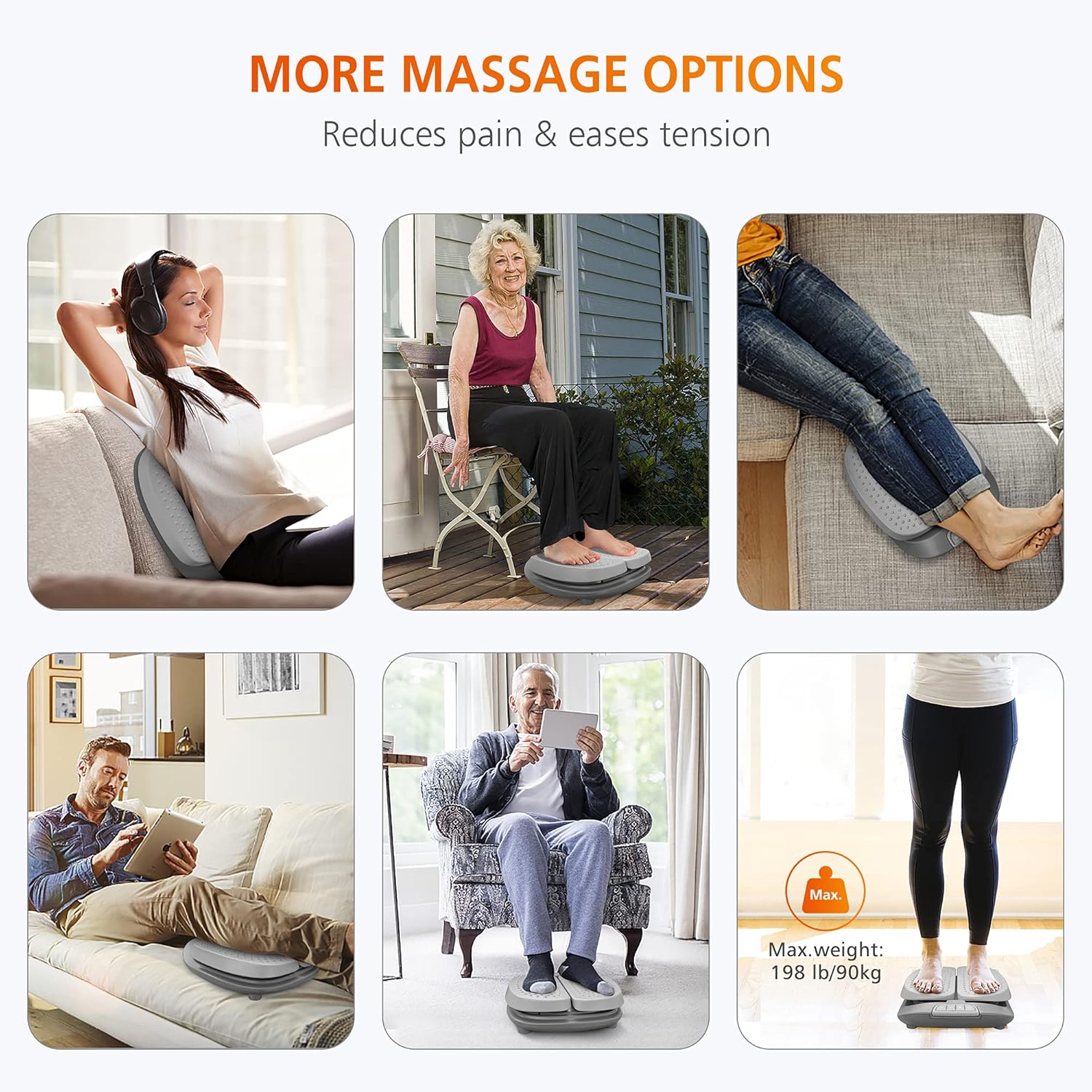
Figure 4: Versatile massage options for different body parts.
The massager has a default 15-minute auto-off timer. It is recommended to use the massager for up to 3 cycles per day.
Maintenance
- Cleaning: Always unplug the massager before cleaning. Wipe the main unit with a soft, damp cloth. Do not use abrasive cleaners or immerse the unit in water.
- Detachable Dust Cover: The included dust cover is washable. Remove it from the unit and hand wash or machine wash on a gentle cycle with mild detergent. Air dry completely before reattaching.
- Storage: Store the massager in a cool, dry place away from direct sunlight and extreme temperatures. Avoid placing heavy objects on top of the unit.

Figure 5: Benefits and care of the detachable dust cover.
Troubleshooting
| Problem | Possible Cause | Solution |
|---|---|---|
| Massager does not turn on. | Not plugged in correctly; Power outlet issue; Remote control battery low. | Ensure power adapter is securely plugged into both the unit and the wall outlet. Test the outlet with another device. Replace remote control battery if needed. |
| Vibration is too weak/strong. | Incorrect intensity setting. | Adjust the intensity level using the Intensity Button on the control panel or remote. |
| Heat function is not working or is too low. | Heat function not activated; User's feet not centered; Ambient temperature too low. | Press the Heat Button to activate. Ensure your feet are properly positioned on the heating areas. Allow a few minutes for the heat to build up. |
| Massager turns off automatically. | Auto-off timer activated. | This is a normal safety feature (15-minute cycle). You can restart the massager if desired, but adhere to recommended usage limits. |
Specifications
- Model: SL-591
- Brand: Snailax
- Product Dimensions: 12.8 x 4.33 x 16.46 inches
- Item Weight: 6.8 Pounds
- Power Source: Corded Electric
- Material: Durable, water-resistant synthetic material (e.g., plastic)
- Max User Weight (Standing): Approximately 198 lbs / 90 kg
- Auto-off Timer: 15 minutes
- Country of Origin: China

Figure 6: Product dimensions for the Snailax Foot Massager.
Warranty and Support
The Snailax Vibration Foot Massager comes with a 2-year free warranty. Additionally, a 30-day free return policy is offered. For any product inquiries, technical support, or warranty claims, please contact Snailax customer service through the retailer's platform or the official Snailax website.
For further assistance, please refer to the contact information provided with your purchase or visit the official Snailax store online.
Documents and downloads
Ask a question about this manual
Ask about setup, troubleshooting, compatibility, parts, safety, or missing instructions. Manuals+ will review the question and use this page’s manual context to help answer it.