
BOMGE 06D
BOMGE 6 Channel Audio Sound Mixer User Manual
Model: 06D | Brand: BOMGE
Introduction
This manual provides detailed instructions for the BOMGE 6 Channel Audio Sound Mixer, a professional digital DJ mixing console designed for live streaming, karaoke, and stereo recording. It features PC computer record playback, Bluetooth connectivity, MP3/USB support, 48V phantom power, and 16 DSP echo effects.
Product Overview

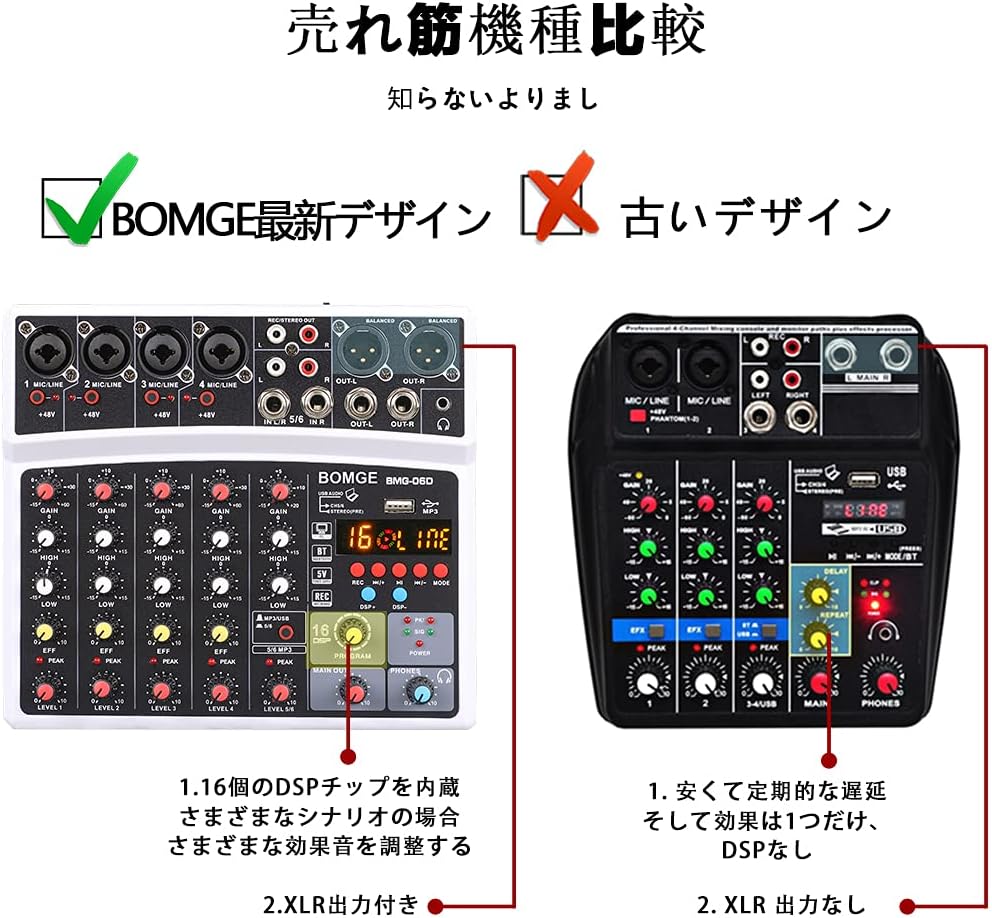
Front view of the BOMGE 6 Channel Audio Sound Mixer, showing all input/output ports and control knobs.
The BOMGE 6 Channel Audio Sound Mixer is a versatile device offering multiple input options and advanced features for various audio applications. Its compact design makes it suitable for home studios, live events, and mobile setups.
Setup Guide
Connecting Your Mixer
- Power Connection: Connect the mixer to a power source using the provided power adapter. The mixer operates on 5 Volts and 2 watts.
- Microphone/Instrument Inputs: The mixer features 4 XLR/LINE jack combo inputs for microphones and instruments (guitars, keyboards, drums). Each channel includes independent 48V phantom power for condenser microphones.
- Stereo Inputs: Utilize the 1/4'' stereo inputs and RCA stereo inputs for additional audio sources.
- Main Outputs: Connect your speakers or recording devices to the 1/4'' Main and XLR balanced outputs. An additional pair of RCA stereo outputs is also available.
- Headphone Output: Connect headphones to the dedicated headphone jack for monitoring.

The mixer connected to a laptop and smartphone, demonstrating its versatility for various setups.

Illustration highlighting the 48V phantom power capability for condenser microphones, ensuring high-performance sound reduction and ultra-low noise.

Diagram illustrating how to connect various devices such as guitars, microphones, speakers, power amplifiers, electronic organs, CDs, computers, and U-disks to the mixer.
Operating Instructions
Audio Input and Mixing
The mixer allows you to combine audio from various sources. Adjust the GAIN, HIGH, LOW, EFF, and LEVEL knobs for each channel to achieve the desired sound. The PEAK indicator lights up if the signal is too strong, indicating potential clipping.
This video demonstrates the audio input and mixing capabilities of the BOMGE 6 Channel DJ Audio Mixer, showing how to connect and adjust various audio sources.
Bluetooth Streaming
The mixer features built-in Bluetooth for wireless audio streaming. Pair your smartphone, tablet, or other Bluetooth-enabled device to play music directly through the mixer. The wireless range is approximately 15 feet.

The mixer's Bluetooth feature allows for wireless streaming from devices like smartphones, indicated by the Bluetooth logo and a phone connected to the mixer.
MP3 Module and Recording
The integrated MP3 module includes a high-definition LCD screen for status display. You can record directly to a U-disk or a connected PC. It also supports playing audio from U-disks and computers.
- Recording to U-Disk: Insert a U-disk into the designated USB port and use the REC function to record your mix.
- Recording to PC: Connect the mixer to your computer via USB. The mixer acts as a sound card, allowing you to record audio directly to your PC.
The mixer connected to a computer, illustrating its capability to function as a sound card for direct recording to PC.
DSP Effects
The mixer features 16 built-in DSP (Digital Signal Processor) effects, primarily echo, delay, and echo plus delay. Use the PROGRAM knob to select an effect and adjust its intensity to enhance your audio output for various scenarios like studio recording, live performances, or karaoke.
Maintenance
- Cleaning: Regularly wipe the mixer with a soft, dry cloth. Avoid using liquid cleaners or solvents that could damage the surface or internal components.
- Storage: Store the mixer in a cool, dry place away from direct sunlight, excessive heat, or moisture when not in use.
- Cable Management: Ensure all cables are properly connected and not strained to prevent damage to the ports or cables themselves.
- Ventilation: Do not block the ventilation openings to prevent overheating.
Troubleshooting
| Problem | Possible Cause | Solution |
|---|---|---|
| No sound output | Incorrect cable connections, low volume levels, power issue. | Check all audio cable connections. Ensure main output and channel levels are turned up. Verify power supply. |
| Distorted audio | Input signal too high (clipping), incorrect gain settings. | Reduce the GAIN for the affected channel until the PEAK indicator no longer lights up. Adjust input levels on connected devices. |
| Bluetooth not connecting | Device too far, interference, mixer not in pairing mode. | Ensure the Bluetooth device is within 15 feet. Restart both the mixer and the Bluetooth device. Check if the mixer's Bluetooth mode is active. |
| Recording issues to PC | Incorrect sound card settings on PC, faulty USB cable. | Verify the mixer is selected as the input device in your computer's sound settings or recording software. Try a different USB cable. |
Specifications
- Model: 06D
- Channels: 6
- Inputs: 4 x XLR/LINE combo, 1 x 1/4'' Stereo, 1 x RCA Stereo
- Outputs: 1 x 1/4'' Main, 1 x XLR Balanced, 1 x RCA Stereo, Headphone
- Phantom Power: +48V (switchable per channel)
- DSP Effects: 16 (Echo, Delay, Echo+Delay)
- Connectivity: Bluetooth, USB (for PC/U-disk recording/playback)
- Power Source: Corded Electric
- Voltage: 5 Volts
- Wattage: 2 watts
- Dimensions: 10.83 x 9.69 x 2.76 inches
- Item Weight: 1.79 pounds (812 Grams)
- Material Type: Plastic
Warranty and Support
For detailed warranty information and customer support, please refer to the official BOMGE website or contact your retailer. A user guide in PDF format is also available for download:
You can also visit the official BOMGE store for more products and support:
Related documents06D

Ask a question about this manual
Ask about setup, troubleshooting, compatibility, parts, safety, or missing instructions. Manuals+ will review the question and use this page’s manual context to help answer it.