
1. Introduction
Thank you for choosing the Vangoa 30-inch Electric Guitar Kit. This manual provides essential information for the proper setup, operation, and maintenance of your new electric guitar and its accessories. Please read these instructions carefully before use to ensure optimal performance and longevity of your instrument.
2. Package Contents
Your Vangoa 30-inch Electric Guitar Kit includes the following items:
- 30-inch Electric Guitar
- Mini Guitar Amplifier
- Guitar Bag (1680D Nylon Oxford, Waterproof)
- Guitar Strap
- Digital Tuner
- Capo
- Extra Set of Strings
- Picks (multiple)
- Instrument Cable (1/4 inch)
- Clean Cloth
- User Manual for Guitar
- Charging Cable for Amplifier
- Instructions for Amplifier

3. Product Features
3.1 Guitar Design and Construction
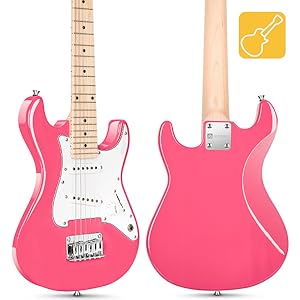
The Vangoa 30-inch electric guitar is specifically designed for young players and beginners, offering a comfortable and accessible playing experience.
- Compact Size: At 30 inches, the guitar is appropriately sized for smaller arms, reducing physical strain during practice.
- Lightweight: Weighing approximately 5.8 lbs, it is easy to handle and transport.
- Ergonomic Body: The curved body design and high polished finish ensure comfortable playing, whether seated or standing, and minimize arm friction.
- Durable Finish: The gloss finish is applied with a paint process for pure color and enhanced durability.
- C-Shaped Maple Neck: Features a Canadian C-shaped maple neck, finely polished for a smooth feel, facilitating easier movement of the hand along the fretboard.
- Rosewood Fretboard: Provides a smooth playing surface.
- Poplar Body: Contributes to the guitar's overall tone and weight.


3.2 Electronics and Tone
The guitar is equipped with electronics designed to provide a versatile range of tones suitable for various music genres.
- S-S Pickup Configuration: Features two classic single-coil pickups, offering bright and stable sound, ideal for rock, funk, and blues.
- 3-Way Pickup Selector Switch: Allows selection between different pickup positions to achieve varied tonal characteristics.
- Volume and Tone Knobs: Standard controls for adjusting the guitar's output volume and tonal brightness.

3.3 Mini Guitar Amplifier
The included mini amplifier provides portable amplification for practice and performance.
- Output Power: 4Ω3W*2
- Charging Voltage: DC 5V
- Charging Time: 2-4 hours
- Endurance Time: Approximately 3 hours
- Frequency Response Range: 280Hz-17KHz
- Battery Specification: 2400mAh
- Housing Material: ABS, Environmental Protection Plastic
- Controls: Master Volume, Drive Volume, Tone, Drive/Clean Switch, Input, Bluetooth (BT), Headphone Output.

4. Setup Guide
Follow these steps to set up your Vangoa Electric Guitar Kit:
4.1 Unpacking
- Carefully remove all components from the packaging.
- Inspect the guitar and accessories for any signs of damage. If any damage is found, contact customer support immediately.
- Keep the packaging for future storage or transport.
4.2 Connecting the Amplifier
- Ensure the mini amplifier is charged. Connect the provided charging cable to the Type C 5V input on the amplifier and a suitable USB power source.
- Once charged, turn on the amplifier using the Power ON/OFF switch.
- Connect one end of the instrument cable to the guitar's output jack (located on the side of the guitar body).
- Connect the other end of the instrument cable to the 'INPUT' jack on the mini amplifier.
- Adjust the 'Master Volume' knob on the amplifier to a low setting before playing.
4.3 Tuning the Guitar
Accurate tuning is crucial for proper sound. Use the included digital tuner.
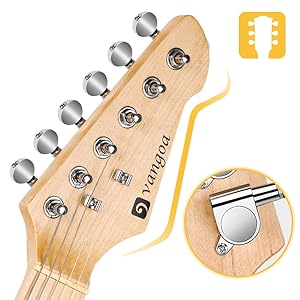
- Clip the digital tuner onto the headstock of the guitar.
- Turn on the tuner. It will display the note being played.
- Pluck each string individually, starting from the thickest (low E string).
- Adjust the corresponding tuning peg (located on the headstock) until the tuner indicates the correct note and shows it is in tune (usually a green light or center needle).
- Standard electric guitar tuning from thickest to thinnest string is E-A-D-G-B-e.
- New strings may stretch and go out of tune frequently initially. Retune as needed.
4.4 Attaching the Strap
- Locate the two strap buttons on the guitar body (one near the neck joint, one at the bottom of the body).
- Securely attach each end of the guitar strap to these buttons.
- Adjust the strap length for comfortable playing while standing.
5. Operating Instructions
5.1 Guitar Controls
- Volume Knob: Controls the overall output volume of the guitar. Turn clockwise to increase volume, counter-clockwise to decrease.
- Tone Knob: Adjusts the tonal brightness of the guitar. Turning it clockwise typically brightens the sound, while counter-clockwise makes it warmer or darker.
- 3-Way Pickup Selector Switch: This switch allows you to select which pickup(s) are active, influencing the guitar's tone.
- Position 1 (Neck Pickup): Produces a warmer, fuller tone.
- Position 2 (Middle Pickup): Offers a balanced tone.
- Position 3 (Bridge Pickup): Delivers a brighter, sharper tone.
5.2 Amplifier Controls
- Master Volume: Controls the overall output volume of the amplifier.
- Drive Volume: Adjusts the volume when the 'Drive' channel is active.
- Tone: Modifies the amplifier's tonal characteristics.
- DR/CL Switch: Toggles between 'Drive' (overdriven/distorted sound) and 'Clean' (clear sound) channels.
- BT (Bluetooth): Activates Bluetooth mode for connecting external audio devices to play along with music.
- Headphone Output: For silent practice, connect headphones to this jack. This will mute the amplifier's speaker.
6. Maintenance
Regular maintenance will help preserve your guitar's playability and appearance.
- Cleaning: After each use, wipe down the strings, fretboard, and body with the included clean cloth to remove sweat, oils, and dust. For a deeper clean, use guitar-specific cleaning products.
- String Replacement: Strings wear out over time, affecting tone and playability. Replace strings when they sound dull, feel rough, or show signs of corrosion. Use the included extra set of strings or purchase new ones of the same gauge.
- Storage: When not in use, store the guitar in its included guitar bag to protect it from dust, humidity changes, and physical damage. Avoid extreme temperatures and direct sunlight.
- Amplifier Care: Keep the amplifier in a dry, cool place. Avoid dropping it or exposing it to liquids. Charge the amplifier regularly to maintain battery health.

7. Troubleshooting
If you encounter issues with your Vangoa Electric Guitar Kit, refer to the table below for common problems and solutions.
| Problem | Possible Cause | Solution |
|---|---|---|
| No sound from amplifier | Amplifier not powered on Low amplifier battery Instrument cable not connected properly Guitar volume knob turned down Headphones connected | Ensure amplifier is ON Charge the amplifier Check cable connections at both guitar and amp Turn up guitar volume knob Disconnect headphones |
| Guitar sounds out of tune frequently | New strings stretching Improper tuning technique Worn strings | Retune frequently until strings stabilize Use the digital tuner carefully Replace old strings with new ones |
| Buzzing sound when playing | Fingers not pressing strings firmly Fretting too close to the fret wire Action (string height) too low | Ensure firm finger pressure Fret just behind the fret wire Consult a guitar technician if action adjustment is needed |
| Amplifier not charging | Faulty charging cable Faulty power adapter Charging port issue | Try a different Type C charging cable Try a different USB power adapter Contact customer support |
8. Product Specifications
| Feature | Specification |
|---|---|
| Brand | Vangoa |
| Size | 30 inches |
| Item Weight | 9.57 pounds (total package) |
| Package Dimensions | 32.5 x 12.25 x 4.27 inches |
| Body Material | Poplar |
| Back Material | Maple Wood |
| Top Material | Maple |
| Neck Material Type | Maple |
| Fretboard Material | Rosewood |
| Number of Strings | 6 |
| String Material | Nylon (Note: Electric guitars typically use steel strings. This may be a data discrepancy or refer to initial strings.) |
| Guitar Pickup Configuration | S-S (Single-Single) |
| Guitar Bridge System | Fixed |
| Connector Type | 1/4 inch (6.35mm) audio jack |
| Amplifier Output Power | 4Ω3W*2 |
| Amplifier Battery | 2400mAh |
| Amplifier Charging Time | 2-4 hours |
| Amplifier Endurance Time | Approx. 3 hours |
9. Warranty and Support
Vangoa products are manufactured to high-quality standards. For specific warranty information, please refer to the documentation included with your purchase or contact Vangoa customer support directly. If you have any questions or require assistance with your product, please reach out to the seller or manufacturer's customer service channels.