
1. Introduction
The Jura Z10 Aluminum White is a state-of-the-art automatic coffee machine designed to deliver a wide range of hot and cold brew specialty coffees. Featuring advanced technology and intuitive controls, it ensures a premium coffee experience in your home. This manual provides essential information for setting up, operating, and maintaining your Jura Z10 to ensure optimal performance and longevity.
2. Setup
Before first use, ensure all packaging materials are removed. Place the machine on a stable, level surface near a power outlet. Follow these steps to prepare your Jura Z10 for brewing:
- Fill the Water Tank: Remove the water tank from the side of the machine. Fill it with fresh, cold water up to the maximum fill line. Ensure the water filter is correctly inserted if using one.
- Add Coffee Beans: Open the bean container lid located on top of the machine. Pour fresh, whole coffee beans into the container. Close the lid securely.
- Power On: Connect the power cord and press the power button. The machine will perform an initial cleaning cycle.
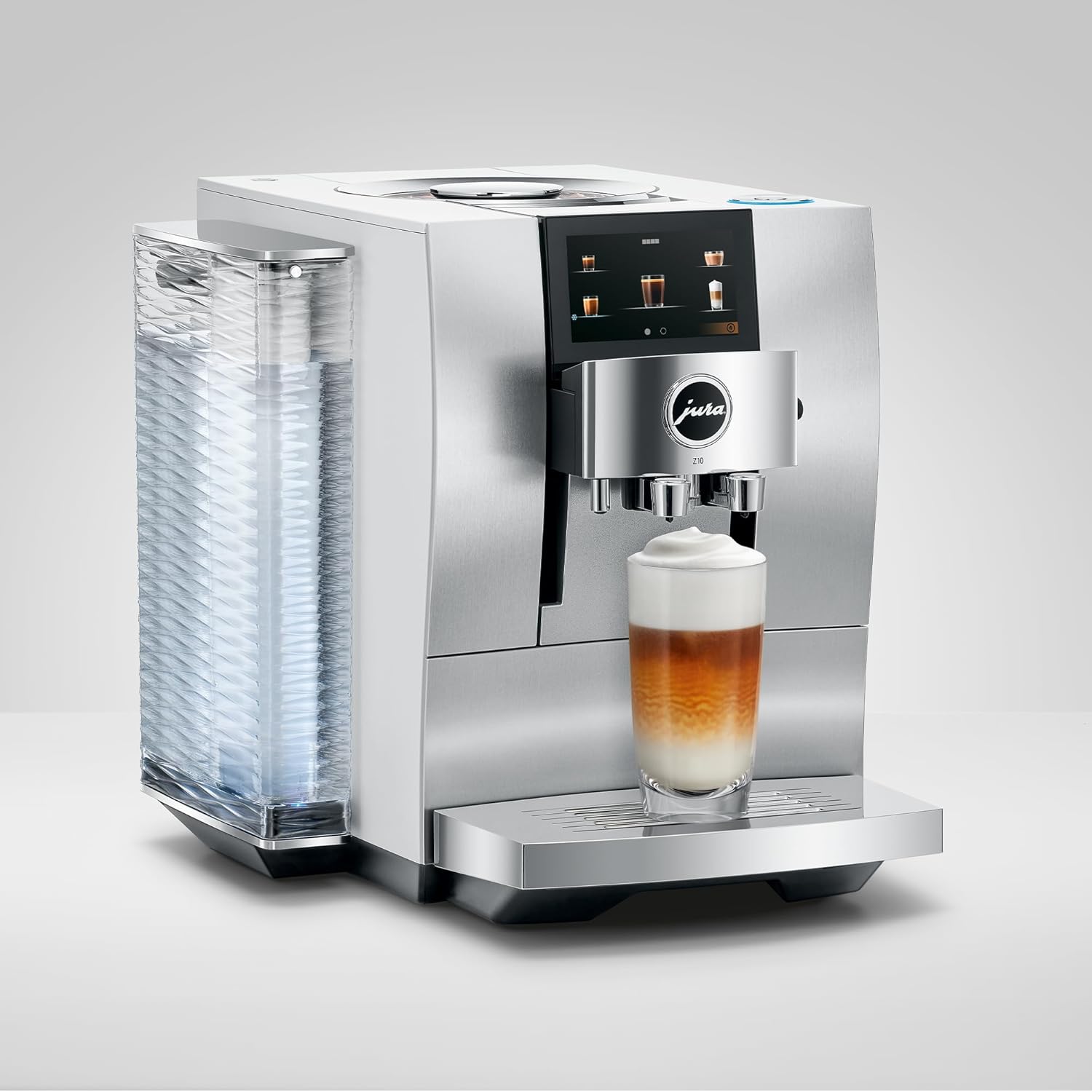
Figure 2.1: Overview of the Jura Z10, showing the water tank on the left and the bean hopper on top.

Figure 2.2: The illuminated water tank of the Jura Z10, indicating water level.

Figure 2.3: The bean hopper of the Jura Z10, where whole coffee beans are stored for grinding.
3. Operating Instructions
The Jura Z10 offers a wide array of coffee specialties, including hot and cold brew options, accessible via its intuitive touchscreen display. You can customize coffee strength, volume, and milk froth to your preference.
3.1. Brewing a Coffee Specialty
- Select Drink: On the touchscreen, swipe through the available coffee specialties and tap on your desired drink (e.g., Espresso, Cappuccino, Cold Brew).
- Customize Settings: Adjust parameters such as coffee strength (from mild to extra strong) and volume (in ounces) using the on-screen controls.
- Place Cup: Position your cup under the coffee spout. For milk-based drinks, ensure the milk system is connected and the milk container is filled.
- Start Brewing: Confirm your selection. The machine will automatically grind the beans and brew your chosen specialty.

Figure 3.1: The Jura Z10 brewing a refreshing cold brew coffee.

Figure 3.2: Customizing coffee strength and grind consistency on the Jura Z10 touchscreen.
3.2. Official Product Videos
My Honest Review and Recommendation with Jura Z10
This video provides an honest review and recommendation for the Jura Z10, highlighting user experience and key features after extended use.
What makes the Jura Z10 better than other coffee makers?
Explore the unique advantages and superior features that set the Jura Z10 apart from other coffee machines on the market.
Review Jura Z10 Espresso Machine
A detailed review of the Jura Z10 Espresso Machine, showcasing its capabilities and performance in making various espresso-based drinks.
Make different drinks with Jura Z10 &Starbucks Coffee Bean
Learn how to prepare a variety of coffee drinks using the Jura Z10 and Starbucks coffee beans, demonstrating its versatility.
Best Espresso Machine out there!!
A short video highlighting why the Jura Z10 is considered one of the best espresso machines available, focusing on its performance and features.
4. Maintenance
Regular cleaning and maintenance are crucial for the longevity and optimal performance of your Jura Z10. The machine features automated cleaning cycles, but some manual steps are required, especially for milk-based drinks.
4.1. Daily Cleaning
- Empty Drip Tray and Coffee Grounds Container: The machine will prompt you when these need to be emptied. Remove, rinse with warm water, and dry thoroughly.
- Rinse Milk System: After preparing milk-based drinks, the machine will prompt for milk system rinsing. Follow the on-screen instructions.

Figure 4.1: The internal coffee grounds container, which should be emptied regularly.
4.2. Regular Maintenance
- Cleaning Program: Run the integrated cleaning program when prompted by the machine. This typically involves using a Jura cleaning tablet.
- Descaling Program: The machine will indicate when descaling is necessary based on water hardness settings. Use Jura descaling tablets and follow the instructions.
- Filter Replacement: Replace the water filter as indicated by the machine or after approximately two months of use.
5. Troubleshooting
This section addresses common issues you might encounter with your Jura Z10.
| Problem | Possible Cause | Solution |
|---|---|---|
| Machine stops mid-brew | Low water, coffee beans, or milk. | Check and refill water tank, bean hopper, or milk container before starting a drink. |
| Coffee is not hot enough | Default temperature settings for milk-based drinks may be too low. | Adjust the milk temperature settings for each drink via the touchscreen interface to your preference. |
| J.O.E. App not connecting | Connectivity issues, app bugs. | Ensure stable Wi-Fi connection. Check app store for updates. Refer to Jura support for persistent issues. |
6. Specifications
| Feature | Detail |
|---|---|
| Brand | Jura |
| Model Name | Z10 |
| Item Model Number | 15361 |
| Color | Aluminum White |
| Product Dimensions | 12.6"D x 17.7"W x 15"H |
| Item Weight | 27 pounds |
| Coffee Maker Type | Espresso Machine |
| Operation Mode | Fully Automatic |
| Human Interface Input | Touchscreen |
| Special Feature | Programmable |
| Included Components | Filter |
| Voltage | 120 |
7. Warranty and Support
Specific warranty details and support information are typically provided with your product packaging or can be found on the official Jura website. Please refer to these resources for comprehensive details regarding your product's warranty coverage and how to obtain technical support.

