
Introduction
This user manual provides instructions for the Easytry123 replacement remote control, designed for use with various Pioneer Micro Hi-Fi Receiver Systems. Please read this manual carefully before using the remote control to ensure proper operation and to maximize its functionality.
This replacement remote control may not support all advanced functions of the original remote. Refer to your Pioneer system's original manual for specific features not covered here.
Product Overview
The Easytry123 replacement remote control is an infrared device designed for intuitive control of your compatible Pioneer Micro Hi-Fi Receiver System. It features an ergonomic design for comfortable handling.

Image 1: Front view of the Easytry123 replacement remote control. This image displays the full layout of buttons, including power, source selection (DISC, USB, TUNER, iPod, AUX), navigation, volume, playback controls, and numeric keypad.
Setup
Battery Installation
The remote control requires two (2) AAA batteries (not included). Follow these steps to install the batteries:
- Locate the battery compartment cover on the back of the remote control.
- Press down on the tab and slide the cover downwards to open the compartment.
- Insert two AAA batteries, ensuring the positive (+) and negative (-) terminals align correctly with the markings inside the compartment.
- Slide the battery compartment cover back into place until it clicks securely.
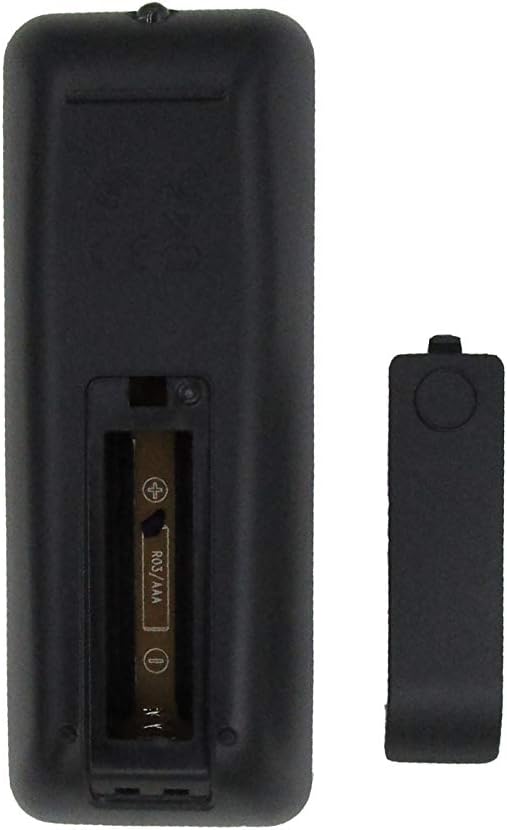
Image 2: Back view of the remote control with the battery compartment open, showing the slot for two AAA batteries.
Important: Remove batteries if the remote control will not be used for an extended period to prevent leakage and damage.
Operating Instructions
Point the remote control directly at the infrared sensor on your Pioneer Micro Hi-Fi Receiver System. Ensure there are no obstructions between the remote and the receiver.
Button Functions
| Button | Function |
|---|---|
| STANDBY/ON | Powers the system on or off (standby mode). |
| DISC | Selects the CD/Disc player as the audio source. |
| USB | Selects the USB input as the audio source. |
| TUNER | Selects the FM/AM tuner as the audio source. |
| OPEN/CLOSE | Opens or closes the CD tray. |
| iPod | Selects the iPod/iPhone dock as the audio source. |
| MODE | Cycles through various playback modes (e.g., repeat, shuffle). |
| PROGRAM | Used to program tracks for CD playback or tuner presets. |
| AUX | Selects the auxiliary input as the audio source. |
| DOCK MENU | Accesses the menu for a docked iPod/iPhone. |
| SLEEP/TIMER | Sets the sleep timer or accesses timer functions. |
| Navigation (Up/Down/Left/Right/ENTER) | Navigates menus and confirms selections. |
| PLAY/PAUSE (►/❚❚) | Starts or pauses playback. |
| STOP (■) | Stops playback. |
| SKIP (◀◀ / ►►) | Skips to the previous or next track/station. |
| P.BASS | Activates or adjusts the P.BASS (Powerful Bass) feature. |
| DISPLAY/CLOCK | Changes display information or accesses clock settings. |
| EQ | Cycles through equalizer presets. |
| MUTE | Mutes or unmutes the audio output. |
| VOL + / - | Increases or decreases the volume level. |
| Numeric Keypad (0-9) | Direct selection of tracks, radio presets, or inputting numbers. |
| RDS | Activates or cycles through Radio Data System information (for compatible tuners). |
| PTY | Selects program type for RDS (e.g., News, Pop, Rock). |
| ASPM | Auto Station Preset Memory (for tuner). |
Compatibility
This Easytry123 replacement remote control is designed to be compatible with the following Pioneer Micro Hi-Fi Receiver Systems and original remote models:
- Pioneer AXD7737
- Pioneer AXD7738
- Pioneer RC-953S (original remote model)
- Pioneer X-EM26
- Pioneer X-EM22
- Pioneer X-EM12
- Pioneer X-EM21
- Pioneer X-EM11
- Pioneer X-EM16
- Pioneer X-PM12
- Pioneer X-PM32
- And other compatible CD/FM Micro Hi-Fi Receiver Systems.
Please verify your system's model number to ensure compatibility. While designed for broad compatibility, some specific functions may vary or not be supported depending on your exact Pioneer system model.
Troubleshooting
- Remote not responding:
- Ensure batteries are inserted correctly with the correct polarity (+/-).
- Replace old batteries with new AAA batteries.
- Check for any obstructions between the remote control and the receiver's infrared sensor.
- Ensure you are within the effective range and pointing the remote directly at the receiver.
- Certain functions do not work:
- This is a replacement remote; some advanced or model-specific functions of your original Pioneer remote may not be supported.
- Refer to your Pioneer system's original manual to confirm if the function is supported by your unit.
Specifications
- Brand: Easytry123
- Model: Replacement for Pioneer AXD7737, AXD7738, RC-953S
- Connectivity Technology: Infrared (IR)
- Power Source: 2 x AAA batteries (not included)
- Max Number of Supported Devices: 1 (controls one Pioneer system)
- Special Feature: Ergonomic design
Maintenance
- Cleaning: Wipe the remote control with a soft, dry cloth. Do not use liquid cleaners or abrasive materials.
- Storage: Store the remote control in a cool, dry place away from direct sunlight and extreme temperatures.
- Battery Care: Remove batteries if the remote is not used for extended periods to prevent corrosion. Dispose of used batteries responsibly according to local regulations.
Warranty and Support
For information regarding warranty coverage or technical support for your Easytry123 replacement remote control, please refer to the retailer or manufacturer's official website where the product was purchased. Keep your proof of purchase for warranty claims.
As this is a replacement product, specific support for the Pioneer Micro Hi-Fi Receiver System itself should be directed to Pioneer customer service or their authorized service centers.