
1. Introduction
This manual provides comprehensive instructions for the DALY Smart BMS 3S 12V 30A Li-ion Battery Protection Module. This module is designed to manage and protect 3-series (3S) 12V lithium-ion battery packs, ensuring their safe and efficient operation. It features integrated Bluetooth connectivity for monitoring and parameter adjustment via a mobile application.
2. Key Features
- Smart BMS with Bluetooth: Fully programmable via Android or iPhone application for real-time monitoring and parameter settings.
- Integrated Charge/Discharge Port: Utilizes a single port for both charging and discharging operations.
- Advanced Protection Functions: Incorporates a high-quality IC chip for precise protection against over-charge, over-discharge, over-current, and short-circuit conditions.
- Voltage Balancing: Features voltage balancing for individual cells to maintain battery health and extend lifespan.
- Temperature Protection: Includes low temperature charging protection (down to -1°C) and programmable temperature limits.
- Accurate SOC Calculation: Provides precise State of Charge (SOC) calculation with automatic learning functionality.
- Automatic Battery Management: Supports automatic battery charging and static balance functions.

Image 2.1: Overview of the 12 protection functions integrated into the DALY Smart BMS. These include Bluetooth connectivity, programmability, over-charging, over-discharging, over-current, short-circuit, over-voltage, balance function, NTC temperature protection, waterproof, moistureproof, fireproof, and dustproof features.
3. Package Contents
The following items are included in your product package:
- 1 x DALY Smart BMS Module
- 1 x Set of Balance Wires
- 1 x Bluetooth Module (for Mobile APP IOS & Android)
- 1 x UART Cable (for PC screen connection)
- 1 x English Version Wiring Manual
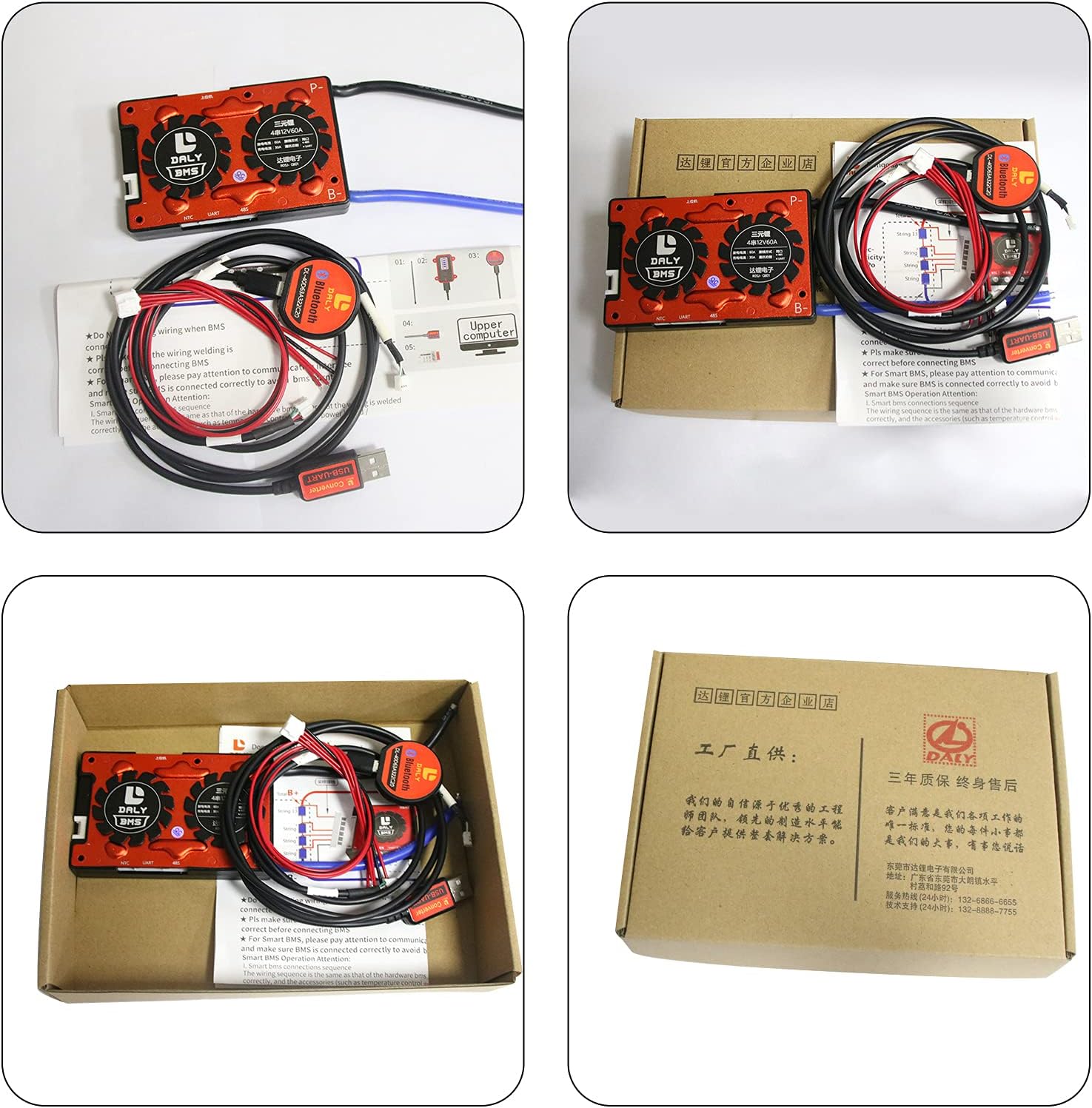
Image 3.1: The DALY Smart BMS package showing the main BMS unit, balance wires, Bluetooth module, and UART communication cable.
4. Specifications
| Feature | Value |
|---|---|
| Product Dimensions | 3.94 x 2.44 x 0.51 inches (100 x 65 x 13 mm) |
| Item Weight | 3.53 ounces (≈186g) |
| Battery Cell Composition | Lithium Ion |
| Nominal Voltage | 12V (3S configuration) |
| Discharge Current | 30A (Continuous) |
| Charge Current | 15A |
| Over-discharge Current Protection | 45A ± 3A (Configurable) |
| Overcharge Current Protection | 45A ± 3A (Configurable) |
| Overcharge Voltage Protection | 4.25V ± 0.05V (per cell, Configurable) |
| Over-discharge Voltage Protection | 2.7V ± 0.1V (per cell, Configurable) |
| Charge Voltage | 12.6V (Configurable) |
| Communication Interface | UART, Bluetooth, (Optional: CAN/RS485) |
| Output Wire Gauge | 16AWG |
| Balance Wires | 24AWG/350mm |
| Model Number | R05J |

Image 4.1: Technical specifications and physical dimensions of the DALY Smart BMS 3S 12V 30A module.
5. Setup and Installation
5.1 Important Safety Notes
- Always disconnect balance wires and BMS connection port before welding black and red balance wires on the battery pack.
- Ensure proper polarity when connecting. Incorrect wiring can damage the BMS and battery.
- Use appropriate safety gear during installation.
5.2 Wiring Diagram
Refer to the following diagram for correct wiring of the BMS to your battery pack, motor/load, and charger.

Image 5.1: Detailed wiring diagram illustrating how to connect the DALY Smart BMS to a 3S battery pack, charger, and motor/load.
5.3 Installation Steps
- Prepare Battery Pack: Ensure all individual cells in your 3S Li-ion battery pack are balanced and at a safe voltage level before connecting the BMS.
- Connect Balance Wires: Carefully connect the balance wires from the BMS to the corresponding positive terminals of each cell in your battery pack, starting from B- (negative terminal of the first cell) up to B+ (positive terminal of the last cell). Ensure the order is correct.
- Connect Main Power Wires: Connect the main negative terminal of the battery pack to the B- terminal on the BMS. Connect the main positive terminal of the battery pack to the P+ terminal on the BMS.
- Connect Load/Charger: Connect your load (e.g., motor) and charger to the P- and P+ terminals of the BMS.
- Activate BMS: Plug in the NTC (temperature sensor) and Bluetooth module. Press the button on the Bluetooth module to activate the smart BMS.
- Verify Connection: Use a multimeter to measure the voltage between adjacent balance cables to confirm correct wiring. The reading should approximate the nominal voltage of a single cell.
Video 5.2: An official DALY video demonstrating the connection process for a Smart BMS, including balance wire connection, main power leads, and activation of the Bluetooth module. This video is provided by the seller, DalyElec.
6. Operating Instructions
6.1 Mobile App Installation and Connection
- Download App: Search for "Smart BMS" in the Huawei App Store or Apple App Store and download the application.
- Open App and Connect: Open the Smart BMS application on your mobile phone. The app will scan for available Bluetooth devices. Select the corresponding Bluetooth module number to connect.
- View Parameters: Once connected, you can view real-time battery parameters such as voltage, current, temperature, and individual cell voltages.

Image 6.1: The DALY Smart BMS mobile application interface, demonstrating how to connect via Bluetooth and view battery parameters.
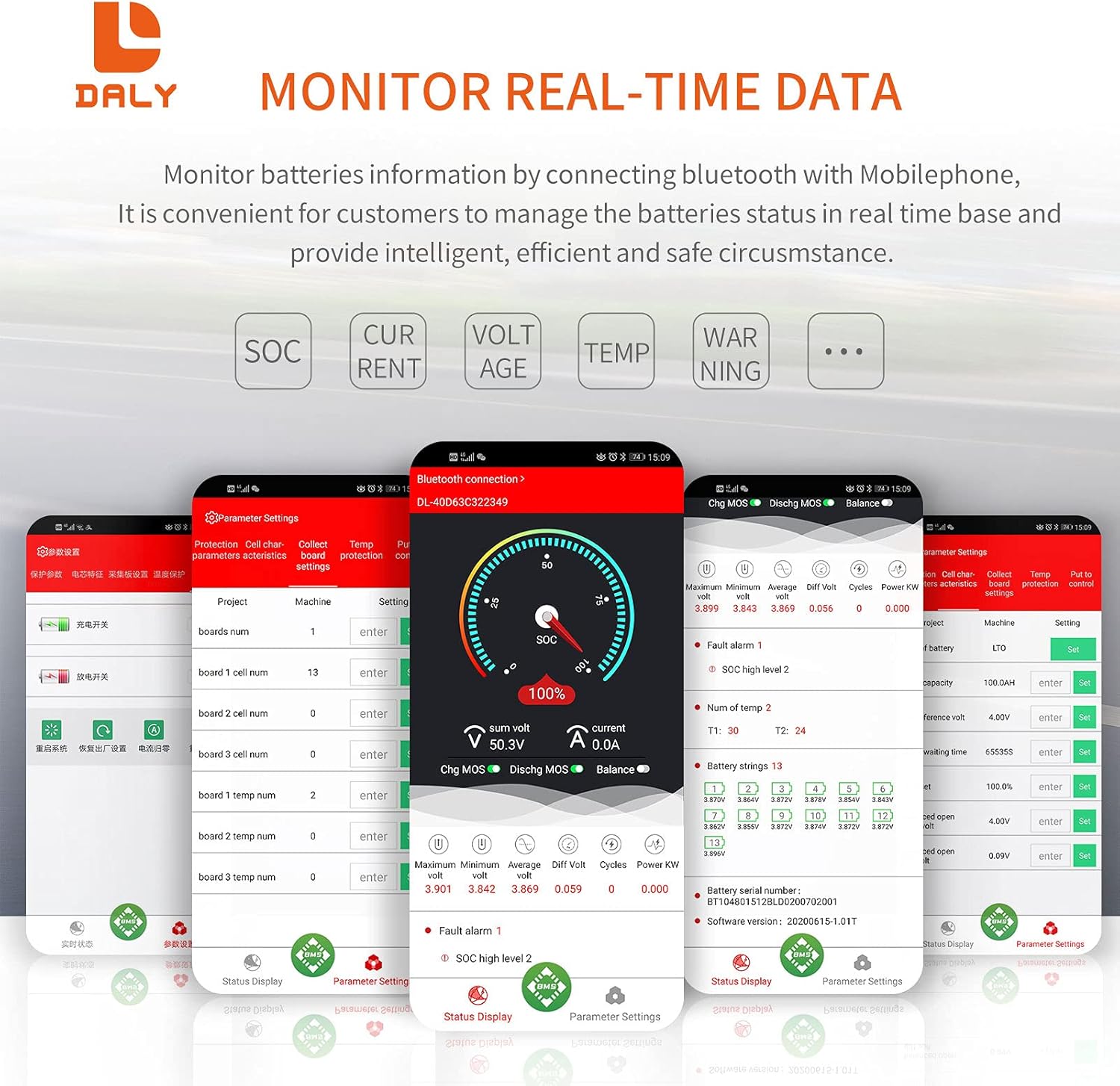
Image 6.2: The DALY Smart BMS mobile application showing real-time monitoring of battery status, including State of Charge (SOC), current, voltage, and temperature.
6.2 Parameter Settings
- Initial Setup: For the first power-on, the battery capacity must be set to the actual capacity of your battery pack. The initial password for parameter modification is 123456.
- Adjust Parameters: Navigate to the "Parameter Settings" section in the app to adjust various protection thresholds such as over-charge voltage, over-discharge voltage, over-current limits, and temperature protection settings.
- Automatic Calibration: The BMS supports automatic calibration. For example, if the battery is charged until the voltage reaches a high level 2 alarm, the battery will automatically calibrate.

Image 6.3: An exploded view of the DALY Smart BMS, detailing its internal construction including the two-wheels style heatsinks, wave style heatsink, thermally conductive silica gel, soft silicone wire, Daly BMS PCBA, and pure aluminum heatsink.
6.3 PC Software (UART)
The BMS can also be monitored and configured using PC software via the UART cable. Open the host computer software to view detailed battery status and adjust parameters.
7. Maintenance
- Regular Monitoring: Periodically check battery parameters via the mobile app or PC software to ensure optimal performance and identify any anomalies.
- Keep Connections Secure: Ensure all wiring connections, especially balance leads and main power cables, remain secure and free from corrosion.
- Environmental Conditions: Operate the BMS within its specified temperature range. Avoid exposure to extreme temperatures, moisture, or dust.
- Firmware Updates: Check the DALY website or app for any available firmware updates to ensure your BMS has the latest features and bug fixes.
8. Troubleshooting
- BMS Not Activating:
- Ensure all balance wires are correctly connected and in the right sequence.
- Verify the main power connections (B- and P+).
- Press the activation button on the Bluetooth module.
- Check if the battery pack voltage is within the operational range.
- Bluetooth Connection Issues:
- Ensure the Bluetooth module is properly plugged into the BMS.
- Restart the Smart BMS app and try reconnecting.
- Verify that Bluetooth is enabled on your mobile device.
- Ensure no other devices are actively connected to the BMS Bluetooth module.
- Incorrect Parameter Readings:
- Confirm that the battery capacity is correctly set in the app (initial password: 123456).
- Check for loose or damaged balance wires.
- Perform a system reset or zero-drift current calibration if current readings are consistently inaccurate.
- Over-Protection Triggered:
- If over-charge or over-discharge protection triggers, check individual cell voltages.
- If over-current protection triggers, reduce the load or charging current.
- If temperature protection triggers, allow the battery to cool down and ensure adequate ventilation.
9. Warranty and Support
DALY products typically come with a warranty. For specific warranty terms, duration, and support inquiries, please refer to the documentation included with your purchase or visit the official DALY website. You can also contact the seller, DalyElec, for assistance.
Manufacturer: DALY
Seller: DalyElec
For additional resources and tutorials, visit the DALY website: https://www.dalyelec.cn


