
1. Introduction
This manual provides essential information for the safe and efficient operation of your Volt Polska Sinus 5000 12/230V (2500/5000) Voltage Converter. This device is designed to convert 12V DC power from a battery into 230V AC power, suitable for powering various electronic devices and appliances. Please read this manual thoroughly before installation and use, and retain it for future reference.
2. Safety Instructions
Failure to follow these safety instructions may result in electric shock, fire, or serious injury.
- Read all instructions: Before operating the converter, read and understand all safety and operating instructions.
- Ventilation: Ensure adequate ventilation around the converter. Do not block ventilation openings.
- Avoid moisture: Do not expose the converter to rain, moisture, or operate it in damp environments.
- Proper grounding: The converter must be properly grounded.
- Battery connection: Connect the converter only to a 12V DC battery system. Ensure correct polarity.
- Overload protection: Do not exceed the converter's rated power output. Overloading can damage the unit and connected devices.
- Children and pets: Keep the converter out of reach of children and pets.
- Servicing: Do not attempt to service the converter yourself. Refer all servicing to qualified personnel.
3. Package Contents
Verify that all items are present in the package:
- Volt Polska Sinus 5000 Voltage Converter
- DC Input Cables (Red for positive, Black for negative)
- User Manual (this document)

Image 3.1: The Volt Polska Sinus 5000 Voltage Converter packaging, showing the product box.

Image 3.2: Included DC input cables, one red for positive connection and one black for negative connection.
4. Product Overview
Familiarize yourself with the components of your voltage converter.
4.1 Front Panel

Image 4.1: Front panel of the converter, showing AC output sockets and control indicators.
- AC Output Sockets: Two 230V AC sockets for connecting appliances.
- Power Switch: Main switch to turn the converter ON/OFF.
- Power Indicator (Green LED): Illuminates when the converter is operating normally.
- Protection Indicator (Red LED): Illuminates to indicate a fault condition (e.g., overload, overheating, low battery).
- Grounding Terminal: For connecting an external ground wire.
4.2 Rear Panel

Image 4.2: Rear panel of the converter, showing the DC battery input terminals.
- Battery Input Terminals:
- Red Terminal (+): For positive (+) 12V DC battery connection.
- Black Terminal (-): For negative (-) 12V DC battery connection.
- Cooling Fans: Integrated fans for thermal management.
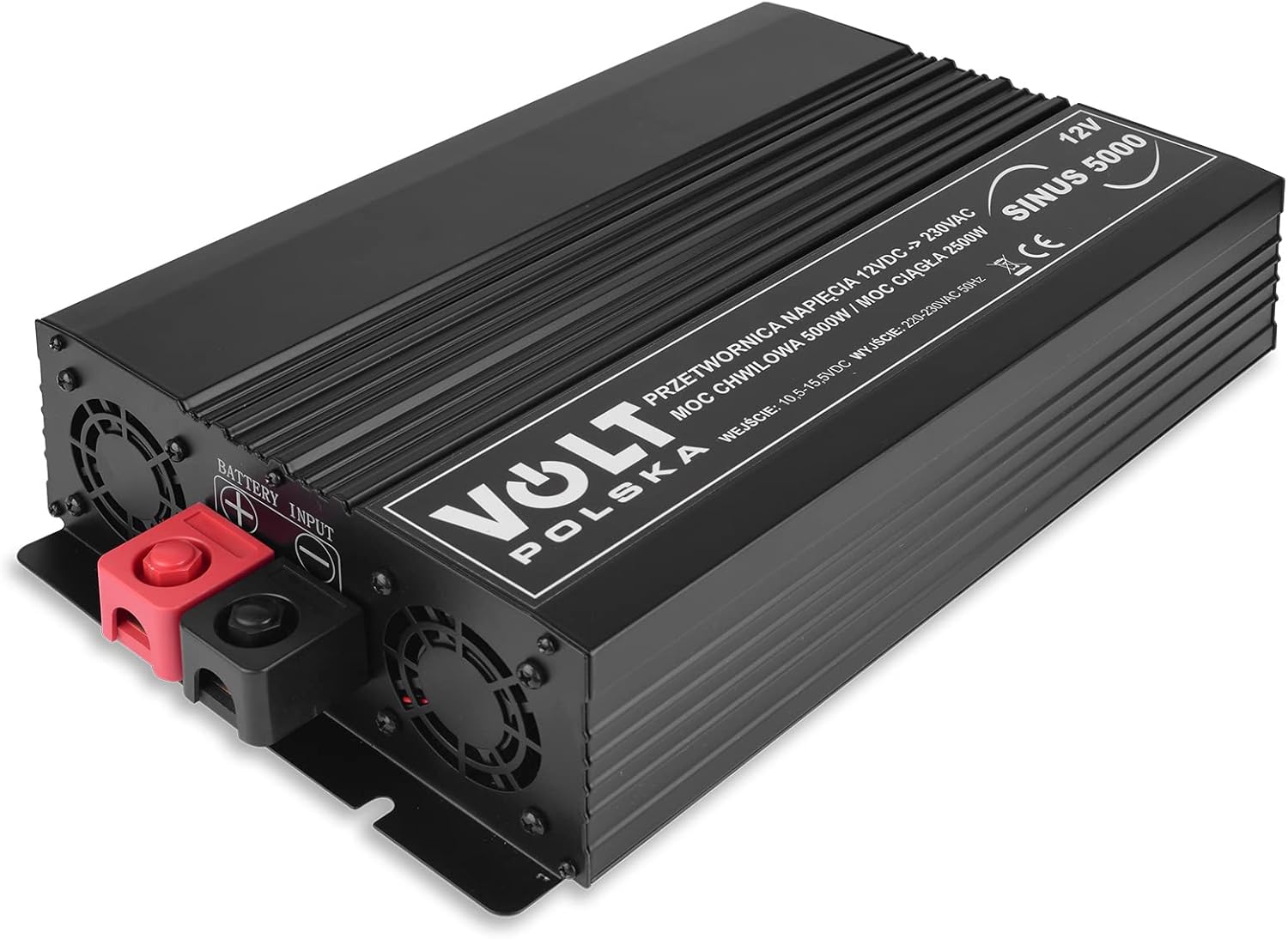
Image 4.3: Overall view of the Volt Polska Sinus 5000 Voltage Converter.

Image 4.4: Angled view of the converter, highlighting its compact design.
5. Setup
Follow these steps to set up your voltage converter:
- Placement: Choose a dry, well-ventilated area for the converter. Ensure there is sufficient space around the unit for air circulation. Avoid direct sunlight or heat sources.
- Grounding: Connect a suitable ground wire from the grounding terminal on the converter's front panel to a reliable earth ground.
- Battery Connection:
- Ensure the converter's power switch is in the OFF position.
- Connect the red DC input cable to the positive (+) terminal of your 12V battery.
- Connect the other end of the red cable to the red (+) battery input terminal on the converter's rear panel.
- Connect the black DC input cable to the negative (-) terminal of your 12V battery.
- Connect the other end of the black cable to the black (-) battery input terminal on the converter's rear panel.
- Important: Ensure all connections are tight and secure to prevent arcing and overheating. Incorrect polarity will damage the converter.
- Initial Check: Before connecting any AC appliances, double-check all connections.
6. Operating Instructions
To operate the Volt Polska Sinus 5000 Voltage Converter:
- Power On: Once the battery is connected, switch the converter's power switch to the ON position. The green power indicator LED should illuminate. If the red protection indicator illuminates, refer to the Troubleshooting section.
- Connect Appliances: Plug your 230V AC appliances into the AC output sockets on the converter's front panel. Ensure the total power consumption of all connected appliances does not exceed the converter's continuous power rating (2500W) or peak power rating (5000W for short durations).
- Power Off: When you are finished using the converter, first turn off all connected AC appliances, then switch the converter's power switch to the OFF position.
- Disconnect Battery (for storage): If storing the converter for an extended period, disconnect the DC input cables from the battery terminals.
Note: The converter produces a pure sine wave output, making it suitable for sensitive electronics.
7. Maintenance
Regular maintenance ensures optimal performance and longevity of your converter.
- Cleaning: Keep the converter clean and free of dust. Use a dry, soft cloth to wipe the exterior. Do not use liquid cleaners.
- Ventilation: Periodically check that the cooling fans and ventilation openings are clear of obstructions.
- Connections: Regularly inspect battery cable connections for tightness and corrosion. Clean any corrosion with a wire brush and baking soda solution.
- Storage: Store the converter in a cool, dry place when not in use. Disconnect it from the battery.
8. Troubleshooting
If you encounter issues with your converter, refer to the following table:
| Problem | Possible Cause | Solution |
|---|---|---|
| Converter does not turn on. |
|
|
| Red protection indicator is on. |
|
|
| No AC output. |
|
|
If the problem persists after attempting these solutions, please contact Volt Polska customer support.
9. Specifications
Technical specifications for the Volt Polska Sinus 5000 Voltage Converter:
| Feature | Detail |
|---|---|
| Brand | Volt Polska |
| Model Number | 3SIP500012 |
| Input Voltage | 12V DC |
| Output Voltage | 230V AC |
| Continuous Power | 2500 Watts |
| Peak Power | 5000 Watts |
| Output Waveform | Pure Sine Wave |
| Power Source | DC |
| Color | Black |
| Item Weight | 4.6 Kilograms |
10. Warranty and Support
For warranty information, technical support, or service inquiries, please contact Volt Polska customer service through their official website or the retailer where the product was purchased. Please have your model number (3SIP500012) and purchase date available when contacting support.


