
1. Introduction
This manual provides detailed instructions for the proper use and maintenance of your realme Buds Air 2 Hybrid Active Noise Cancelling Wireless Earbuds. Please read this guide thoroughly before using the product to ensure optimal performance and longevity.

Image 1.1: realme Buds Air 2 earbuds in their charging case.
2. Package Contents
Verify that all items are present in the package:
- realme Buds Air 2 x 1 (Pair of Earbuds)
- Charging case x 1
- Type-C charging cable x 1
- Earbuds tips x 3 (S/M/L sizes)
- User Guide x 1
- Info Card x 1
3. Setup
3.1 Charging the Earbuds and Case
Before first use, fully charge the earbuds and the charging case. Connect the provided Type-C charging cable to the charging port on the case and a power source. The indicator light on the case will show charging status.
- Full Playback: Up to 25 hours total playback with the charging case.
- Single Playback: Up to 5 hours of playback on a single charge.
- Quick Charge: 10 minutes of charging provides approximately 120 minutes of playback.

Image 3.1: Battery life and quick charge capabilities.
3.2 Initial Pairing
- Ensure the earbuds are in the charging case and the case lid is open.
- Activate Bluetooth on your device (smartphone, tablet, etc.).
- Search for available Bluetooth devices and select "realme Buds Air 2" from the list.
- Once connected, the earbuds are ready for use.
4. Operating Instructions
4.1 Touch Controls
The realme Buds Air 2 feature intelligent touch controls for various functions:
- Double Tap: Play/Pause music, Answer/Hang up calls.
- Triple Tap: Skip to the next track.
- Press & Hold (2 seconds on one earbud): Reject incoming calls.
- Press & Hold (2 seconds on both earbuds): Switch between Active Noise Cancellation (ANC) and Transparency Mode.
- Press & Hold (both sides simultaneously): Enter/Exit Gaming Mode.

Image 4.1: Overview of intelligent touch controls.
4.2 Active Noise Cancellation (ANC) & Transparency Mode
The Buds Air 2 offer up to 25dB of Active Noise Cancellation to reduce ambient noise, and a Transparency Mode to stay aware of your surroundings.
- Active Noise Cancellation: Filters out low-frequency noise from environments like airplanes, subways, or home appliances, allowing for immersive audio or focused work.
- Transparency Mode: Allows you to hear sounds from your environment, enabling conversations without removing the earbuds.
To switch between ANC and Transparency Mode, press and hold both earbuds for 2 seconds.

Image 4.2: Active Noise Cancellation up to 25dB.

Image 4.3: Transparency Mode for environmental awareness.
4.3 Gaming Mode
For an enhanced gaming experience, activate Gaming Mode to achieve ultra-low latency of 88ms, ensuring perfect synchronization between audio and video.
To enter or exit Gaming Mode, press and hold both earbuds simultaneously.

Image 4.4: Gaming Mode with 88ms super low latency.
4.4 Calls
The Buds Air 2 are equipped with dual microphones and an Environmental Noise Cancellation (ENC) algorithm. This technology reduces surrounding noise, ensuring clear communication during calls, even in noisy environments.

Image 4.5: Crystal clear calls with dual microphones and ENC.
4.5 realme Link App
Download the realme Link app for additional features and customization options, including:
- Firmware updates.
- EQ presets selection.
- Volume enhancements.
- Switching sound modes.
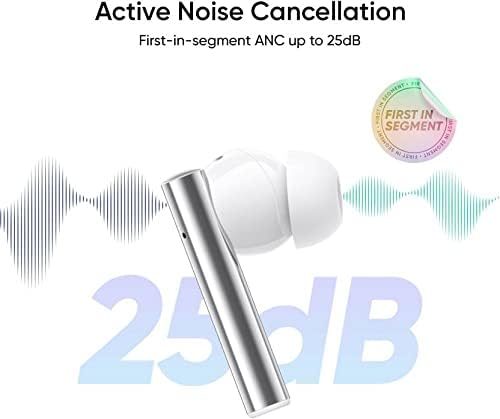
Image 4.6: realme Link app interface for advanced controls.
5. Maintenance
- Cleaning: Regularly clean the earbuds, charging contacts, and charging case with a soft, dry, lint-free cloth. Do not use harsh chemicals or abrasive materials.
- Ear Tips: Clean the ear tips regularly. If necessary, remove them and rinse with water, ensuring they are completely dry before reattaching.
- Storage: When not in use, store the earbuds in their charging case to protect them and ensure they remain charged. Store in a cool, dry place away from extreme temperatures.
- Water Resistance: The earbuds are IPX5 water-resistant, meaning they can withstand splashes and sweat. They are not designed for submersion in water. Avoid exposing the charging case to liquids.
6. Troubleshooting
If you encounter issues with your realme Buds Air 2, refer to the following common solutions:
- Earbuds not pairing:
- Ensure both earbuds are charged.
- Place earbuds back in the case, close the lid, then open it again to re-enter pairing mode.
- Forget the device from your phone's Bluetooth settings and try pairing again.
- No sound from one earbud:
- Check if the earbud is charged.
- Clean the charging contacts on both the earbud and the case.
- Try resetting the earbuds (refer to realme Link app or product support for specific reset instructions).
- Charging issues:
- Ensure the charging cable is securely connected to both the case and the power source.
- Try a different charging cable or power adapter.
- Clean the charging port on the case.
- Poor sound quality or weak bass:
- Ensure the ear tips provide a snug fit. Try different sizes if necessary.
- Clean any debris from the earbud nozzles.
- Ensure your device's volume is adequately set.
- Active Noise Cancellation not effective:
- Ensure the earbuds are properly seated in your ears for a good seal.
- Verify that ANC mode is activated (not Transparency Mode).
7. Specifications
| Brand | realme |
| Model Name | realme Buds Air 2 |
| Connectivity Technology | Wireless (Bluetooth 5.2) |
| Noise Control | Active Noise Cancellation |
| Audio Driver Type | 10mm Dynamic Driver |
| Battery Life (Earbuds) | Up to 5 Hours (single playback) |
| Total Playback Time | Up to 25 Hours (with charging case) |
| Charging Port | USB Type-C |
| Water Resistance Level | IPX5 (Earbuds only) |
| Control Type | Touch Control |
| Earpiece Shape | Rounded tips (In-Ear) |
| Item Weight | 4.6 ounces |
8. Warranty and Support
Your realme Buds Air 2 are covered by a limited warranty. For detailed warranty information, terms, and conditions, please refer to the warranty card included in your package or visit the official realme website.
For technical support, troubleshooting assistance, or service inquiries, please contact realme customer support through their official channels. You can find contact information on the realme website or the info card provided with your product.
Visit the realme Store for more product information and support resources.