
1. Introduction
This manual provides detailed instructions for the proper installation, operation, and maintenance of your TYT TH-9000D Plus UHF Mobile Transceiver. This device is designed for amateur radio use within the UHF frequency band (420-450MHz for transmit, 400-490MHz for receive) and offers 40W of power output. Please read this manual thoroughly before using the transceiver to ensure safe and optimal performance.
2. Safety Information
Operation of an amateur radio station requires an amateur operator license grant from the FCC. It is illegal to unlock the radio without proper authorization. Always ensure proper antenna connection before transmitting to prevent damage to the transceiver. Do not operate the radio in explosive atmospheres. Keep the device away from water and extreme temperatures. This surface may become hot during prolonged operation.
3. Package Contents
Verify that all items are present in your package:
- 1x TYT TH-9000D Base (420-450MHz)
- 1x Handheld Microphone
- 1x Power Cable
- 1x Screws and Accessories
- 1x User's Manual
- 1x Fixed Bracket
- 1x TYT Programming Cable

Image: All components included in the TYT TH-9000D Plus package, laid out for inspection.
4. Product Overview
4.1. Front Panel Controls

Image: Detailed view of the transceiver's front panel, highlighting the LCD display, function buttons (P1-P5), power button, volume knob, and main dial.
- 1. F: Function Key: Accesses secondary functions.
- 2. P1: Call Key: Initiates a call.
- 3. P2: Squelch Off: Temporarily disables squelch.
- 4. Power on/off: Turns the unit on or off.
- 5. VOL: Adjusts audio volume.
- 6. Main Dial: Used for frequency tuning and menu navigation.
- 7. P3: Switch VFO/MR mode: Toggles between VFO (Frequency) and Memory (Channel) modes.
- 8. P4: Step Key: Adjusts frequency step size.
- 9. P5: Set Key: Confirms settings.
- 10. Mic. Connector: Port for the handheld microphone.
- 11. Data Terminal: For programming and data transfer.
- 12. TX: Indicator light during transmitting.
4.2. Rear Panel Connections

Image: Rear view of the transceiver, showing the heat sink, fan, antenna connector, and power input.
4.3. Handheld Microphone
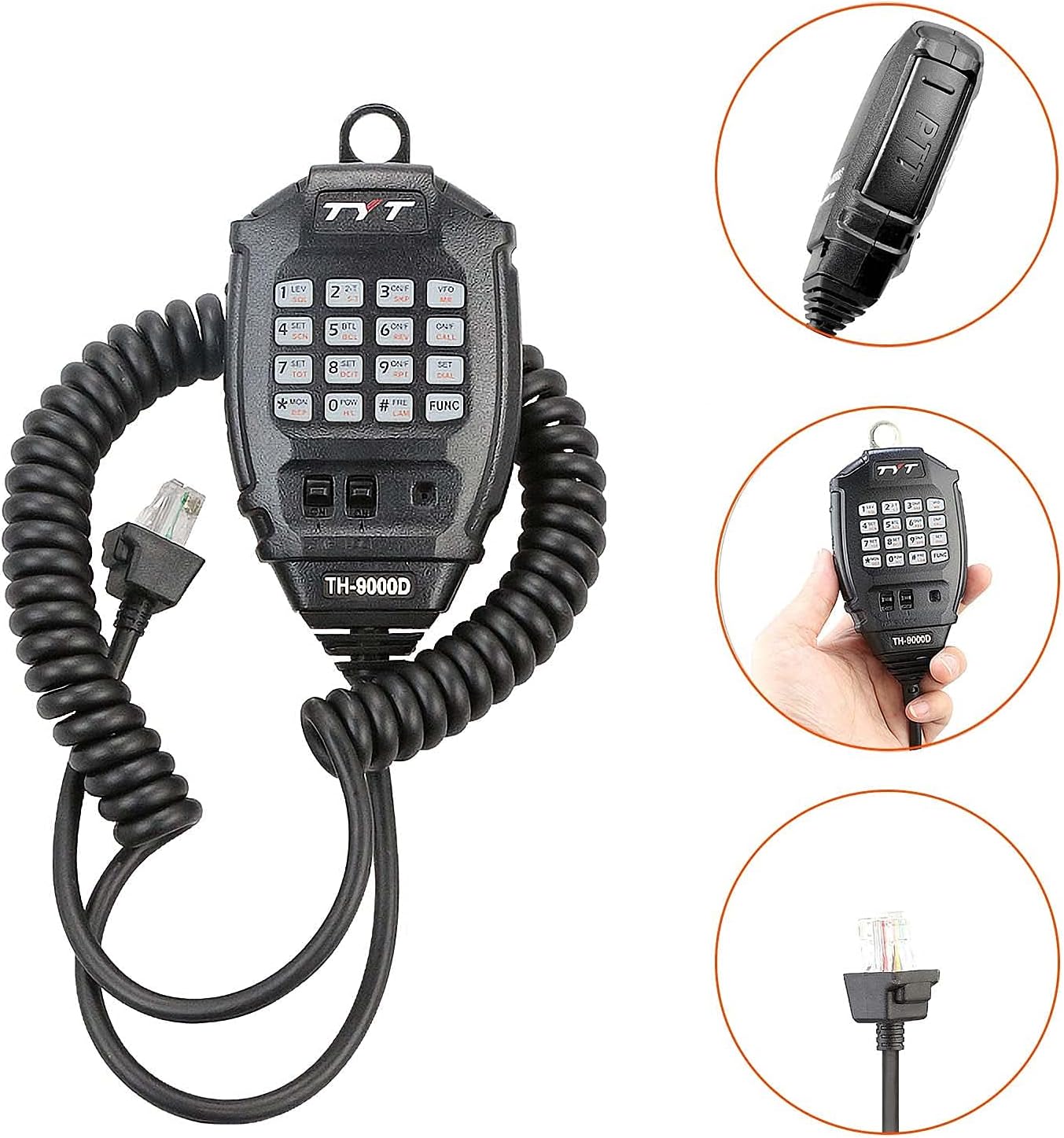
Image: The handheld microphone with a full keypad and coiled cable, designed for easy operation.
5. Setup
5.1. Power Connection
Connect the supplied power cable to the transceiver's power input on the rear panel. Ensure the power source provides 13.8V DC. Observe correct polarity (red for positive, black for negative).
5.2. Antenna Connection
Connect a suitable UHF antenna (420-450MHz) to the SO-239 antenna connector on the rear panel. Ensure the connection is secure. Never transmit without an antenna connected to prevent damage to the final amplifier.
5.3. Microphone Connection
Plug the handheld microphone into the Mic. Connector on the front panel of the transceiver.
5.4. Mounting
Use the provided fixed bracket and screws to securely mount the transceiver in your desired location, such as a vehicle or base station. Ensure adequate ventilation around the unit, especially the heat sink, to prevent overheating.
6. Operating Instructions
6.1. Power On/Off
Press the PWR button on the front panel to turn the transceiver on or off.
6.2. Volume Adjustment
Rotate the VOL knob on the front panel to adjust the audio output level.
6.3. Squelch Adjustment
The squelch level can be adjusted from 0-9. Refer to the user manual for specific menu navigation to set the squelch level.
6.4. Frequency Selection (VFO Mode)
Press the P3 (VFO/MR) button to enter VFO (Variable Frequency Oscillator) mode. Use the Main Dial to tune the frequency or enter it directly using the handheld microphone's keypad.
6.5. Channel Mode (Memory Channels)
Press the P3 (VFO/MR) button to switch to Memory (MR) mode. Use the Main Dial to select a stored channel.
6.6. Programming Channels
Channels can be programmed manually via the front panel or handheld microphone, or more easily using the provided TYT Programming Cable and CHIRP software (available from the TYT Website).
6.7. CTCSS / DCS Tones
Set CTCSS (Continuous Tone-Coded Squelch System) or DCS (Digital Coded Squelch) tones for both transmit and receive to access repeaters or filter unwanted signals. Refer to the menu settings for tone configuration.
6.8. VOX Function
The VOX (Voice Operated Transmit) function allows for hands-free operation. Activate and adjust the VOX sensitivity through the menu settings.
6.9. Scan Function
The transceiver supports various scan functions to monitor frequencies or channels. Activate scanning via the menu or a programmable function key.
7. Features and Functions
- FCC Certified: FCC ID: PODTH-9000DU.
- Frequency Range: TX: UHF: 420-450MHz, RX: UHF: 400-490MHz.
- Channel Capacity: 200 channels.
- CTCSS/DCS: 50 CTCSS / 1024 DCS codes.
- Scrambler: 8 groups of scrambler for enhanced privacy.
- Voice Compander: Improves audio clarity.
- Time-out Timer (TOT): Prevents accidental long transmissions.
- ANI ID: Automatic Number Identification.
- 1750Hz Tone: For repeater access.
- Chirp Support: Compatible with CHIRP programming software for easier setup.
- Full Keypad Microphone: For direct frequency entry and function control.
8. Specifications

Image: A table detailing the general, transmitter, and receiver specifications of the TYT TH-9000D Plus.
| Item Number | TH-9000D |
|---|---|
| General | |
| Frequency Range | UHF: TX: 420-450MHz, RX: 400-490MHz |
| Channel Capacity | 200 Channels |
| Channel Spacing | 25 / 20 / 12.5 K |
| Frequency Stability | ±2.5ppm |
| Operating Temperature | -20°C ~ +60°C |
| Operating Voltage | 13.8V DC ±15% |
| Dimension (W*H*D) | 5.7 x 1.85 x 7.48 inches |
| Weight | Approx. 2.64 lbs (1.2 kg) |
| Transmitter (ETSI EN 300 086 standard testing) | |
| Power Output (UHF) | 40W / 20W / 10W |
| Modulation | 16KΦF3E |
| Adjacent Ch. Power | ≥70dB |
| Hum & Noise | ≥40dB |
| Spurious Emission | ≥60dB |
| Audio Response | +1 ~ -3dB (0.3 ~ 3KHz) |
| Receiver (ETSI EN 300 086 standard testing) | |
| Sensitivity (12dB SINAD) | ≤0.25μV |
| Adjacent Ch. Selectivity | ≥70dB |
| Inter-Modulation | ≥65dB |
| Spurious Rejection | ≥70dB |
| Audio Response | +1 ~ -3dB (0.3 ~ 3KHz) |
| Hum & Noise | ≥45dB |
| Audio Distortion | ≤5% |
| Audio Power Output | >2W@10% |
9. Maintenance
To ensure the longevity and proper functioning of your transceiver, follow these maintenance guidelines:
- Regularly clean the exterior of the unit with a soft, dry cloth. Avoid abrasive cleaners or solvents.
- Ensure all connections (power, antenna, microphone) are secure and free from corrosion.
- Keep the transceiver in a dry, dust-free environment when not in use.
- Do not obstruct the cooling fan or heat sink to maintain proper operating temperature.
10. Troubleshooting
If you encounter issues with your transceiver, refer to the following common problems and solutions:
- No Power: Check power cable connections, power supply voltage (13.8V DC), and fuses.
- No Transmit: Ensure antenna is properly connected, check SWR, verify frequency is within transmit range, and confirm FCC license compliance.
- Poor Reception: Check antenna connection, ensure squelch is not set too high, verify correct frequency and tone settings.
- Programming Issues: Ensure the correct programming cable is used and the CHIRP software is up-to-date. Consult the TYT Website for software downloads and guides.
11. Warranty Information
This product comes with a 3-month warranty. Please retain your proof of purchase for any warranty claims.
12. Support
For further assistance, software downloads, or additional product information, please visit the official TYT website.


