
1. Introduction
This manual provides essential information for the safe and efficient use of your Hisense BSA65226PX Multifunction Thermoventilated Oven. Please read all instructions carefully before installation and operation, and retain this manual for future reference.
The Hisense BSA65226PX is a 60 cm multifunction thermoventilated oven featuring an XXL 77-liter cavity, allowing for simultaneous cooking of multiple dishes or large-sized foods. It offers 13 cooking functions, including 3 programs with steam addition, a dedicated 300°C Pizza function, and an AirFry cooking function for healthy, oil-free frying. The oven is equipped with touch controls and an LED display for easy access to all functions. Its stainless steel finish and glass door provide a modern aesthetic suitable for any kitchen.

Figure 1: Hisense BSA65226PX oven interior with food cooking on two levels.
2. What's in the Box
Upon unpacking, please ensure all components are present and undamaged. The standard package for your Hisense BSA65226PX oven includes:
- Hisense BSA65226PX Oven Unit
- Instruction Manual (this document)
- 2 x Oven Trays (Leccarda)
- 1 x Steel Grill (Griglia in Acciaio)

Figure 2: Standard accessories included with the oven.
3. Setup and Installation
Proper installation is crucial for the safe and optimal performance of your oven. It is recommended that installation be performed by a qualified technician.
3.1. Unpacking
Carefully remove all packaging materials. Keep packaging out of reach of children. Inspect the oven for any signs of damage. Do not install a damaged appliance.
3.2. Placement and Ventilation
Ensure the installation cabinet meets the required dimensions for a built-in oven. Adequate ventilation around the oven is necessary to prevent overheating. Refer to the installation diagrams for precise measurements and clearances.

Figure 3: Installation diagram with required cabinet dimensions.
3.3. Electrical Connection
The oven must be connected to a properly grounded electrical outlet. Ensure the voltage and frequency match the specifications on the rating plate. Do not use extension cords or multiple adapters.
4. Operating Instructions
Your Hisense BSA65226PX oven features an intuitive control panel with touch controls and an LED display. Familiarize yourself with the controls before first use.

Figure 4: Oven control panel with touch controls and LED display.
4.1. First Use
- Remove all accessories and internal packaging.
- Clean the oven interior with a damp cloth.
- Heat the empty oven at maximum temperature for approximately 30 minutes to burn off any manufacturing residues. Ensure good ventilation during this process.
4.2. Key Cooking Functions
The oven offers 13 cooking functions. Here are some of the most notable:
- XXL Cavity 77 L: The generous 77-liter capacity allows for cooking large items or multiple dishes simultaneously across different levels, thanks to the thermoventilation system.

Figure 5: XXL 77L Cavity for versatile cooking.
- Thermoventilation: Ensures even heat distribution throughout the oven cavity, ideal for consistent cooking results on all levels.

Figure 6: Thermoventilated air circulation for even cooking.
- 300°C Pizza Function: Achieve restaurant-quality pizza at home with a dedicated function that reaches temperatures up to 300°C.

Figure 7: Perfect pizza with the 300°C Pizza Function.
- AirFry Function: Enjoy crispy and tasty food with minimal to no oil, offering a healthier alternative to traditional frying.

Figure 8: AirFry function for healthier crispy results.
- Rapid Preheating: The oven can reach a temperature of 200°C in just 6 minutes, saving time and energy.

Figure 9: Rapid preheating for quick cooking starts.
- Steam Addition Programs: Three programs allow for the addition of steam during cooking, enhancing moisture and texture for certain dishes.

Figure 10: Adding water for steam cooking.
5. Maintenance and Cleaning
Regular cleaning and maintenance will prolong the life of your oven and ensure optimal performance.
5.1. Pyrolytic Self-Cleaning
The Hisense BSA65226PX features a Pyrolytic Self-Cleaning function. This advanced cleaning system uses extremely high temperatures (over 400°C) to burn off food residues and grease, turning them into fine ash. After the cycle, simply wipe away the ash with a damp cloth once the oven has cooled.

Figure 11: Pyrolytic self-cleaning in action.
5.2. General Cleaning
- Always ensure the oven is cool before cleaning.
- Use mild detergents and a soft cloth for the exterior and control panel.
- For the interior, after pyrolytic cleaning, wipe with a damp cloth. For minor spills, use warm soapy water.
- Do not use abrasive cleaners, harsh chemicals, or sharp objects that could damage surfaces.
6. Troubleshooting
If you encounter any issues with your oven, please consult the following table before contacting customer service.
| Problem | Possible Cause | Solution |
|---|---|---|
| Oven does not turn on | No power supply; Door not closed properly; Control panel locked. | Check power connection and circuit breaker; Ensure door is fully closed; Unlock control panel if applicable. |
| Uneven cooking | Incorrect temperature/function; Overcrowding the oven; Improper placement of food. | Verify settings; Avoid overcrowding; Use appropriate rack levels. |
| Excessive smoke during cooking | Food residue or grease buildup; High fat content food. | Clean oven thoroughly; Use a drip tray for fatty foods. |
| Pyrolytic cleaning not effective | Oven too dirty for one cycle; Door not properly sealed. | Run another cleaning cycle; Ensure door is fully closed and sealed. |
7. Technical Specifications
Below are the technical specifications for the Hisense BSA65226PX oven:
- Model Number: BSA65226PX
- Manufacturer: Hisense
- Dimensions (W x H x D): 59.5 x 59.5 x 56.4 cm
- Weight: 29 kg
- Cavity Volume: 77 Liters (XXL)
- Energy Efficiency Class: A+
- Heating Method: Convection (Thermoventilated)
- Fuel Type: Electric
- Cleaning Type: Pyrolytic Self-Cleaning
- Special Functions: 300°C Pizza Function, AirFry, Rapid Preheating, Steam Addition Programs
- Country of Origin: Slovenia
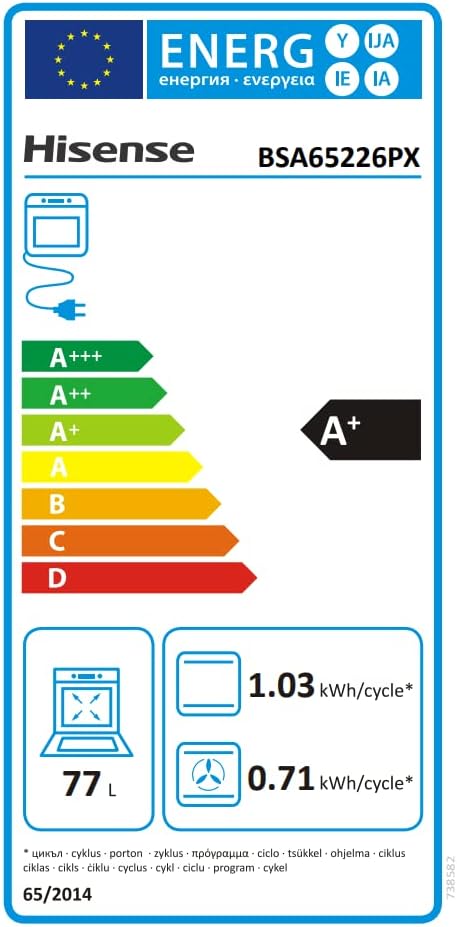
Figure 12: Energy Label for Hisense BSA65226PX.
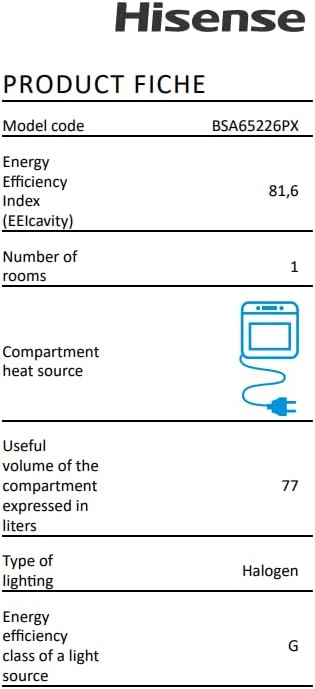
Figure 13: Product Fiche with detailed specifications.
8. Warranty and Support
Your Hisense BSA65226PX oven is covered by a manufacturer's warranty. Please refer to the warranty card included with your product for specific terms and conditions.
8.1. Returns Policy
If you wish to return a product within 30 days of receipt because you changed your mind, please consult the retailer's return policy. If you have received a defective or damaged product, please contact the retailer or Hisense customer support immediately for assistance.
8.2. Customer Support
For technical assistance, spare parts, or any other inquiries, please contact Hisense customer support. Contact details can typically be found on the Hisense official website or on your warranty documentation.