
Important Safety Information
Please read and follow all assembly instructions carefully before using the chair. Ensure the chair is used correctly to prevent injuries.
- Maximum Weight Capacity: This chair is designed to support a maximum weight of 150 kg (330 lbs). Do not exceed this limit.
- Moving Parts: Keep fingers and loose clothing away from moving parts when adjusting the chair.
- Stability: Always ensure the chair is stable before sitting or making adjustments.
Product Overview
The Steelcase Please ergonomic office chair is designed for optimal comfort and support throughout your workday. It features a high backrest, adjustable components, and a patented synchronized tilt mechanism.

Figure 1: Steelcase Please Ergonomic Office Chair (Onyx)
Setup and Assembly
The Steelcase Please chair requires some assembly. Detailed assembly instructions are typically included with the product packaging. Please refer to those specific instructions for step-by-step guidance.
- Unpacking: Carefully remove all components from the packaging.
- Base Assembly: Attach the chair base and casters according to the provided instructions.
- Seat and Backrest: Secure the seat and backrest to the mechanism and gas lift.
- Armrests: Install the armrests as directed.
The chair is equipped with wheels suitable for both hard and soft floor surfaces, ensuring smooth movement in various office environments.
Operating and Adjustments
The Steelcase Please chair offers a range of adjustments to customize your seating experience for optimal ergonomic support.
1. Seat Height Adjustment

Figure 2: Seat Height and Depth Adjustment
To adjust the seat height, locate the lever on the right side under the seat. Lift the lever to raise the seat. To lower, lift the lever while seated. Release the lever at the desired height.
2. Seat Depth Adjustment
The seat depth can be adjusted to ensure proper leg support. Locate the lever or knob under the seat (often near the height adjustment). Pull or turn it to slide the seat forward or backward until your back is against the backrest and there is a 2-3 finger gap between the edge of the seat and the back of your knees.
3. 4D Armrests

Figure 3: 4D Armrest Adjustments
The 4D armrests offer extensive adjustability:
- Height: Adjust the armrest height (11 positions) by pressing the button on the side of the armrest and moving it up or down.
- Angle: Pivot the armrest pads inward or outward (4 positions: -20°, -10°, 0°, +10°).
- Depth: Slide the armrest pads forward or backward (45mm range in 6 positions).
4. Patented Synchronized Tilt Mechanism (LTC2)

Figure 4: LTC2 Mechanism for Independent Backrest Adjustment
The unique LTC2 mechanism features a dual backrest that adapts independently to your body and spine, providing continuous ergonomic support in any posture. This includes:
- Lumbar Support: The lower back section adjusts to support the natural curve of your spine.
- Thoracic Support: The upper back section moves with your upper body, maintaining contact and support.
5. Tilt Tension Adjustment
Adjust the resistance of the chair's recline to match your body weight and preference. Turn the large knob located under the seat (usually at the front) clockwise to increase tension or counter-clockwise to decrease it.
6. Forward Tilt Lock
The chair features a forward tilt lock, allowing you to lock the seat in a slightly forward-tilted position, which can be beneficial for certain tasks or postures.
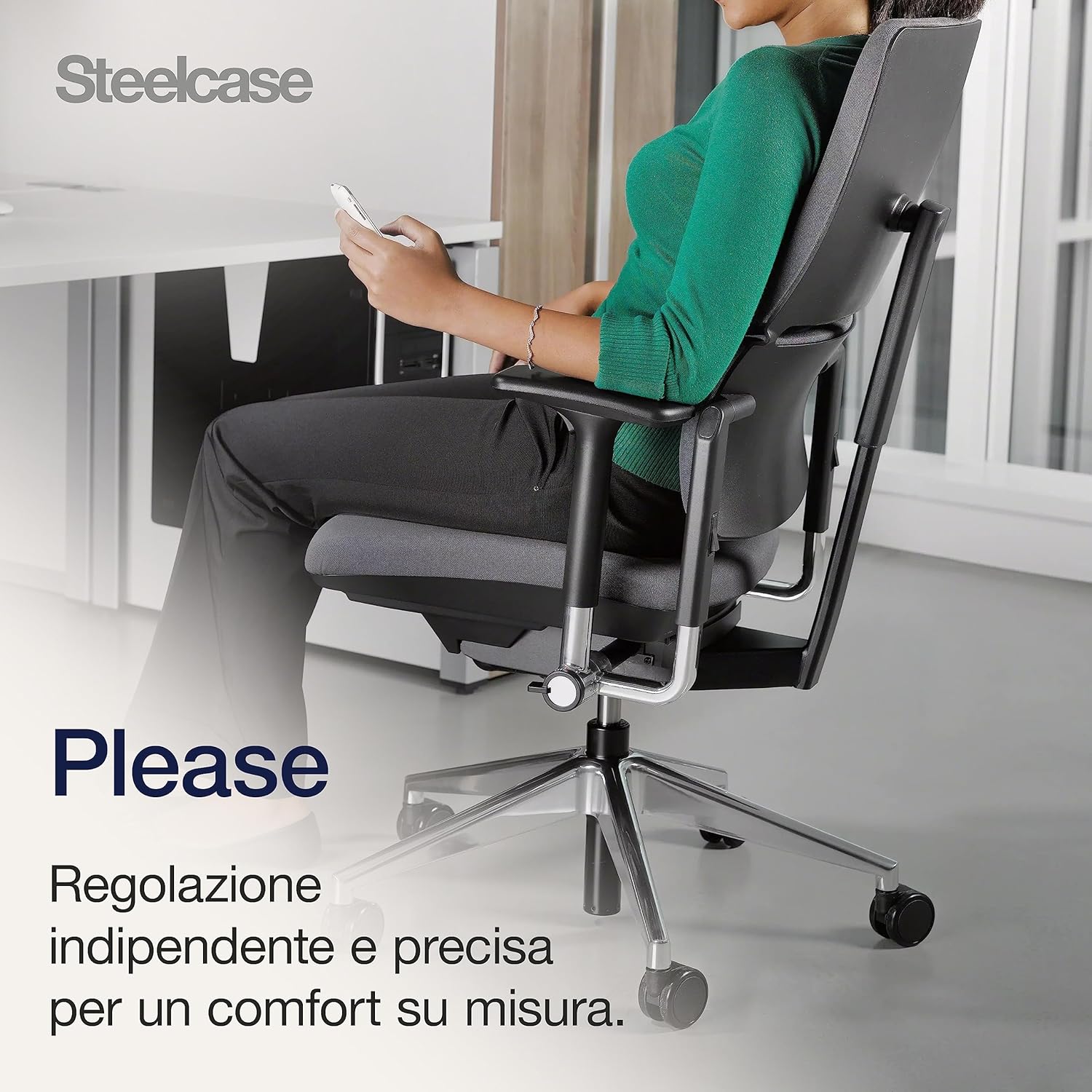
Figure 5: User demonstrating chair flexibility
Maintenance
Proper maintenance ensures the longevity and optimal performance of your Steelcase Please chair.
- Cleaning: Wipe the chair surfaces with a damp cloth. For fabric parts, use a mild upholstery cleaner if necessary. Avoid harsh chemicals.
- Inspection: Periodically check all screws and fasteners to ensure they are tight. Tighten if loose.
- Moving Parts: Keep the chair's mechanisms free from dust and debris. Do not lubricate unless specifically instructed by Steelcase.

Figure 6: Oeko-Tex Certified Polyester Fabric
The fabric is 100% polyester and Oeko-Tex certified, ensuring it is free from harmful substances.
Troubleshooting
If you encounter any issues with your Steelcase Please chair, please refer to the following general advice:
- Difficulty Adjusting: Ensure no obstructions are blocking the adjustment mechanisms. Check if any levers or knobs are stuck.
- Squeaking/Noise: Inspect for loose fasteners. If the noise persists, contact customer support.
- Caster Issues: Ensure casters are clean and free of hair or debris. The wheels are designed for both hard and soft floors.

Figure 7: Chair Casters for Hard and Soft Floors
For persistent problems or issues not covered here, please contact Steelcase customer support.
Specifications
Detailed technical specifications for the Steelcase Please Ergonomic Office Chair (Model 468200MPWFH04).

Figure 8: Chair Dimensions (Front and Side View)
| Feature | Detail |
|---|---|
| Brand | Steelcase |
| Model Name | Please |
| Model Number | 468200MPWFH04 |
| Color | Onyx |
| Material | Plastic, Steel Alloy, Fabric (100% Oeko-Tex certified polyester) |
| Product Dimensions (D x W x H) | 64.5 cm x 52.5 cm x 107 cm (25.4 x 20.7 x 42.1 inches) |
| Item Weight | 19.9 kg (43.9 lbs) |
| Maximum Recommended Weight | 150 kg (330 lbs) |
| Special Features | Adjustable Height, 4D Armrests, Ergonomic Design, Adjustable Lumbar Support, Synchronized Tilt Mechanism |
| Seat Height | Adjustable, up to 52 cm (20.5 inches) |
| Seat Depth | Adjustable, up to 47 cm (18.5 inches) |
| Backrest Style | High Back, Rigid Backrest |
| Base Movement | Swivel, Casters for hard and soft floors |
| Assembly Required | Yes |
| Country of Origin | France |
Warranty and Support
Steelcase stands behind the quality of its products.
- Warranty: The Steelcase Please office chair comes with a 12-year manufacturer's warranty. This warranty covers defects in materials and workmanship under normal use.
- Support: For warranty claims, technical assistance, or any questions regarding your product, please contact Steelcase customer service through their official website or the retailer where the product was purchased.


