Introduction
This user manual provides essential information for the safe and efficient operation, maintenance, and troubleshooting of your Samsung WindFree™ Wall-mount Air Conditioner. Please read this manual thoroughly before using the appliance and keep it for future reference.

Image: Front view of the Samsung WindFree™ Wall-mount AC indoor unit, displaying a temperature of 23°C.
Safety Information
Always adhere to the following safety precautions to prevent injury or damage to the appliance.
- Ensure the air conditioner is installed by a qualified professional.
- Do not insert fingers or foreign objects into the air inlet or outlet.
- Do not spray water directly onto the unit.
- Unplug the unit before cleaning or performing maintenance.
- Keep children away from the unit and remote control.
Product Components
Your Samsung WindFree™ AC package includes the following main components:
- Indoor Unit
- Outdoor Unit
- Remote Control
- User Manual (this document)
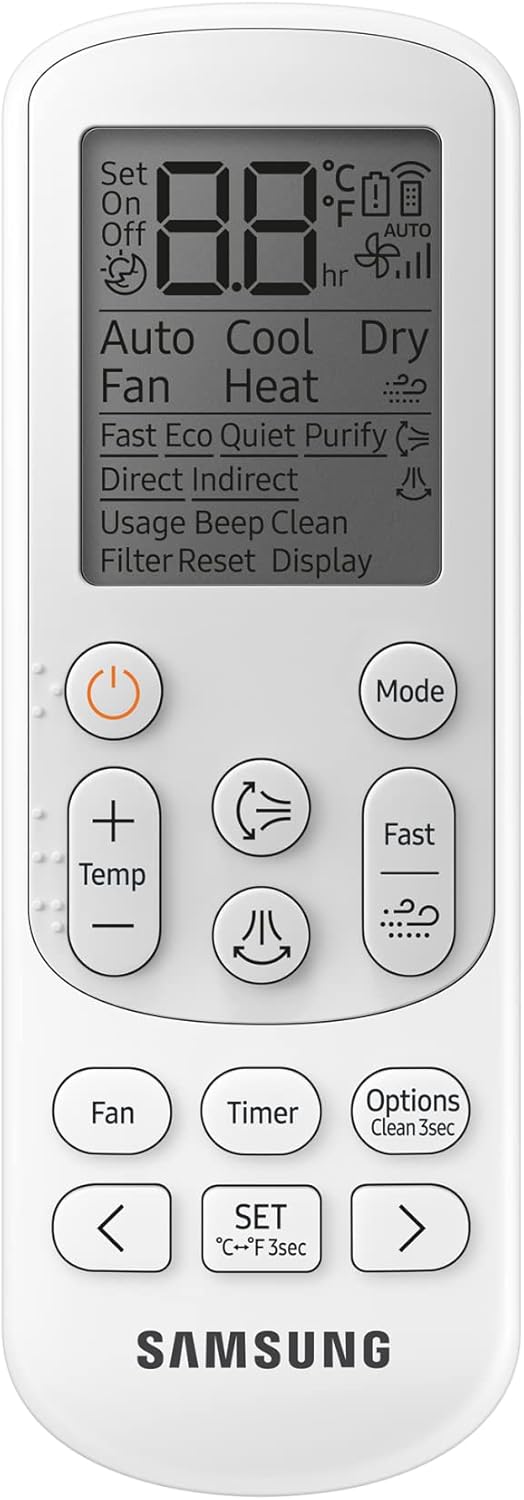
Image: The remote control for the Samsung WindFree™ AC, showing various function buttons.
Setup and Installation
Installation of the Samsung WindFree™ Wall-mount AC should only be performed by certified technicians. This section provides general information regarding the setup.
Pre-Installation Checks
- Ensure the installation location is structurally sound to support the unit's weight.
- Verify proper electrical supply (240 Volts AC) is available.
- Confirm adequate space for airflow around both indoor and outdoor units.
Mounting the Indoor Unit
The indoor unit is designed for wall-mounting. Ensure it is level and securely fastened to prevent vibration and noise.

Image: The indoor unit with its air outlet flap open, ready for operation.
Connecting Refrigerant Lines and Electrical Wiring
Refrigerant lines and electrical wiring must be connected according to local codes and manufacturer specifications. Improper connections can lead to system malfunction or safety hazards.
Outdoor Unit Placement
The outdoor unit should be placed on a stable, level surface, away from direct sunlight and obstructions that could impede airflow. Ensure sufficient clearance for maintenance.

Image: The outdoor unit, designed for durability and efficient operation.
Operating Instructions
Your Samsung WindFree™ AC offers various modes and features for optimal comfort and energy efficiency.
Basic Operation with Remote Control
- Power On/Off: Press the Power button to turn the unit on or off.
- Mode Selection: Use the Mode button to cycle through modes: Cool, Fan, Dry, Auto.
- Temperature Adjustment: Use the Temp + and Temp - buttons to set your desired temperature.
- Fan Speed: Adjust fan speed using the Fan button.
Key Features
- WindFree™ Cooling: This mode disperses air gently through 23,000 micro air holes, eliminating unpleasant drafts. Activate via the remote control.
- Fast Cooling: Designed to cool rooms quickly from corner to corner. This mode utilizes a wider inlet, bigger fan, and wider blade for enhanced airflow.

Image: Diagram showing the enhanced airflow design for faster cooling.
- AI Auto Cooling: This intelligent feature optimizes cooling based on user preferences and environmental conditions.
- Good Sleep Mode: Provides an optimal temperature for a comfortable night's sleep, often reducing noise levels.

Image: Good Sleep mode promotes comfortable rest.
- Digital Inverter Technology: This technology maintains the desired temperature without frequently turning the compressor on and off, leading to energy savings.

Image: Energy saving graph illustrating the efficiency of Digital Inverter technology.
Maintenance
Regular maintenance ensures optimal performance and longevity of your air conditioner.
Auto Clean Function
When the air conditioner is turned off, the Auto Clean function automatically runs a fan to remove dust and moisture from the heat exchanger, preventing the growth of bacteria and odors.

Image: Internal view of the AC unit, highlighting the heat exchanger cleaned by the Auto Clean function.
Cleaning the Anti-Bacterial Filter
The Easy Filter Plus is located on the top of the indoor unit for easy access. It should be cleaned regularly to maintain air quality and efficiency.
- Turn off the air conditioner and unplug it from the power source.
- Open the front panel of the indoor unit.
- Gently remove the Easy Filter Plus from its slot.
- Clean the filter with a soft brush or vacuum cleaner. For heavy dirt, wash with lukewarm water and a mild detergent.
- Allow the filter to dry completely in a shaded area before reinserting.
- Close the front panel.

Image: Illustration of removing the Easy Filter Plus for cleaning.
General Cleaning
- Wipe the exterior of the indoor and outdoor units with a soft, damp cloth.
- Do not use harsh chemicals or abrasive cleaners.
- Ensure the drainage hose is clear of obstructions.
Troubleshooting
Before contacting service, please refer to the following common issues and their solutions.
| Problem | Possible Cause | Solution |
|---|---|---|
| Unit does not turn on. | No power supply; remote control batteries dead. | Check power connection and circuit breaker; replace remote control batteries. |
| Insufficient cooling. | Dirty air filter; blocked outdoor unit; room too large; windows/doors open. | Clean air filter; clear obstructions from outdoor unit; ensure room is sealed; check unit capacity for room size. |
| Water leakage from indoor unit. | Clogged drain hose; improper installation. | Check and clear drain hose; contact a qualified technician for inspection. |
| Unusual noise. | Loose parts; foreign objects; fan imbalance. | Turn off unit and inspect for loose parts or obstructions; if noise persists, contact service. |
If the problem persists after attempting these solutions, please contact Samsung customer support.
Specifications
Detailed technical specifications for the Samsung WindFree™ Wall-mount AC (Model: AR24TVFCKWK/GU).
| Attribute | Value |
|---|---|
| Model Number | AR24TVFCKWK/GU |
| Brand | SAMSUNG |
| Type | Wall-mount Split System Air Conditioner |
| Capacity | 2 Tons (24000 British Thermal Units) |
| Power Source | Corded Electric |
| Voltage | 240 Volts (AC) |
| Wattage | 1985 watts |
| Noise Level | 51 dB |
| Indoor Unit Dimensions (L x W x H) | 97 x 28 x 30 cm (approx. 27.94 x 96.82 x 29.95 cm) |
| Item Weight | 55 Kilograms |
| Special Features | WindFree™ Cooling, Digital Inverter, AI Auto Cooling, Anti Bacterial Filter, Auto Clean |
| Refrigerant Type | R410A (Hydrofluorocarbon) |

Image: Dimensions of the indoor unit.

Image: Internal components of the outdoor unit, contributing to its performance.

Image: Properties of R410A refrigerant used in the system.
Warranty and Support
For warranty information and customer support, please refer to the warranty card included with your product or visit the official Samsung website for your region.
Samsung Customer Service: For technical assistance, repairs, or inquiries, please contact Samsung's authorized service centers.
- Online Support: www.samsung.com/support/
- Phone Support: Refer to your regional Samsung website for local contact numbers.
Keep your purchase receipt and product serial number readily available when contacting support.