
1. Product Overview
The GAN 251 M Air is a high-performance 2x2 magnetic speed cube designed for both beginners and experienced cubers. It features a stickerless design with a frosted surface, providing a comfortable grip and resistance to scratches and fingerprints. This model incorporates a magnetic positioning system for enhanced stability and smoother turns.

Figure 1: The GAN 251 M Air 2x2 Magnetic Speed Cube, showcasing its vibrant colors and frosted finish.
Key Features:
- Magnetic Positioning: Equipped with 42 magnets for precise alignment and improved turning feel.
- Lightweight Design: Weighs approximately 50 grams, contributing to a balanced and fast solving experience.
- Frosted Surface: Provides a comfortable, non-slip grip and is resistant to scratches and fingerprints.
- Smooth Handfeel: Features a rounded slide design and advanced corner-cutting capabilities (55° positive, 35° reverse).
- Stickerless: Durable and vibrant colors that will not fade or peel.
2. Initial Setup
The GAN 251 M Air speed cube comes pre-assembled and ready for use. No complex assembly is required. Upon unboxing, you will find the cube along with several accessories designed to enhance your cubing experience.
Included Accessories:

Figure 2: The GAN 251 M Air comes with a tuning rod, the GAN251 M Series Manual, and a 2x2 Cube Tutorial.
- Tuning Rod: Used for adjusting the cube's tension and elasticity.
- GAN251 M Series Manual: This document, providing detailed instructions.
- 2x2 Cube Tutorial: A guide to help beginners learn how to solve the 2x2 cube.
Before your first solve, gently rotate each face of the cube to familiarize yourself with its movement and magnetic feel.
3. Operating the Cube
The GAN 251 M Air is designed for smooth and precise operation, facilitating efficient solving. The magnetic system assists in aligning the layers, making turns more consistent.
Basic Operation:
- Hold the cube comfortably in your hands.
- Rotate the faces (top, bottom, front, back, left, right) to mix the colors.
- Apply solving algorithms to return each face to a single color.

Figure 3: The cube's internal design allows for a smooth handfeel and excellent corner cutting, enhancing the solving experience.
Magnetic System and Corner Cutting:
The integrated magnets provide a tactile feedback and help guide the layers into place, reducing overshooting and improving stability. The cube's design allows for significant corner cutting, specifically 55° positive and 35° reverse, which helps prevent lock-ups during rapid turns.

Figure 4: Illustration highlighting the 42 magnets embedded within the GAN 251 M Air for precise and swift turns. Note that the corner magnets are unadjustable in this model.
4. Tuning and Customization
The GAN 251 M Air offers various tuning options to customize the cube's feel to your preference. This model utilizes the GES v3 system, allowing adjustments to tension and elasticity.
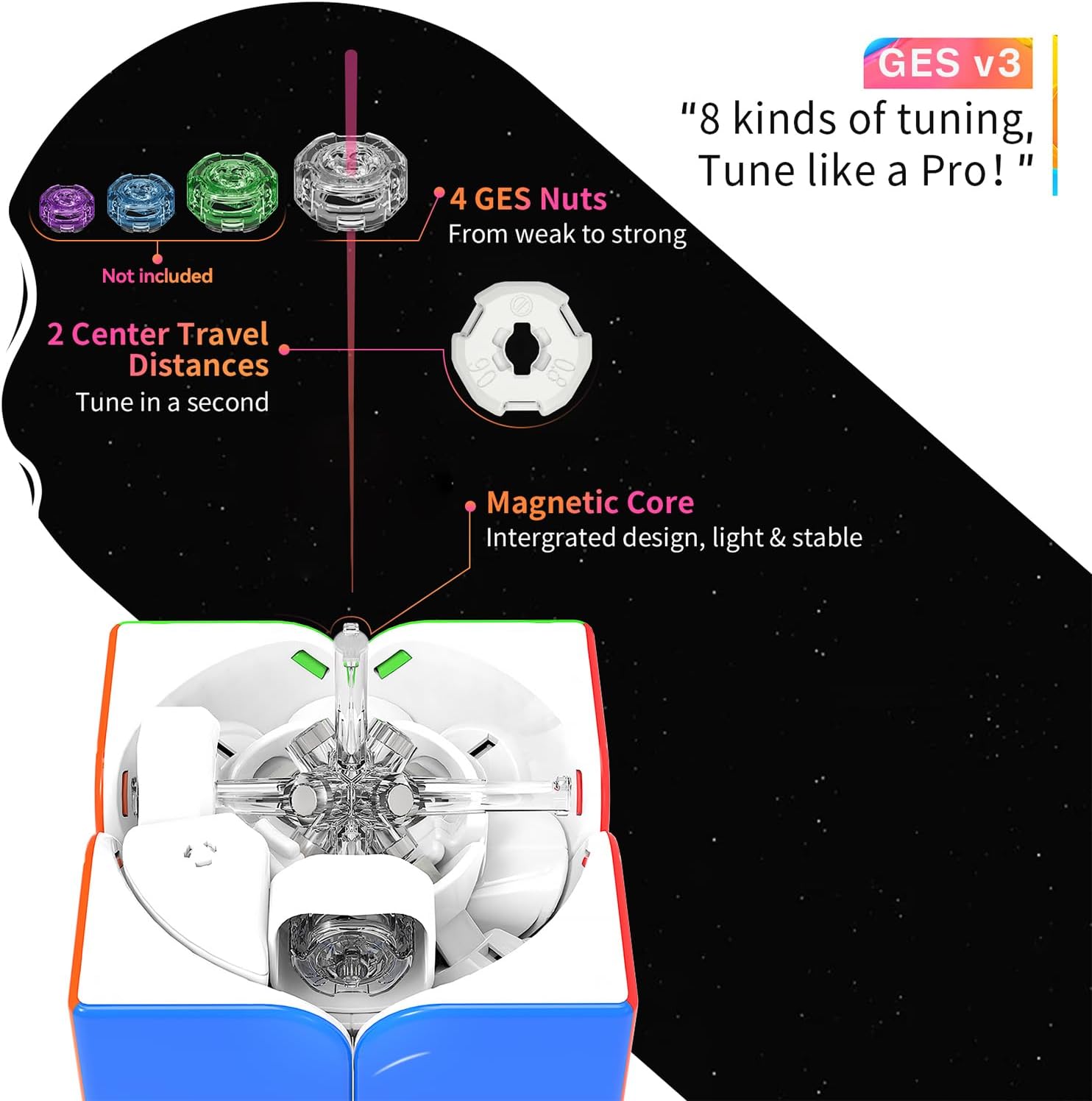
Figure 5: The GES v3 tuning system, featuring 4 GES Nuts for varying elasticity and 2 Center Travel Distances for tension adjustment.
Adjusting Tension and Elasticity:
- Accessing the GES Nuts: Gently remove the center caps on each face of the cube. This will expose the GES nuts.
- Using the Tuning Rod: Insert the provided tuning rod into the GES nut.
- Adjusting Elasticity: The GAN 251 M Air comes with 4 levels of elasticity, controlled by different GES nuts (not included, but the system supports them). You can swap these nuts to change the spring compression and thus the cube's elasticity.
- Adjusting Center Travel Distance: This refers to the distance the center piece can move, affecting the overall tension. The system supports 2 kinds of nut distances.
- Testing: After making adjustments, re-attach the center caps and test the cube's feel. Repeat the process until you achieve your desired tension and elasticity.
Note: The GAN 251 M Air model features unadjustable corner magnets and does not have magnets in the core, which contributes to its lighter weight and straightforward turning feel. For models with adjustable core magnets, refer to the specific instructions for those versions.
5. Maintenance
Proper maintenance ensures the longevity and optimal performance of your GAN 251 M Air speed cube.
Cleaning:
- Use a soft, dry cloth to wipe down the cube's exterior surfaces regularly.
- For dust or debris in the internal mechanisms, you may carefully separate the pieces and clean them with a soft brush or compressed air.
- Avoid using harsh chemicals or abrasive materials, as these can damage the frosted surface and plastic components.
Lubrication:
- While the cube is designed for smooth turning, applying a small amount of speed cube lubricant can further enhance its performance and feel.
- Apply lubricant sparingly to the internal contact points between pieces.
- Rotate the cube thoroughly after lubrication to distribute the product evenly.
Storage:
- Store the cube in a clean, dry place away from direct sunlight and extreme temperatures.
- Avoid dropping the cube, as this can cause internal damage or pop out pieces.
6. Troubleshooting
This section addresses common issues you might encounter with your GAN 251 M Air speed cube.
| Problem | Possible Cause | Solution |
|---|---|---|
| Cube feels too loose or too tight. | Incorrect tension settings. | Adjust the GES nuts using the tuning rod (refer to Section 4: Tuning and Customization). Experiment with different settings to find your preferred feel. |
| Turns are not smooth or feel gritty. | Lack of lubrication or accumulation of dust/debris. | Clean the cube and apply speed cube lubricant (refer to Section 5: Maintenance). |
| Pieces occasionally pop out. | Cube is too loose, or aggressive turning. | Tighten the tension slightly using the GES nuts. Practice smoother turning techniques. Reassemble any popped pieces carefully. |
| Cube locks up during turns. | Tension is too tight, or corner cutting limits are being exceeded. | Loosen the tension slightly. Ensure turns are completed before initiating the next move. The GAN 251 M Air has excellent corner cutting, but extreme angles can still cause lock-ups. |
If you encounter issues not listed here or require further assistance, please contact GAN customer support.
7. Specifications
- Model: GAN251 M Air
- Type: 2x2 Magnetic Speed Cube
- Dimensions: Approximately 2 x 2 x 0.04 inches (50 x 50 x 1 mm)
- Weight: Approximately 2.89 ounces (50 grams)
- Magnets: 42 (unadjustable corner magnets)
- Surface: Frosted Stickerless
- Tuning System: GES v3 (2 kinds of nut distances, 4 levels elasticity)
- Corner Cutting: 55° positive, 35° reverse
- Manufacturer: GAN
- Recommended Age: 6 years and up
- ASIN: B09574FD1T

Figure 6: Close-up of the cube's frosted surface, which is designed to be scratch-proof and fingerprint-proof.

Figure 7: Illustration demonstrating the seamless design and stable one-piece construction of the cube's internal components.

Figure 8: The GAN 251 M Air's lightweight construction, weighing approximately 50 grams, is a key design feature.
8. Model Comparison (GAN 251 M Series)
The GAN 251 M series includes several versions, each with distinct features. This table provides a comparison to help understand the differences, particularly for the GAN 251 M Air model.

Figure 9: A detailed comparison table outlining the specifications of the GAN 251 M Air, Pro, and Leap models, including weight, magnetic features, and auto-aligning capabilities.
| Feature | GAN 251 M Air | GAN 251 M Pro | GAN 251 M Leap |
|---|---|---|---|
| Weight | 50g | 56g | 58g |
| Positioning | Corner-Edge | Core | Core |
| Magnet Adjustment | Not applicable | 3 levels | 3 levels |
| Magnet Strength | 3x1 | 3x1, 3x2 | 3x1, 3x2, 5x2 |
| Auto Aligning | ≈1-2° | ≤10° | ≈30° |
9. Warranty and Customer Support
GAN is committed to providing high-quality products and excellent customer service. While specific warranty details are not provided in this manual, GAN offers support for its products.
Customer Support:
Should you have any questions, require assistance with tuning, or encounter any issues with your GAN 251 M Air speed cube, please contact the GAN customer service team. They are available to assist with missing accessories or any other concerns to ensure your satisfaction.
For the latest news on GAN products, to join fan groups, or to provide feedback on future models, you can connect with the GAN team through their official channels or the GAN Cube store.
Visit the GAN Store on Amazon for more information and support.
