1. Introduction
Thank you for choosing AUTOWIKI Fog Lamp Assemblies. This manual provides essential information for the proper installation, operation, and maintenance of your new fog lights. These fog lamp assemblies are designed to enhance visibility in adverse weather conditions such as fog, heavy rain, or snow, improving driving safety. Please read this manual thoroughly before installation and keep it for future reference.
Note: These fog lamp assemblies are specifically designed for 2008-2010 BMW 5 Series (E60/E61) models and are not compatible with models equipped with the M Package.
2. Safety Information
- Always disconnect the vehicle's battery before performing any electrical work to prevent short circuits or electrical shock.
- Wear appropriate personal protective equipment (PPE), such as safety glasses and gloves, during installation.
- Ensure the vehicle is parked on a level surface with the parking brake engaged.
- If you are unsure about any step of the installation process, seek assistance from a qualified automotive technician.
- Verify that the fog lights are securely mounted and all connections are tight before driving.
- These fog lights meet SAE and DOT standards for automotive lighting.
3. Package Contents
Upon opening the package, please verify that all components are present and undamaged:
- 1 Pair of AUTOWIKI Fog Lamp Assemblies (Left and Right)
- 2 Halogen Bulbs (H8 12V35W)
- Fixed Accessories for Installation

Image: Front view of the AUTOWIKI Fog Lamp Assemblies, showing both left and right units.
4. Specifications
| Feature | Specification |
|---|---|
| Brand | AUTOWIKI |
| Model Number | CB30-0511-09S0 |
| Compatibility | 2008-2010 BMW 5 Series (E60/E61) |
| Lens Color | Clear |
| Lens Material | High Grade ABS Plastic |
| Bulb Type | Halogen (H8 12V35W) |
| Dimensions (L x W x H) | 7.46 x 7.5 x 9.94 inches |
| Item Weight | 1.98 pounds (per pair) |
| Certifications | SAE and DOT Compliant |
| Special Features | Waterproof, Dustproof, Anti-snow |

Image: Diagram showing the dimensions of the fog lamp assembly (9.94 inches height, 7.46 inches length, 7.5 inches width).
5. Setup and Installation
The installation process for these fog lamp assemblies is designed to be straightforward. However, professional installation is recommended if you are not familiar with automotive electrical systems or vehicle body work.
Tools Required (Not Included):
- Screwdriver set
- Socket wrench set
- Plastic trim removal tools (recommended)
- Wire cutters/strippers (if wiring modifications are needed)
Installation Steps:
- Prepare the Vehicle: Park the vehicle on a flat, stable surface. Turn off the engine and engage the parking brake. Disconnect the negative terminal of the vehicle's battery to prevent electrical hazards.
- Access the Fog Light Area: Depending on your BMW 5 Series model (E60/E61), you may need to remove or partially remove the front bumper cover or fender liner to access the existing fog light assemblies. Refer to your vehicle's service manual for specific instructions on bumper removal.
- Remove Old Fog Lights: Locate the existing fog light assemblies. Disconnect the electrical connector from the back of the fog light. Unscrew or unclip any mounting hardware holding the old fog light in place and carefully remove it.
- Install New Halogen Bulbs: If the bulbs are not pre-installed, carefully insert the provided H8 halogen bulbs into the new AUTOWIKI fog lamp assemblies. Ensure they are seated correctly and twist to lock if applicable. Avoid touching the glass part of the bulb with bare hands.
- Mount New Fog Lights: Position the new AUTOWIKI fog lamp assembly into the opening. Align the mounting tabs or holes with the vehicle's chassis. Secure the new fog light using the provided fixed accessories or the original mounting hardware. Ensure it is firmly in place.
- Connect Wiring: Reconnect the vehicle's electrical connector to the new fog lamp assembly. Ensure the connection is secure.
- Repeat for Other Side: Follow the same steps for the fog light on the opposite side of the vehicle.
- Reassemble Vehicle: Reinstall any bumper covers or fender liners that were removed.
- Reconnect Battery: Reconnect the negative terminal of the vehicle's battery.
- Test Functionality: Turn on your vehicle's ignition and activate the fog lights to ensure they are functioning correctly. Check both sides for proper illumination.
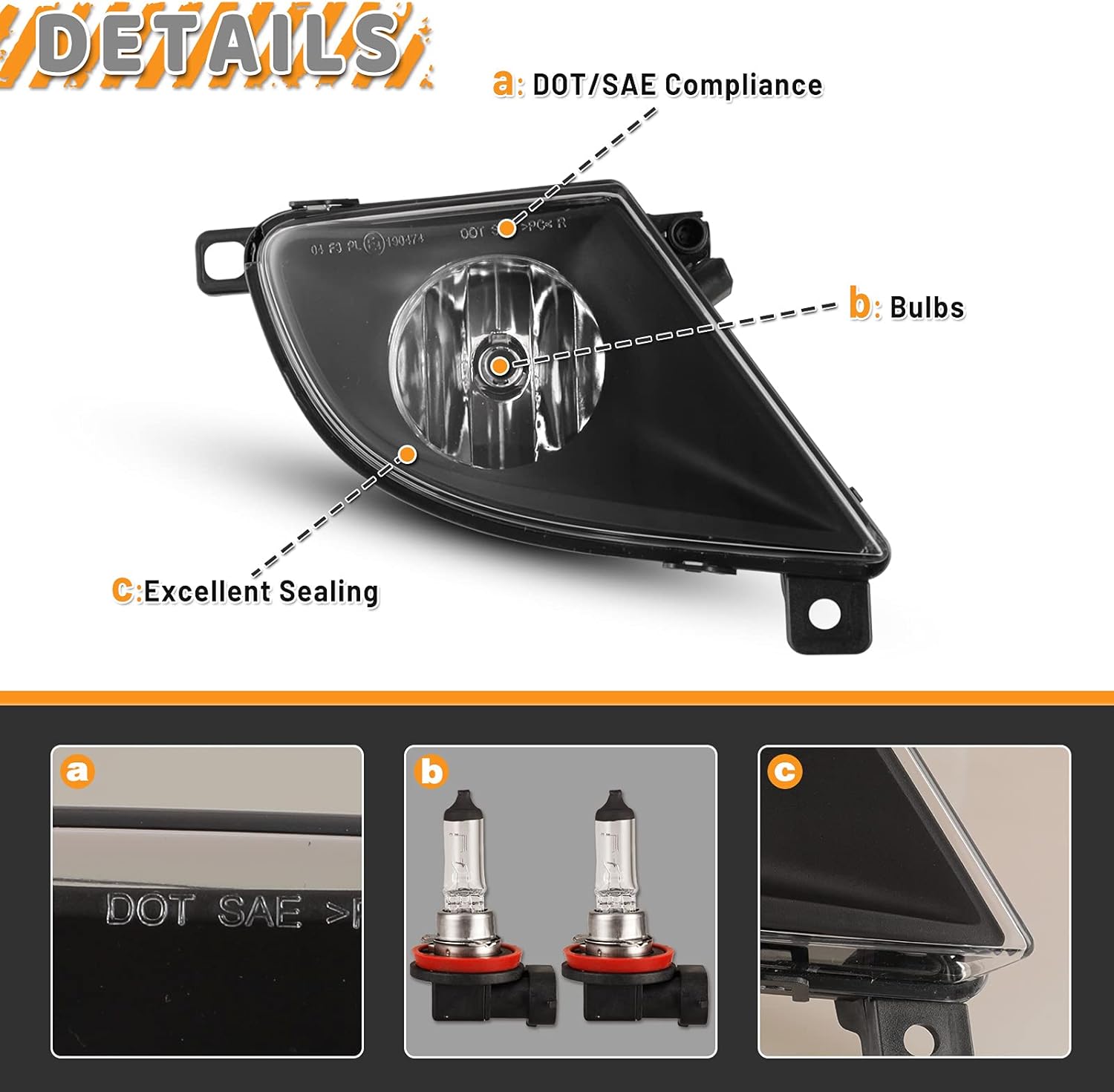
Image: Close-up view of the fog light highlighting DOT/SAE compliance markings, bulb location, and the excellent sealing around the lens.

Image: Rear view of the fog light showing the light dimmer screw for adjustment, the sealing ring for bulb access, and the waterproof seal cap.
6. Operating Instructions
Once installed, the AUTOWIKI Fog Lamp Assemblies operate in conjunction with your vehicle's existing fog light switch. Refer to your BMW 5 Series owner's manual for specific instructions on how to activate and deactivate the fog lights.
- Typically, fog lights are activated via a switch on the dashboard or steering column.
- They are designed for use in conditions of reduced visibility, such as fog, heavy rain, or snow.
- Always turn off fog lights when visibility improves to avoid dazzling oncoming drivers.

Image: A BMW 5 Series car on the road with the fog lights actively illuminated, demonstrating their function.
7. Maintenance
Proper maintenance will ensure the longevity and optimal performance of your AUTOWIKI Fog Lamp Assemblies.
Cleaning:
- Regularly clean the fog light lenses with a soft cloth and mild automotive cleaning solution.
- Avoid abrasive cleaners or harsh chemicals that could damage the lens material.
- Ensure the lenses are free from dirt, mud, or ice, which can obstruct light output.
Bulb Replacement:
- If a halogen bulb burns out, replace it with an H8 12V35W halogen bulb.
- To replace, disconnect the battery, access the rear of the fog light (as in installation), twist or unclip the bulb holder, remove the old bulb, and insert the new one.
- Avoid touching the glass of the new bulb with bare hands, as oils can reduce its lifespan.
Waterproof Features:
The fog lights are designed to be waterproof, dustproof, and anti-snow. However, avoid high-pressure washing directly onto the light seals to prevent potential water ingress over time.

Image: Visual representation of the fog lights' waterproof capabilities, with water splashing around them.
8. Troubleshooting
If you encounter issues with your AUTOWIKI Fog Lamp Assemblies, refer to the following common problems and solutions:
| Problem | Possible Cause | Solution |
|---|---|---|
| Fog lights do not turn on | Blown fuse Loose electrical connection Faulty bulb Vehicle's fog light switch issue | Check and replace the vehicle's fog light fuse. Ensure all electrical connectors are securely plugged in. Inspect and replace bulbs if necessary. Consult a mechanic for vehicle electrical system diagnosis. |
| One fog light is not working | Faulty bulb Loose connection to that specific light | Replace the bulb. Check the electrical connection at the back of the non-functioning light. |
| Dim or flickering light | Poor electrical connection Aging bulb Insufficient power supply | Check and secure all wiring connections. Replace the bulb. Have the vehicle's electrical system checked by a professional. |
| Moisture inside the lens | Condensation (normal in some conditions) Compromised seal | Small amounts of condensation should dissipate. If excessive or persistent, check for cracks or damage to the housing/seal. Ensure the waterproof seal cap is tightly closed. |
For further assistance, please refer to the official Troubleshooting Guide (PDF) provided by the manufacturer.
9. Warranty and Support
AUTOWIKI products are designed for quality and durability. For information regarding product warranty, returns, or technical support, please contact AUTOWIKI customer service through the retailer where the product was purchased or visit the official AUTOWIKI store page.
AUTOWIKI Store: Visit the AUTOWIKI Store on Amazon
Customer recognition drives our passion to build better parts that help you safely hit the road and enjoy the all-out pleasure of driving.


