
LONGRUF 710
LONGRUF 7-inch GPS Navigation System User Manual
Model: 710 | Brand: LONGRUF
1. Introduction
The LONGRUF 7-inch GPS Navigation System provides reliable and accurate turn-by-turn voice guidance with pre-installed 2025 North America maps (USA, Canada, Mexico). It features a touch screen, intelligent error correction, and support for various vehicle modes, ensuring a safer and more efficient journey. This manual provides detailed instructions for setup, operation, maintenance, and troubleshooting.

Figure 1: LONGRUF 7-inch GPS Navigation System
2. Safety Information
- Airbag Clearance: Always install the GPS device far away from any car airbags to prevent obstruction during deployment.
- Power Source: The built-in battery is primarily for emergency use and operates for approximately 50 minutes. For continuous operation, keep the device plugged in using the provided car charger.
- Charging Indicator: The power indicator light changes from RED to GREEN when the device is fully charged.
- FM Transmitter Usage: If using the FM transmit function for audio output through car speakers, remember to turn off FM transmission when not in use to restore sound directly from the GPS unit.
3. What's in the Box
Upon opening the package, verify that all the following components are included:
- GPS Navigation Unit
- Car Charger
- USB Cable
- Suction Cup Mount
- Clip Holder
- Sunshade

Figure 2: Included Accessories
4. Setup
4.1 Assembling the Mount
The GPS unit comes with a suction cup mount and a clip holder. These three pieces (GPS unit, clip holder, and suction cup mount) need to be assembled before installation in your vehicle.
- Attach the clip holder to the back of the GPS unit.
- Connect the suction cup mount to the clip holder. Ensure all connections are secure.
Video 1: Demonstrates how to assemble the GPS unit with its mount and attach it to a car windshield. It shows releasing the suction cup handle, pressing the suction cup against the windshield, and then locking the handle to secure it. The video also illustrates how to adjust the angle and remove the mount.
4.2 Mounting to Windshield
- Ensure the handle on the suction cup mount is in its released position (perpendicular to the pad).
- Clean the glass surface of your windshield where you intend to mount the GPS.
- Press the suction cup firmly against the windshield.
- Flip the handle to the locked position to secure the mount.
- Adjust the angle of the GPS unit for optimal viewing, then tighten the screws on the mount to fix the position.

Figure 3: Suction Cup Mount and Device Dimensions
4.3 Initial Power-On and GPS Signal Acquisition
After mounting, connect the GPS to your car's power outlet using the provided car charger. Allow the device to acquire GPS information. This process may take 5-30 minutes initially. Ensure at least 3 green bars are displayed in the "GPS Info" section for successful positioning.

Figure 4: GPS Mounted in Vehicle
5. Operating Instructions
5.1 Map and Navigation Features
- Pre-loaded Maps: The device comes with the latest 2025 North America maps (USA, Canada, Mexico) pre-installed, featuring 2D and 3D map displays.
- Destination Search: Supports search by postal code, address, coordinates, and Points of Interest (POI).
- Route Planning: Offers four route options: Fast, Green, Short, and Easy.
- Voice Guidance: Provides intelligent turn-by-turn voice navigation (Multi-Language Version), comprehensive voice prompts, and intelligent error correction, automatically generating new routes if you deviate.

Figure 5: Advanced Navigation Features
5.2 Vehicle Modes
The GPS navigation system supports 7 vehicle modes: car, truck, bus, taxi, bicycle, emergency vehicle, and pedestrian. When driving a vehicle, you can benefit from information such as length, width, height, and weight data for optimized routing.

Figure 6: Supported Vehicle Modes
5.3 Alerts and Warnings
- Speed Camera Alerts: Provides intelligent alerts for current speed cameras.
- Speed Limit Reminders: Voice prompts remind you to maintain a safe speed on expressway sections with speed limits.
- Traffic Light Reminders: Voice reminders for traffic lights ahead.
- Height Limit Reminders: Alerts drivers to pay attention to road height limits on bridges and height limit poles.

Figure 7: Traffic Light and Speed Limit Reminders

Figure 8: Speed Camera and Height Limit Reminders
5.4 FM Transmitter Function
The FM function allows you to transmit navigation audio to your car's audio system. Set the GPS unit and your car radio to the same FM frequency for audio output.
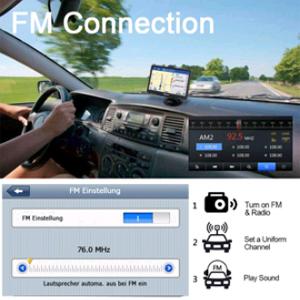
Figure 9: FM Transmit Frequency Band
6. Maintenance
To ensure the longevity and optimal performance of your LONGRUF GPS Navigation System, follow these maintenance guidelines:
- Cleaning: Use a soft, dry cloth to clean the screen and exterior of the device. Avoid abrasive cleaners or solvents.
- Storage: When not in use for extended periods, store the device in a cool, dry place away from direct sunlight and extreme temperatures.
- Map Updates: Keep your maps updated for the most accurate navigation. Contact LONGRUF customer support for information on free lifetime map updates.

Figure 10: Map Update Process
7. Troubleshooting
If you encounter issues with your GPS device, refer to the following common troubleshooting steps:
- Device Not Locating Correctly:
- Enter "GPS Info" on the device to check the signal strength.
- Ensure the signal bar is green (indicating a signal). If blue, reset the device.
- Allow sufficient time (5-30 minutes) for initial GPS signal acquisition, especially in new locations.
- No Sound from GPS (after using FM transmit):
- If you have used the FM transmit function, ensure it is turned off. The GPS will not produce sound directly if FM transmission is active.
- Battery Life is Short:
- The built-in battery is designed for emergency use (approx. 50 minutes). For prolonged use, keep the device connected to the car charger.
- Ensure you are using the specific car charger provided with the unit.
- Device Not Powering On/Charging:
- Verify the car charger is properly connected to both the GPS unit and the car's power outlet.
- Check the car's power outlet for functionality.
8. Specifications
| Feature | Detail |
|---|---|
| Screen | 7-inch Touch Screen |
| ROM | 8GB Memory |
| RAM | SDRAM 256MB |
| Operating System | Windows CE 6.0 |
| Material | ABS |
| Chip | MTK |
| FM Support | Yes |
| GPS Support | Yes |
| Input Voltage | DC 5V 1.5A-2A (MINI USB interface) |
| External Memory | TF card maximum 32G (external) |
| Supported Languages | English, French, German, Italian, Portuguese, Russian, Spanish, Polish, Hungarian, Roman, Slovenian, etc. |
| Item Weight | 1.65 pounds |
| Product Dimensions | 6.3 x 4.3 x 4.7 inches |
| Country of Origin | China |
| Item Model Number | 710 |
| Batteries | 1 Lithium Polymer battery required (included) |
| Battery Life | 3 years (rated) |
| Vehicle Service Type | Bus, Car, Truck, Bicycle |
| Special Features | Touchscreen, Free Lifetime Update Maps, Custom Truck Routing, Road Warnings, Lane Assist |
| Connectivity Technology | USB |
| Map Type | Europe, North America |
9. Warranty & Support
9.1 Warranty Information
The LONGRUF GPS Navigation System comes with a 1-year manufacturer's warranty from the date of purchase. This warranty covers defects in materials and workmanship under normal use.
9.2 Customer Support
For any questions, technical assistance, or warranty claims, please contact LONGRUF customer support. We offer 24/7 customer care live support to assist you.


Figure 11: Support and Service Information
Ask a question about this manual
Ask about setup, troubleshooting, compatibility, parts, safety, or missing instructions. Manuals+ will review the question and use this page’s manual context to help answer it.