1. Product Overview
The DNL Teclink MOAGW-1 Optical Fiber Decoder Box is an essential adapter designed for integrating aftermarket car stereos into Mercedes-Benz vehicles equipped with a factory fiber optic sound system (Audio Gateway). This device allows the factory sound system to remain functional after an aftermarket head unit installation, eliminating the need for extensive rewiring.

Image 1.1: The DNL Teclink MOAGW-1 Optical Fiber Decoder Box, a compact black unit with an optical fiber input and a multi-pin connector.
Key features include:
- Enables the use of an aftermarket radio while retaining the factory fiber optic sound system (Audio Gateway).
- Eliminates the requirement to run a 6-meter extension cable from the front to the rear of the vehicle.
- Includes an RCA cable for direct connection to aftermarket radios.
- Designed for plug-and-play installation, simplifying the integration process.
2. Compatibility
This optical fiber adapter is specifically designed for Mercedes-Benz vehicles with a factory fiber optic sound system (Audio Gateway). It is compatible with the following models and their respective factory audio equipment:
- Mercedes E-Class W211: Model years 2002-2009
- Mercedes SLK R171: Model years 2004-2010
- Mercedes CLS W219: Model years 2004-2010

Image 2.1: Examples of compatible Mercedes-Benz factory radio units, including Audio 20 Tape Player, Audio 50, and Comand NTG1, found in E-Class W211, CLS W219, and SLK R171 models.
Important Note: This decoder box is not compatible with the D2B optical bus system. Please verify your vehicle's optical bus system before installation.

Image 2.2: Examples of D2B optical bus system connectors, which are incompatible with the MOAGW-1 decoder box. These connectors typically have a different form factor than the MOST system.
3. Setup and Installation
The MOAGW-1 decoder box is designed for straightforward plug-and-play installation. It connects to your vehicle's existing MOST (Media Oriented Systems Transport) optical fiber network and provides RCA outputs for your aftermarket radio.
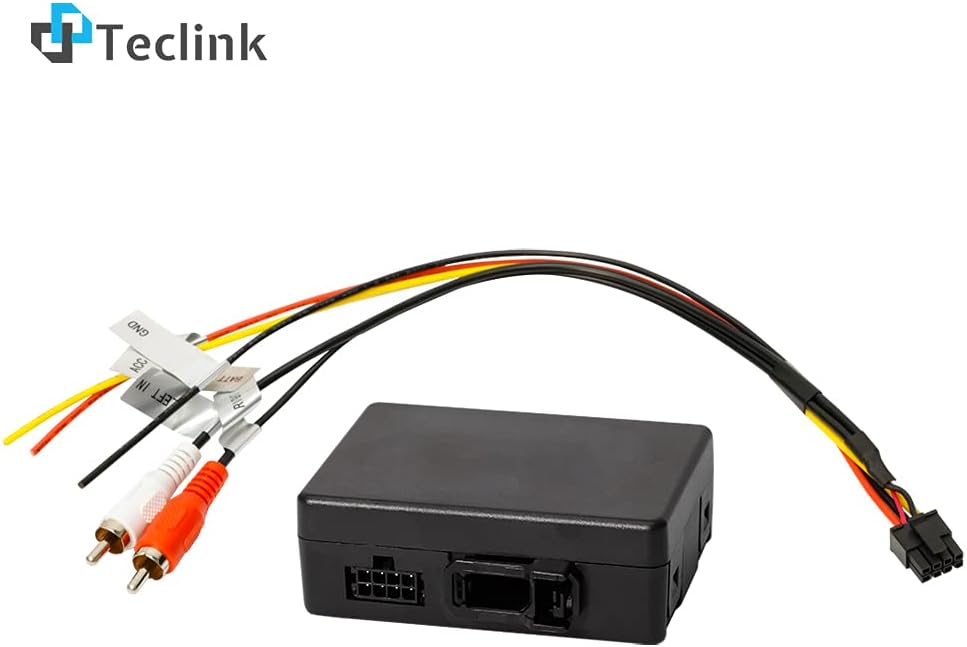
Image 3.1: The MOAGW-1 decoder box shown with its integrated wiring harness, including power connections (ACC, GND, BATT+12V) and RCA audio output cables (Right In, Left In).
Wiring Diagram

Image 3.2: Detailed wiring diagram for the MOAGW-1, illustrating connections for power (ACC, GND, BATT+12V), optical fiber input, and RCA audio outputs (Right In, Left In) to an aftermarket radio's AUX input.
Installation Steps:
- Disconnect Battery: Before beginning any electrical work, disconnect the vehicle's negative battery terminal to prevent short circuits.
- Locate Factory Audio Gateway: Identify the factory fiber optic Audio Gateway module in your Mercedes-Benz. This is typically located in the trunk or under the passenger seat, depending on the vehicle model.
- Connect Optical Fiber: Disconnect the optical fiber cable from the factory Audio Gateway and connect it directly into the optical fiber input port on the MOAGW-1 decoder box. Ensure a secure connection.
- Connect Power Wires:
- Connect the Red (ACC) wire from the MOAGW-1 harness to a switched 12V accessory power source (e.g., ignition wire) from your aftermarket radio harness.
- Connect the Yellow (BATT+12V) wire from the MOAGW-1 harness to a constant 12V power source (e.g., battery wire) from your aftermarket radio harness.
- Connect the Black (GND) wire from the MOAGW-1 harness to a chassis ground point or the ground wire from your aftermarket radio harness.
- Connect RCA Audio Outputs: Connect the Red (RIGHT IN) RCA cable from the MOAGW-1 to the AUX RIGHT OUT cable of your aftermarket radio. Connect the White (LEFT IN) RCA cable from the MOAGW-1 to the AUX LEFT OUT cable of your aftermarket radio.
- Secure Connections: Ensure all connections are firm and properly insulated.
- Reconnect Battery: Reconnect the vehicle's negative battery terminal.
- Test System: Turn on your aftermarket radio and test the audio output to ensure the factory sound system is functioning correctly.
4. Operation
The DNL Teclink MOAGW-1 is a passive decoder box. Once correctly installed, it automatically integrates your aftermarket radio's audio output with the vehicle's factory fiber optic sound system. There are no user-adjustable settings or controls on the unit itself. The operation is seamless, allowing the factory amplifier and speakers to reproduce audio from your new head unit.
5. Maintenance
The MOAGW-1 decoder box requires minimal maintenance. It contains no user-serviceable parts. To ensure optimal performance and longevity:
- Keep the unit dry and away from excessive moisture or liquids.
- Avoid exposing the unit to extreme temperatures.
- Ensure all connections remain secure and free from corrosion.
- Do not attempt to open or modify the unit, as this will void any warranty.
6. Troubleshooting
If you encounter issues after installing the MOAGW-1 decoder box, consider the following troubleshooting steps:
- No Audio Output:
- Verify all power connections (ACC, BATT+12V, GND) are correctly wired and receiving power.
- Ensure the optical fiber cable is securely connected to the MOAGW-1 and the vehicle's optical network.
- Check that the RCA cables are properly connected to the AUX input of your aftermarket radio.
- Confirm that the aftermarket radio's AUX input is selected as the audio source.
- Ensure your vehicle's factory amplifier is receiving power and is functional.
- Distorted or Low Audio:
- Check RCA cable connections for looseness or damage.
- Ensure the volume levels on both the aftermarket radio and the vehicle's factory system are appropriately set.
- Verify that the optical fiber cable is not bent sharply or damaged, which can impede signal transmission.
- Unit Not Powering On:
- Check the fuse for the aftermarket radio and any inline fuses for the MOAGW-1's power connections.
- Confirm that the ACC and BATT+12V wires are receiving the correct voltage.
- Ensure the GND wire has a solid connection to chassis ground.
If problems persist after following these steps, it is recommended to consult with a professional car audio installer or contact DNL customer support.
7. Specifications
| Attribute | Detail |
|---|---|
| Brand | DNL |
| Model Number | MOAGW-1 |
| Mounting Type | Cable Mount |
| Number of Pins | 4 (for power/control) |
| Interface Type | RCA (Audio Output), Optical Fiber (Input) |
| Number of Channels | 2 (Stereo Audio) |
| Item Weight | 3.2 ounces |
| UPC | 760385297029 |
| Manufacturer | DNL |
8. Warranty and Support
For information regarding product warranty, returns, or technical support, please refer to the documentation provided with your purchase or contact DNL customer service directly. Ensure you have your product model number (MOAGW-1) and purchase details available when seeking support.
Note: Unauthorized modifications or improper installation may void the product warranty.


