
Introduction
This manual provides essential information for the safe and efficient operation, installation, and maintenance of your Candy Smart Pro CSOE H9A2DE-S 9 Kg Heat Pump Dryer. Please read these instructions carefully before using the appliance and retain them for future reference.
Important Safety Information
Always follow basic safety precautions when using electrical appliances to reduce the risk of fire, electric shock, and injury to persons. Ensure the appliance is properly earthed. Do not allow children to play with the appliance. Do not dry unwashed items in the tumble dryer. Items that have been soiled with substances such as cooking oil, acetone, alcohol, petrol, kerosene, spot removers, turpentine, waxes, and wax removers should be washed in hot water with an extra amount of detergent before being dried in the tumble dryer.
Setup and Installation
Proper installation is crucial for the performance and safety of your dryer. Ensure the appliance is placed on a firm, level floor. Adjust the feet to stabilize the dryer. Do not install the appliance behind a lockable door, a sliding door, or a door with a hinge on the opposite side to that of the tumble dryer, in such a way that a full opening of the tumble dryer door is restricted.

Image: Front view of the Candy Smart Pro dryer, showing the control panel, door, and overall design. This view is typical for installation planning.

Image: Side view of the Candy Smart Pro dryer, illustrating its depth and side panel design. Useful for checking space requirements.

Image: Rear view of the Candy Smart Pro dryer, showing the power cord connection and ventilation outlets. Essential for proper electrical and airflow setup.
Electrical Connection
Connect the dryer to a properly earthed electrical outlet. Ensure the voltage and frequency match the specifications on the appliance rating plate.
Drainage
The dryer collects condensed water in a removable tank. For continuous drainage, an optional drain hose can be connected directly to a household drain. Refer to the full instruction manual for detailed steps.
Operating Instructions
Your Candy Smart Pro dryer offers a range of programs and features designed for optimal drying results and convenience.

Image: Front view of the Candy Smart Pro dryer, with an overlay highlighting features like 3 Rapid Programs, Woolmark Care, and Easy Iron. This provides a quick overview of the dryer's capabilities.
Loading the Dryer
Before loading, ensure all items are suitable for tumble drying. Do not overload the dryer; refer to the maximum load capacity for each program. Close the door firmly.
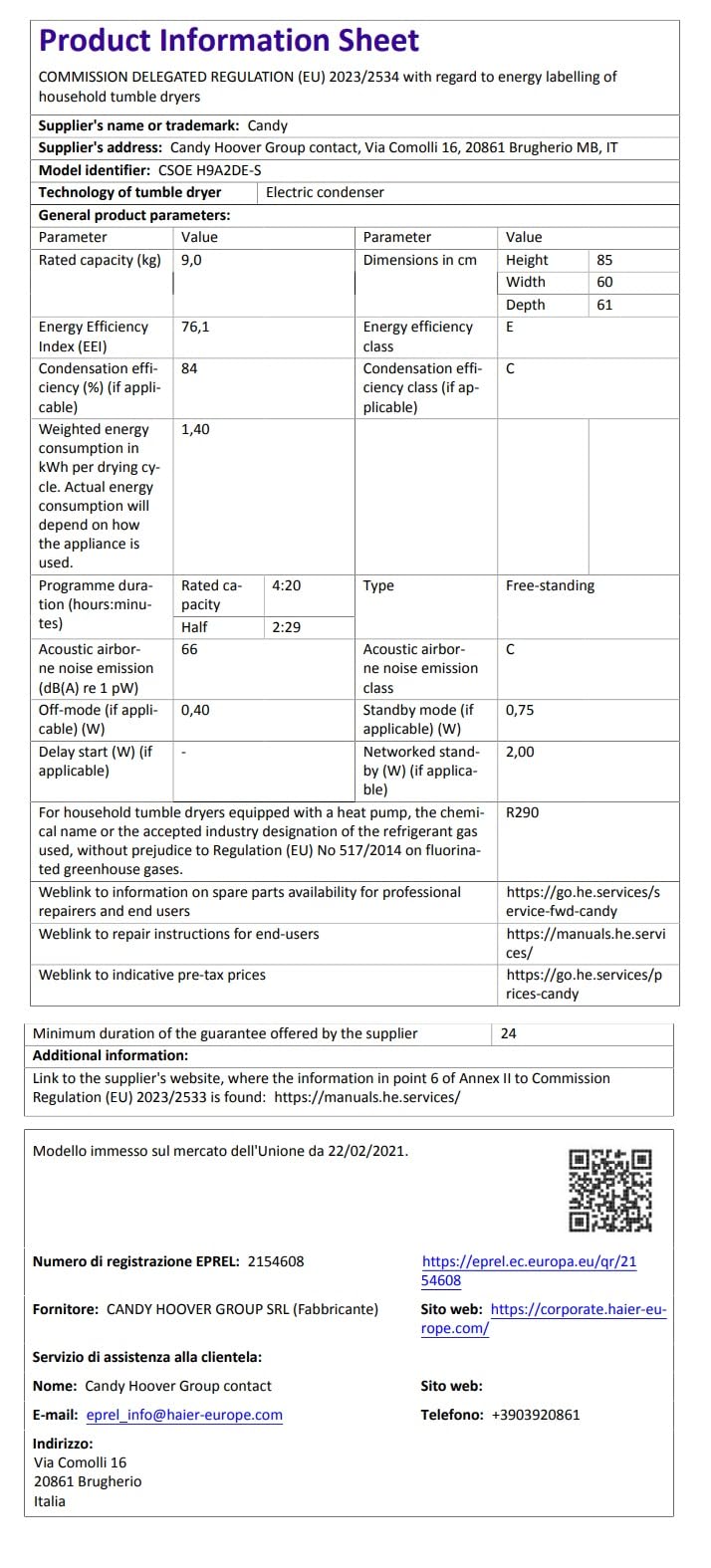
Image: A man loading laundry into the drum of a Candy Smart Pro dryer, which is stacked above a washing machine. This illustrates the typical loading process.
Control Panel Overview
The control panel allows you to select programs, adjust settings, and monitor the drying cycle.
Image: A close-up view of the Candy Smart Pro dryer's control panel, showing the program selector dial, digital display, and various function buttons. This helps users identify controls for operation.
Program Selection
Turn the program selector dial to choose the desired drying program. The display will show the estimated drying time.
Key Features and Programs
- Smart Start Delay: This function allows you to delay the start of the drying cycle for up to 24 hours. This is useful for optimizing energy consumption by running the dryer during off-peak hours or having laundry ready upon your return.
- Super Easy Iron: Designed to reduce creases and tangles in your laundry. This feature uses a Smart sensor and alternating drum movements to minimize wrinkles, potentially halving ironing time.
- Rapid Programs: The dryer includes three rapid programs for everyday needs, completing cycles in under 90 minutes. These are ideal for quick drying of smaller loads or specific fabric types.
- Woolmark Approved Care: This program is specifically designed to preserve the natural softness of delicate fabrics, such as wool, that are labeled as 'machine washable'. It ensures gentle drying to prevent shrinkage and damage.
- Refresh 20 min Program: This program helps reduce creases, remove odors, and facilitate ironing for garments that don't require a full wash or dry cycle.
- Wi-Fi + BLE Connectivity (hOn App): Connect your dryer to the hOn app via Wi-Fi and Bluetooth Low Energy (BLE) for smart control. Discover intelligent functionalities, new programs, and optimize your energy consumption directly from your smartphone.

Image: An image illustrating the rapid program feature, specifically showing shirts and indicating a 30-minute cycle for up to 4 shirts. This highlights the speed and efficiency for common garments.

Image: A stack of colorful wool sweaters with the Woolmark Apparel Care logo, emphasizing the dryer's ability to preserve delicate fabrics. This visually confirms the gentle care for wool items.

Image: A white t-shirt with a steam effect, accompanied by text indicating 'Easier Ironing', 'Reduces Creases', and 'Removes Odors'. This illustrates the benefits of the Refresh 20 min program.

Image: A woman interacting with a smartphone displaying the hOn app interface, with the dryer visible in the background. This demonstrates the smart connectivity feature and app control.
Heat Pump Technology
This dryer utilizes heat pump technology, which reuses hot air, making it significantly more energy-efficient than traditional condensation dryers. This results in reduced energy consumption and gentle care for your laundry.

Image: A diagram illustrating the heat pump drying process, showing air intake, heat exchange, refrigerant flow, and air output. It highlights the energy-efficient mechanism of the dryer.
Maintenance
Regular maintenance ensures the longevity and efficiency of your dryer.
- Cleaning the Lint Filter: Clean the lint filter after every cycle. A clogged filter reduces drying efficiency and increases energy consumption.
- Emptying the Water Tank: Empty the condensed water tank after each drying cycle. If the tank is full, the dryer will stop operating.
- Cleaning the Condenser: Periodically clean the condenser unit as per the full instruction manual to maintain optimal performance.
- Cleaning the Exterior: Wipe the exterior surfaces with a soft, damp cloth. Do not use abrasive cleaners.
Troubleshooting
If you encounter issues with your dryer, consult the following common troubleshooting tips before contacting service.
- Dryer Not Starting: Check if the power cord is securely plugged in, the door is fully closed, and the program selector is set correctly. Ensure the start/pause button has been pressed.
- Clothes Not Drying Properly: Check if the lint filter is clean, the water tank is empty, and the load size is not exceeding the maximum capacity. Ensure the correct program for the fabric type has been selected.
- Excessive Noise: Verify that the dryer is level and stable. Check for any foreign objects in the drum.
- Error Codes: If an error code appears on the display, refer to the full user manual for specific meanings and solutions.
Specifications
Detailed technical specifications for the Candy Smart Pro CSOE H9A2DE-S dryer.
Image: The official Product Information Sheet, detailing energy efficiency, dimensions, capacity, and other technical specifications for the Candy Smart Pro CSOE H9A2DE-S dryer. This document provides comprehensive data for the appliance.
| Specification | Value |
|---|---|
| Brand | Candy |
| Model Identifier | CSOE H9A2DE-S |
| Form Factor | Free-standing |
| Loading Type | Front Load |
| Rated Capacity | 9 Kg |
| Energy Efficiency Class | E |
| Energy Efficiency Index (EEI) | 76.1 |
| Weighted Energy Consumption (kWh/cycle) | 1.40 |
| Programme Duration (hours:minutes) | 4:20 (Half load: 2:29) |
| Acoustic Noise Emission (dB(A) re 1 pW) | 66 |
| Off-mode (W) | 0.40 |
| Standby mode (W) | 0.75 |
| Delay Start (W) | 1.00 |
| Networked Stand-by (W) | 2.00 |
| Refrigerant Type | R290 |
| Dimensions (H x W x D) | 85 cm x 60 cm x 61 cm |
For household tumble dryers equipped with a heat pump, the chemical name of the accepted industry designation of the refrigerant has been used without prejudice to Regulation (EU) No 517/2014 on fluorinated greenhouse gases.
Further product information can be found in the EPREL database: https://eprel.ec.europa.eu/qr/2154608
Warranty Information
The minimum duration of the guarantee offered by the supplier is 24 months from the date of purchase. Please retain your proof of purchase for warranty claims. For specific terms and conditions, refer to the warranty card included with your product or contact Candy customer support.
Customer Support
For assistance, spare parts availability, or repair services, please contact Candy Hoover Group.
- Supplier's Name: Candy Hoover Group
- Address: Via Comolli 16, 20861 Brugherio MB, IT
- Official Website: https://www.candy.it (General website)
- Service Website: https://go.he.services/service-fwd-candy
- Manuals Website: https://manuals.he.services
- Pre-tax Prices Website: https://go.he.services/prices-candy
- Telephone: +3903920861


