1. Introduction
Thank you for choosing the LEFANT M210B Robot Vacuum Cleaner and Mop. This intelligent cleaning device is designed to simplify your daily cleaning routine, offering powerful suction and convenient mopping capabilities. Please read this manual thoroughly before use to ensure proper operation and maintenance.

The LEFANT M210B is a compact and efficient robot vacuum cleaner and mop, designed to keep your floors spotless with minimal effort.
2. Safety Instructions
To reduce the risk of injury or damage, always follow basic safety precautions when operating your robot vacuum cleaner:
- Read all instructions before using the appliance.
- Do not allow children to play with the robot.
- Ensure the robot is used on dry surfaces only. Do not use in wet environments.
- Keep hair, loose clothing, fingers, and all parts of the body away from openings and moving parts.
- Do not pick up anything that is burning or smoking, such as cigarettes, matches, or hot ashes.
- Do not use without dust bin and/or filters in place.
- Only use the charging base and power adapter supplied by the manufacturer.
- Avoid operating the robot on high places where it could fall and cause damage.
3. Package Contents
Upon opening your LEFANT M210B package, you should find the following items:
- LEFANT M210B Robot Vacuum Cleaner
- Charging Base
- Power Adapter
- 500ML Large Dust Box
- 2 HEPA Filters
- 4 Side Brushes
- 5 Disposable Wipes
- 1 Reusable Wipe
- 1 Wet Wipe Holder
- Robot Cleaning Brush
- User Manual
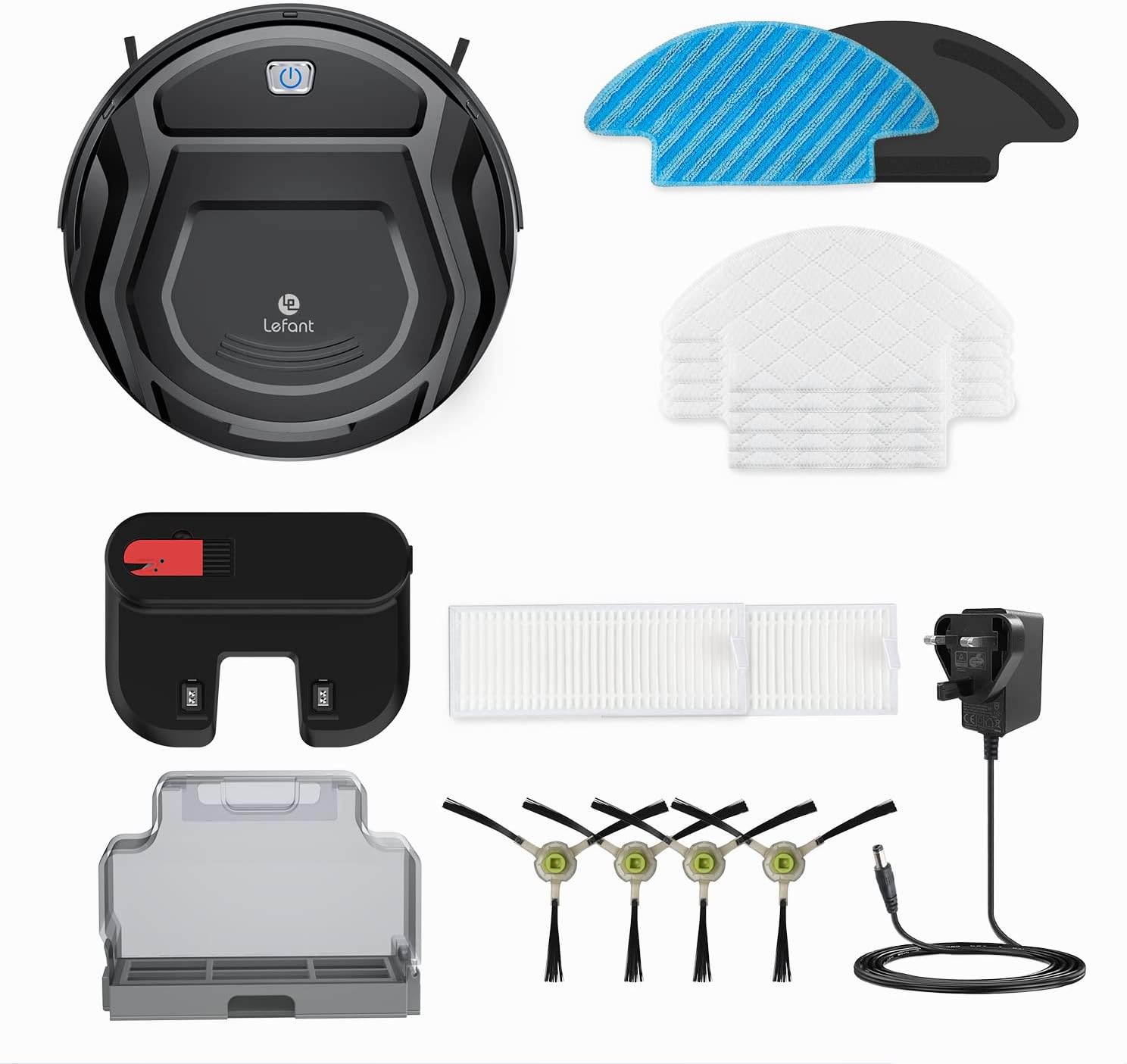
Verify all items are present and in good condition before proceeding with setup.
4. Product Overview
The LEFANT M210B is designed with a compact and efficient structure to navigate your home with ease.
4.1 Key Features
- Ultra-Thin Design: At only 7.6 cm (2.99 inches) tall, the robot can easily clean under furniture.
- Powerful Suction: Up to 2000Pa maximum suction for effective cleaning of dust and debris.
- 2-in-1 Vacuuming and Mopping: Capable of both vacuuming and mopping hard floors.
- FreeMove Technology: Enhanced infrared anti-collision sensors prevent the robot from getting stuck or falling.
- Multiple Cleaning Modes: Supports Auto, Edge, Spot, and Zigzag cleaning modes.
- App & Voice Control: Control your robot via the Lefant APP, Amazon Alexa, or Google Assistant.
- Pet Hair Friendly: Brushless suction port prevents tangles from pet hair.
- Long Battery Life: Up to 100 minutes of runtime on a single charge, with automatic recharging.

The robot's compact size (28cm diameter, 7.6cm height) enables it to reach tight spaces.

The 28cm diameter of the M210B allows it to navigate and clean in areas where larger robots might get stuck.
5. Setup
5.1 Initial Charging
Before first use, fully charge the robot. Place the charging base against a wall in an open area, ensuring there are no obstacles within 1 meter to the sides and 2 meters in front. Connect the power adapter to the charging base and a power outlet. Place the robot on the charging base, aligning its charging contacts with those on the base. The indicator light on the robot will show charging status.
5.2 App Download and Connection
For full control and smart features, download the Lefant APP.
- Download the Lefant app from your device's App Store (iOS) or Google Play Store (Android).
- Open the Lefant app and create an account or log in.
- Click "Add device" and ensure your phone's Bluetooth is enabled.
- Turn the robot's blue button switch to "I" (On).
- Press and hold the robot's start button for 6 seconds until you hear a voice prompt.
- The app will automatically detect the M210B robot. Confirm the device on the connection page.
- Ensure your phone is connected to a 2.4 GHz Wi-Fi network. The robot only supports 2.4 GHz Wi-Fi. Enter your Wi-Fi password.
- Wait for the robot to pair successfully with the app.
This video provides a step-by-step guide on connecting your LEFANT M210B robot vacuum to the mobile application for smart control.
This video demonstrates the unboxing and initial setup of the LEFANT M210P (similar to M210B), showing how quickly it can be put into service.
6. Operation
6.1 Cleaning Modes
The LEFANT M210B offers four distinct cleaning modes to suit various needs:
- Auto Cleaning: The robot intelligently navigates and cleans the entire area.
- Edge Cleaning: The robot cleans along walls and furniture edges.
- Spot Cleaning: The robot focuses on a specific dirty area, cleaning in a spiral pattern.
- Zigzag Cleaning: The robot cleans in a systematic zigzag pattern, ideal for open areas.

Choose the appropriate cleaning mode via the app or voice command for optimal results.


6.2 App Control
The Lefant APP provides comprehensive control over your robot, allowing you to:
- Start/Stop cleaning.
- Select cleaning modes.
- Adjust suction power.
- Schedule cleaning times.
- Monitor cleaning progress and battery level.

The app provides a user-friendly interface for managing your robot's cleaning tasks.
6.3 Voice Control
Integrate your LEFANT M210B with smart home assistants for hands-free control:
- Amazon Alexa: Say "Alexa, start M210B" to begin cleaning.
- Google Assistant: Use voice commands to control your robot.

Voice control offers a convenient way to manage your robot without needing to open the app.
7. Maintenance
Regular maintenance ensures your LEFANT M210B operates efficiently and extends its lifespan.
7.1 Dustbin and Filters
The robot is equipped with a 500ml dustbin and HEPA filters. It is recommended to empty the dustbin after each cleaning cycle and clean the filters weekly.
- Open the top cover of the robot.
- Remove the dustbin.
- Open the dustbin and empty its contents into a trash can.
- Remove the HEPA filters and tap them gently to remove dust. You can also rinse them with water if heavily soiled, but ensure they are completely dry before reinserting.
- Reassemble the filters and dustbin, then place it back into the robot.

The large dust box reduces the frequency of emptying, typically once a week.

The brushless suction port is designed to prevent hair tangles, making it ideal for homes with pets.
7.2 Side Brushes
Inspect and clean the side brushes regularly. If they are worn or damaged, replace them with new ones from the package contents.
7.3 Mopping Pad
The LEFANT M210B uses disposable wipes for mopping. Attach a fresh disposable wipe to the wet wipe holder before mopping. Dispose of the wipe after each use for hygiene and convenience.

The disposable wipes offer a convenient and quick mopping solution.
8. Troubleshooting
| Problem | Possible Cause | Solution |
|---|---|---|
| Robot does not start | Low battery; Power switch off | Charge the robot; Turn on the power switch. |
| Robot gets stuck frequently | Obstacles; Uneven surfaces | Clear obstacles; Ensure cleaning area is suitable. |
| Poor suction performance | Full dustbin; Clogged filter; Worn brushes | Empty dustbin; Clean/replace filter; Clean/replace side brushes. |
| Cannot connect to Wi-Fi | Incorrect Wi-Fi band; Wrong password | Ensure 2.4 GHz Wi-Fi; Re-enter password carefully. |
| Robot does not return to charging base | Charging base obstructed; Robot too far | Clear area around base; Manually place robot closer to base. |
9. Specifications
| Feature | Specification |
|---|---|
| Brand | LEFANT |
| Model Number | M210P (also referred to as M210B) |
| Color | Black |
| Product Dimensions (L x W x H) | 27.94 x 27.94 x 7.59 cm (11 x 11 x 2.99 inches) |
| Weight | 2 Kilograms (4.4 lbs) |
| Dustbin Capacity | 500 Milliliters |
| Voltage | 120 Volts |
| Noise Level | 60 dB |
| Runtime | 1 hour and 40 minutes (100 minutes) |
| Compatibility | Lefant APP, Google Assistant, Amazon Alexa, Smartphone |
| Special Feature | Small Robot Vacuum Cleaner and Mop M210B |
| Surface Recommendation | Hard Floor, Carpet, Parquet, Tile |
| Controller Type | APP Control (2.4 GHz WiFi), Alexa & Google Assistant Control, Button Control |
| Filter Type | HEPA |
| Battery Life | 12 months (estimated) |
10. Warranty and Support
LEFANT products come with a standard manufacturer's warranty. For detailed warranty information, product support, or to purchase replacement parts, please visit the official LEFANT website or contact their customer service. Keep your purchase receipt as proof of purchase.


