
Introduction
The Retevis RB20 Global Walkie Talkies are advanced communication devices designed for wide-area coverage, supporting 2G, 3G, and 4G signals. These Push-to-Talk Over Cellular (POC) radios offer nationwide call capabilities and integrated GPS tracking, making them suitable for various professional and personal applications. This manual provides essential information for setting up, operating, and maintaining your RB20 walkie-talkies.

Image: The Retevis RB20 walkie-talkies and their accompanying USB chargers.
What's in the Box
Upon unboxing your Retevis RB20 package, please verify that all the following components are included:
- 2x RB20 Network Two Way Radio
- 2x 4000mAh Li-ion Battery
- 2x USB Charger and Adapter
- 2x Belt Clip (including 4 screws)
- User Manual (this document)

Image: All components included in the Retevis RB20 product package.
Product Overview
The RB20 features a robust design with a 1.77-inch color LCD screen for clear display and easy navigation. It operates on a Linux system, providing a stable and efficient platform for communication. The device is equipped with essential buttons and ports for user interaction and connectivity.
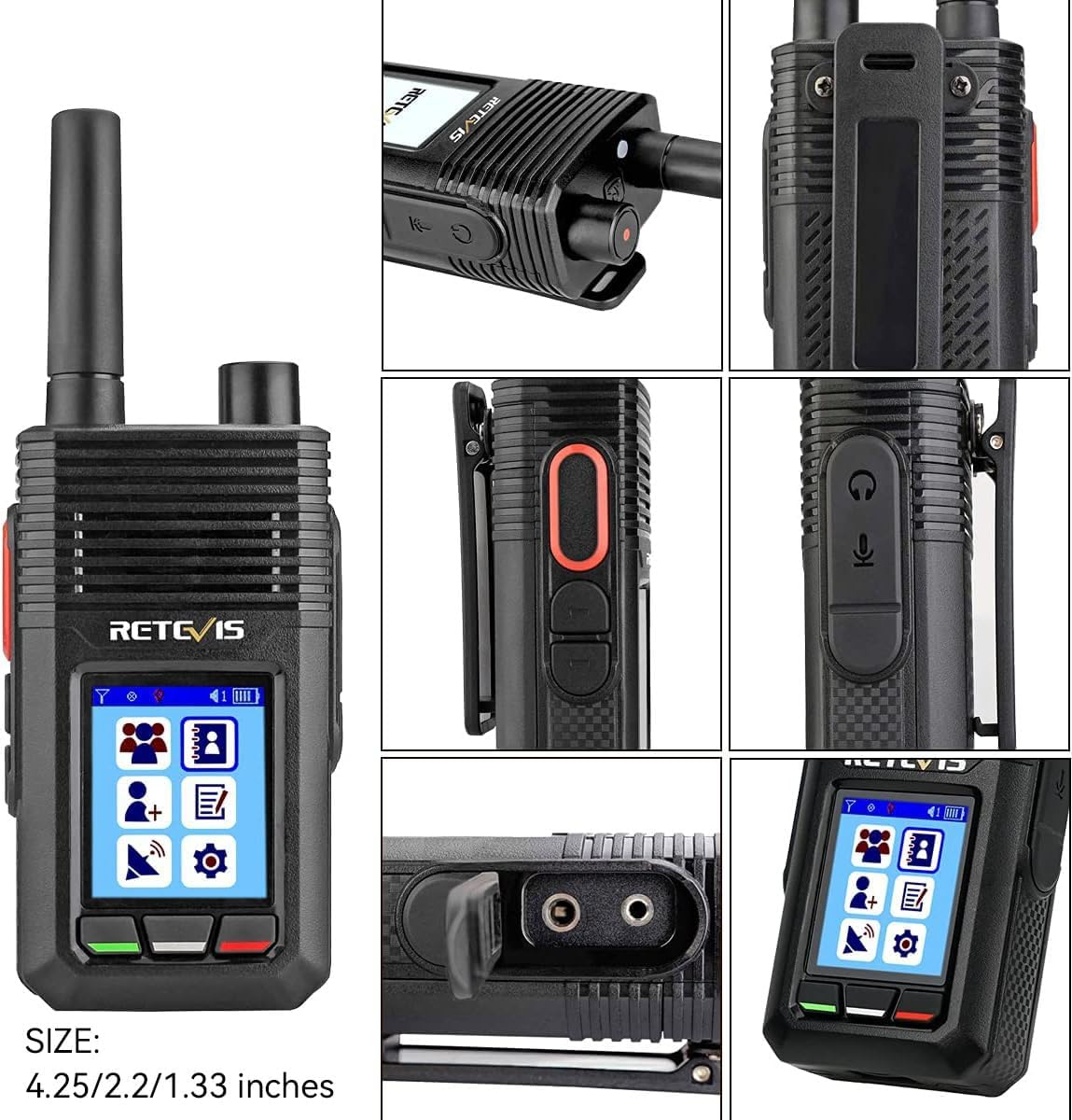
Image: Detailed views highlighting various features and ports of the Retevis RB20 walkie-talkie.
Key physical features include:
- Display: 1.77-inch color screen (128*160 resolution)
- Buttons: Intuitive navigation and call buttons.
- Ports: Charging port and accessory port for external audio devices.
- SIM Card Slot: Located for easy access to insert a micro SIM card.
Setup
Initial setup of your RB20 walkie-talkie involves inserting a micro SIM card and logging into the network system. The device requires an active mobile carrier signal (Verizon, AT&T, T-Mobile, Sprint are supported) to function.
- Insert SIM Card: Locate the SIM card slot on the device. Carefully insert a micro SIM card into the designated slot. Ensure it is correctly oriented.
- Power On: Press and hold the power button until the device powers on and the screen illuminates.
- System Login: Upon first boot-up or after a reset, you will be prompted to enter an account number and password to log in to the network walkie-talkie system. Refer to the included quick start guide or contact customer support for your login credentials.
- Network Connection: Once logged in, the device will attempt to connect to the available 2G/3G/4G network. A successful connection is indicated on the screen.

Image: Illustration of SIM card insertion for the RB20 walkie-talkie.
Note: The RB20 cannot communicate with analog or digital walkie-talkies. It requires a cellular network connection and does not support Wi-Fi or other firmware outside its dedicated system.
Operating Instructions
The Retevis RB20 is designed for straightforward communication over cellular networks.
Making Calls
- Individual Calls: Select the desired contact from your contact list on the device. Press the Push-to-Talk (PTT) button to initiate a private call.
- Group Calls: The device supports group calling, allowing communication with multiple users simultaneously. Select the desired group from the menu and press the PTT button to broadcast your message to all members of that group.

Image: Visual representation of individual and group call functionalities on the RB20.
Range and Factors Affecting Range
Unlike traditional two-way radios, the Retevis RB20 operates on cellular networks (2G/3G/4G), enabling nationwide communication as long as there is mobile carrier signal coverage. This means its range is not limited by line-of-sight or local terrain in the same way conventional radios are.
However, the effectiveness of communication can still be influenced by several factors:
- Network Coverage: The primary determinant of range for the RB20 is the availability and strength of the cellular network signal.
- Terrain and Obstacles: While less impactful than for conventional radios, extremely dense urban environments or deep valleys might still affect signal quality.
- Atmospheric Conditions: Severe weather can sometimes interfere with cellular signals.
Video: An informational video from Retevis Direct explaining factors affecting two-way radio range, including terrain, obstacles, and signal types.
Extending Range (General Principles for Two-Way Radios)
While the RB20's range is primarily network-dependent, understanding general principles for extending two-way radio range can be beneficial for optimizing performance in challenging areas:
- Increase Transmission Power: In theory, doubling transmission power can extend communication distance by approximately 1.4 times. The RB20 operates at optimal power for its cellular connection.
- Improve Receiving Sensitivity: Adjusting the squelch threshold and using a high-gain antenna can improve the receiving sensitivity. The RB20 is designed with optimized internal components for its network type.
- Higher Location: Transmitting from a higher location (e.g., a hilltop or tall building) can significantly improve signal propagation by reducing physical obstructions.
- Keep Battery Charged: A fully charged battery ensures the radio operates at its peak performance, including optimal transmission power.
GPS Positioning
The Retevis RB20 includes a GPS tracking feature, allowing for accurate location identification. This is particularly useful for team coordination, safety, and asset management.

Image: The GPS tracking capability of the Retevis RB20 walkie-talkie.
For detailed instructions on accessing and utilizing the GPS functionality, please refer to the specific software interface provided with your network walkie-talkie system.
Battery Management
The RB20 is equipped with a 4000mAh Li-ion battery, providing extended standby time and reliable operation throughout your day.
- Charging: Use the provided USB charger and adapter to charge the walkie-talkie. Connect the USB cable to the device's charging port and plug the adapter into a power outlet.
- Charging Indicator: The device's screen will display a charging indicator. Ensure the battery is fully charged before extensive use to maximize performance.
- Battery Life: The 4000mAh capacity ensures long standby time, reducing concerns about power issues during critical operations.

Image: The Retevis RB20 walkie-talkie being charged via USB.
Maintenance
To ensure the longevity and optimal performance of your Retevis RB20 walkie-talkies, follow these maintenance guidelines:
- Cleaning: Use a soft, damp cloth to clean the exterior of the device. Avoid using harsh chemicals or abrasive materials.
- Storage: Store the walkie-talkies in a cool, dry place away from direct sunlight and extreme temperatures.
- Battery Care: Do not expose batteries to high temperatures or dispose of them in fire. Recycle batteries according to local regulations.
- Water Resistance: The device is water-resistant, but it is not fully waterproof. Avoid submerging it in water.
Troubleshooting
If you encounter issues with your Retevis RB20, refer to the following common problems and solutions:
| Problem | Possible Cause | Solution |
|---|---|---|
| Device does not power on. | Low battery; incorrect battery installation. | Charge the battery fully. Ensure the battery is correctly inserted. |
| No network signal. | Out of cellular coverage; SIM card issue; incorrect system login. | Move to an area with better cellular coverage. Verify SIM card is properly inserted and activated. Re-enter login credentials. |
| Cannot make calls. | No network connection; incorrect contact/group selection. | Ensure device is connected to the network. Verify you have selected the correct individual or group for communication. |
| GPS not tracking. | Poor satellite signal; software issue. | Ensure device has a clear view of the sky. Check system settings for GPS activation. |
For further assistance, please contact Retevis customer support.
Specifications
| Feature | Detail |
|---|---|
| Model Number | RB20 |
| Dimensions | 1.33 x 2.2 x 4.25 inches |
| Weight | 14.5 ounces |
| Battery Capacity | 4000mAh Li-ion (2 required) |
| Display Type | LCD, 1.77 inch color screen (128*160 resolution) |
| Network Support | 2G / 3G / 4G cellular signal |
| Special Features | GPS, 4G network, long range (network dependent) |
| Water Resistance Level | Water Resistant |
| Operating System | Linux |
Warranty and Support
Retevis provides comprehensive support for your RB20 walkie-talkies:
- Warranty: We offer a 2-year warranty for the radio body and a 1-year warranty for accessories.
- Returns: 30 days no-reason return policy.
- Maintenance: Beyond the warranty period, maintenance services are available, with buyers responsible for associated costs.
- Contact Support: For any inquiries or support needs, please contact us on Amazon. We aim to reply within 12 hours.


