
1. Introduction
Thank you for choosing the NEXPEAK NC201 10-Amp Battery Charger. This intelligent pulse repair charger is designed to efficiently charge and maintain various 12V and 24V lead-acid batteries, including AGM, GEL, SLA, and Flooded types. Its advanced features ensure safe, fast, and reliable charging for your car, truck, motorcycle, lawn mower, boat, and marine batteries. This manual provides essential information for the proper setup, operation, maintenance, and troubleshooting of your device.
2. Safety Information
Always prioritize safety when working with batteries and electrical equipment. Failure to follow these instructions may result in electric shock, fire, or serious injury.
- Read all instructions carefully before using the charger.
- Ensure adequate ventilation when charging batteries, as they can produce explosive gases.
- Wear eye protection and protective clothing. Avoid touching your eyes while working near batteries.
- Do not expose the charger to rain or wet conditions.
- Disconnect the AC power before making or breaking the connections to the battery.
- This charger features 8 smart protections including reverse polarity, cooling system, overcurrent, fireproof material, overvoltage, and short circuit protection to ensure safe operation.
- Do not attempt to charge frozen batteries.
- Keep out of reach of children.

Image: The charger's display highlighting its 8 smart protection features, including smart control, temperature compensation, reverse protection, cooling system, overcurrent, fireproof material, overvoltage, and short circuit protection.
3. Package Contents
Verify that all items are present in your package:
- NEXPEAK NC201 Battery Charger Unit
- Battery Clamps (Red for Positive, Black for Negative)
- User Manual
4. Product Overview
The NEXPEAK NC201 is designed for user-friendly operation with a clear digital display and intuitive controls.
Key Components:
- LCD Display: Large screen displaying charging status, battery voltage, current, internal temperature, and charge percentage.
- Mode Selection Button: Allows switching between different charging modes (STD, AGM/GEL, WET, Motorcycle, Repair).
- Battery Clamps: Red (+) and Black (-) clamps for connecting to battery terminals.
- Cooling Fan: Integrated fan for efficient heat dissipation during operation.

Image: The NEXPEAK NC201 charger showcasing its large, easy-to-read LCD screen and the prominent mode selection button for intuitive operation.
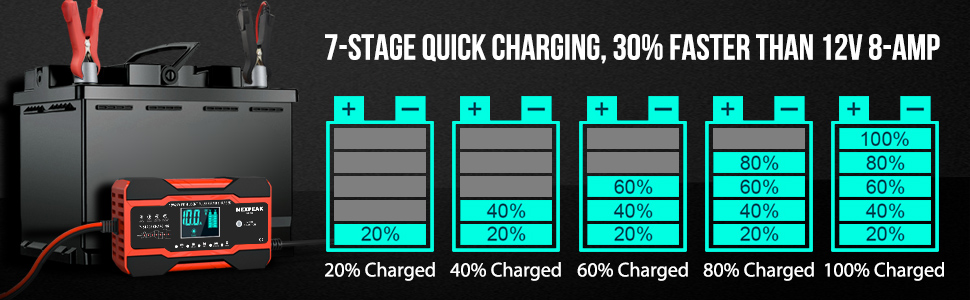
Image: The charger's display showing various charging parameters, emphasizing its visual feedback during the charging process.
5. Setup
Follow these steps to set up your NEXPEAK NC201 battery charger:
- Prepare the Battery: Ensure the battery terminals are clean and free of corrosion.
- Connect Clamps: Connect the RED (+) clamp to the positive battery terminal. Connect the BLACK (-) clamp to the negative battery terminal. Ensure a secure connection. Note: A small spark and loud beep may occur upon initial connection to the battery, even before plugging into an AC outlet. This is normal as the unit draws power to display battery status.
- Connect to Power: Plug the charger's AC power cord into a standard electrical outlet.
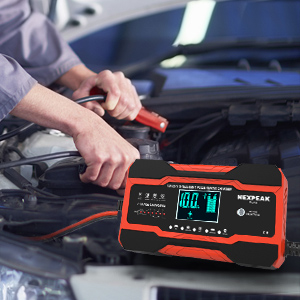
Image: A person demonstrating the correct connection of the charger's clamps to a car battery.
6. Operating Instructions
Once connected, the charger will automatically detect the battery voltage (12V or 24V) and display the current battery status.
Selecting Charging Mode:
Press the "MODE SELECTION" button to cycle through the available charging modes:
- STD: Standard lead-acid batteries.
- AGM/GEL: For AGM and Gel batteries.
- WET: For wet cell batteries, often requiring higher current.
- Motorcycle: Optimized for motorcycle batteries.
- Repair: Pulse repair function to restore lost battery performance and extend battery life. Note: This function cannot activate or charge totally dead batteries.
The charger also features automatic temperature compensation. Above 82°F (28°C), it enters summer mode to prevent overcharge. Below 50°F (10°C), it enters winter mode for powerful charging in cold climates.

Image: The charger illustrating its automatic temperature compensation, switching between summer mode (above 82°F) and winter mode (below 50°F) for optimized charging.
Charging Process (7-Stage Charging):
The NC201 utilizes a 7-stage charging process for optimal battery health and faster charging:
- Desulfation
- Soft Start
- Bulk Charge
- Absorption
- Battery Test
- Recondition
- Float
The LCD will display the charging progress. When the display shows "FUL", the battery is fully charged. For optimal results, some users recommend allowing the charger to continue until it displays "OFF", indicating the completion of the entire charging cycle, including maintenance phases.
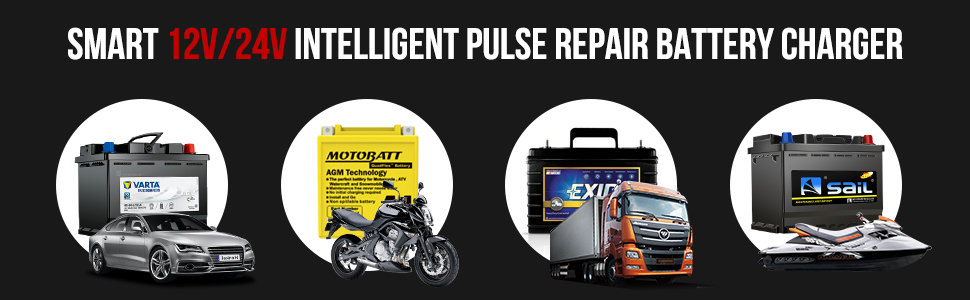
Image: A visual representation of the 7-stage quick charging process, illustrating how the battery charges from 20% to 100% through various stages.
7. Maintenance
Proper maintenance ensures the longevity and optimal performance of your charger:
- Keep the charger clean and dry. Wipe with a soft, damp cloth. Do not use harsh chemicals or abrasives.
- Inspect the cables and clamps regularly for any damage or wear. Replace if necessary.
- Store the charger in a cool, dry place when not in use.
8. Troubleshooting
If you encounter issues with your NEXPEAK NC201 charger, refer to the following common problems and solutions:
| Problem | Possible Cause / Solution |
|---|---|
| Charger does not turn on / No display | Ensure the AC power cord is securely plugged into a live outlet. Check for power outages or tripped circuit breakers. |
| "Error" mode displayed / Charger not working | This may indicate an internal fault or an incompatible battery. Disconnect the charger, wait a few minutes, and reconnect. If the error persists, contact customer support. |
| Cannot activate or charge a totally dead battery | The pulse repair function is designed to restore lost performance, not to activate or charge batteries that are completely dead (below a certain voltage threshold). Such batteries may require professional assessment or replacement. |
| Display is difficult to read | The display may be less visible in certain lighting conditions or from a distance. Position the charger in a well-lit area for better readability. |
| Cables seem too short | The cable length is standard for compact chargers. If needed, use a suitable extension cord for the AC power, ensuring it is rated for outdoor use if applicable. Position the charger as close to the battery as safely possible. |
| Spark and loud beep when connecting to battery | This is a normal occurrence as the charger initializes and draws a small current from the battery to power its display and internal circuits before AC power is applied. Ensure connections are firm. |
9. Specifications
Detailed technical specifications for the NEXPEAK NC201 Battery Charger:
- Model: NC201
- Product Dimensions: 3.86 x 2.28 x 6.69 inches (9.8 x 5.8 x 17 cm)
- Item Weight: 1.23 pounds (557.92 Grams)
- Output Voltage: 12 Volts, 24 Volts
- Charging Current: 10-Amp (12V), 5-Amp (24V)
- Battery Types: Lead-acid (AGM, GEL, SLA, Flooded)
- Manufacturer: NEXPEAK
- Country of Origin: China
- First Available Date: May 25, 2021
10. Warranty and Support
NEXPEAK stands behind the quality of its products. A new replacement is available for any quality issue encountered with your NC201 Battery Charger.
For warranty claims, technical assistance, or any questions regarding your product, please contact NEXPEAK customer support through the retailer's platform or the official NEXPEAK website. Please have your purchase details and model number (NC201) ready when contacting support.


