
1. Introduction
The Royal Sovereign RBC-100N is a high-speed bill counter designed for efficient and accurate counting of currency. It features advanced counterfeit detection capabilities using Ultraviolet (UV) and Magnetic (MG) technology to ensure the authenticity of bills. This manual provides detailed instructions for the proper setup, operation, and maintenance of your RBC-100N bill counter.
Key Features:
- High-Speed Counting: Processes up to 1,500 bills per minute for rapid counting.
- Large Hopper Capacity: Accommodates up to 200 bills in the back-load hopper.
- Advanced Counterfeit Detection: Integrated UV (Ultraviolet) and MG (Magnetic) detection systems identify suspicious bills.
- Automatic Operation: Features auto start/stop for convenient and continuous counting.
- Multiple Counting Modes: Includes Add mode for cumulative counting and Batch mode for counting specific quantities.
- Self-Diagnostic Test: Performs an automatic self-diagnostic test upon startup to ensure accuracy.
- Lightweight and Portable: Designed for easy transport and use in various environments.

Image 1.1: The Royal Sovereign RBC-100N Bill Counter showcasing its fast operation, large hopper capacity, and two-phase counterfeit detection.
2. Product Components and Overview
Familiarize yourself with the different parts of your RBC-100N bill counter before operation.

Image 2.1: Diagram illustrating the main components of the RBC-100N, including the back-load hopper, control panel, counterfeit detection sensors (UV/MG), and bill receiving vane.
Control Panel Functions:
- COUNT: Standard counting mode.
- UV: Activates Ultraviolet counterfeit detection.
- MG: Activates Magnetic counterfeit detection.
- ADD: Enables cumulative counting.
- BAT (+1/-10): Adjusts batch size.
- ALARM: Indicates detection of a suspicious bill or error.
- RESET: Clears current count and resets the machine.
3. Setup
- Unpacking: Carefully remove the bill counter from its packaging. Retain packaging for future storage or transport.
- Placement: Place the unit on a stable, flat surface away from direct sunlight, heat sources, or excessive dust. Ensure adequate ventilation around the machine.
- Power Connection: Connect the power cord to the power inlet on the back of the machine, then plug the other end into a standard electrical outlet.
- Power On: Flip the power switch, usually located on the back or side of the unit, to the 'ON' position. The machine will perform an automatic self-diagnostic test.
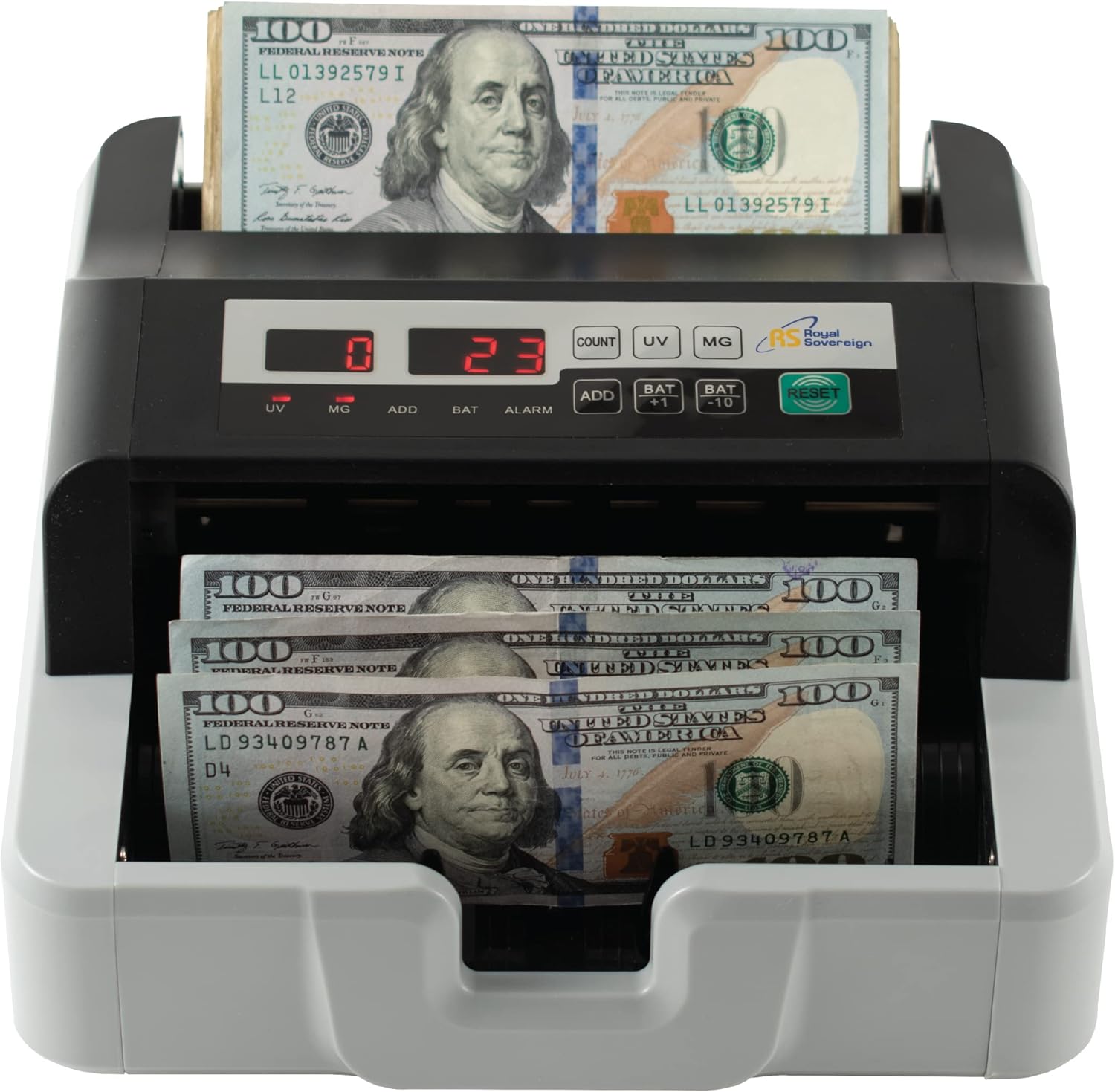
Image 3.1: The RBC-100N ready for operation with bills placed in the hopper and counted bills in the stacker.
4. Operating Instructions
4.1 Standard Counting
- Ensure the machine is powered on and has completed its self-diagnostic test.
- Place the stack of bills neatly into the back-load hopper. Ensure bills are aligned and not folded or crumpled.
- The machine will automatically start counting. The count will be displayed on the screen.
- Once counting is complete, remove the counted bills from the receiving vane.
- Press the RESET button to clear the count for the next batch.
4.2 Counterfeit Detection (UV/MG)
The RBC-100N is equipped with UV and MG detection for enhanced security. These features are typically active by default or can be toggled.
- If a suspicious bill is detected, the machine will stop, and an alarm will sound. The display may show an error code or indicate the type of detection (UV or MG).
- Remove the suspicious bill from the stacker.
- Press RESET to continue counting the remaining bills.
4.3 Add Mode
Add mode allows you to count multiple batches of bills cumulatively.
- Press the ADD button to activate Add mode. The 'ADD' indicator light will illuminate.
- Place the first batch of bills into the hopper. The machine will count them.
- Place subsequent batches into the hopper. The machine will add the new count to the previous total.
- Press RESET to exit Add mode and clear the cumulative total.
4.4 Batch Mode
Batch mode allows you to count bills into predetermined quantities.
- Press the BAT button to activate Batch mode. The 'BAT' indicator light will illuminate.
- Use the BAT +1 and BAT -10 buttons to set the desired batch quantity (e.g., 25, 50, 100).
- Place bills into the hopper. The machine will count bills until the set batch quantity is reached, then stop.
- Remove the batched bills. The machine will automatically resume counting the next batch.
- Press RESET to exit Batch mode.

Image 4.1: The RBC-100N actively counting bills, demonstrating its high-speed capability.
5. Maintenance
Regular maintenance ensures optimal performance and longevity of your bill counter.
5.1 Cleaning the Sensors and Rollers
Dust and debris can accumulate on sensors and rollers, affecting counting accuracy and detection. Clean these components regularly.
- Power Off: Always turn off and unplug the machine before cleaning.
- Access Interior: Open the top cover of the machine to access the internal components.
- Clean Sensors: Use a soft brush or compressed air to gently clean the UV and MG sensors located inside the bill path.
- Clean Rollers: Use a soft, lint-free cloth dampened with a small amount of isopropyl alcohol to wipe down the rubber rollers. Ensure they are dry before closing the cover.
- Close Cover: Securely close the top cover.

Image 5.1: View of the internal rollers and bill path, which require periodic cleaning for optimal performance.
5.2 General Care
- Keep the machine free from dust and moisture.
- Avoid placing heavy objects on top of the unit.
- Do not attempt to repair the machine yourself. Contact customer support for assistance.
6. Troubleshooting
This section addresses common issues you might encounter with your RBC-100N bill counter.
| Problem | Possible Cause | Solution |
|---|---|---|
| Machine does not power on. | Power cord not connected; power switch off; no power from outlet. | Ensure power cord is securely connected. Turn power switch to 'ON'. Check power outlet with another device. |
| Bills are not feeding or jamming frequently. | Bills are not properly aligned; bills are worn/damaged; dust/debris on rollers/sensors. | Align bills neatly in the hopper. Remove any excessively worn or damaged bills. Clean rollers and sensors as described in Section 5.1. |
| Counterfeit detection alarm sounds frequently. | Suspicious bill detected; sensors are dirty; currency is not USD. | Remove the flagged bill and inspect it. Clean UV/MG sensors. Ensure only USD currency is being counted, as this model is designed for USD. |
| Inaccurate counting. | Bills are not properly aligned; sensors are dirty; machine requires calibration (rare). | Ensure bills are stacked evenly. Clean sensors. If problem persists after cleaning, contact customer support. |
7. Specifications
Technical specifications for the Royal Sovereign RBC-100N Bill Counter.

Image 7.1: Dimensions of the RBC-100N bill counter, measuring approximately 8.86 inches in height, 9.45 inches in width, and 5.12 inches in depth.
| Feature | Specification |
|---|---|
| Model Number | RBC-100N |
| Counting Speed | Up to 1,500 bills per minute |
| Hopper Capacity | Up to 200 bills |
| Counterfeit Detection | UV (Ultraviolet) and MG (Magnetic) |
| Operating Modes | Count, Add, Batch |
| Accepted Currency | USD (United States Dollar) |
| Item Weight | 8 pounds (approx.) |
| Product Dimensions | 8.86 x 9.45 x 5.12 inches (H x W x D) |
| Power Supply | Standard AC power (refer to unit label for specific voltage) |
8. Warranty and Support
8.1 Warranty Information
The Royal Sovereign RBC-100N Bill Counter typically comes with a 1-Year Limited Warranty. This warranty covers defects in materials and workmanship under normal use. Please refer to the warranty card included with your product or visit the official Royal Sovereign website for complete warranty terms and conditions.

Image 8.1: The RBC-100N, emphasizing its 1-year limited warranty, automatic self-diagnostic test, and suitability for U.S. currency.
8.2 Customer Support
For technical assistance, troubleshooting beyond this manual, or warranty claims, please contact Royal Sovereign customer support. Contact information can typically be found on the product packaging, the official Royal Sovereign website, or your purchase documentation.
When contacting support, please have your model number (RBC-100N) and purchase date available.


