
1. Introduction
Thank you for choosing the Fire-Boltt BN1400 Bluetooth Wireless In-Ear Earphones. This manual provides essential information for setting up, operating, and maintaining your earphones to ensure optimal performance and longevity. Please read this manual thoroughly before use.
2. Package Contents
Please check the box for the following items:
- 1 x Fire-Boltt BN1400 Neckband Earphones
- 1 x USB Charging Cable (Micro USB)
- 1 x User Manual
3. Product Overview
The Fire-Boltt BN1400 earphones feature an ergonomic neckband design with in-ear earbuds, integrated controls, a microphone, and an SD card slot for direct music playback.
3.1 Controls and Ports
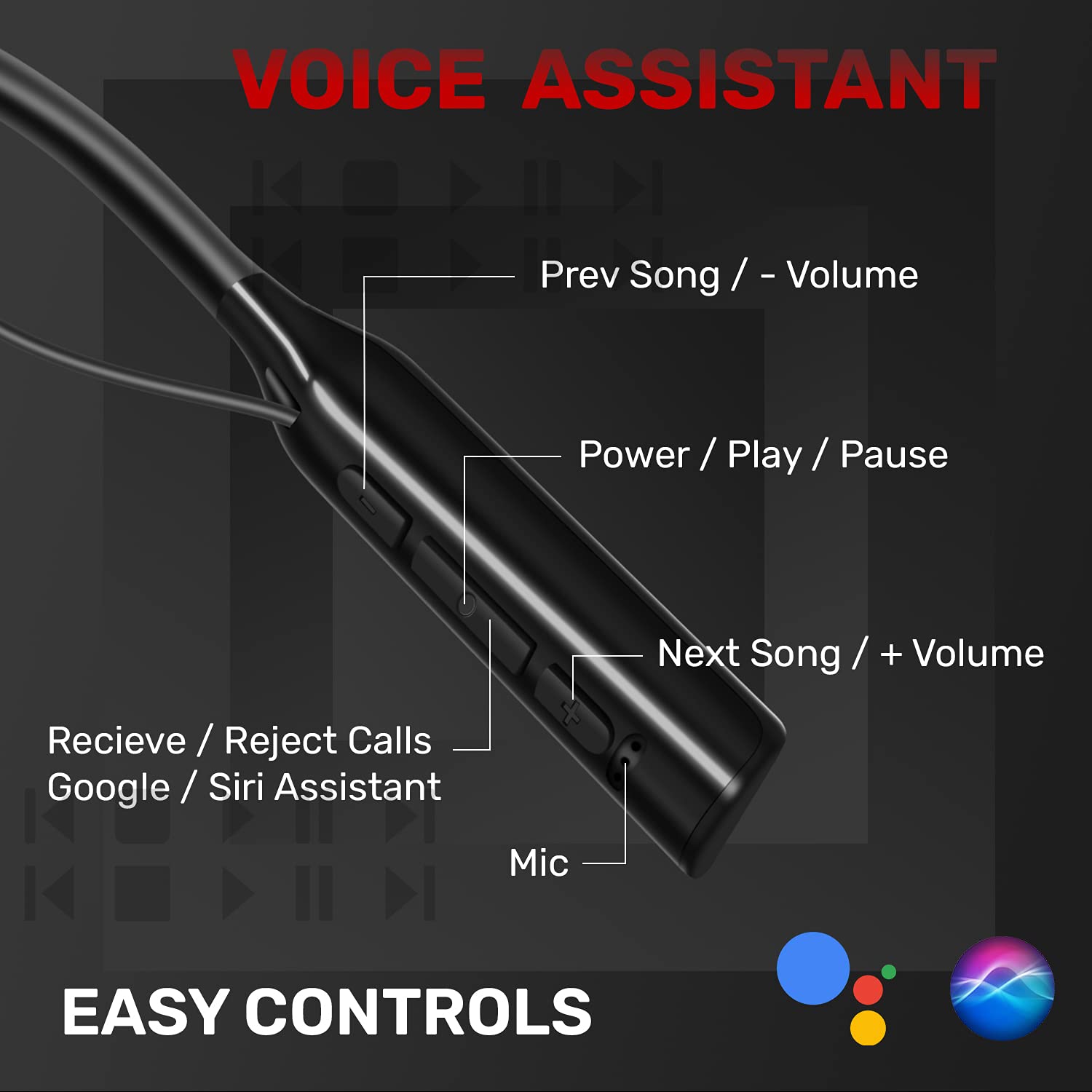
Image: Detailed view of the control panel on the neckband, indicating buttons for volume, track control, power, play/pause, call management, voice assistant activation, and the microphone.
- Power / Play / Pause Button: Used to turn the earphones on/off, play/pause music, and answer/end calls.
- Volume Up / Next Track Button: Press briefly to increase volume, press and hold to skip to the next track.
- Volume Down / Previous Track Button: Press briefly to decrease volume, press and hold to go to the previous track.
- Microphone: For hands-free calling and voice assistant commands.
- Micro USB Charging Port: For charging the earphones.
- SD Card Slot: For direct music playback from a MicroSD card.
3.2 Magnetic Earbuds

Image: The magnetic earbuds are shown, designed to securely attach to each other when not in use, preventing tangling.
The earbuds feature magnets that allow them to securely attach to each other when not in use, helping to prevent tangles and keep the earphones safely around your neck.
4. Setup Instructions
4.1 Charging the Earphones

Image: The earphones are depicted alongside a battery graphic, highlighting their 40-hour playtime and 2-hour fast charging capability.
- Connect the Micro USB charging cable to the charging port on the neckband.
- Connect the other end of the cable to a USB power adapter (not included) or a computer's USB port.
- The LED indicator will show the charging status. It typically turns red while charging and blue or off when fully charged.
- A full charge takes approximately 2 hours and provides up to 40 hours of playtime.
4.2 Powering On/Off
- To Power On: Press and hold the Power / Play / Pause button for approximately 3-5 seconds until the LED indicator flashes blue and you hear a power-on prompt.
- To Power Off: Press and hold the Power / Play / Pause button for approximately 3-5 seconds until the LED indicator flashes red and you hear a power-off prompt.
4.3 Bluetooth Pairing
Image: A stylized image of a microchip with 'Bluetooth 5.0' and '20M Range' text, representing the advanced connectivity features of the earphones.
- Ensure the earphones are powered off.
- Press and hold the Power / Play / Pause button for about 5-7 seconds until the LED indicator flashes red and blue alternately, indicating pairing mode.
- On your device (smartphone, tablet, etc.), enable Bluetooth and search for available devices.
- Select "Fire-Boltt BN1400" from the list of found devices.
- Once paired, the LED indicator will flash blue slowly, and you will hear a connection confirmation.
- The earphones will automatically reconnect to the last paired device when powered on, if it is within range (up to 20 meters).
4.4 Multi-Connection Technology

Image: A user is shown with a laptop and a smartphone, demonstrating the earphones' ability to connect to multiple devices simultaneously for seamless switching between audio sources.
The Fire-Boltt BN1400 supports connecting to two Bluetooth devices simultaneously. To use this feature:
- Pair the earphones with the first device as described in Section 4.3.
- Disable Bluetooth on the first device. The earphones will re-enter pairing mode.
- Pair the earphones with the second device.
- Re-enable Bluetooth on the first device. The earphones should now be connected to both devices.
- Audio will automatically switch to the device that is actively playing media or receiving a call.
4.5 SD Card Usage

Image: A detailed view of the neckband highlights the integrated SD card slot, with a MicroSD card partially inserted, demonstrating its direct music playback capability.
The earphones feature an integrated SD card slot, allowing you to play music directly without a Bluetooth connection.
- Insert a MicroSD card (up to 32GB, not included) with your desired audio files into the SD card slot on the neckband.
- The earphones will automatically detect the SD card and switch to SD card playback mode.
- Use the Play/Pause and Next/Previous track buttons to control music playback.
5. Operating Instructions
5.1 Music Playback
- Play/Pause: Press the Power / Play / Pause button once.
- Next Track: Press and hold the Volume Up / Next Track button.
- Previous Track: Press and hold the Volume Down / Previous Track button.
- Volume Up: Press the Volume Up / Next Track button briefly.
- Volume Down: Press the Volume Down / Previous Track button briefly.
5.2 Call Management
- Answer Call: Press the Power / Play / Pause button once when a call comes in.
- End Call: Press the Power / Play / Pause button once during a call.
- Reject Call: Press and hold the Power / Play / Pause button for 2 seconds when a call comes in.
5.3 Voice Assistant
- Activate Voice Assistant: Double-press the Power / Play / Pause button to activate your device's voice assistant (e.g., Google Assistant, Siri).
5.4 Wearing the Earphones

Image: A user is shown comfortably wearing the earphones, emphasizing the ergonomic fit of the earbuds and the flexible neckband for extended use.
Place the neckband around your neck and insert the earbuds into your ears. The ergonomic design and flexible neckband ensure a comfortable and secure fit for various activities.
6. Maintenance
6.1 Cleaning
- Wipe the earphones with a soft, dry cloth.
- Do not use abrasive cleaners or solvents.
- Clean the ear tips regularly to maintain hygiene and sound quality.
6.2 Storage
- Store the earphones in a cool, dry place away from direct sunlight and extreme temperatures.
- When not in use, attach the magnetic earbuds to prevent tangling.
6.3 Water Resistance

Image: The earphones are shown with water splashing over them, illustrating their IPX5 waterproof rating, making them resistant to sweat and light splashes.
The Fire-Boltt BN1400 earphones are IPX5 water-resistant, meaning they are protected against low-pressure water jets from any direction. This makes them suitable for workouts and light rain. However, they are not designed for submersion in water.
7. Troubleshooting
If you encounter any issues with your earphones, please refer to the following common problems and solutions:
| Problem | Possible Solution |
|---|---|
| Earphones do not power on. | Ensure the earphones are fully charged. Connect to a power source and check the charging indicator. |
| Cannot pair with a device. | Ensure earphones are in pairing mode (LED flashing red and blue). Turn off and on Bluetooth on your device. Move closer to the device (within 20m). Forget the device in your Bluetooth settings and try pairing again. |
| No sound or low volume. | Check the volume levels on both the earphones and your connected device. Ensure the earphones are properly paired. Try playing audio from a different source. |
| Poor call quality. | Ensure the microphone is not obstructed. Move to an area with less background noise. Check your device's network signal. |
| SD card not playing. | Ensure the SD card is inserted correctly. Check if the audio files on the SD card are in a compatible format. Try a different SD card. |
8. Specifications
| Brand | Fire-Boltt |
| Model Number | BN1400 |
| Bluetooth Version | 5.0 |
| Bluetooth Range | Up to 20 meters |
| Battery Life (Playtime) | Up to 40 hours |
| Battery Capacity | 400mAh |
| Charging Time | Approximately 2 hours |
| Driver Size | 10mm Dynamic Drivers |
| Impedance | 140 Ohms |
| Water Resistance | IPX5 |
| Noise Control | Sound Isolation |
| Microphone | Noise Isolation Microphone |
| Control Type | Call Control, Media Control, Noise Control, Volume Control |
| Control Method | Voice, Button |
| Ear Placement | In Ear |
| Form Factor | In Ear (Neckband) |
| Material | Plastic |
| Item Weight | 50 Grams |
| Connectivity | Bluetooth, SD Card Slot |
| Charging Port | Micro USB |
9. Warranty Information
The Fire-Boltt BN1400 earphones come with a 1-Year Brand Warranty from the date of purchase. This warranty covers manufacturing defects under normal use. Please retain your purchase receipt as proof of purchase.
The warranty does not cover:
- Damage caused by misuse, abuse, accident, or negligence.
- Normal wear and tear.
- Unauthorized repairs or modifications.
For warranty claims or service, please contact Fire-Boltt customer support.
10. Support
If you require further assistance or have questions not covered in this manual, please contact Fire-Boltt customer support. You can find contact information on the official Fire-Boltt website or through your retailer.
Manufacturer: Boltt Games Pvt Ltd