Introduction
Welcome to the KAT Percussion KT-300 Electronic Drum Set user manual. This guide provides essential information for the proper setup, operation, and maintenance of your new electronic drum kit. Please read this manual thoroughly before using the instrument to ensure optimal performance and longevity.

Figure 1: Fully assembled KAT Percussion KT-300 Electronic Drum Set.
Safety Information
- Power Supply: Use only the specified power adapter. Ensure the voltage matches your local power supply.
- Placement: Place the drum set on a stable, level surface to prevent tipping. Avoid extreme temperatures, direct sunlight, and high humidity.
- Moisture: Do not expose the unit to rain or moisture. Do not place objects filled with liquids on the unit.
- Cleaning: Clean the unit with a soft, dry cloth. Do not use abrasive cleaners or solvents.
- Servicing: Do not attempt to service the unit yourself. Refer all servicing to qualified service personnel.
- Cables: Route all cables carefully to prevent tripping hazards and damage.
What's in the Box
Verify that all components listed below are present in your package:
- KT-300 USB sound module
- Shock absorption kick tower with 8" pad
- Hi-hat trigger pedal
- 10" Dual-zone Mesh snare pad
- (3) 8" Dual-zone tom pads
- (2) 12" Dual-Zone Crash cymbals
- (1) 14" Three-Zone Ride cymbal
- (1) 12" Single-Zone Hi-Hat Pad
- Bass drum pedal with beater
- Drum rack with mounting hardware
- Multi-pin breakout audio cable snake
- Drum key
- 5 Black Velcro ties
- Assembly instructions
- User manual (this document)
Setup
Follow these steps to assemble your KAT Percussion KT-300 Electronic Drum Set. Refer to the included assembly instructions for detailed diagrams.
- Assemble the Drum Rack: Connect the rack pipes using the provided clamps and drum key. Ensure all connections are secure.
- Mount the Pads and Cymbals: Attach the snare, tom pads, hi-hat pad, crash cymbals, and ride cymbal to the rack using their respective mounting hardware. Adjust their positions for comfortable playing.
- Install the Kick Tower and Pedal: Place the kick tower in position and attach the bass drum pedal. Ensure the beater strikes the center of the kick pad.
- Mount the Sound Module: Secure the KT-300 sound module to the designated mount on the drum rack.
- Connect the Cables: Use the multi-pin breakout audio cable snake to connect each pad and cymbal to the corresponding input on the KT-300 sound module. Ensure all connections are firm.
- Connect Power: Plug the power adapter into the module and then into a wall outlet.

Figure 2: An alternative view of the KT-300 setup, highlighting the module and pedal placement.
Components Overview
Pads and Cymbals
- REMO Mesh Heads: The snare and tom pads feature REMO mesh heads, providing a realistic feel and rebound. These heads are highly durable and designed for extensive use.
- Dual-Triggering Technology: The 10" snare and 8" tom pads utilize dual-triggering technology, allowing for distinct sounds from the head and rim. This enhances the expressive capabilities of the kit.
- Velocity Sensitivity: All pads and cymbals are velocity-sensitive, meaning the sound's volume and timbre change based on how hard you strike them, mimicking an acoustic drum set.
- Cymbals:
- Hi-Hat (12"): Dual-zone with choke capability.
- Crash Cymbals (2 x 12"): Dual-zone with choke capability.
- Ride Cymbal (14"): Three-zone with choke capability, allowing for bell, bow, and edge sounds.
KT-300 Sound Module
The KT-300 sound module is the central control unit for your drum set, offering a wide range of sounds, kits, and features.
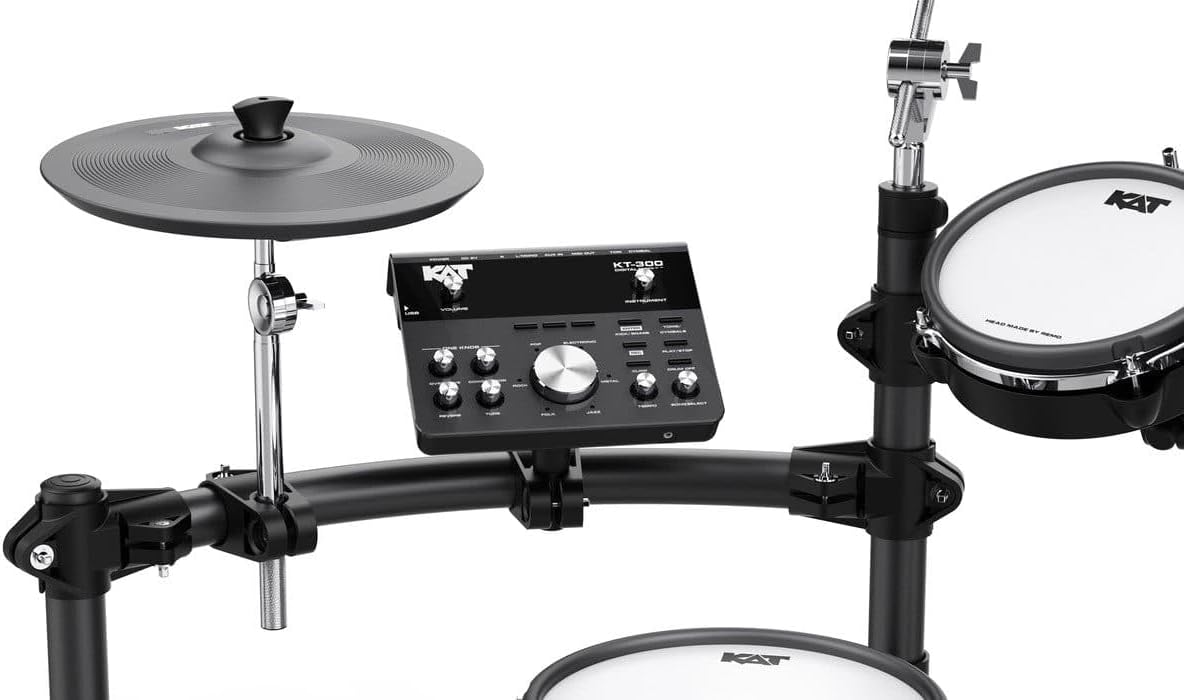
Figure 3: Detailed view of the KT-300 sound module interface.
- Display Screen: Shows current kit, instrument, and parameter settings.
- Kit/Instrument Knobs: Select preset or user kits, and choose individual instrument sounds.
- Function Buttons: Access various settings like TAP/Metronome, Rhythm, Tempo Rate, Volume, and EFX.
- ONE KNOB Function: Apply and adjust effects such as Overdrive, Compressor, Reverb, and Tune with a single control.
- Connectivity: Headphone output, main outputs, power input, USB MIDI, AUX IN, and an additional Tom4 Trigger-in.
Operating Instructions
Power On/Off
- To power on, press the power button on the module.
- To power off, press and hold the power button until the unit shuts down.
Selecting Drum Kits
- The KT-300 comes with 30 preset kits and 18 user kits.
- Use the KIT knob to scroll through and select different drum kits.
Editing Instrument Sounds
- Turn the INSTRUMENT knob and strike the desired pad to call up the sound assigned to it.
- Use the UP and DOWN buttons to select a different instrument sound for that pad.
- Further editing parameters for the selected instrument can be accessed through the module's menu.
Applying Effects (ONE KNOB Function)
- The ONE KNOB function allows quick application of effects like Overdrive, Compressor, Reverb, and Tune.
- Select the desired effect type and adjust its intensity using the ONE KNOB control.
- Detailed editing of these effects is available in the module's EFX settings.
Playing Along and Recording
- Demo Songs: The module includes 20 demo songs. Use the appropriate function button to select and play them.
- AUX IN: Connect an external audio device (e.g., smartphone, MP3 player) to the AUX IN interface to play along with your favorite tracks.
- Recording: To record your performance, press the "Record" button before you start playing. Press it again to stop recording. Your performance can then be played back.
Maintenance
- Cleaning: Regularly wipe down the pads, cymbals, and module with a soft, dry, lint-free cloth. Avoid using harsh chemicals or abrasive materials.
- Cable Management: Periodically check all cables for wear and tear. Use the provided Velcro ties to keep cables organized and prevent damage.
- Storage: If storing the drum set for an extended period, disconnect the power adapter and cover the unit to protect it from dust.
- Mesh Head Tension: The REMO mesh heads can be adjusted for tension using the drum key, similar to acoustic drum heads. Adjust to your preferred feel, but avoid over-tightening.
Troubleshooting
| Problem | Possible Cause | Solution |
|---|---|---|
| No sound from module. | Power not connected; volume too low; headphones/output cables not connected properly. | Ensure power adapter is connected and unit is on. Check master volume and headphone/output connections. |
| Pad/Cymbal not triggering. | Cable loose or damaged; pad sensitivity too low; incorrect instrument assigned. | Check cable connection to both pad and module. Adjust pad sensitivity in module settings. Verify correct instrument is assigned to the pad. |
| Unwanted double triggers. | Pad sensitivity too high; pad rebound causing multiple triggers. | Reduce pad sensitivity in the module settings. Ensure mesh head tension is appropriate. |
| Module freezes or behaves erratically. | Temporary software glitch. | Power off the module, wait a few seconds, then power it back on. If the issue persists, perform a factory reset (refer to the full manual for instructions). |
Specifications
| Feature | Detail |
|---|---|
| Model | KT-300 |
| Snare Pad | 10" Dual-zone Mesh |
| Tom Pads | (3) 8" Dual-zone Mesh |
| Kick Pad | 8" Shock absorption kick tower |
| Hi-Hat Pad | 12" Single-zone |
| Crash Cymbals | (2) 12" Dual-zone with choke |
| Ride Cymbal | 14" Three-zone with choke |
| Drum Heads | REMO Mesh |
| Preset Kits | 30 |
| User Kits | 18 |
| Effects | Overdrive, Compressor, Reverb, Tune (ONE KNOB function) |
| Connectivity | Headphone, Output, Power In, USB MIDI, AUX In, Tom4 Trigger-in |
| Item Weight | 81.8 pounds (37.2 kg) |
| Package Dimensions | 34.5 x 27 x 14 inches |
| UPC | 840126951561 |
Warranty and Support
For warranty information, please refer to the warranty card included with your product or visit the official KAT Percussion website.
If you encounter any issues not covered in the troubleshooting section or require further assistance, please contact KAT Percussion customer support. Contact details can typically be found on the manufacturer's website or on your purchase documentation.


