
1. Introduction
This manual provides essential information for the safe and efficient operation of your QFX E-B5 Professional High-Power Dual 15" Bluetooth Speaker System. Please read this manual thoroughly before using the product and retain it for future reference.
The QFX E-B5 is a versatile audio system designed for various applications, including parties, live performances, and DJ setups. It features dual 15-inch woofers, a 1.75-inch tweeter, Bluetooth connectivity, FM radio, USB/TF card playback, and multiple input options.
2. Safety Instructions
- Power Source: Ensure the power supply matches the voltage requirements specified on the unit. Use only the provided power cord.
- Ventilation: Do not block ventilation openings. Maintain adequate space around the unit for proper airflow to prevent overheating.
- Water and Moisture: Do not expose the unit to rain, moisture, or excessive humidity. Keep liquids away from the speaker.
- Heat Sources: Keep the unit away from heat sources such as radiators, heat registers, stoves, or other apparatus that produce heat.
- Cleaning: Unplug the unit from the power outlet before cleaning. Use a soft, dry cloth. Do not use liquid cleaners or aerosol cleaners.
- Servicing: Do not attempt to service this product yourself. Refer all servicing to qualified service personnel.
- Placement: Place the speaker on a stable, flat surface to prevent it from falling.
- Hearing Protection: Avoid prolonged listening at high volume levels to prevent hearing damage.
3. Package Contents
Verify that all items are present in the packaging:
- 1 x QFX E-B5 Professional High-Power Dual 15" Bluetooth Speaker System
- 1 x Remote Control
- 1 x Power Cord
- 1 x User Manual (this document)
4. Product Overview
The QFX E-B5 speaker system is designed for powerful audio output and versatile connectivity. It features integrated wheels and a handle for easy transport.
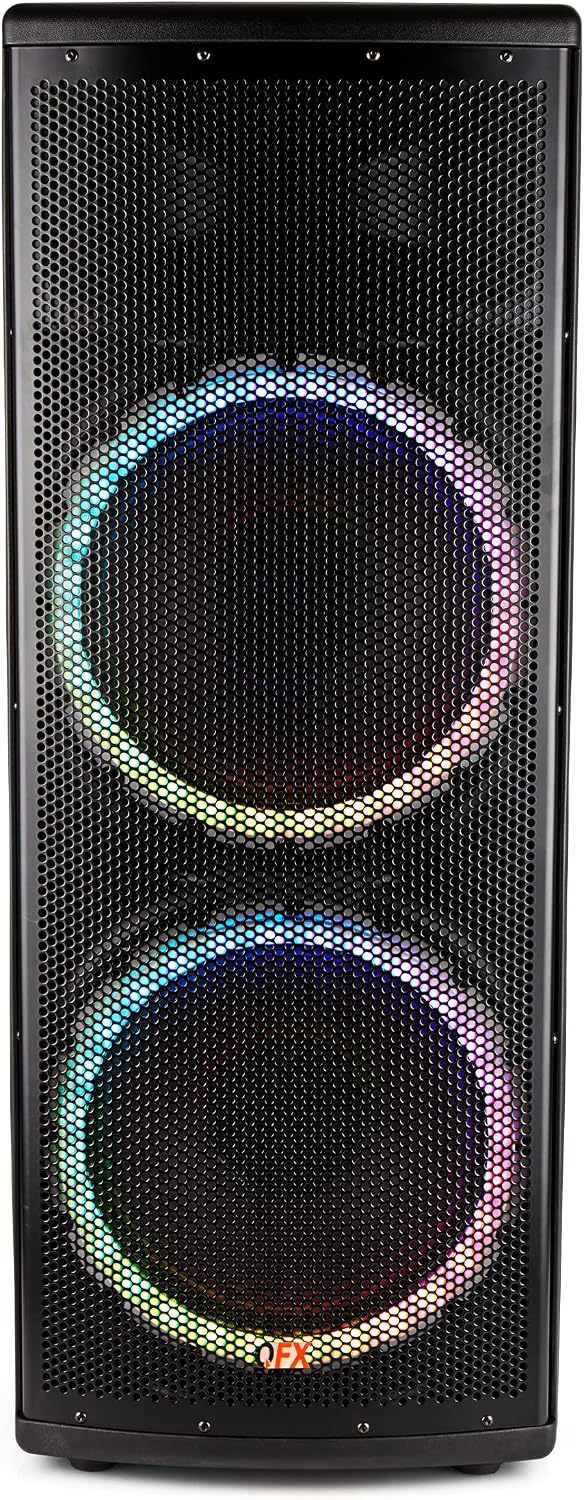
Figure 4.1: Front view of the QFX E-B5 speaker, showcasing the dual 15-inch woofers with circular LED lights and the protective grille.

Figure 4.2: Detailed view highlighting the 1.75-inch tweeter and the two 15-inch woofers, which are responsible for the speaker's broad frequency response and powerful sound.

Figure 4.3: The QFX E-B5 speaker being transported using its integrated wheels and retractable handle, demonstrating its portability despite its size.
5. Setup
5.1 Unpacking
- Carefully remove the speaker system from its packaging.
- Inspect the unit for any signs of damage during transit. If damage is found, do not operate the unit and contact customer support.
- Retain the original packaging for future storage or shipping.
5.2 Placement
Position the speaker on a flat, stable surface. Ensure there is sufficient space around the unit for proper ventilation. For optimal sound dispersion, place the speaker in a central location within the listening area.
5.3 Power Connection
- Locate the power input on the rear panel of the speaker.
- Connect the provided power cord to the speaker and then to a suitable AC power outlet (120V/240V, 50/60Hz).
- Ensure the power switch is in the OFF position before connecting to power.
5.4 Initial Power On
Once connected to power, switch the main power button to the ON position. The digital display on the control panel should illuminate, indicating the unit is powered on.
6. Operating Instructions
6.1 Control Panel Overview
The control panel, located on the rear of the speaker, provides access to all input and output connections, as well as audio adjustments.

Figure 6.1: The control panel of the QFX E-B5, showing the digital display, mode buttons, Bluetooth controls, microphone and line level inputs, graphic equalizer, and master volume control.
- Digital Display: Shows current mode, track information, or FM frequency.
- Mode Button: Cycles through input modes (Bluetooth, USB, TF Card, FM, AUX).
- USB/TF Card Ports: For playing audio files from USB drives or TF cards.
- Bluetooth Button: Initiates Bluetooth pairing.
- MIC Level: Adjusts the volume of connected microphones.
- LINE Level: Adjusts the volume of line-level inputs.
- PLAYER Level: Adjusts the volume of the internal media player (USB/TF/Bluetooth/FM).
- Graphic Equalizer: Allows fine-tuning of audio frequencies (100Hz, 400Hz, 1KHz, 4KHz, 10KHz).
- Master Volume: Controls the overall output volume of the speaker.
- XLR Inputs: For professional audio connections (microphones, mixers).
- RCA Input: For connecting devices with RCA outputs.
- AUX IN: 3.5mm input for general audio devices.
6.2 Bluetooth Pairing
- Power on the E-B5 speaker.
- Press the MODE button until "BLUETOOTH" appears on the digital display. The speaker will enter pairing mode, indicated by a flashing Bluetooth icon or sound.
- On your mobile device (smartphone, tablet, etc.), enable Bluetooth and search for available devices.
- Select "QFX E-B5" from the list of devices.
- Once paired, the speaker will emit a confirmation sound, and the Bluetooth icon on the display will stop flashing.
- You can now play audio from your device through the E-B5 speaker.
6.3 TWS (True Wireless Stereo) Pairing
The TWS function allows you to connect two QFX E-B5 speakers wirelessly for a stereo sound experience.

Figure 6.2: Two QFX E-B5 speakers shown wirelessly connected, illustrating the True Wireless Stereo (TWS) feature for enhanced audio immersion.
- Ensure both E-B5 speakers are powered on and in Bluetooth mode.
- On one of the speakers (this will be your primary speaker), press and hold the TWS button for a few seconds. The speaker will emit a sound indicating it is searching for another TWS speaker.
- The primary speaker will automatically connect to the secondary speaker. A confirmation sound will indicate successful TWS pairing.
- Once TWS is connected, pair your mobile device to the primary speaker via Bluetooth as described in Section 6.2.
- Audio will now play in stereo across both speakers.
6.4 USB/TF Card Playback
- Insert a USB flash drive or TF card (with compatible audio files) into the respective port on the control panel.
- The speaker will automatically switch to USB or TF mode and begin playing the first track. If not, press the MODE button to select the correct input.
- Use the playback controls (Play/Pause, Next/Previous Track) on the control panel or remote control to manage your music.
6.5 FM Radio
- Press the MODE button until "FM" appears on the digital display.
- Press the Play/Pause button once to initiate an automatic scan for FM stations. The speaker will save all found stations.
- Use the Next/Previous Track buttons to navigate through the saved FM stations.
6.6 AUX Input
- Connect an audio device (e.g., MP3 player, laptop) to the AUX IN (3.5mm) port on the control panel using a 3.5mm audio cable.
- Press the MODE button until "AUX" appears on the digital display.
- Control playback and volume from your connected device.
6.7 XLR/RCA Inputs
- For microphones, connect an XLR microphone to the MIC IN port. Adjust the MIC Level knob to control the microphone volume.
- For other audio sources (e.g., DJ mixer, instrument), connect via the LINE IN (XLR or RCA) ports. Adjust the LINE Level knob for volume control.
6.8 Graphic Equalizer
Use the sliders on the GRAPHIC EQUALIZER to adjust specific frequency bands (100Hz, 400Hz, 1KHz, 4KHz, 10KHz) to tailor the sound output to your preference or acoustic environment.
6.9 LED Party Lights
The E-B5 features circular LED lights around the woofers. These lights typically activate automatically when the speaker is powered on. Specific controls for light modes or on/off functionality may be available via the remote control or a dedicated button on the control panel (refer to the remote control section if applicable).
7. Maintenance
7.1 Cleaning
To clean the speaker, first ensure it is powered off and unplugged from the wall outlet. Use a soft, dry, lint-free cloth to wipe down the exterior surfaces. Do not use abrasive cleaners, waxes, or solvents as they may damage the finish. Avoid spraying liquids directly onto the speaker.
7.2 Storage
When not in use for extended periods, store the speaker in a cool, dry place, away from direct sunlight and extreme temperatures. It is recommended to use the original packaging for protection during storage.
8. Troubleshooting
| Problem | Possible Cause | Solution |
|---|---|---|
| No power | Power cord not connected; Power outlet not active; Power switch off. | Ensure power cord is securely connected. Check power outlet with another device. Turn power switch ON. |
| No sound output | Volume too low; Incorrect input mode selected; Audio cable not connected properly; Bluetooth not paired. | Increase Master Volume. Press MODE button to select correct input. Check audio cable connections. Re-pair Bluetooth device. |
| Bluetooth not connecting | Speaker not in pairing mode; Device too far; Device already connected to another speaker. | Ensure speaker is in Bluetooth pairing mode. Move device closer to speaker. Disconnect device from other Bluetooth speakers. |
| TWS not pairing | Speakers not in Bluetooth mode; TWS button not held long enough. | Ensure both speakers are in Bluetooth mode. Press and hold the TWS button on one speaker until pairing is confirmed. |
| USB/TF card not playing | Incorrect file format; Card/drive not inserted correctly; Speaker not in USB/TF mode. | Ensure audio files are in a compatible format (e.g., MP3). Re-insert card/drive. Press MODE button to select USB/TF mode. |
| Distorted sound | Volume too high; Input signal too strong; Equalizer settings incorrect. | Reduce Master Volume or input level. Adjust Graphic Equalizer settings. |
9. Specifications
The following table outlines the technical specifications of the QFX E-B5 speaker system.

Figure 9.1: Dimensional diagram of the QFX E-B5 speaker, indicating its height, width, and depth for placement and transport considerations.
| Feature | Specification |
|---|---|
| Model Number | E-B5 |
| Brand | QFX |
| Speaker Type | Professional High-Power Bluetooth Speaker System |
| Woofers | Dual 15 inches |
| Tweeter | 1.75 inches |
| Power Output | 250W RMS (Continuous) |
| Connectivity | Bluetooth, USB, TF Card, FM Radio, AUX (3.5mm), XLR, RCA |
| Equalizer | 5-band Graphic Equalizer (100Hz, 400Hz, 1KHz, 4KHz, 10KHz) |
| Special Features | TWS (True Wireless Stereo), LED Party Lights, Wheels, Handle |
| Power Source | Corded Electric, Switchable AC (120V/240V, 50/60Hz) |
| Product Dimensions (L x W x H) | 17 x 16.5 x 44.5 inches |
| Item Weight | 64.8 pounds |
| UPC | 606540039489 |
10. Warranty and Support
QFX products are designed for quality and reliability. For information regarding warranty coverage and terms, please refer to the warranty card included with your product or visit the official QFX website.
For technical assistance, troubleshooting beyond this manual, or service inquiries, please contact QFX customer support. Contact details can typically be found on the QFX website or product packaging.