1. Important Safety Information
Please read all instructions carefully before using the Woowind DP3 Portable Tire Inflator. Failure to follow these safety guidelines may result in injury or damage to the device.
- Keep out of reach of children.
- Do not operate the inflator in wet conditions or near flammable liquids or gases.
- Ensure the hose connection is secure before inflating to prevent air leakage or detachment.
- Do not over-inflate tires. Always refer to the recommended pressure for your specific tire or item.
- The device may become warm during prolonged use. Allow it to cool down if it feels excessively hot.
- Use only the provided charging cables and adapters.
- Do not disassemble or attempt to repair the device yourself. Contact customer support for assistance.
2. Package Contents
Verify that all items are present in your package:
- Woowind DP3 Portable Tire Inflator (×1)
- Flexible Hose (Schrader Valve) (×1)
- Presta/Schrader/Dunlop Valve Adapter (×1)
- Swimming Ring Nozzle (×1)
- Ball Needle (×1)
- 12V Car Cigarette Lighter Cable (×1)
- Storage Case (×1)
- USB Charging Cable (×1)
- User Manual (×1)
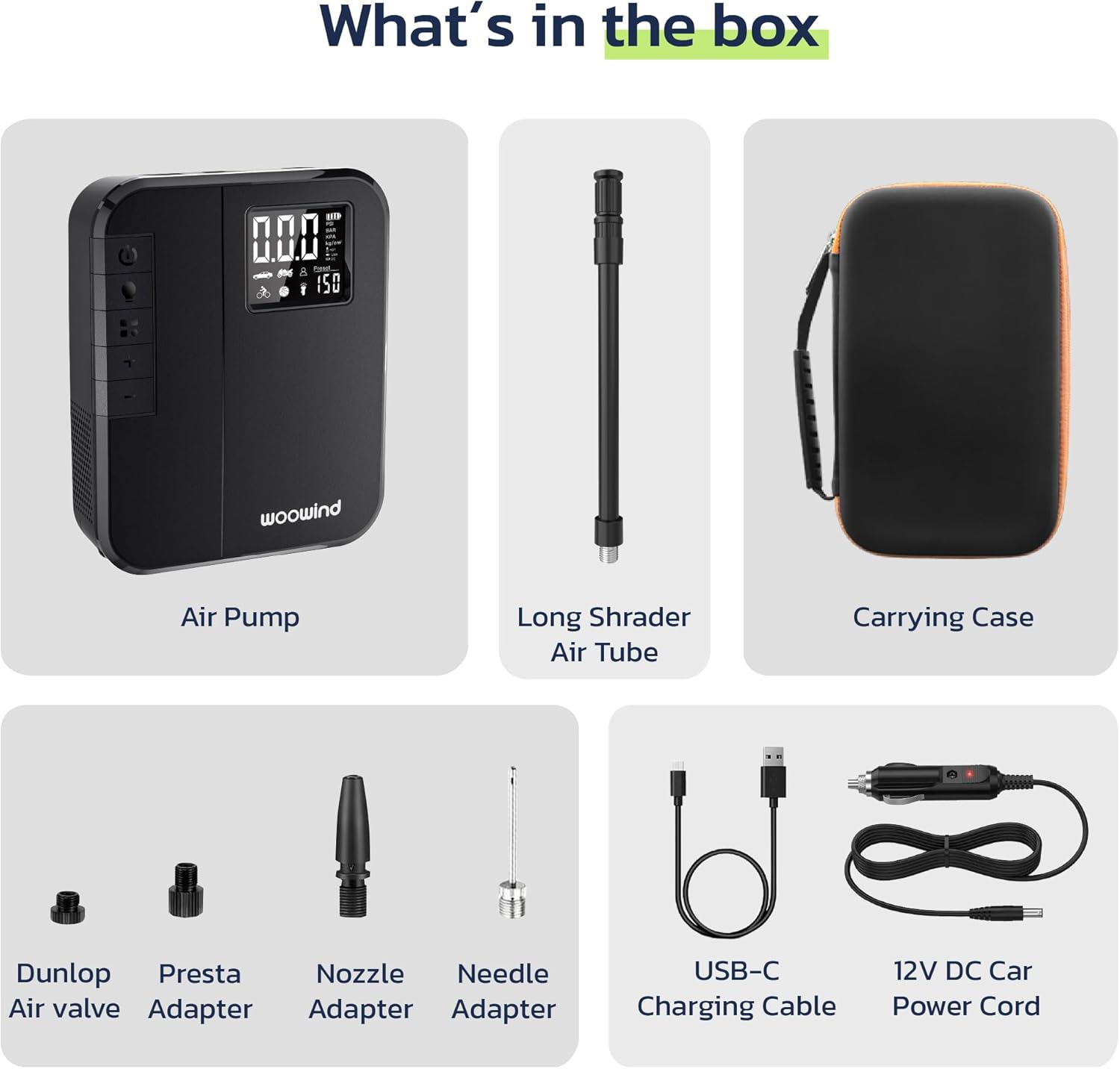
Image: All components included in the Woowind DP3 Portable Tire Inflator package, neatly arranged.
3. Product Overview
The Woowind DP3 is a versatile and portable air compressor designed for quick and efficient inflation and deflation of various items, including car tires, motorcycle tires, bicycle tires, and sports balls. Its compact size and multiple power options make it an essential tool for roadside emergencies and outdoor activities.
Key Features:
- Fast Inflation: Inflates a car tire from 29PSI to 36PSI in approximately 90 seconds (for tire size 195/55/R15).
- High Pressure Capability: Capable of inflating up to 150PSI, suitable for various tire types including track bike tires with the included Presta/Schrader valve adapter.
- Dual Power Supply: Operates on a rechargeable battery and can also be powered by a 12V car cigarette lighter cable for continuous use.
- Auto Stop Function: Automatically stops inflation once the preset target pressure is reached.
- 5 Programmable Modes: Includes preset modes for Car, Motorcycle, Bike, Sports Ball, and a customizable mode.
- Tire Deflation: Features an "air release button" to deflate tires while monitoring real-time pressure on the large screen.
- Integrated LED Light: Provides illumination for night-time use or in low-light conditions.
- Portable Design: Compact and lightweight, easily stored in a glove box or backpack.

Image: The Woowind DP3 inflator showcasing its compact design and versatility for different inflation needs.

Image: Demonstrates the wide range of applications for the Woowind DP3, from vehicle tires to sports equipment.
4. Setup
4.1 Charging the Device
Before first use, fully charge the Woowind DP3. The device can be charged via the included USB charging cable or the 12V car cigarette lighter cable.
- Connect the USB charging cable to the device's charging port and to a compatible USB power source (e.g., wall adapter, power bank, car USB port).
- Alternatively, connect the 12V car cigarette lighter cable to the device and your vehicle's 12V outlet.
- The display will indicate charging status. A full charge allows inflation of approximately 4 car tires.
4.2 Connecting the Hose and Adapters
The flexible hose connects to the top of the inflator. Select the appropriate adapter for your item:
- For Schrader valves (common on cars, motorcycles, and some bikes), directly attach the flexible hose.
- For Presta or Dunlop valves (common on road bikes), screw the corresponding adapter onto the flexible hose before attaching to the valve.
- For sports balls, use the ball needle adapter.
- For swimming rings or other inflatables, use the swimming ring nozzle.

Image: The inflator connected to a car tire, ready for use.
5. Operating Instructions
5.1 Powering On/Off
- Press and hold the power button (⏻) to turn the device on or off.
- The large LED display will illuminate, showing the current pressure and selected mode.
5.2 Selecting Inflation Mode
Press the mode button (▨) to cycle through the 5 preset modes:
- Car Mode: Default pressure range for car tires.
- Motorcycle Mode: Default pressure range for motorcycle tires.
- Bike Mode: Default pressure range for bicycle tires.
- Sports Ball Mode: Default pressure range for sports balls.
- Custom Mode: Allows you to set any desired pressure within the device's maximum capacity.
5.3 Setting Target Pressure
- Once a mode is selected, use the '+' and '-' buttons to adjust the target pressure.
- The display will show the real-time pressure as well as the preset target pressure.
5.4 Inflation Process
- Connect the hose securely to the item's valve.
- Press the inflation button (usually the large central button or indicated by a play/start icon) to begin inflating.
- The device will automatically stop once the preset target pressure is reached.
- Disconnect the hose from the valve.

Image: User connecting the inflator to a tire, demonstrating ease of use.
Image: The inflator's display showing real-time pressure and preset target pressure.
5.5 Deflation Function
- To deflate a tire, connect the hose to the valve.
- Press the "air release button" (refer to device diagram for exact location).
- Monitor the pressure on the screen as air is released. The device will not auto-stop during deflation.
5.6 Using the LED Light
- Press the light button (💡) to turn the integrated LED flashlight on or off.
- This feature is useful for inflating in low-light conditions or during roadside emergencies.

Image: The inflator's integrated flashlight for emergencies and its compact size for glovebox storage.
6. Maintenance
Proper maintenance ensures the longevity and optimal performance of your Woowind DP3.
- Cleaning: Wipe the device with a soft, dry cloth. Do not use harsh chemicals or abrasive cleaners.
- Storage: Store the inflator and its accessories in the provided storage case in a cool, dry place, away from direct sunlight and extreme temperatures.
- Battery Care: For optimal battery life, charge the device regularly, even if not in frequent use. Avoid completely draining the battery for extended periods.
7. Troubleshooting
If you encounter issues with your Woowind DP3, refer to the following common problems and solutions:
| Problem | Possible Cause | Solution |
|---|---|---|
| Device does not turn on. | Low battery; device not charged. | Charge the device fully using the USB or 12V car cable. |
| Inflator not pumping air. | Hose not securely connected; valve stem issue; incorrect mode selected. | Ensure hose is tightly screwed onto the valve. Check valve stem for damage. Verify correct inflation mode is selected. |
| Inaccurate pressure reading. | Loose connection; sensor calibration issue. | Ensure a tight connection. If issues persist, contact customer support. |
| Device overheats and shuts off. | Prolonged continuous operation. | Allow the device to cool down for at least 15-20 minutes before resuming use. |
8. Specifications
| Feature | Detail |
|---|---|
| Color | Dp3-black |
| Brand | Woowind |
| Material | Acrylonitrile Butadiene Styrene |
| Item Weight | 564 Grams (1.24 pounds) |
| Product Dimensions | 4.52"L x 1.81"W x 5.39"H |
| Power Source | Battery Powered (Lithium Ion) / 12V Car Cigarette Lighter |
| Air Flow Capacity | 40 LPM |
| Maximum Pressure | 150 PSI |
| Operation Mode | Automatic |
| Voltage | 12 Volts |
| Sound Level | 85 dB |
| Type of Bulb | LED |
| Item Model Number | LP1 |
| UPC | 791265784612 |
9. Official Product Videos
Watch these official videos for a visual guide on using your Woowind DP3 Portable Tire Inflator.
Woowind Tire Inflator Portable Air Compressor
Video: An overview of the Woowind Tire Inflator, demonstrating its features and ease of use for various applications. This video highlights the product's portability, intelligent modes, auto-stop function, and quick inflation capabilities.
10. Warranty and Support
The Woowind DP3 Portable Tire Inflator comes with a 24-month warranty from the date of purchase.
For any questions, technical support, or warranty claims, please contact Woowind Direct customer service. Refer to the contact information provided in your purchase documentation or visit the official Woowind website for support.


