
FLB FORELIBRA 2000gx0.01 (BATTERY NOT INCLUDED)
FLB FORELIBRA Lab Scale Instruction Manual
Model: 2000gx0.01 (BATTERY NOT INCLUDED)
Brand: FLB FORELIBRA
Product Overview
The FLB FORELIBRA Lab Scale is a high-precision electronic balance designed for industrial weighing and counting. It features 0.01g precision, ensuring accurate measurements for various applications. Built with high-precision sensors, it provides fast and stable readings. The scale is equipped with a large LED display with backlight for easy and clear readability. It supports multiple functions including taring, counting, and percentage weighing, and includes an RS232 interface for connecting to a printer or laptop. This versatile scale is suitable for laboratory, industrial, business, and daily home use.

Image: The FLB FORELIBRA Lab Scale with calibration weights on its stainless steel platform.
What's in the Box
Your FLB FORELIBRA Lab Scale package includes the following items:
- Lab Scale Unit
- Power Adapter with Connection Line
- 500g Calibration Weight
- User's Manual

Image: Contents of the product box, including the scale, power adapter, 500g calibration weight, and user manual.
Setup
Before using your new lab scale, please follow these essential setup steps to ensure proper functionality and accuracy:
- Unpacking: Carefully remove the scale and all accessories from the packaging. The scale is packaged as a complete machine and does not require complex installation.
- Remove Protection Screw: Locate the long protection screw on the bottom of the scale. This screw is crucial for securing internal components during transit and must be removed before operation. Refer to the video and image below for guidance.
- Placement: Place the scale on a stable, level surface. The four adjustable feet with non-slip mats help ensure stability and accurate readings.
- Power Connection: Connect the power adapter to the scale and plug it into a suitable power outlet. The scale can also be powered by a 7.4V lithium battery (not included) for portable use.
Video: Demonstrates unpacking, a 360-degree view of the scale, and crucially, how to remove the long protection screw from the bottom of the unit before first use.
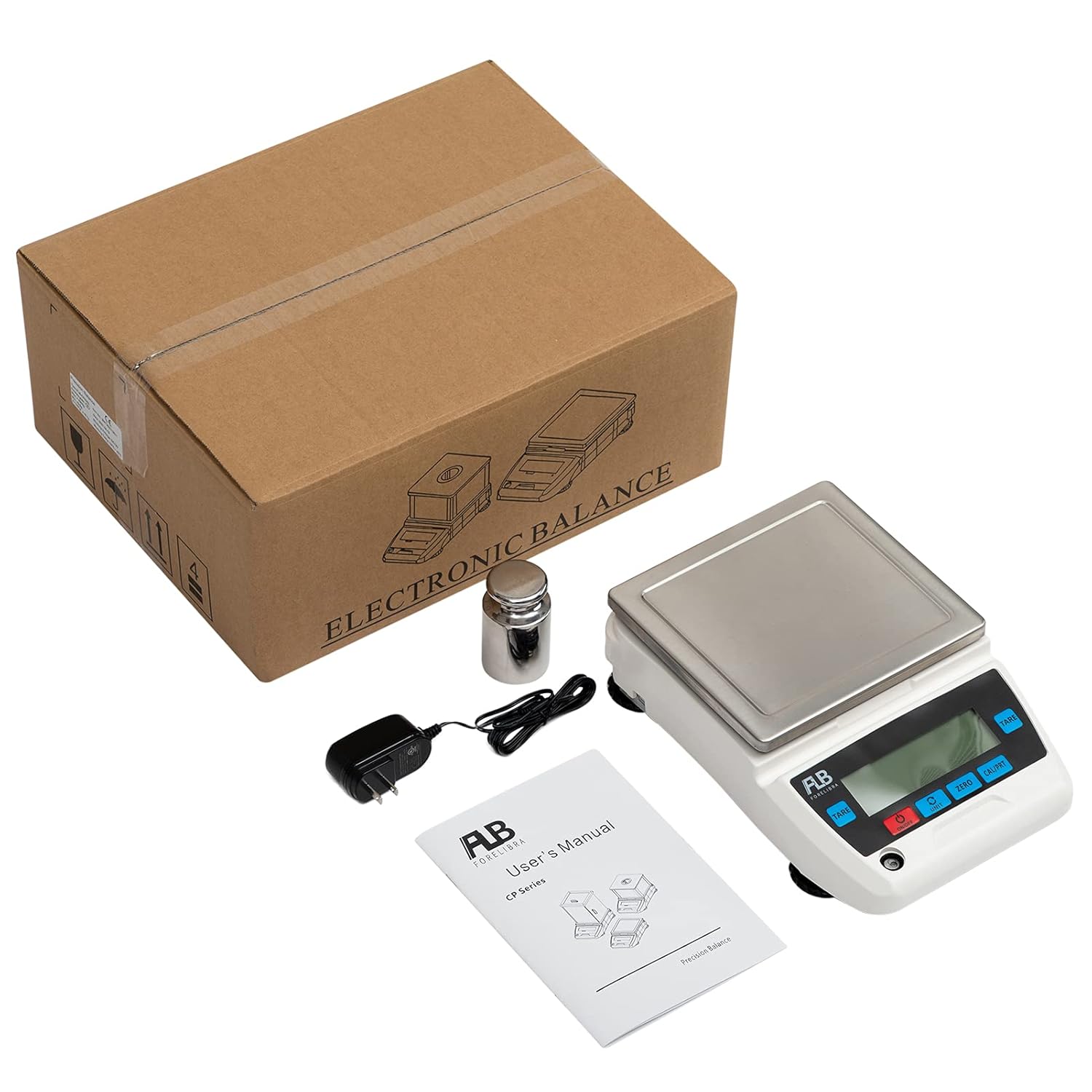
Image: Underside of the scale highlighting the long protection screw that needs to be removed and the non-slip adjustable feet.
Operating Instructions
This section details the various functions and how to operate your FLB FORELIBRA Lab Scale.
1. Power On/Off
Press the red 'ON/OFF' button to turn the scale on or off.
2. Switching Units
The scale supports 17 types of weighing units. To switch between units (e.g., grams, kilograms, ounces), press the 'UNIT' button. The display will cycle through the available units.
3. Calibration
To ensure accurate readings, regular calibration is recommended. The scale comes with a 500g calibration weight for this purpose.
- Ensure the scale is on a stable surface and nothing is on the weighing pan.
- Press and hold the 'CAL/PRT' button until 'CAL' appears on the display.
- Follow the on-screen prompts to place the specified calibration weight (e.g., 500.00g) on the pan.
- The scale will automatically calibrate and return to zero once complete.
4. Taring Function
The tare function allows you to subtract the weight of a container, so only the weight of the contents is measured.
- Place the empty container on the weighing pan.
- Press the 'TARE' button. The display will show zero, indicating the container's weight has been tared.
- Add the items you wish to weigh to the container. The display will show the net weight of the items.
5. Counting Function (PCS)
The counting function allows you to determine the quantity of multiple identical items.
- Press the 'UNIT' button until 'PCS' (pieces) is displayed.
- Place a known sample quantity (e.g., 10, 20, 50, 100 pieces) of the items on the pan as prompted by the display.
- Confirm the sample quantity by pressing 'CAL/PRT'.
- Remove the sample. You can now place any quantity of the same items on the pan, and the scale will display the count.
6. Percentage Weighing Function (PER)
The percentage weighing function allows you to measure the weight of a sample as a percentage of a reference weight.
- Press the 'UNIT' button until 'PER' (percentage) is displayed.
- Place your reference weight on the pan.
- Press 'CAL/PRT' to set this as 100%.
- Remove the reference weight. Now, when you place a sample on the pan, the display will show its weight as a percentage of the reference weight.
7. Data Reading and Connectivity
The scale provides stable and fast data readings, typically within 1-2 seconds. It also features an RS232 interface for connecting to external devices.
- Direct Reading: Readings are displayed clearly on the large backlit LED screen.
- Printer Connection: Connect a compatible printer via the RS232 interface to print weighing data.
- Computer Connection: Connect to a laptop or computer via the RS232 interface to transfer weighing data for recording or analysis (e.g., in Excel).
Video: Demonstrates unit switching, calibration, percentage and counting functions, fast data reading, and connectivity to a printer and computer.
Maintenance
Proper maintenance ensures the longevity and accuracy of your lab scale.
- Cleaning: The stainless steel weighing pan is easy to clean. Use a soft, damp cloth with mild detergent to wipe down the pan and the scale body. Avoid abrasive cleaners or harsh chemicals.
- Storage: When not in use, store the scale in a clean, dry environment away from extreme temperatures, humidity, and direct sunlight.
- Handle with Care: Avoid dropping the scale or subjecting it to sudden impacts, as this can affect its precision.
- Regular Calibration: Calibrate the scale regularly, especially if it has been moved or after prolonged use, to maintain accuracy.
Troubleshooting
If you encounter issues with your FLB FORELIBRA Lab Scale, consider the following common solutions:
- No Power: Ensure the power adapter is securely connected to both the scale and a working power outlet. If using battery power, check that the battery is correctly installed and charged (battery not included).
- Inaccurate Readings: Verify that the scale is placed on a stable, level surface. Recalibrate the scale using the provided calibration weight. Ensure no external factors (like drafts or vibrations) are affecting the weighing process.
- Display Errors: If the display shows an error code, refer to the specific error code section in the printed user manual for detailed instructions. Often, turning the scale off and on again can resolve minor display glitches.
- Slow Readings: Ensure the scale is not overloaded beyond its maximum capacity. Check for any obstructions under the weighing pan.
If the problem persists after attempting these solutions, please contact customer support for further assistance.
Specifications
| Feature | Detail |
|---|---|
| Capacity | 2000g (2kg) |
| Accuracy | 0.01g |
| Package Dimensions | 15.71 x 12.56 x 7.2 inches |
| Weight | 7.92 Pounds |
| Manufacturer | FLB FORELIBRA |
| Brand | FLB FORELIBRA |
| Color | White, Black |
| Recommended Uses | Coins, Food, Jewellery, Medicines, Powder |
| Special Feature | Backlit Display |
| Display Type | LED |

Image: Diagram showing the key dimensions of the lab scale.
Warranty and Support
Your FLB FORELIBRA Lab Scale comes with a one-year warranty service from the date of purchase. All units are calibrated before shipment to ensure quality and accuracy.
For any questions, problems, or warranty claims, please feel free to contact FLB FORELIBRA customer support. Refer to your purchase documentation or the manufacturer's website for specific contact information.
Ask a question about this manual
Ask about setup, troubleshooting, compatibility, parts, safety, or missing instructions. Manuals+ will review the question and use this page’s manual context to help answer it.