
1. Introduction
This manual provides essential instructions for the installation, operation, and maintenance of your Balboa Water Group VL400 4-Button LCD Topside Control Panel, Model 55130. Please read this manual thoroughly before attempting any installation or operation to ensure proper function and safety. This control panel is designed for use with compatible Balboa spa control systems.
2. Safety Information
- Electrical Hazard: Installation and service must be performed by a qualified electrician or spa technician. Ensure power to the spa is disconnected at the main breaker before any installation or maintenance.
- Water and Electronics: Keep the control panel dry during installation. Do not expose internal components to water.
- Proper Sealing: Ensure the control panel is properly sealed and mounted to prevent water intrusion into the spa's internal components.
- Use Only as Intended: This topside control panel is designed for specific Balboa spa systems. Do not attempt to use it with incompatible systems.
3. Package Contents
Verify that all items are present and undamaged:
- Balboa VL400 4-Button LCD Topside Control Panel (Model 55130)
- Attached RJ45 Communication Cable
Note: This model is supplied without an overlay. A compatible overlay must be purchased separately if desired.
4. Setup and Installation
Installation should only be performed by a qualified spa technician. Incorrect installation can lead to equipment damage, electrical shock, or fire.
4.1 Preparing for Installation
- Disconnect Power: Turn off all power to the spa at the main electrical breaker. Verify power is off using a voltage tester.
- Access Control Box: Locate and open the spa's main control box.
- Remove Old Panel (if applicable): Carefully disconnect and remove the existing topside control panel. Note the routing of the communication cable.
4.2 Connecting the New Panel

Figure 1: Rear view of the Balboa VL400 topside control panel, showing the circuit board and the RJ45 communication cable connector. This is where the panel connects to the spa's main control system.
- Locate Port: Identify the designated RJ45 port on the spa's main control board for the topside control panel. Refer to your spa's main control system manual for exact port location.
- Connect Cable: Carefully insert the RJ45 communication cable from the new VL400 topside panel into the corresponding port on the control board. Ensure it clicks securely into place.
4.3 Mounting the Panel
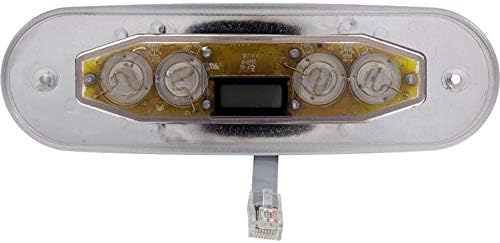
Figure 2: Front view of the Balboa VL400 topside control panel without the overlay, displaying the four button locations and the LCD screen cutout. An overlay is required for button identification and water protection.
- Position Panel: Route the cable through the spa shell opening and position the topside panel into its designated cutout.
- Secure Panel: Secure the panel using the appropriate mounting hardware (not included, typically part of the spa shell or overlay kit). Ensure a watertight seal around the panel to prevent water from entering the spa's internal compartment.
- Apply Overlay (Optional): If using an overlay, carefully align and apply it to the topside panel, ensuring all buttons and the LCD screen are correctly covered and sealed.
4.4 Power Up
- Restore Power: Once installation is complete and all connections are secure, restore power to the spa at the main breaker.
- Initial Boot: The control panel LCD should illuminate and display an initial boot sequence.
5. Operating Instructions
The Balboa VL400 topside control panel features four buttons and an LCD display for managing your spa's functions. The exact function of each button is determined by the overlay applied and the spa's main control system programming.
5.1 Button Functions (Common)
While specific functions may vary, typical 4-button configurations include:
- Jets: Activates/deactivates the spa's jet pump(s). Multiple presses may cycle through different jet speeds or pumps.
- Light: Turns the spa's light(s) on/off. May cycle through different light modes or colors with multiple presses.
- Warm / Up Arrow: Increases the desired water temperature setting.
- Cool / Down Arrow: Decreases the desired water temperature setting.
5.2 LCD Display
The LCD displays critical information about your spa's status:
- Current Water Temperature: Shows the actual temperature of the spa water.
- Set Temperature: Displays the desired temperature setting.
- Status Indicators: May show icons for heater activity, filter cycles, jet pump status, light status, and error codes. Refer to your spa's main control system manual for a complete list of indicators and their meanings.
5.3 Adjusting Temperature
Press the 'Warm' or 'Cool' button to adjust the set temperature. The display will show the new set temperature, then revert to the current water temperature after a few seconds.
6. Maintenance
Regular maintenance ensures the longevity and proper function of your topside control panel.
- Cleaning: Wipe the panel surface with a soft, damp cloth. Do not use abrasive cleaners, solvents, or harsh chemicals, as these can damage the display or buttons.
- Inspect Seal: Periodically check the seal around the topside panel for any signs of wear or damage that could allow water intrusion.
- Cable Inspection: Ensure the communication cable is not pinched, cut, or damaged.
- Environmental Protection: Protect the panel from direct, prolonged sunlight and extreme weather conditions if possible, as this can degrade the plastic and display over time.
7. Troubleshooting
If you experience issues with your control panel, perform these basic checks before contacting a service technician.
| Problem | Possible Cause | Solution |
|---|---|---|
| Panel is blank / No display | No power to spa; Loose communication cable; Faulty panel. | Check spa's main breaker; Ensure RJ45 cable is securely connected; Contact a qualified technician. |
| Buttons unresponsive | Overlay misalignment; Internal panel issue; Main control system fault. | Check overlay alignment; Power cycle the spa; Contact a qualified technician. |
| Incorrect temperature reading | Sensor issue; Main control system fault. | Ensure water flow is adequate; Power cycle the spa; Contact a qualified technician. |
| Error codes displayed | Specific spa system fault. | Refer to your spa's main control system manual for error code definitions and solutions. |
If troubleshooting steps do not resolve the issue, contact a qualified spa service technician for further assistance.
8. Specifications
- Brand: Balboa Water Group
- Model: VL400 (55130)
- Type: Topside Control Panel
- Buttons: 4
- Display: LCD
- Connectivity: RJ45 (8-pin phone style connector)
- Overlay: Not included (requires separate purchase)
9. Warranty and Support
For warranty information, please refer to the documentation provided with your complete spa system or contact Balboa Water Group directly. Warranty terms typically cover manufacturing defects for a specified period.
For technical support or service, please contact your spa dealer or a certified Balboa Water Group service technician. Do not attempt repairs yourself, as this may void your warranty and could lead to further damage or injury.