1. Introduction
This manual provides essential information for the safe and efficient use of your SAUTER SOP6615LX multifunction electric oven. Please read these instructions carefully before installation, operation, or maintenance. Keep this manual for future reference.
2. Safety Information
- Ensure the oven is correctly installed by a qualified technician before use.
- Do not touch hot surfaces. Always use oven mitts or gloves.
- Keep children away from the oven during operation and cooling.
- Never use water to extinguish grease fires; turn off the appliance and cover the pan.
- Do not store flammable materials in or near the oven.
- Disconnect the appliance from the power supply before cleaning or maintenance.
- The oven door features a 'Cold Door' design, but caution is still advised during and after cooking.
3. Product Overview
The SAUTER SOP6615LX is a 73-liter multifunction electric oven designed for built-in installation. It features a TFT color display, a Soft Close door, and various cooking programs to simplify your culinary tasks.
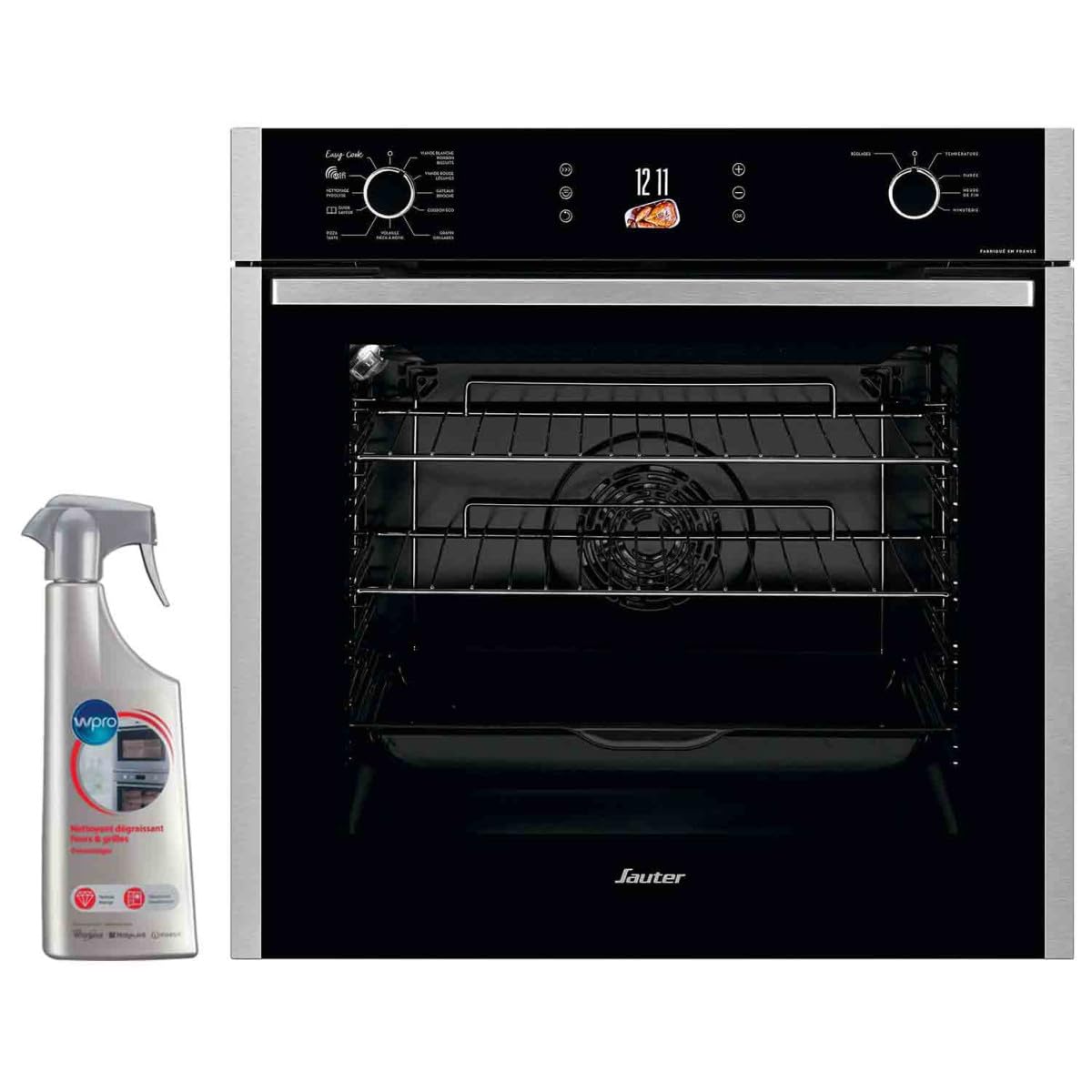
This image displays the SAUTER SOP6615LX oven. The top section features a black glass control panel with a digital display showing '12 11', two rotary knobs, and touch controls. The left knob is for 'Easy Cook' programs and cleaning functions, while the right knob controls temperature and settings. The oven interior is black enamel with multiple chrome wire racks and a fan at the back.
Key Features:
- Multifunction Cooking: Offers a variety of cooking modes for diverse culinary needs.
- 73 Liters Capacity: Spacious interior suitable for large dishes.
- TFT Color Display: Intuitive electronic programmer for easy control.
- Soft Close Door: Ensures gentle and quiet closing.
- Cold Door: Enhances safety by keeping the exterior door temperature low.
- Pyrolysis Cleaning: Self-cleaning function for effortless maintenance.
- Connected Functionality: Allows for remote control or monitoring (if applicable, refer to specific app instructions).
- Accessories: Includes 2 grids and 1 drip pan.
4. Setup and Installation
The SAUTER SOP6615LX oven is designed for built-in installation. It is crucial that installation and electrical connections are performed by a qualified professional in accordance with local regulations and safety standards. Incorrect installation can lead to hazards and void the warranty.
Initial Preparation:
- After installation, remove all packaging materials and accessories from the oven cavity.
- Clean the interior of the oven with a damp cloth and mild detergent.
- Before first use, operate the empty oven at maximum temperature for approximately 30 minutes to burn off any manufacturing residues. Ensure adequate ventilation during this process.
5. Operating Instructions
Your oven features an intuitive control panel with a TFT display and rotary knobs for selecting functions and settings.
Control Panel Overview:
- Left Rotary Knob: Used to select 'Easy Cook' pre-programmed recipes, Pyrolysis cleaning, and oven light.
- Right Rotary Knob: Used to set temperature and adjust time-related settings (duration, end time, timer).
- TFT Display: Shows current time, selected program, temperature, and other relevant information.
- Touch Controls: For fine-tuning settings and navigating menus.
Cooking Modes and 'Easy Cook' Programs:
The oven offers 7 cooking modes and several pre-programmed 'Easy Cook' recipes for convenience.
- Selecting a Program: Turn the left rotary knob to choose between 'Easy Cook' programs or other functions.
- 'Easy Cook' Programs include:
- White Meat
- Red Meat
- Fish
- Cakes
- Brioche
- Gratin
- Pizza
- Tarts
- Eco Cooking
- Setting Temperature and Time: Once a cooking mode is selected, use the right rotary knob to adjust the temperature. The display will show the recommended temperature, which can be modified. Use the 'Settings' (RÉGLAGES) option to set the cooking duration (DURÉE), end time (HEURE DE FIN), or a simple timer (MINUTERIE).
- Preheating: For best results, preheat the oven to the desired temperature before placing food inside, especially for baking.
- Oven Light: The oven light can be activated via the left rotary knob to monitor cooking progress without opening the door.
6. Maintenance and Cleaning
Regular cleaning and maintenance ensure the longevity and optimal performance of your oven.
General Cleaning:
- Always ensure the oven is cool and disconnected from the power supply before cleaning.
- Clean the exterior surfaces with a soft cloth and mild detergent. Avoid abrasive cleaners or harsh chemicals.
- The interior can be wiped with a damp cloth after each use to prevent food residue buildup. For stubborn stains, use a specialized oven cleaner, following the product instructions carefully.
- Remove and clean the oven racks and drip pan separately in warm soapy water.
Pyrolysis Cleaning (NETTOYAGE PYROLYSE):
The Pyrolysis function uses high temperatures to burn off food residues, turning them into ash that can be easily wiped away.
- Remove all accessories (racks, drip pan, etc.) from the oven cavity before starting a pyrolysis cycle.
- Wipe away any large spills or loose debris.
- Select the 'Pyrolysis Cleaning' function using the left rotary knob.
- Follow the instructions on the TFT display to start the cycle. The oven door will lock automatically during the process.
- Once the cycle is complete and the oven has cooled down, wipe the interior with a damp cloth to remove the ash.
7. Troubleshooting
If you encounter issues with your oven, refer to the following common troubleshooting steps. For problems not listed here, contact customer support.
- Oven not heating: Check if the oven is properly plugged in and if the circuit breaker has tripped. Ensure a cooking mode and temperature have been selected.
- Display not working: Verify power supply. If the issue persists, a power cycle (unplugging and replugging) might resolve it.
- Uneven cooking: Ensure food is placed correctly on the racks. Avoid overcrowding the oven. Check if the fan is operating correctly.
- Oven door not closing properly: Inspect the door seal for any obstructions or damage.
- Error codes: If an error code appears on the display, consult the full digital manual (available on the Sauter website) or contact customer service, providing the specific code.
8. Specifications
| Brand | Sauter |
| Model Number | SOP6615LX |
| Dimensions (L x W x H) | 66 x 64 x 69 cm |
| Weight | 38 Kilograms |
| Capacity | 73 Liters |
| Energy Efficiency | A+ |
| Installation Type | Built-in |
| Cooking Mode | Electric |
| Color | Black |
| Heating Method | Electric |
9. Warranty and Support
Your SAUTER SOP6615LX oven comes with a standard manufacturer's warranty. For detailed information regarding warranty terms, coverage, and duration, please refer to the warranty card included with your purchase or visit the official Sauter website.
For technical assistance, spare parts, or service requests, please contact Sauter customer support. Ensure you have your oven's model number (SOP6615LX) and serial number ready when contacting support.
Sauter Official Website: www.sauter-electromenager.com


