
Introduction
Thank you for purchasing the Whirlpool 1.1 cu. ft. (30L) Microwave Oven, Model WM-1811B. This manual provides essential information for the safe and efficient operation, maintenance, and troubleshooting of your new appliance. Please read these instructions thoroughly before use and retain them for future reference.
Important Safety Instructions
When using electrical appliances, basic safety precautions should be followed, including the following:
- Read all instructions before using the appliance.
- Do not operate the oven if the door or door seals are damaged.
- Do not heat liquids or other foods in sealed containers as they are liable to explode.
- Only allow children to use the oven without supervision when adequate instructions have been given.
- Do not use corrosive chemicals or vapors in this appliance.
- Do not use this microwave for commercial purposes. It is designed for household use only.
- Always ensure the turntable and roller ring are correctly positioned before operation.
WARNING: To reduce the risk of fire, electric shock, injury to persons or exposure to excessive microwave energy:
- Do not attempt to operate this oven with the door open.
- Do not place any object between the oven front face and the door or allow soil or cleaner residue to accumulate on sealing surfaces.
- Do not operate the oven if it is damaged.
Package Contents
Verify that all components are present and undamaged:
- Whirlpool Microwave Oven Model WM-1811B
- Glass Turntable
- Roller Ring
- User Manual (This document)
- Warranty Information
Setup and Installation
- Unpacking: Remove all packaging materials from inside and outside the microwave oven. Check for any damage such as dents or a misaligned door. Do not operate the oven if it is damaged.
- Placement: Place the microwave on a flat, stable surface that can support its weight and the heaviest food item likely to be cooked in it. Ensure adequate ventilation by leaving at least 10 cm (4 inches) of space at the back, 20 cm (8 inches) at the top, and 5 cm (2 inches) on the sides. Do not block any ventilation openings.
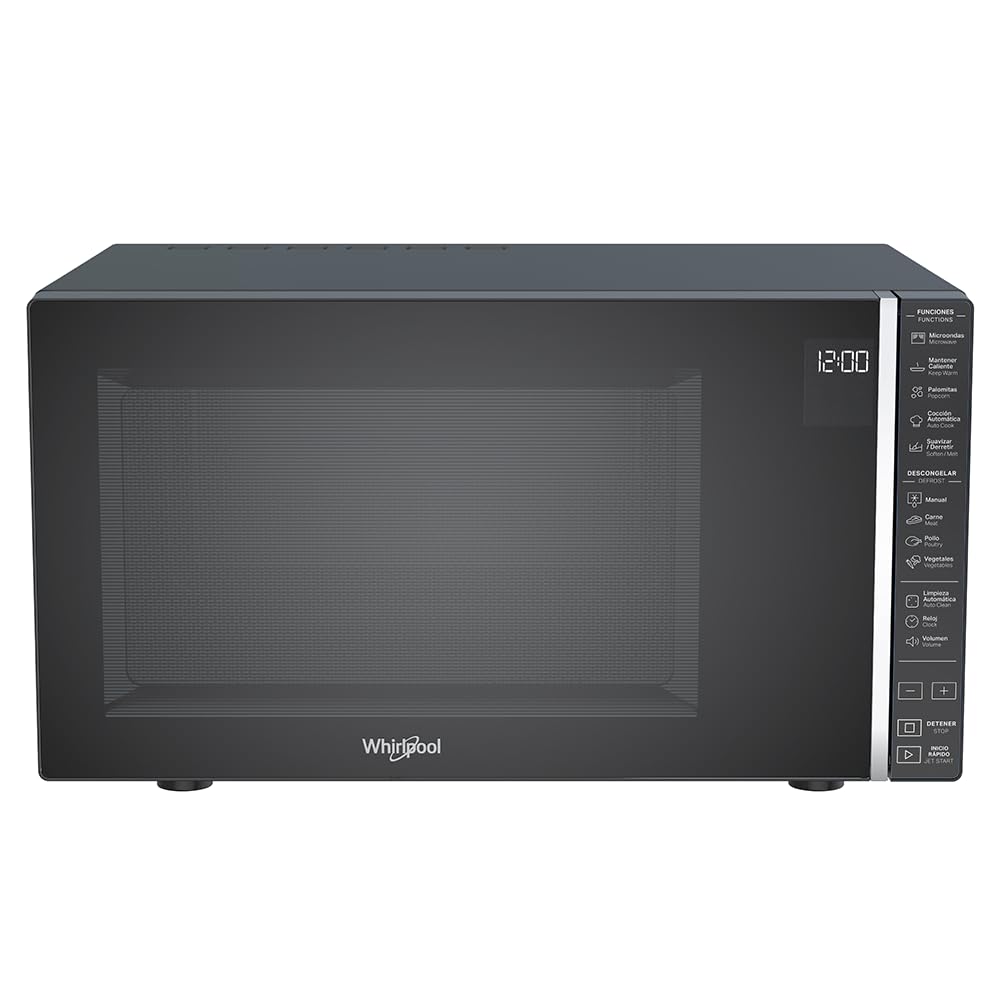
Figure 1: Front view of the Whirlpool WM-1811B Microwave Oven. Ensure proper clearance around the unit for ventilation.
- Turntable Installation:
- Place the roller ring in the center of the oven cavity floor.
- Place the glass turntable on top of the roller ring, ensuring it sits securely in the center hub.

Figure 2: Interior view of the microwave with the door open, showing the glass turntable and roller ring in place.
- Power Connection: Plug the microwave oven into a properly grounded electrical outlet. Do not use extension cords or adapters.
Operating Instructions
Your Whirlpool WM-1811B microwave oven features a touch control panel and an LCD display for easy operation. It offers 7 power levels and 25 pre-programmed functions, including specialized options like Keep Warm and Automatic Cleaning.

Figure 3: Detailed view of the touch control panel and LCD display.
Setting the Clock
- Press the "Clock" button.
- Use the number pads to enter the current time.
- Press the "Clock" button again to confirm.
Microwave Cooking
- Place food in a microwave-safe container on the glass turntable.
- Close the oven door securely.
- Enter the desired cooking time using the number pads.
- Press the "Power Level" button repeatedly to select the desired power level (1-7). The default is usually P100 (full power).
- Press "Start" to begin cooking.
Quick Start / Jet Start
For quick heating at full power, simply press the "Jet Start" button. Each press adds 30 seconds of cooking time at 100% power.
Automatic Cooking Programs (25 Pre-programmed Functions)
The microwave features 25 pre-programmed functions for various food types, ensuring optimal cooking results. Refer to the icons on the control panel for specific programs such as Popcorn, Pizza, Potato, Beverage, Reheat, etc.
- Place the food in the oven.
- Press the "Automatic Cooking" button or the specific program icon (e.g., "Popcorn").
- Select the desired quantity or weight if prompted (e.g., for popcorn, select bag size).
- Press "Start" to begin.
Defrosting (Manual and Automatic)
The microwave offers both manual and automatic defrosting options for meat, poultry, and vegetables.
- Manual Defrost:
- Press the "Defrost" button.
- Enter the desired defrosting time.
- Press "Start".
- Automatic Defrost:
- Press the specific defrost program icon (e.g., "Meat", "Poultry", "Vegetables").
- Enter the weight of the food.
- Press "Start". The oven will automatically calculate the defrosting time and power level.
Keep Warm Function
This specialized function helps maintain the temperature of cooked food without further cooking. Press the "Keep Warm" button and then "Start".

Figure 4: Example of food being heated inside the microwave oven.
Maintenance and Cleaning
Regular cleaning and maintenance will ensure the longevity and optimal performance of your microwave oven.
Exterior Cleaning
- Wipe the exterior with a damp cloth and mild detergent.
- Avoid abrasive cleaners or scouring pads.
Interior Cleaning
- General Cleaning: Wipe the interior cavity with a damp cloth after each use. For stubborn food splatters, place a bowl of water with lemon slices inside and microwave for 2-3 minutes to loosen residue, then wipe clean.
- Glass Turntable and Roller Ring: These can be removed and washed in warm soapy water or in the dishwasher. Ensure they are dry before placing them back in the oven.
- Automatic Cleaning Function: Your microwave features an auto-clean function. Consult the control panel for the specific icon and follow the on-screen instructions. This function typically uses steam to loosen food particles for easier wiping.
Door and Seal Cleaning
Keep the door seals and adjacent parts clean. Use a mild soap and water solution. Never use abrasive sprays or pads.
Troubleshooting
Before contacting customer service, try the following solutions for common issues:
| Problem | Possible Cause | Solution |
|---|---|---|
| Oven does not start. | Power cord not plugged in; Door not closed properly; Fuse blown or circuit breaker tripped. | Plug in power cord; Close door securely; Check household fuse or reset circuit breaker. |
| Food not heating. | Incorrect cooking time/power level set; Door not closed properly. | Adjust cooking time/power level; Ensure door is fully closed. |
| Turntable not rotating. | Turntable or roller ring not correctly positioned; Obstruction under turntable. | Reposition turntable and roller ring; Remove any obstructions. |
| Unusual noises during operation. | Food container touching oven walls; Turntable not centered. | Ensure container is not touching walls; Center turntable. |
Specifications
| Brand | Whirlpool |
| Model Number | WM1811B |
| Capacity | 1.1 Cubic Feet (30 Liters) |
| Color | Black |
| Dimensions (D x W x H) | 40 cm x 53.9 cm x 30 cm (15.75 in x 21.22 in x 11.81 in) |
| Weight | 17.7 Kilograms (39 lbs) |
| Wattage | 1000 Watts |
| Power Levels | 7 |
| Programs | 25 (Pre-programmed functions) |
| Control Type | Touch Control / Touch Screen |
| Special Features | Automatic Cleaning, Keep Warm Function, Timer Function |
| Material | Plastic (Exterior and Interior) |
| Installation Type | Freestanding |
| GTIN | 07501545633287 |
| Country of Origin | Mexico |

Figure 5: Dimensional diagram of the microwave oven (Depth: 40 cm, Width: 53.9 cm, Height: 30 cm).
Warranty and Support
Your Whirlpool WM-1811B Microwave Oven comes with a 12-month manufacturer's warranty. This warranty covers defects in materials and workmanship under normal use.
For warranty claims, technical support, or service inquiries, please contact Whirlpool customer service directly. Refer to the warranty card included in your package for specific contact details and terms.
Please have your model number (WM-1811B) and proof of purchase ready when contacting support.


