
Easytry123 N2QAYB000752
Easytry123 Replacement Remote Control User Manual
Model: N2QAYB000752
For Panasonic Viera LCD HDTV TVs
1. Introduction
This manual provides instructions for the Easytry123 Replacement Remote Control, model N2QAYB000752. This remote is designed to function as a replacement for various Panasonic Viera LCD HDTV models, including TX-L42E5E, TX-L42E5Y, TX-L42EW5, TX-L47E5B, TX-L47E5E, TX-L47E5Y, TX-L47EW5, TX-LR32E5, TX-LR42E5, TX-L42ETW5, TX-L47ET5, and TX-P42UT50. Please note that as a replacement unit, some advanced or specific functions of your original remote may not be fully supported.
For optimal performance, ensure your TV model is listed as compatible. This remote does not require programming and is ready for use once batteries are installed.
2. Setup
2.1 Battery Installation
- Locate the battery compartment on the back of the remote control.
- Slide the battery compartment cover downwards or in the direction indicated by an arrow to open it.
- Insert two (2) AA-size batteries, ensuring the positive (+) and negative (-) terminals align correctly with the markings inside the compartment.
- Replace the battery compartment cover by sliding it back into position until it clicks securely.

Figure 1: Back of the remote control with the battery compartment open, illustrating the correct orientation for inserting two AA batteries.

Figure 2: Back of the remote control with the battery compartment securely closed after battery installation.
2.2 Initial Use
Once batteries are installed, the remote control is ready for immediate use with compatible Panasonic Viera TVs. Point the remote directly at the TV's infrared receiver.
3. Operating the Remote Control
This section details the primary functions of the buttons on your replacement remote control. Refer to the image below for button layout.
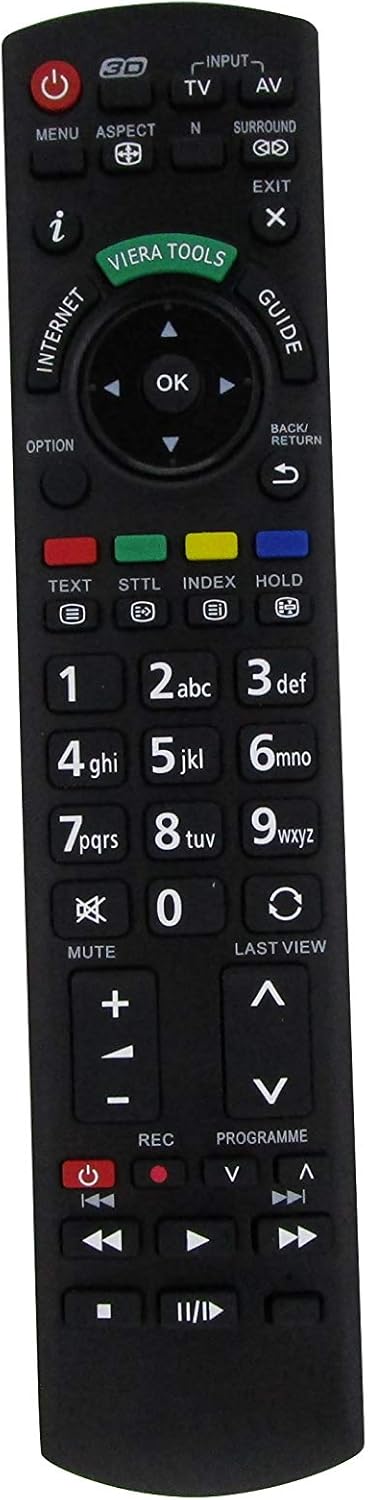
Figure 3: Front view of the Easytry123 Replacement Remote Control, highlighting the various function buttons.
3.1 Key Functions
- Power (●): Turns the TV on or off.
- Input/AV: Selects the video input source (e.g., HDMI 1, AV, Component).
- TV: Switches to TV broadcast mode.
- Menu: Opens the TV's main menu for settings and adjustments.
- Aspect: Changes the screen aspect ratio (e.g., 16:9, 4:3).
- N: (Function may vary) Often used for picture modes or specific TV features.
- Surround: Activates or deactivates surround sound modes.
- Exit: Closes menus or returns to the previous screen.
- i (Info): Displays program information or current status.
- Viera Tools: Accesses Panasonic's Viera Tools menu for smart features.
- Internet: Direct access to internet features (if supported by TV).
- Guide: Opens the electronic program guide (EPG).
- Navigation Pad (Up, Down, Left, Right, OK): Used to navigate menus and confirm selections.
- Option: Accesses context-sensitive options within menus.
- Back/Return: Returns to the previous menu or channel.
- Text: Activates teletext (if available).
- STTL (Subtitle): Toggles subtitles on/off.
- Index: Accesses index pages in teletext or other features.
- Hold: Holds teletext page.
- Numeric Pad (0-9): Enters channel numbers or numerical data.
- Mute: Silences the TV audio.
- Last View: Returns to the previously viewed channel or input.
- Volume (+/-): Adjusts the TV volume.
- Channel (▲/▼): Changes TV channels up or down.
- REC (Record): Initiates recording (if TV supports PVR function).
- Programme (▲/▼): Similar to Channel Up/Down, for program selection.
- Playback Controls (Play, Pause, Stop, Rewind, Fast Forward, Skip): Controls media playback for connected devices or TV's internal media player.
Note: The functionality of certain buttons may depend on your specific Panasonic TV model and its features.
4. Maintenance
4.1 Battery Replacement
Replace batteries when the remote's response becomes sluggish or it stops functioning. Always replace both batteries simultaneously with new AA-size batteries. Do not mix old and new batteries, or different types of batteries.
4.2 Cleaning
To clean the remote control, use a soft, dry cloth. For stubborn dirt, slightly dampen the cloth with water. Avoid using harsh chemicals, abrasive cleaners, or solvents, as these can damage the remote's surface or internal components.
4.3 Storage
When storing the remote for extended periods, remove the batteries to prevent leakage, which can cause damage. Store in a cool, dry place away from direct sunlight and extreme temperatures.
5. Troubleshooting
- Remote not responding:
- Check if the batteries are inserted correctly with the correct polarity.
- Replace old batteries with new ones.
- Ensure there are no obstructions between the remote and the TV's infrared sensor.
- Confirm that the remote is pointed directly at the TV.
- Certain buttons do not work:
- As a replacement remote, some specific functions might not be supported by this unit or your TV model.
- Ensure the TV is in the correct mode (e.g., TV mode for channel buttons, AV mode for playback controls).
- Intermittent operation:
- Weak batteries can cause intermittent operation. Replace them.
- Ensure no strong light sources (like direct sunlight or bright fluorescent lights) are interfering with the IR signal.
6. Specifications
| Model Number | N2QAYB000752 |
| Brand | Easytry123 |
| Compatibility | Panasonic Viera LCD HDTVs (e.g., TX-L42E5E, TX-L47E5B, TX-P42UT50) |
| Power Source | 2 x AA Batteries |
| Connectivity | Infrared (IR) |
7. Warranty and Support
For information regarding warranty coverage or technical support, please refer to the purchase documentation or contact the seller, Easytry123, directly. As this is a replacement product, warranty terms may vary from original manufacturer warranties.
For further assistance, please visit the seller's support page or contact their customer service.
Ask a question about this manual
Ask about setup, troubleshooting, compatibility, parts, safety, or missing instructions. Manuals+ will review the question and use this page’s manual context to help answer it.