Product Overview
The Scosche BTFMPD3SR-SP1 BTFREQ Pro Power Delivery universal Bluetooth 5.0 car kit adapter is designed to enhance your in-car audio experience. It enables hands-free calls and wireless music streaming from your Bluetooth-compatible device directly to your vehicle's FM radio, delivering clear sound. The unit supports both Bluetooth 5.0 for robust wireless connections and a 3.5mm AUX output for wired connections, with an included cable. It features a multi-function button for easy control of calls, media playback, and voice assistants like Siri and Google Voice. Additionally, it provides dual charging capabilities with a 20W USB-C Power Delivery 3.0 port and a 12W USB-A port, allowing you to charge multiple devices simultaneously. Its user-friendly LCD display simplifies FM frequency adjustment and pairing.

Image: The Scosche BTFMPD3SR-SP1 Universal Bluetooth Hands-Free Car Kit.
What's in the Box
- Bluetooth FM Audio Transmitter
- 3.5mm AUX Audio Cable

Image: The BTFMPD3SR-SP1 unit and the included 3.5mm audio cable.
Key Features
- Car FM Transmitter: Enjoy crystal-clear sound and wireless streaming with our Bluetooth FM transmitter for car. Perfect for adding Bluetooth for cars without Bluetooth, this adapter enables hands-free calls and streams music directly from your phone to your car's radio.
- Hands-Free Car Kit: Easily make and receive calls by connecting your smartphone to your car stereo with the Scosche FM Bluetooth transmitter, featuring an aux port for added convenience. Stay focused on the road with this Bluetooth adapter for car, ensuring a safer driving experience.
- 12V Cigarette Lighter Adapter: Plug the FM Bluetooth transmitter into your car’s 12V socket to stream music and charge multiple devices simultaneously. Enjoy fast charging with dual charger ports—12W USB-A and 20W USB-C—keeping your phone powered and connected on the go.
- Voice Command: Answer phone calls or play/pause your music with a simple press of a button on our Scosche FM Bluetooth Transmitter for car radio. With hands-free controls and built-in microphone that support Siri and Google Voice commands, make your in car audio experience safer and more convenient.
- Universal Compatibility: The FM radio Bluetooth transmitter for car easily connects to any iPhone, Galaxy, or Android cell phone via Bluetooth. Use the aux port and included 3.5mm cable to connect your MP3 player or other mobile devices for music or hands-free calls.

Image: Labeled diagram of the BTFMPD3SR-SP1 highlighting its key components and controls.

Image: The BTFMPD3SR-SP1 installed in a car's 12V outlet, demonstrating charging and voice assistant compatibility.
Setup Instructions
Step 1: Powering On and Initial Setup
- Insert the BTFMPD3SR-SP1 into your vehicle's 12V power outlet (cigarette lighter socket). The device will power on automatically and its LCD display will illuminate.
- Find an unused FM frequency on your vehicle's stereo. This should be a frequency with no active radio station to ensure clear audio transmission.
- Adjust the FM frequency on the BTFMPD3SR-SP1 to match the unused frequency on your car stereo. To do this, press and hold the Frequency Button (located on the side of the unit) until the numbers on the LCD display begin to flash. Then, use the Multi-functional Button (the large circular button on the front) to rotate and adjust the frequency up or down. Press the Frequency Button again to confirm and set the frequency.
Step 2: Bluetooth Pairing
- On your smartphone or Bluetooth-enabled device, navigate to the Bluetooth settings.
- Ensure Bluetooth is enabled. Look for "Scosche BTFMPD3SR-SP1" or a similar name in the list of available devices and select it to pair.
- Once successfully paired, the BTFMPD3SR-SP1's LCD display will show a Bluetooth icon, and you will hear an audible confirmation.
Step 3: Auxiliary Connection (Optional)
If your device does not support Bluetooth or you prefer a wired connection, use the included 3.5mm AUX audio cable:
- Plug one end of the 3.5mm AUX cable into the AUX Port on the BTFMPD3SR-SP1.
- Plug the other end of the 3.5mm AUX cable into your audio device's headphone jack or AUX output.
- Ensure your car stereo is set to the AUX input mode (if applicable) or the matched FM frequency for audio transmission.
Video: An official Scosche video demonstrating the setup and key features of the BTFREQ Pro Wireless Hands-Free Car Kit, including unboxing, installation, FM tuning, Bluetooth pairing, and charging capabilities.
Operating Instructions
Making Hands-Free Calls
- Answer/End Call: Press the Multi-functional Button once to answer an incoming call or to end an active call.
- Reject Call: Press and hold the Multi-functional Button for 2 seconds to reject an incoming call.
- Redial: Double-press the Multi-functional Button to redial the last number called.
Streaming Music
- Play/Pause: Press the Multi-functional Button once to play or pause music playback.
- Next Track: Rotate the Multi-functional Button clockwise to skip to the next track.
- Previous Track: Rotate the Multi-functional Button counter-clockwise to go to the previous track.
- Volume Adjustment: Adjust the volume directly on your paired device or your car stereo. The BTFMPD3SR-SP1 does not have independent volume controls for media playback.
Using Voice Commands (Siri/Google Voice)
With your device paired, you can activate your smartphone's voice assistant:
- Activate Voice Assistant: Press and hold the Multi-functional Button for 2 seconds to activate Siri (for iOS devices) or Google Voice (for Android devices). You will hear a prompt from your device, and you can then issue commands through the BTFMPD3SR-SP1's built-in microphone.
Charging Devices
The BTFMPD3SR-SP1 features two charging ports:
- USB-C PD 3.0 Port (20W): Use this port with a compatible USB-C to USB-C or USB-C to Lightning cable for fast charging of Power Delivery enabled devices.
- USB-A Port (12W): Use this port with a standard USB-A cable to charge other USB-powered devices.
You can charge both devices simultaneously while streaming audio.
Maintenance
- Keep the device clean by wiping it with a soft, dry cloth. Avoid using harsh chemicals or abrasive cleaners.
- Ensure the 12V power outlet in your vehicle is clean and free of debris to maintain a good connection.
- Store the device in a cool, dry place when not in use, away from direct sunlight and extreme temperatures.
Troubleshooting
| Problem | Possible Cause | Solution |
|---|---|---|
| No power to the unit. | Loose connection in 12V outlet; vehicle's 12V outlet is not powered. | Ensure the unit is firmly seated in the 12V outlet. Check if the vehicle's ignition is on (some outlets are only powered when the car is running). Test the outlet with another device. |
| Static or poor audio quality. | FM frequency interference; low volume on device/car stereo. | Try a different FM frequency on both the transmitter and your car stereo. Choose a frequency that is completely clear of any radio stations. Increase volume on your paired device and car stereo. |
| Bluetooth not pairing. | Bluetooth on device is off; device already paired to another unit; unit not in pairing mode. | Ensure Bluetooth is enabled on your device. Forget previous Bluetooth connections on your device. Restart both the BTFMPD3SR-SP1 and your device. Make sure the unit is discoverable (it should automatically enter pairing mode when powered on if not already paired). |
| Devices not charging. | Cable issue; device not compatible with fast charging; unit not receiving power. | Try a different charging cable. Ensure the unit is powered on. Verify your device supports the charging standard (PD for USB-C). |
Specifications
| Feature | Detail |
|---|---|
| Product Dimensions | 1.75 x 4.38 x 7.1 inches |
| Item Weight | 3.52 ounces |
| Model Number | BTFMPD3SR-SP1 |
| Connectivity Technology | Bluetooth 5.0, 3.5mm AUX |
| Charging Ports | 1 x USB-C Power Delivery 3.0 (20W), 1 x USB-A (12W) |
| Special Features | Hands-Free Calls, Fast Charging, Built-In Microphone, Voice Command (Siri/Google Voice) |
| Color | Black & Silver |
| Material | Plastic |
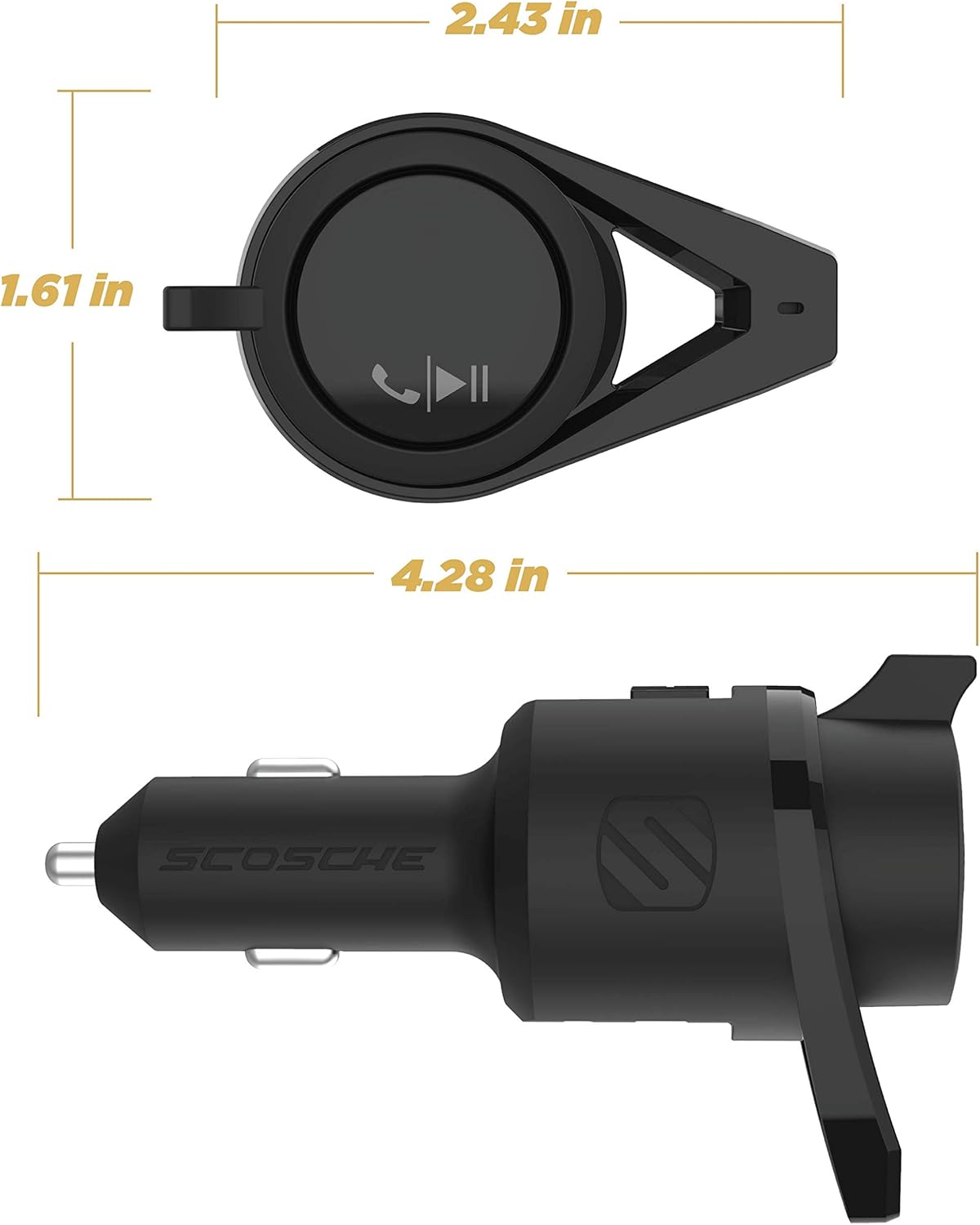
Image: Product dimensions for the Scosche BTFMPD3SR-SP1.
Warranty and Support
The Scosche BTFMPD3SR-SP1 is backed by Scosche's commitment to quality and customer satisfaction. It comes with a 3-year limited warranty, covering defects in materials and workmanship under normal use. Additionally, Scosche provides Lifetime Tech Support to assist you with any questions or issues you may encounter.
For detailed warranty information, technical assistance, or to download the full user manual in PDF format, please visit the official Scosche website or refer to the provided user guide link: