Introduction
This manual provides essential information for the safe and efficient use of your Xiaomi Mi 11 Lite smartphone. Please read this manual carefully before using the device to ensure optimal performance and to prevent damage.
The Xiaomi Mi 11 Lite is designed to offer a premium mobile experience with its ultra-thin and ultra-light design, powerful Snapdragon 732G processor, long-lasting 4250 mAh battery with 33W fast charging, and a versatile 64MP triple camera system. Its AMOLED DotDisplay screen provides vibrant visuals, and the durable glass and metal frame ensure a superior look and feel.
Setup
1. Unboxing and Initial Inspection
Carefully remove all components from the packaging. Verify that all items are present and undamaged. The standard package typically includes the Xiaomi Mi 11 Lite smartphone, a power adapter, a USB Type-C cable, a SIM eject tool, and a protective case.

Image: Front view of the Xiaomi Mi 11 Lite smartphone in Bubblegum Blue color. The phone features a punch-hole camera on the top left of the screen and slim bezels.
2. Inserting SIM Card and microSD Card (Optional)
- Locate the SIM card tray on the side of the device.
- Insert the SIM eject tool into the small hole on the tray to open it.
- Place your Nano-SIM card(s) and/or microSD card (if applicable) into the tray with the gold contacts facing down, ensuring correct orientation as indicated on the tray.
- Gently push the tray back into the device until it clicks into place.

Image: Side view of the Xiaomi Mi 11 Lite, highlighting the slim profile and the location of the SIM card tray on the left side of the device.
3. Charging the Battery
Before first use, fully charge the device. Connect the USB Type-C cable to the phone's charging port and the other end to the power adapter. Plug the power adapter into a wall outlet. The charging indicator will appear on the screen.
The Xiaomi Mi 11 Lite supports 33W fast charging. Use the original charger and cable for optimal charging speed and safety.
4. Powering On and Initial Configuration
Press and hold the Power button (located on the right side of the device) until the Xiaomi logo appears. Follow the on-screen instructions to complete the initial setup, including language selection, Wi-Fi connection, Google account setup, and security settings.
Operating
1. Basic Navigation
- Power Button: Press to turn the screen on/off. Press and hold to power on/off or restart.
- Volume Buttons: Adjust media volume, call volume, or notification volume.
- Touchscreen Gestures:
- Tap: Select an item or open an app.
- Swipe: Scroll through screens or lists.
- Pinch: Zoom in or out on images or web pages.
- Long Press: Access contextual menus or move icons.
2. Camera Usage
The Mi 11 Lite features a 64MP triple camera system. To open the camera app, tap the camera icon on the home screen or lock screen. Select different modes such as Photo, Portrait, Video, or Pro mode. Tap the shutter button to capture an image or start/stop video recording.
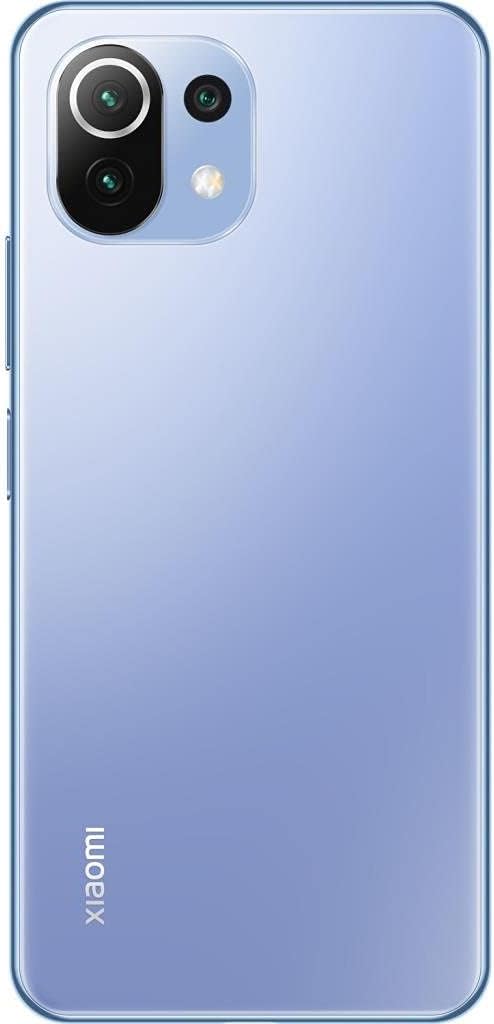
Image: Back view of the Xiaomi Mi 11 Lite in Bubblegum Blue, showcasing the triple camera module located on the top left corner. The Xiaomi logo is vertically aligned on the bottom left.
3. Connectivity
- Wi-Fi: Go to Settings > Wi-Fi to connect to available networks.
- Bluetooth: Go to Settings > Bluetooth to pair with other Bluetooth devices like headphones or speakers.
- Mobile Data: Ensure your SIM card is active and mobile data is enabled in Settings > SIM cards & mobile networks.
Maintenance
1. Cleaning the Device
Use a soft, lint-free cloth to clean the screen and body of the phone. Avoid using harsh chemicals, abrasive cleaners, or aerosol sprays, as these can damage the device's finish or internal components. The phone features a fingerprint-resistant coating on the back.
2. Battery Care
- Avoid exposing the device to extreme temperatures (below 0°C or above 45°C).
- Do not fully discharge the battery regularly. It is recommended to keep the battery level between 20% and 80% for optimal longevity.
- Use only original or certified chargers and cables.
3. Software Updates
Regularly check for and install software updates to ensure your device has the latest features, security patches, and performance improvements. Go to Settings > About phone > MIUI version to check for updates.
Troubleshooting
- Device not turning on: Ensure the battery is charged. Connect the charger and wait a few minutes before attempting to power on again.
- Apps crashing or freezing: Close the problematic app and reopen it. If the issue persists, restart the device. Clear the app's cache or data in Settings > Apps.
- Poor battery life: Check for background apps consuming power. Reduce screen brightness, disable unnecessary features like GPS or Bluetooth when not in use, and ensure the device is running the latest software update.
- Network connectivity issues: Toggle Airplane mode on and off. Restart the device. Check if your SIM card is properly inserted. Contact your mobile carrier if the issue persists.
- Screen unresponsive: Force restart the device by holding the Power button for about 10-15 seconds.
Specifications
| Feature | Detail |
|---|---|
| Brand | XIAOMI |
| Model Name | Mi 11 Lite |
| Part Number | M2101K9AG |
| RAM Size | 6 GB |
| Internal Storage | 128 GB |
| Processor | Snapdragon 732G |
| Display Type | AMOLED |
| Screen Size | 6.55 Inches |
| Display Resolution | 2400 x 1080 |
| Battery Capacity | 4250 mAh (Lithium Ion) |
| Cellular Technology | 4G |
| Dimensions | 16 x 4 x 2 cm; 470 g |
Warranty and Support
Warranty Information
This product comes with a 3-month warranty provided by the seller, Telmov. Please retain your proof of purchase for any warranty claims. The warranty covers manufacturing defects under normal use conditions.
Customer Support
For technical assistance, troubleshooting, or warranty inquiries, please contact your point of purchase or refer to the official Xiaomi support channels. You can find more information on the official Xiaomi website: www.mi.com/global/service/support/


