
Introduction
The Arlo Essential 1 HD camera is designed to capture essential details day and night with 1080p resolution, an integrated spotlight, and full-color night vision. This wireless, weather-resistant camera is suitable for both indoor and outdoor use, providing reliable surveillance. It offers easy installation, smart notifications for detected persons, vehicles, animals, or packages, two-way audio, and a long-lasting rechargeable battery. Cloud video recording is available with an Arlo Secure subscription.

A set of four Arlo Essential 1 HD wireless security cameras, designed for comprehensive home surveillance.
What's Included
The Arlo Essential 1 HD camera package includes the following components:
- (4) Arlo Essential Cameras
- (4) Mounting Kits
- (1) Charger
- (1) Quick Start Guide
Key Features
- HD Video + Color Night Vision: Records in 1080p HD with an integrated spotlight for clear, full-color night vision up to 5 meters.
- 6-Month Battery Life: Equipped with a long-lasting rechargeable battery. Compatible with an optional solar panel (sold separately) for continuous power.
- Arlo Secure Trial Included: Comes with a free trial of Arlo Secure, offering basic motion alerts and live camera feed viewing.
- Advanced Detection: With an Arlo Secure subscription, benefit from advanced motion detection for people, pets, vehicles, or packages.
- 2-Year Warranty: All Arlo products are covered by a 2-year manufacturer's warranty.
- 130° Viewing Angle + WiFi: Features a 130-degree wide-angle lens and 2.4 GHz WiFi connectivity for broad coverage.
- Smart Home Integration: Compatible with Amazon Alexa, Google Assistant, and IFTTT. The Arlo Secure app is accessible on smartphones, smartwatches, and tablets.
- Weather-Resistant + Siren: IP65-rated for water resistance and includes a siren to deter unwanted visitors. Operates in temperatures from -20°C to 45°C.
- Easy Installation + 12x Zoom: Simple setup via the Arlo Secure app with step-by-step instructions. Features 12x digital zoom for detailed viewing.
- Local Storage Option: Supports local storage via USB when paired with an Arlo Smart Hub (sold separately), protecting video footage from theft.
Setup
Setting up your Arlo Essential camera is a straightforward process designed for user convenience. Ensure you have downloaded the Arlo Secure app on your smartphone or tablet before beginning installation.
- Charge the Camera: Fully charge your Arlo Essential camera using the provided charging cable. The battery is not removable.
- Download the Arlo Secure App: Install the Arlo Secure app from your device's app store.
- Create an Account: Follow the in-app instructions to create a new Arlo account or log in to an existing one.
- Add Your Device: Select 'Add New Device' in the app and choose your Arlo Essential camera. The app will guide you through connecting the camera to your 2.4 GHz Wi-Fi network.
- Mount the Camera: Choose a suitable location for your camera, ensuring it has a clear view of the area you wish to monitor. Use the included mounting kit to securely attach the camera to a wall or ceiling.

Step-by-step guide illustrating the simple installation process for the Arlo Essential camera, including mounting and securing the device.

The Arlo Essential camera is designed for easy DIY installation, suitable for various outdoor and indoor placements.
Operation
Once installed, your Arlo Essential camera provides robust surveillance capabilities accessible through the Arlo Secure app.
Live View and Recording
Access a live feed of your camera's view at any time through the Arlo Secure app. The camera records in 1080p HD, ensuring clear and detailed footage.

The Arlo Essential 1 HD camera records in 1080p resolution, providing clear and detailed video footage for enhanced security monitoring.
Wide-Angle View
The camera's 130-degree viewing angle captures a broad area, minimizing blind spots and providing extensive coverage of your property.

With a 130-degree viewing angle, the Arlo Essential camera captures a wide field of view, minimizing blind spots and maximizing coverage.
Color Night Vision
Equipped with an integrated spotlight, the camera provides full-color night vision, allowing you to see important details even in complete darkness.

The camera provides clear video both day and night, featuring full-color night vision to identify details even in low-light conditions.
Two-Way Audio and Siren
Communicate with visitors or deter intruders using the built-in speaker and microphone for two-way audio. The integrated siren can be activated remotely via the app to alert others or scare off unwanted guests.

The Arlo Essential camera's two-way audio feature allows for clear communication with visitors through the Arlo Secure app.
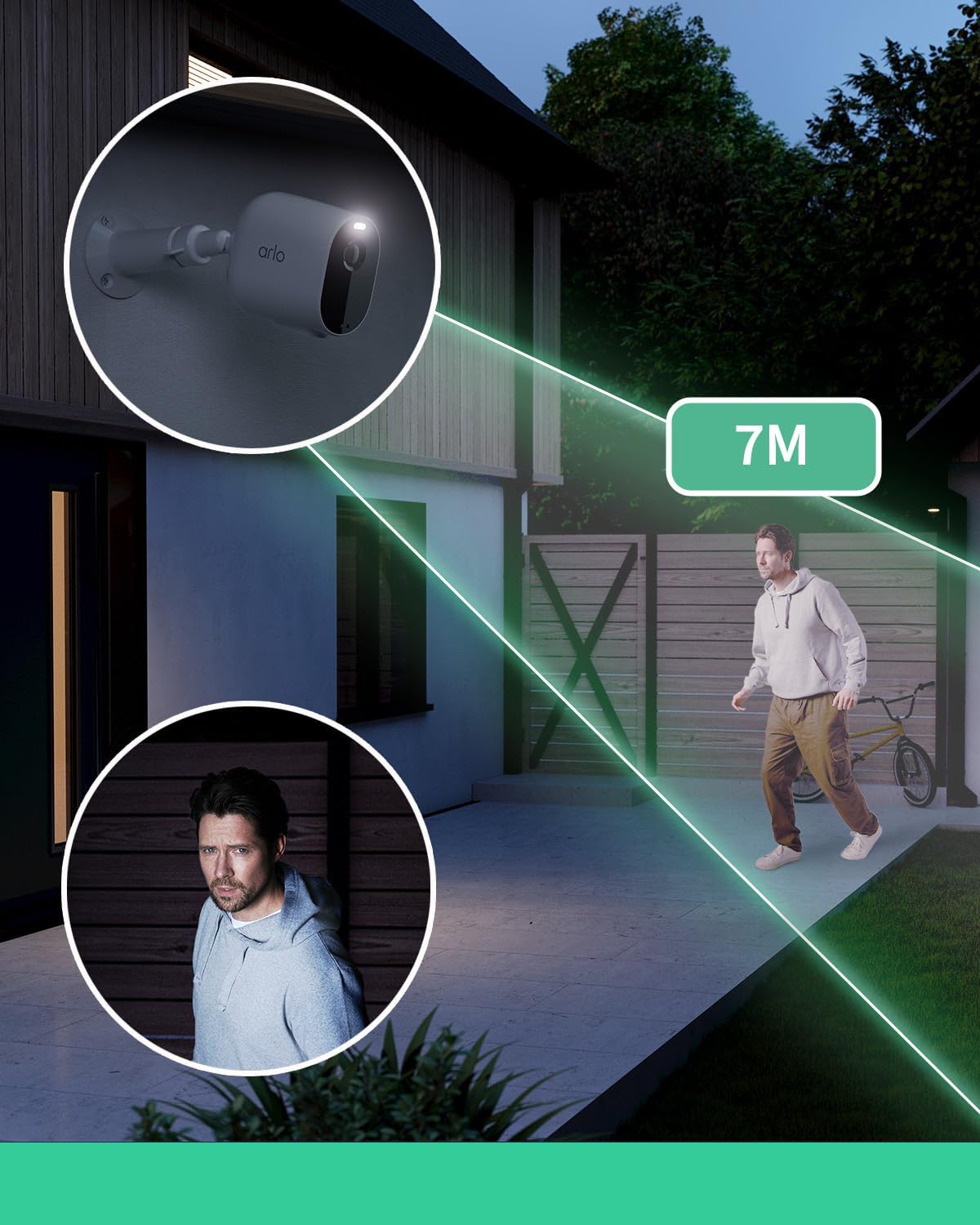
The integrated siren can be activated remotely via the app to deter intruders, and the camera offers a wide detection range for comprehensive monitoring.
Smart Home Integration
The Arlo Essential camera seamlessly integrates with popular smart home platforms, allowing you to control and monitor your security system using voice commands or through connected devices.
- Amazon Alexa
- Google Assistant
- IFTTT
- Apple HomeKit (requires Arlo SmartHub, sold separately)

The Arlo Essential camera seamlessly integrates with popular smart home platforms like Amazon Alexa, Google Assistant, and Apple HomeKit (requires Arlo SmartHub for HomeKit).
Maintenance
To ensure optimal performance and longevity of your Arlo Essential camera, follow these maintenance guidelines:
- Battery Charging: The camera features a long-lasting rechargeable battery. Recharge it using the provided charging cable when the battery level is low. The battery is not designed to be user-removable.
- Weather Resistance: The camera is IP65-rated for weather resistance, meaning it can withstand rain, snow, heat, and cold. However, avoid submerging the camera in water.
- Operating Temperature: The camera is designed to operate in temperatures ranging from -20°C to 45°C. Ensure it is not exposed to extreme temperatures outside this range.
- Lens Cleaning: Periodically clean the camera lens with a soft, lint-free cloth to ensure clear video quality. Avoid abrasive materials or harsh chemicals.
- Optional Solar Panel: For continuous charging and reduced maintenance, consider purchasing an Arlo Solar Panel (sold separately) to keep your camera's battery charged using sunlight.
Storage Options
Arlo offers flexible options for storing your video recordings:
Arlo Secure Cloud Storage
With an Arlo Secure subscription, your video recordings are securely stored in the cloud for a specified period (e.g., 30 days). This ensures your footage is safe and accessible from anywhere, even if your camera is stolen or damaged.

Arlo Secure offers cloud storage to ensure your video recordings are safe and accessible, even if the camera or local storage is compromised.
Local Storage (via Smart Hub)
For local backup, the Arlo Essential camera can utilize local storage via USB when paired with an Arlo Smart Hub (sold separately). This provides an additional layer of security for your video footage.

Arlo prioritizes data privacy and security, encrypting your video data with bank-level protection and offering continuous threat monitoring.
Specifications
| Feature | Detail |
|---|---|
| Model Name | VMC2430-100EUS |
| Video Recording Resolution | 1080p |
| Color | White |
| Number of Items | 4 Cameras |
| Wireless Communication Technology | Wi-Fi (2.4 GHz) |
| Form Factor | Dome |
| Viewing Angle | 130 Degrees |
| Night Vision Range | 91 Meters |
| Material | Metal |
| Power Source | Battery Powered (Lithium-ion, included) |
| Dimensions (L x W x H) | 8.9 x 5.2 x 7.7 cm |
| Weight | 331 Grams |
| Special Features | HD Resolution, Night Vision, Two-Way Audio, Siren |
| Indoor/Outdoor Use | Outdoor, Indoor |
| Compatible Devices | Computer, Laptop, Smartphone, Tablet |
| Connectivity Protocol | HomePlug |
| Controller Type | Amazon Alexa |
Troubleshooting
If you encounter any issues with your Arlo Essential camera, consider the following common troubleshooting steps:
- No Live View/Offline Camera: Ensure your camera is within range of your 2.4 GHz Wi-Fi network and has sufficient battery. Check your Wi-Fi router for connectivity issues.
- Poor Video Quality: Verify your Wi-Fi signal strength. Clean the camera lens if it appears smudged or dirty.
- Motion Detection Issues: Adjust the motion detection sensitivity settings in the Arlo Secure app. Ensure the camera's field of view is clear of obstructions.
- Battery Draining Quickly: High activity areas or frequent live view access can reduce battery life. Consider adjusting motion detection zones or adding an Arlo Solar Panel.
- Audio Problems: Check the microphone and speaker settings in the app. Ensure there are no physical obstructions blocking the audio components.
For more detailed troubleshooting or persistent issues, refer to the comprehensive help section within the Arlo Secure app or visit the official Arlo support website.
Warranty & Support
Your Arlo Essential 1 HD camera comes with a 1-year manufacturer's warranty. This warranty covers defects in materials and workmanship under normal use.
For warranty claims, technical assistance, or additional support, please contact Arlo customer service through their official website or the Arlo Secure app. Ensure you have your product model number (VMC2430-100EUS) and proof of purchase readily available.
Arlo is committed to providing secure and reliable home monitoring solutions. For further information on product updates, security best practices, or to explore additional Arlo products and services, visit the Arlo Brand Store.


