
carrier DF-20DEN7-WF
Contents
Carrier Midea DF-20DEN7-WF Dehumidifier Instruction Manual
Model: DF-20DEN7-WF
1. Safety Instructions
Please read all instructions carefully before operating the dehumidifier and retain this manual for future reference. Failure to follow these instructions may result in electric shock, fire, or personal injury.
- Ensure the power supply matches the voltage specified on the rating label.
- Do not operate the unit with a damaged cord or plug. If the supply cord is damaged, it must be replaced by the manufacturer, its service agent, or similarly qualified persons to avoid a hazard.
- Do not block the air inlet or outlet. Maintain at least 20 cm clearance around the unit.
- Do not insert fingers or foreign objects into the air inlet/outlet.
- Always place the unit on a level, stable surface to prevent water spillage.
- Unplug the unit before cleaning, moving, or performing any maintenance.
- Do not use the unit in areas where flammable gases or liquids are stored.
- This appliance is not intended for use by persons (including children) with reduced physical, sensory or mental capabilities, or lack of experience and knowledge, unless they have been given supervision or instruction concerning use of the appliance by a person responsible for their safety.
- Children should be supervised to ensure that they do not play with the appliance.
- The refrigerant R290 is used in this dehumidifier. Handle with care and ensure proper ventilation.
2. Product Overview
The Carrier Midea DF-20DEN7-WF is an efficient dehumidifier designed to reduce excess moisture in indoor environments, preventing issues such as condensation, mold growth, and musty odors. It is suitable for various rooms including bathrooms, cellars, laundry rooms, kitchens, and poorly ventilated areas.
Key Features:
- High Dehumidification Capacity: Up to 20 liters per 24 hours.
- App Capable: Remote monitoring and control via a smartphone application.
- Intelligent Dehumidifier Mode: Automatic humidity control between 45% and 55%.
- Portable Design: Equipped with flexible wheels for easy movement.
- Environmentally Friendly Refrigerant: Uses R290, a natural, freon-free, and low-carbon refrigerant.
- 24-Hour Timer: Allows for scheduled operation.
- Removable Water Tank: 3-liter capacity with anti-spill features.
Product Components:

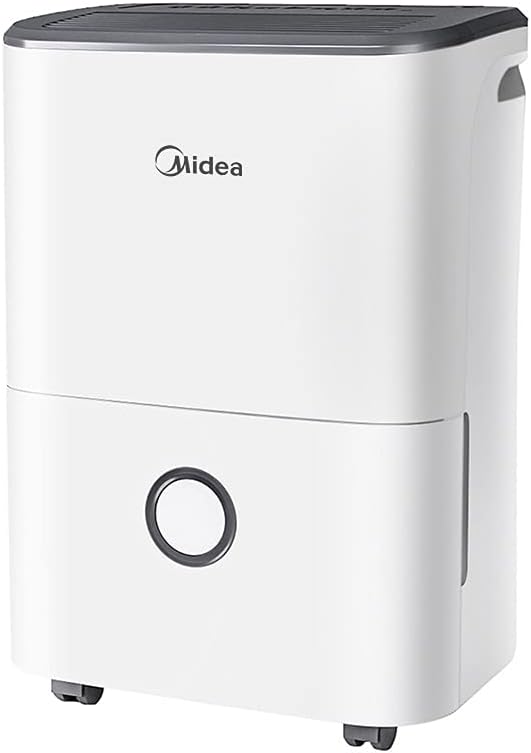

3. Setup
3.1 Unpacking
- Carefully remove the dehumidifier from its packaging.
- Remove all packing materials, tapes, and protective films.
- Check for any damage during transit. If damaged, do not operate and contact customer support.
3.2 Placement
- Place the dehumidifier on a firm, level surface that can support its weight when the water tank is full.
- Ensure there is at least 20 cm (8 inches) of space around the unit for proper airflow. Do not place it against a wall or furniture that could obstruct the air inlets or outlets.
- For optimal performance, close all doors and windows in the room where the dehumidifier is operating.
- Avoid placing the unit near heat sources or in direct sunlight.
3.3 Wheel Installation (Optional)
The dehumidifier comes with flexible wheels for easy mobility. These can be attached or removed as desired.
- Carefully tilt the unit to access the bottom.
- Insert the wheels into the designated slots on the base of the unit until they click into place.
- Ensure all four wheels are securely attached before returning the unit to an upright position.
3.4 Power Connection
- Plug the power cord into a grounded electrical outlet.
- Do not use extension cords or multi-plugs, as this may pose a fire hazard.
3.5 App Setup (Optional)
The dehumidifier is app-capable, allowing for remote monitoring and control.
- Download the Midea app from your smartphone's app store (iOS or Android).
- Follow the in-app instructions to create an account and connect your dehumidifier to your home Wi-Fi network.
- Once connected, you can control the unit, set schedules, and monitor humidity levels from your smartphone.
4. Operating Instructions
4.1 Powering On/Off
- To turn the unit on, press the Power button on the control panel. The unit will start operating in its default mode.
- To turn the unit off, press the Power button again.
4.2 Setting Desired Humidity Level
The dehumidifier features an intelligent dehumidifier mode that automatically controls room humidity within a comfortable range.
- Press the 'Mode' or 'Humidity' button (refer to control panel icons) to cycle through available humidity settings or modes.
- The intelligent mode aims to maintain humidity between 45% and 55% depending on the room temperature.
- You may also be able to manually set a target humidity percentage using the '+' and '-' buttons.
4.3 Timer Function
The 24-hour timer allows you to schedule when the unit turns on or off.
- To set Auto-On Timer: With the unit off, press the 'Timer' button. Use '+' and '-' to set the desired delay (in hours) before the unit turns on.
- To set Auto-Off Timer: With the unit on, press the 'Timer' button. Use '+' and '-' to set the desired delay (in hours) before the unit turns off.
- The timer indicator light will illuminate when the timer is active.
4.4 Water Tank Management
The dehumidifier will automatically stop operating when the 3-liter water tank is full. The 'Tank Full' indicator light will illuminate.
- Carefully pull out the water tank from the front of the unit.
- Empty the collected water into a sink or drain.
- Slide the empty water tank back into the unit until it is securely in place. The unit will resume operation automatically.
4.5 Continuous Drainage (Optional)
For continuous operation without needing to empty the water tank, you can connect a drain hose (not included) to the continuous drainage port on the back of the unit. Ensure the hose is sloped downwards to allow gravity drainage.
5. Maintenance
Regular maintenance ensures optimal performance and extends the lifespan of your dehumidifier.
5.1 Cleaning the Air Filter
The air filter should be cleaned every two weeks or more frequently depending on usage and air quality.
- Turn off the dehumidifier and unplug it from the power outlet.
- Locate the air filter (usually at the back or side of the unit). Remove it carefully.
- Clean the filter with a vacuum cleaner to remove dust and debris. For heavy dirt, wash it gently with warm, soapy water.
- Rinse the filter thoroughly and allow it to air dry completely before reinstalling. Do not expose to direct sunlight or high heat.
- Reinsert the dry filter into the unit.
5.2 Cleaning the Exterior
- Wipe the exterior of the unit with a soft, damp cloth.
- Do not use harsh chemicals, abrasive cleaners, or solvents, as these can damage the surface.
5.3 Water Tank Cleaning
Clean the water tank periodically to prevent mold and mildew growth.
- Remove the water tank and empty any remaining water.
- Wash the tank with mild detergent and warm water.
- Rinse thoroughly and allow it to air dry before placing it back into the unit.
5.4 Storage
If the unit will not be used for an extended period:
- Empty and clean the water tank.
- Clean the air filter.
- Unplug the unit and coil the power cord neatly.
- Store the dehumidifier in an upright position in a cool, dry place, away from direct sunlight and extreme temperatures.
6. Troubleshooting
Before contacting customer service, please refer to the following troubleshooting guide for common issues.
| Problem | Possible Cause | Solution |
|---|---|---|
| Unit does not turn on. | No power supply. Power cord not securely plugged in. Water tank full or not properly installed. | Check power outlet. Ensure power cord is firmly plugged in. Empty water tank and ensure it is correctly seated. |
| Dehumidifier is not collecting water. | Room temperature too low. Air filter clogged. Humidity setting too high. Doors/windows open. | Dehumidifiers operate best above 5°C (41°F). Clean the air filter. Lower the desired humidity setting. Close all doors and windows. |
| Unit is noisy. | Unit not on a level surface. Air filter clogged. Fan obstruction. | Place unit on a flat, stable surface. Clean the air filter. Check for any obstructions in the fan area. |
| Water leaks from the unit. | Water tank not properly installed. Unit is tilted. Continuous drainage hose is blocked or improperly connected. | Reinstall water tank correctly. Ensure unit is on a level surface. Check and clear the drainage hose, ensure proper slope. |
7. Technical Specifications
| Feature | Specification |
|---|---|
| Model Number | DF-20DEN7-WF |
| Brand | Carrier |
| Dehumidification Capacity | 20 Liters/24 hours |
| Water Tank Capacity | 3 Liters |
| Recommended Floor Area | Up to 40 Square Meters |
| Power / Wattage | 440 watts |
| Voltage | 230V |
| Noise Level | 46 Decibels |
| Refrigerant | R290 |
| Product Dimensions (D x W x H) | 26D x 35W x 51H centimeters |
| Item Weight | 15.1 Kilograms |
| Number of Speeds | 2 |
| Special Features | Anti-Spill, Removable Tank, App Capable, Auto Shutoff |
| Material | Metal, Plastic |
8. Warranty and Support
This Carrier Midea dehumidifier is covered by a manufacturer's warranty. Please refer to the warranty card included with your purchase for specific terms, conditions, and duration of coverage.
Customer Support:
For technical assistance, warranty claims, or service inquiries, please contact your local Carrier or Midea authorized service center. Ensure you have your model number (DF-20DEN7-WF) and proof of purchase available when contacting support.
You can also visit the official Carrier or Midea website for additional support resources and contact information.
Documents and downloads
Ask a question about this manual
Ask about setup, troubleshooting, compatibility, parts, safety, or missing instructions. Manuals+ will review the question and use this page’s manual context to help answer it.