
SWAREY S160
SWAREY Portable Power Station S160 User Manual
Model: S160
1. Introduction
This manual provides essential information for the safe and efficient use of your SWAREY Portable Power Station S160. Please read it thoroughly before operating the device and retain it for future reference.
The SWAREY S160 is a compact and versatile portable power station designed to provide reliable power for various devices during outdoor activities, travel, or emergencies. It features a durable LiFePO4 battery, multiple output ports, and supports solar charging.
2. Safety Instructions
WARNING: Failure to follow these safety instructions may result in electric shock, fire, or serious injury.
- Do not disassemble, repair, or modify the unit.
- Keep the unit away from fire, water, and extreme temperatures.
- Do not use or store the unit in high humidity environments.
- Ensure proper ventilation during use and charging.
- Keep out of reach of children and pets.
- Use only approved accessories and charging cables.
- Avoid dropping or subjecting the unit to strong impacts.
- If the unit emits smoke, strange odors, or unusual noise, discontinue use immediately and contact support.
3. Product Overview
Familiarize yourself with the components and interfaces of your SWAREY S160 Portable Power Station.
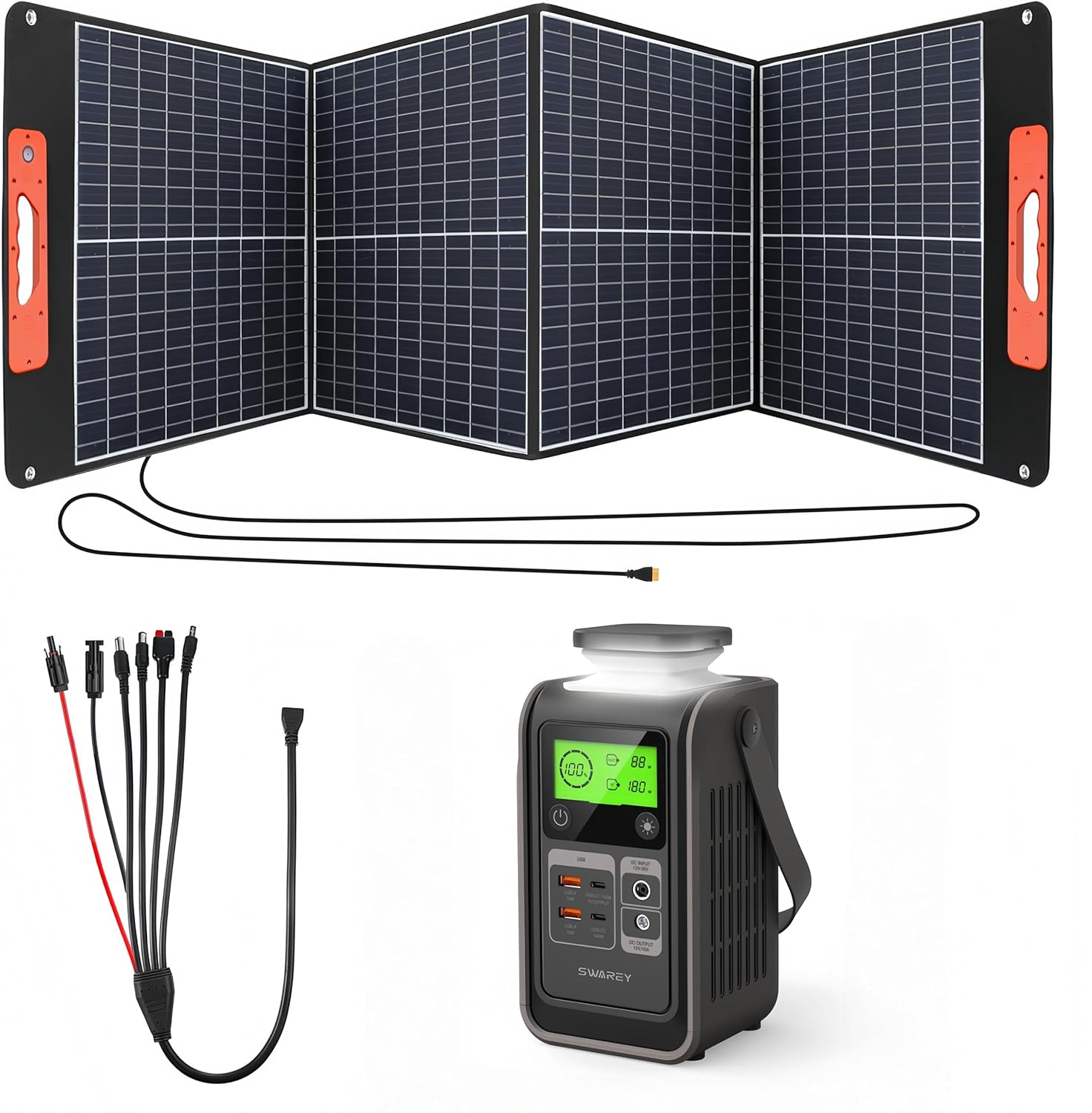
Figure 3.1: SWAREY Portable Power Station S160 with included accessories, including a foldable solar panel and various charging cables.
3.1 Front Panel Interface

Figure 3.2: Detailed view of the SWAREY S160 front panel, highlighting the output ports and control buttons.
- Power Button: Press and hold to turn the unit on/off.
- AC Output Port (230V): For devices requiring AC power (up to 150W continuous, 200W peak).
- DC Output Ports (12V): Two ports for DC-powered devices (up to 100W total).
- USB-A Ports: Two standard USB-A ports (2.4A auto).
- USB-A QC 3.0 Port: One Quick Charge 3.0 USB-A port (18W).
- USB-C Ports: Two USB-C ports (140W Two-Way Fast Charging).
- LCD Display: Shows battery level, output status, and error indicators.
- LED Light Button: Press to cycle through LED light modes (On, SOS, Off).

Figure 3.3: Close-up of the USB-C and DC input/output ports on the SWAREY S160, illustrating their functions and power delivery capabilities.
4. Setup and Charging
4.1 Initial Charging
Before first use, fully charge the power station. This ensures optimal battery performance and calibration.
- Connect the power station to a wall outlet using the provided AC adapter.
- The LCD display will show the charging status.
- Charging typically takes 4-5 hours for a full charge.
4.2 Charging Methods
The SWAREY S160 supports multiple charging methods:

Figure 4.1: Illustration of the different ways to charge the SWAREY S160, including AC wall charging, solar panel charging, and car charging.
- AC Wall Charger: Connect to a standard wall outlet. (Approx. 4-5 hours)
- Solar Panel: Connect a compatible solar panel (DC5521 or MC4 output, not included) to the DC input port. The integrated MPPT technology optimizes solar charging efficiency. (Approx. 4-5 hours with 100W solar panel).
- Car Charger: Use the provided car charger to charge from your vehicle's 12V outlet. (Approx. 2.6 hours with 60W car socket).
- USB-C PD: The 140W USB-C PD port can also be used for charging the power station.
4.3 Solar Panel Setup (Optional)
If using a SWAREY foldable solar panel, follow these steps:

Figure 4.2: A SWAREY foldable solar panel unfolded and positioned outdoors, demonstrating its lightweight and portable design.
- Unfold the solar panel and place it in direct sunlight.
- Adjust the angle of the panel for maximum sun exposure. Some SWAREY solar panels include a "ray tracing" feature to help optimize the angle.
- Connect the solar panel's output cable to the DC input port on the SWAREY S160.
- Monitor the LCD display on the power station to confirm charging.

Figure 4.3: A close-up of a solar panel's integrated shadow indicator, which helps users find the best angle for receiving sunlight by centering the shadow of a small black dot.

Figure 4.4: Detailed view of the output ports on a SWAREY solar panel, including DC (XT60), QC 3.0, and Type-C (PD 60W) for direct device charging.
5. Operating Instructions
5.1 Turning On/Off
Press and hold the main power button for approximately 3 seconds to turn the power station on or off. The LCD display will illuminate upon activation.
5.2 Using Output Ports
Once the power station is on, you can activate specific output sections:
- AC Output: Press the AC button to enable the 230V AC outlet. Connect your device. Ensure the device's power consumption does not exceed 150W (200W peak).
- DC Output: The DC ports are typically active when the unit is on. Connect your 12V DC devices.
- USB Output: The USB-A and USB-C ports are typically active when the unit is on. Connect your USB-powered devices.
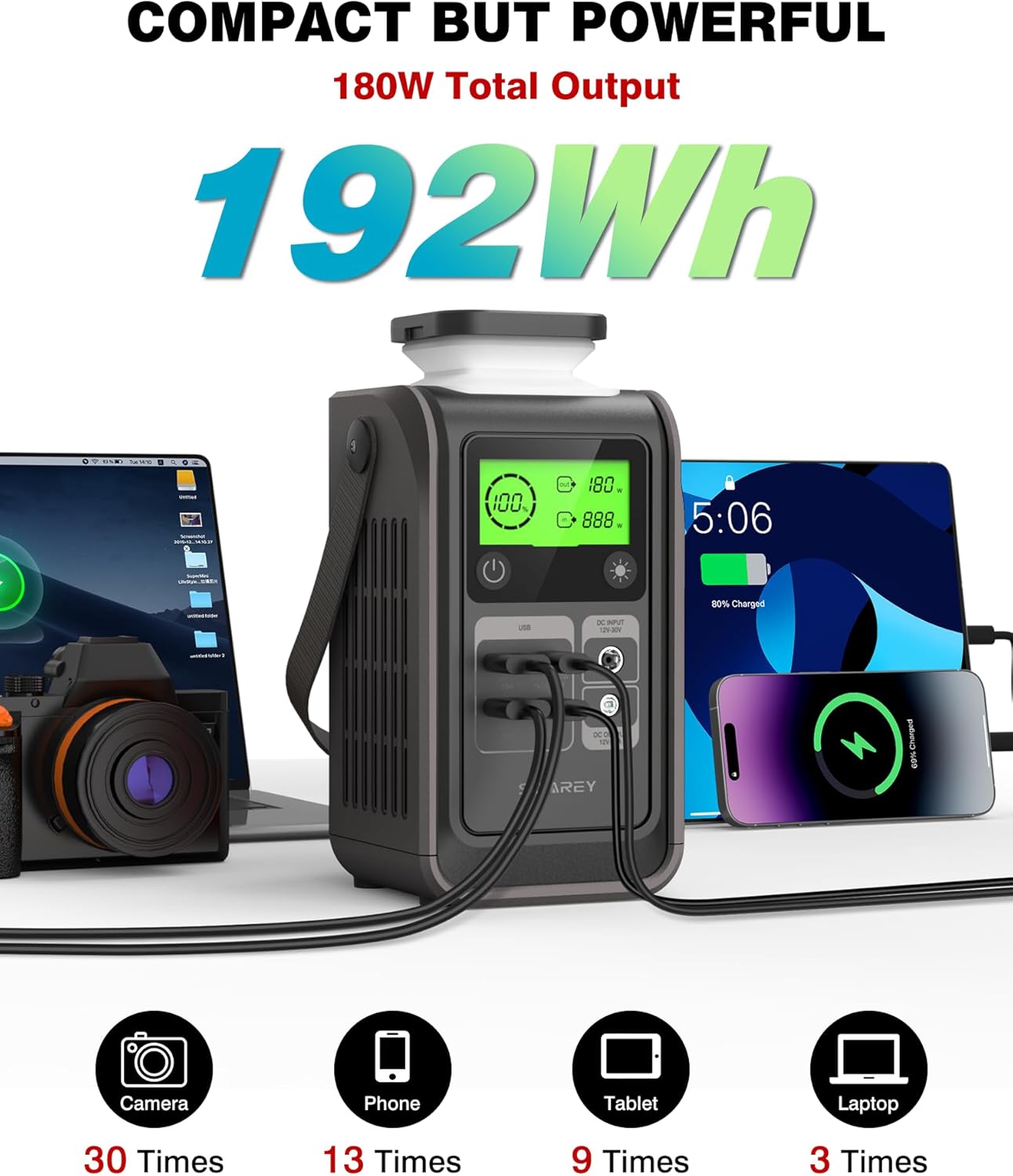
Figure 5.1: The SWAREY S160 simultaneously charging a laptop, camera, smartphone, and tablet, demonstrating its multi-device charging capability.
5.3 LED Light Function
Press the LED light button to cycle through the following modes:
- First press: Constant illumination.
- Second press: SOS signal mode.
- Third press: Turn off the LED light.
6. Maintenance and Storage
6.1 General Maintenance
- Clean the unit with a dry, soft cloth. Do not use abrasive cleaners or solvents.
- Ensure all ports are free from dust and debris.
- Avoid exposing the unit to direct sunlight or heat sources for prolonged periods.
6.2 Battery Care (LiFePO4)
The SWAREY S160 uses a LiFePO4 battery, known for its long cycle life (3500+ cycles) and safety. To maximize its lifespan:
- Charge the unit fully every 3-6 months, even if not in use.
- Store the unit in a cool, dry place, ideally between 0°C and 40°C (32°F and 104°F).
- Avoid completely draining the battery for extended periods.
7. Troubleshooting
If you encounter issues with your SWAREY S160, refer to the following common problems and solutions:
| Problem | Possible Cause | Solution |
|---|---|---|
| Unit does not turn on. | Battery is completely drained. | Connect to an AC charger and allow it to charge for at least 30 minutes before attempting to power on. |
| No output from AC port. | AC output not activated; device exceeds 150W; overheating. | Press the AC button to activate. Check device wattage. Allow unit to cool down if it was running hot. |
| Solar charging is slow or not working. | Insufficient sunlight; incorrect panel angle; panel or cable issue. | Ensure direct sunlight and optimal panel angle. Check connections. Clean solar panel surface. |
| Unit is overheating. | Excessive load; poor ventilation. | Reduce connected load. Ensure unit is in a well-ventilated area. |
If the problem persists after attempting these solutions, please contact SWAREY customer support.
8. Specifications
| Feature | Detail |
|---|---|
| Model Number | S160 |
| Battery Type | LiFePO4 |
| Capacity | 166 Wh (3.2V/52Ah, 12.8V/12.96Ah) |
| AC Output | 230V, 150W (Max 200W) |
| DC Output | 12V, 100W (Max) |
| USB-A Output | 2 x 5V/2.4A Auto, 1 x QC 3.0 (18W) |
| USB-C Output | 2 x 140W Two-Way Fast Charging |
| Charging Input | DC5521/MC4 (Solar), AC Adapter, Car Charger, USB-C PD |
| Dimensions | 17.2 x 8 x 15 cm |
| Weight | 2.2 kg |
| Certifications | UL, CE, FCC, PSE, RoHS |

Figure 8.1: Dimensions of a typical SWAREY foldable solar panel, illustrating its compact folded size and extended length when deployed.
9. Warranty and Support
SWAREY products are designed for reliability and performance. For warranty information and customer support, please refer to the warranty card included with your product or visit the official SWAREY website.
If you have any questions or require assistance, please contact SWAREY customer service with your model number (S160) and purchase details.
Related documentsS160


Ask a question about this manual
Ask about setup, troubleshooting, compatibility, parts, safety, or missing instructions. Manuals+ will review the question and use this page’s manual context to help answer it.