Introduction
Welcome to the user manual for your Bass Jaxx Glow in The Dark Headphones. This guide provides essential information on setting up, operating, maintaining, and troubleshooting your headphones to ensure optimal performance and longevity. Please read this manual thoroughly before use and retain it for future reference.
Product Overview
The Bass Jaxx Glow in The Dark Headphones are designed to deliver high-quality sound with a lightweight and comfortable fit. Featuring a unique glow-in-the-dark design, these wired headphones connect via a standard 3.5mm audio jack, making them compatible with a wide range of audio devices.

Image: Green Bass Jaxx Glow in The Dark Headphones, showcasing the over-ear design and wired connection.

Image: Purple Bass Jaxx Glow in The Dark Headphones, illustrating the alternative color option.
Key Features:
- Glow in the Dark: Unique material that glows after exposure to light.
- High Quality Sound: Engineered for clear audio reproduction.
- Lightweight Design: Comfortable for extended listening sessions.
- 3.5mm Audio Jack: Universal compatibility with most audio devices.
Setup
Setting up your Bass Jaxx Glow in The Dark Headphones is straightforward:
- Identify the Audio Port: Locate the 3.5mm audio jack on your device (e.g., smartphone, tablet, computer, MP3 player).
- Connect the Headphones: Insert the 3.5mm plug of your headphones firmly into the audio port of your device.
- Adjust Volume: Once connected, adjust the volume on your audio device to a comfortable listening level.
Your headphones are now ready for use.
Operating Instructions
These headphones operate on a simple plug-and-play principle. No batteries or additional power sources are required.
Basic Usage:
- Plug the 3.5mm connector into your audio source.
- Place the headphones comfortably over your ears.
- Play audio from your connected device.
Glow in the Dark Feature:
To activate the glow-in-the-dark effect, expose the headphones to a bright light source (e.g., sunlight, room light) for a few minutes. The headphones will then emit a soft glow in dark environments. The intensity and duration of the glow depend on the exposure time and light source.
Maintenance
Proper care will extend the life and performance of your headphones.
- Cleaning: Use a soft, dry cloth to wipe the headphones. Do not use harsh chemicals or abrasive cleaners.
- Storage: When not in use, store the headphones in a clean, dry place away from extreme temperatures. Avoid tangling the cable.
- Cable Care: Do not pull on the cable to disconnect the headphones. Always grasp the plug. Avoid sharp bends or kinks in the cable.
- Moisture: Keep the headphones away from water and excessive moisture.
Troubleshooting
If you encounter issues with your headphones, try the following solutions:
- No Sound:
- Ensure the 3.5mm plug is fully inserted into the audio port.
- Check the volume level on your audio device.
- Test the headphones with a different audio device to rule out a device-specific issue.
- Poor Sound Quality (Static, Muffled Audio):
- Ensure the 3.5mm plug is clean and free of debris.
- Try adjusting the plug slightly in the audio port.
- Test with another audio source to determine if the issue is with the headphones or the source device.
Specifications
Detailed technical specifications for the Bass Jaxx Glow in The Dark Headphones (Model: HP-0044):
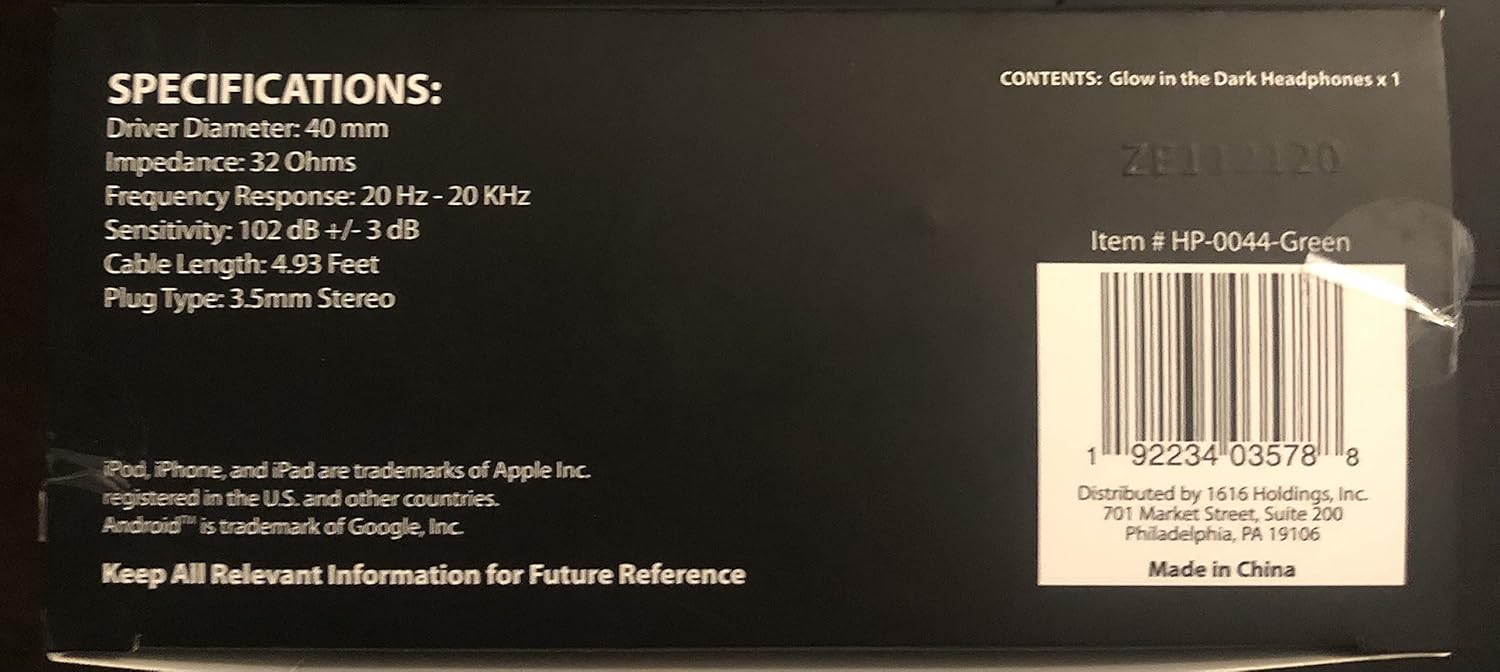
Image: Rear packaging of Bass Jaxx Glow in The Dark Headphones, displaying product specifications.
| Feature | Specification |
|---|---|
| Model Number | HP-0044 |
| Driver Diameter | 40 mm |
| Impedance | 32 Ohms |
| Frequency Response | 20 Hz - 20 KHz |
| Sensitivity | 102 dB +/- 3 dB |
| Cable Length | 4.93 Feet |
| Plug Type | 3.5mm Stereo |
| Connectivity Technology | Wired |
| Item Weight | 7.9 ounces |
| UPC | 192234035788 |
| Compatible With | iPhone, Android Smartphones, iPad Tablets, iPod MP3 Players |
Warranty and Support
For warranty information or technical support, please refer to the product packaging or contact the manufacturer directly. It is recommended to retain your purchase receipt as proof of purchase.
Keep All Relevant Information for Future Reference.


