
Inkbird INK-IFT01, IHT-1P
Contents
Inkbird INK-IFT01 Infrared Thermometer and IHT-1P Instant Read Meat Thermometer User Manual
Models: INK-IFT01 & IHT-1P
1. Introduction
This manual provides detailed instructions for the safe and effective use of your Inkbird INK-IFT01 Infrared Thermometer and IHT-1P Instant Read Meat Thermometer. Please read this manual thoroughly before operating the devices and retain it for future reference.
The INK-IFT01 is a non-contact infrared thermometer designed for surface temperature measurements, while the IHT-1P is a probe-style thermometer for internal temperature readings of food.
2. Product Overview

Figure 2.1: Inkbird INK-IFT01 Infrared Thermometer and IHT-1P Instant Read Meat Thermometer.
2.1 INK-IFT01 Infrared Thermometer
The INK-IFT01 is a digital laser temperature gun designed for non-contact surface temperature measurements. It features a wide temperature range, adjustable emissivity, and a clear LCD display.
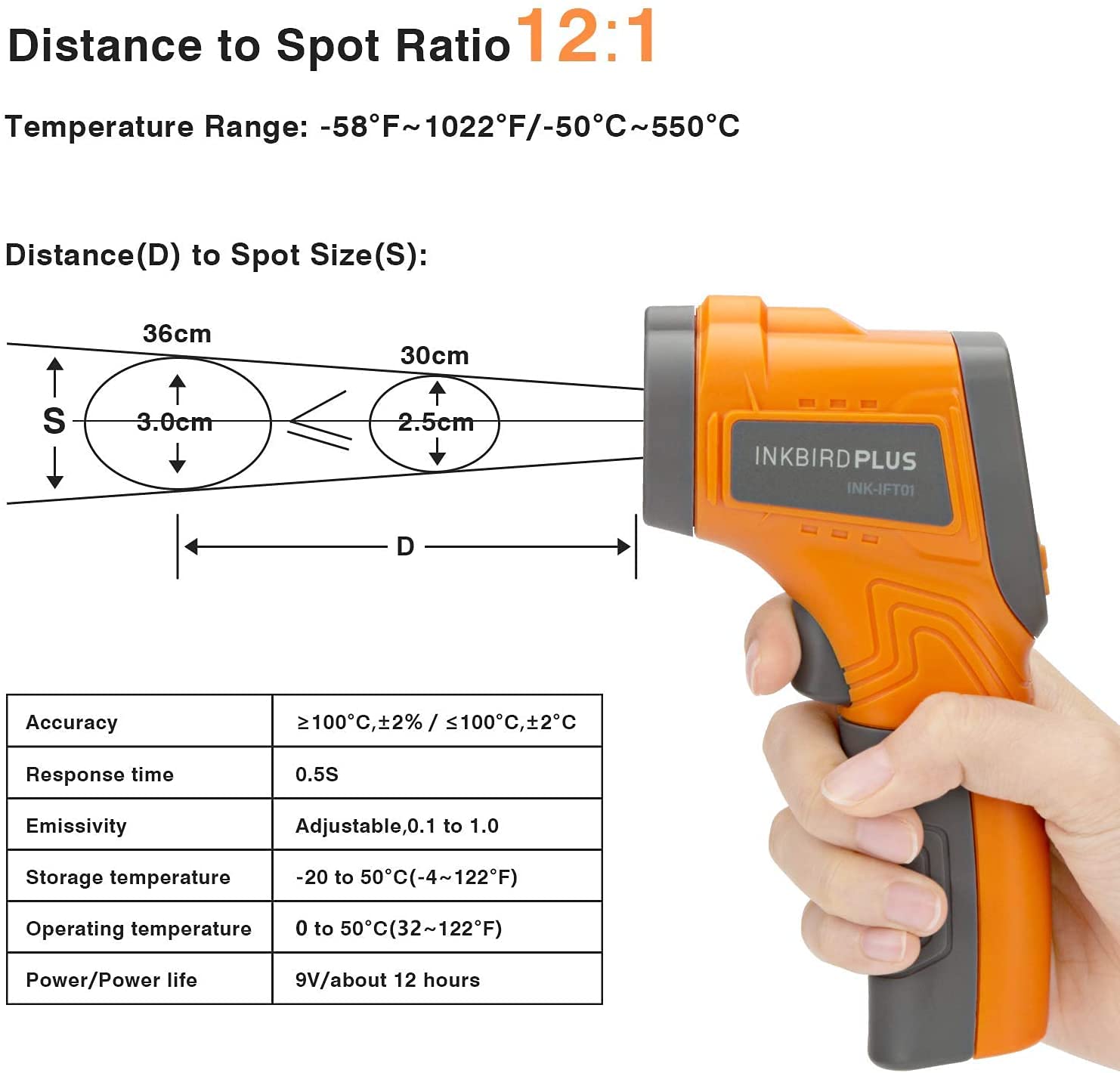
Figure 2.2: Components of the INK-IFT01 Infrared Thermometer.
- Laser Hole: Emits the targeting laser.
- Infrared Sensor: Detects infrared radiation to measure temperature.
- LCD Screen: Displays temperature readings and settings.
- °C/°F/Down Button: Toggles temperature units and navigates menus.
- Function Button: Accesses various settings and modes.
- Laser/Up Button: Activates the laser pointer and navigates menus.
- Trigger: Initiates temperature measurement.
2.2 IHT-1P Instant Read Meat Thermometer
The IHT-1P is a fast-reading probe thermometer suitable for measuring the internal temperature of food. It is designed for convenience with a magnetic back, backlight, and rechargeable battery.

Figure 2.3: Features of the IHT-1P Instant Read Meat Thermometer.
- Foldable Probe: Stainless steel probe for temperature insertion.
- LCD Display: Shows temperature readings.
- HOLD/°F/°C Button: Freezes the current reading and switches temperature units.
- Magnetic Back: Allows for convenient storage on metal surfaces.
- Backlight: Illuminates the display for low-light conditions.
- USB Charging Port: For recharging the internal battery.
3. Setup
3.1 INK-IFT01 Infrared Thermometer Battery Installation
The INK-IFT01 requires one 9V battery (included).
- Locate the battery compartment on the handle of the device.
- Gently pull down the battery cover.
- Connect the 9V battery to the terminal, ensuring correct polarity.
- Place the battery into the compartment and close the cover until it clicks securely.

Figure 3.1: INK-IFT01 9V Battery Installation.
3.2 IHT-1P Instant Read Meat Thermometer Initial Charging
The IHT-1P has a built-in rechargeable battery. Before first use, fully charge the device.
- Locate the USB charging port on the side of the device.
- Connect the provided USB cable to the IHT-1P and a standard USB power adapter (not included).
- The charging indicator will show the charging status. Once fully charged, disconnect the cable.

Figure 3.2: IHT-1P USB Charging.
4. Operation
4.1 INK-IFT01 Infrared Thermometer
The INK-IFT01 measures surface temperature without contact.
- Taking a Measurement: Point the thermometer at the target surface. Pull and hold the trigger. The laser pointer will indicate the measurement area. The temperature will be displayed on the LCD screen. Release the trigger to hold the reading.
- Changing Temperature Units (°C/°F): Press the '°C/°F' button to switch between Celsius and Fahrenheit.
- Adjusting Emissivity: Emissivity (ε) is the ability of a material to emit thermal energy. Different materials have different emissivities. For accurate readings, adjust the emissivity setting to match the target material. Press the 'MODE' button to enter emissivity adjustment mode, then use the 'Up' and 'Down' buttons to change the value (typically between 0.1 and 1.0). Common emissivity values can be found online.
- Distance to Spot Ratio (D:S): The INK-IFT01 has a 12:1 D:S ratio. This means that at a distance of 12 inches, the measurement spot diameter is 1 inch. To ensure accurate readings, ensure the target area is larger than the spot size at your measurement distance.

Figure 4.1: Understanding Distance to Spot Ratio.
4.2 IHT-1P Instant Read Meat Thermometer
The IHT-1P measures internal temperatures quickly.
- Turning On/Off: Unfold the probe to turn the device on. Fold the probe back into the body to turn it off. The device also features an auto-off function after a period of inactivity to conserve battery.
- Taking a Measurement: Insert the stainless steel probe into the thickest part of the food, avoiding bone or gristle. The temperature will display on the LCD screen within seconds.
- Changing Temperature Units (°C/°F): Press the 'HOLD/°F/°C' button to switch between Celsius and Fahrenheit. The device will remember your last selection.
- Hold Function: Press the 'HOLD/°F/°C' button briefly to freeze the current temperature reading on the display. Press it again to resume live readings.

Figure 4.2: IHT-1P Temperature Unit Lock.
5. Maintenance and Care
- Cleaning: Wipe both thermometers clean with a damp cloth after each use. Do not immerse the INK-IFT01 in water. The IHT-1P is IPX5 waterproof, meaning it is resistant to splashes and light rain, but it should not be submerged in water or washed under running water for extended periods.
- Storage: Store the devices in a dry place at room temperature when not in use.
- Battery Replacement (INK-IFT01): Replace the 9V battery when the low battery indicator appears on the display.
- Charging (IHT-1P): Recharge the IHT-1P when the battery indicator is low. A full charge typically takes a few hours and provides extended use.
- Probe Care (IHT-1P): Ensure the probe is clean and dry before folding it back into the device. Avoid bending or damaging the probe tip.
6. Specifications
| Feature | Specification |
|---|---|
| Temperature Range | -58℉~1022℉ (-50℃~550℃) |
| Accuracy | ≥100℃, ±2% / ≤100℃, ±2℃ |
| Response Time | 0.5 seconds |
| Distance to Spot Ratio (D:S) | 12:1 |
| Emissivity | Adjustable, 0.1 to 1.0 |
| Power | 9V Battery |
| Operating Temperature | 0 to 50℃ (32~122℉) |
| Storage Temperature | -20 to 50℃ (-4~122℉) |
| Feature | Specification |
|---|---|
| Waterproof Rating | IPX5 (splash-proof) |
| Battery | 250mAh Rechargeable |
| Special Features | Ultra Fast, High Accuracy, Calibration, Magnetic, Hold Temp, Backlight, Auto Shutoff |
7. Troubleshooting
- Device Not Turning On:
- INK-IFT01: Check if the 9V battery is installed correctly and has sufficient charge. Replace if necessary.
- IHT-1P: Ensure the probe is fully unfolded. Check battery level and recharge if low.
- Inaccurate Readings:
- INK-IFT01: Verify the emissivity setting matches the target material. Ensure the measurement distance is appropriate for the 12:1 D:S ratio. Avoid measuring through glass or reflective surfaces.
- IHT-1P: Ensure the probe is inserted into the thickest part of the food, away from bone. The IHT-1P supports calibration; refer to the full product manual or Inkbird support for calibration procedures if consistent inaccuracies are observed.
- Display Not Working:
- Check battery levels for both devices.
- Ensure the devices are within their specified operating temperature range.
- IHT-1P Not Charging:
- Ensure the USB cable is securely connected to both the device and the power source. Try a different USB cable or power adapter.
8. Warranty and Support
Inkbird products are designed for reliability and performance. For warranty information, technical support, or service inquiries, please refer to the warranty card included with your product or visit the official Inkbird website. Please have your model number (INK-IFT01, IHT-1P) and purchase details ready when contacting support.
Documents and downloads
Ask a question about this manual
Ask about setup, troubleshooting, compatibility, parts, safety, or missing instructions. Manuals+ will review the question and use this page’s manual context to help answer it.