Introduction
The Sennheiser EW-D ME3 Dynamic Headset System (Q1-6) is a digital UHF wireless system designed for high-quality audio transmission in various RF environments. It offers a high dynamic range, simplified setup, and reliable connection. This system is ideal for users who prioritize quality and performance, featuring advanced capabilities like frequency coordination via the Sennheiser Smart Assist app, increased bandwidth, and low latency.
This manual provides essential information for setting up, operating, and maintaining your EW-D ME3 system to ensure optimal performance and longevity.
Package Contents
The EW-D ME3 Dynamic Headset System typically includes the following components:
- EW-D EM Rack Receiver
- EW-D SK Bodypack Transmitter
- ME 3-II Headset Microphone
- Power supply unit
- Antennas
- Rackmount kit
- Batteries

Image: Sennheiser EW-D ME3 Headset System components including receiver, bodypack, and headset microphone.
Setup
Follow these steps to set up your Sennheiser EW-D ME3 Dynamic Headset System:
- Unpack Components: Carefully remove all items from the packaging.
- Install Batteries: Insert the provided batteries into the EW-D SK Bodypack Transmitter.
- Connect Receiver:
- Attach the antennas to the EW-D EM Rack Receiver.
- Connect the power supply unit to the receiver and plug it into an electrical outlet.
- Connect the receiver's audio output to your mixing console or amplifier using an appropriate audio cable.

Image: Front view of the Sennheiser EW-D EM Rack Receiver.
- Connect Headset Microphone: Plug the ME 3-II Headset Microphone into the bodypack transmitter.
- Power On: Turn on the receiver and the bodypack transmitter.
- Frequency Scan and Sync:
- Use the receiver's controls or the Sennheiser Smart Assist app to perform an automatic frequency scan to find available, interference-free channels.
- Sync the bodypack transmitter with the receiver to establish a wireless connection.
- Audio Check: Speak into the headset microphone and check the audio levels on your mixing console or amplifier. Adjust gain settings on the receiver and transmitter as needed.
Video: Introduction to Evolution Digital Wireless and Available Sets. This video demonstrates the various components and setup options for the Sennheiser EW-D series.
Operating Instructions
Once set up, operating your EW-D ME3 system is straightforward:
- Wearing the Headset: Position the ME 3-II headset comfortably on your head, ensuring the microphone boom is positioned near your mouth for optimal sound capture. The design provides a secure fit for active use.
- Gain Adjustment: Adjust the gain on the bodypack transmitter and receiver to achieve appropriate audio levels without distortion. The system offers a high dynamic range to handle various vocal performances.
- Mute Function: The bodypack transmitter may feature a mute switch for temporary audio cutoff. Refer to the bodypack's specific controls for its mute functionality.
- Sennheiser Smart Assist App: Utilize the Smart Assist app for advanced control, monitoring, and frequency management. The app simplifies complex settings and allows for remote adjustments.
- RF Environment: The digital UHF transmission is designed to minimize noise, interference, and static bursts, providing a clear and reliable signal.
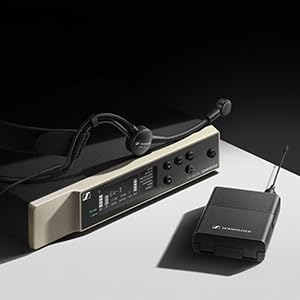
Image: Sennheiser ME 3-II Headset Microphone.
Maintenance
Proper maintenance ensures the longevity and performance of your Sennheiser EW-D ME3 system:
- Cleaning: Use a soft, dry cloth to clean the receiver, transmitter, and headset microphone. Avoid liquid cleaners or abrasive materials.
- Battery Care: Remove batteries from the transmitter if the system will not be used for an extended period to prevent leakage. Use high-quality alkaline batteries or rechargeable equivalents.
- Storage: Store the system in a cool, dry place, away from direct sunlight and extreme temperatures.
- Cable Inspection: Regularly inspect all cables for signs of wear or damage. Replace damaged cables immediately to prevent performance issues.
Troubleshooting
If you encounter issues with your EW-D ME3 system, consider the following common troubleshooting steps:
| Problem | Possible Cause | Solution |
|---|---|---|
| No audio output |
|
|
| Poor audio quality / Dropouts |
|
|
| Feedback (squealing sound) |
|
|
For more detailed troubleshooting or persistent issues, please refer to the official Sennheiser support resources or contact customer service.
Specifications
Key specifications for the Sennheiser EW-D ME3 Dynamic Headset System (Model 508710):
- Item Weight: 5.9 pounds
- Product Dimensions: 15.94 x 13.78 x 2.87 inches
- Item Model Number: 508710
- Color: Black
- Compatible Devices: Bluetooth-enabled digital devices (for app control)
- Connector Type: Wireless
- Material Type: Metal
- Battery Type: Alkaline
- Frequency Band: Q1-6 (specific to this variant)
- Bandwidth: 56 MHz (allowing for up to 90 channels)
- Transmission: Digital UHF
Warranty and Support
Sennheiser products are known for their quality and reliability. For warranty information, product registration, and technical support, please visit the official Sennheiser website or contact their customer service department. Keep your purchase receipt as proof of purchase for warranty claims.
You can find more information and support at the Sennheiser Store on Amazon.


