
Introduction
Thank you for choosing the Mount-It! MI-SB50 Universal Soundbar Mount. This 2-in-1 bracket is designed to securely attach your soundbar to the back of your TV or directly to a wall, enhancing your audio experience. This manual provides detailed instructions for proper installation and use to ensure optimal performance and safety.

Image: The Mount-It! MI-SB50 Universal Soundbar Mount, highlighting its dual functionality for TV and wall installation.
Product Overview
The MI-SB50 mount offers a versatile solution for integrating your soundbar with your television setup. Its design allows for flexible placement and adjustment to suit various soundbar models and TV sizes.
- Universal Compatibility: Fits most TVs with standard VESA patterns and soundbars from various brands.
- 2-in-1 Design: Can be installed directly to the back of the TV or mounted on the wall.
- Enhanced Audio: When attached to the TV, the soundbar moves with the screen, optimizing directional sound quality.
- Adjustable Depth: The cradle depth can be adjusted to securely hold soundbars between 3.5 to 6.1 inches.
- Height Adjustable: Brackets can be adjusted to lower or raise the soundbar for a clean look.
Setup and Installation
Before beginning installation, ensure you have all components and tools required. Refer to the included hardware list. Always ensure the mounting surface can support the combined weight of your TV, soundbar, and the mount.
TV Mounting Installation
- Attach Brackets to Uprights: Secure the soundbar brackets to the vertical uprights using the provided hardware. Ensure they are tightened for stability.
- Secure to TV: Attach the assembled uprights and VESA bracket to the back of your TV using the appropriate VESA screws. The mount can be positioned above or below the TV.
- Adjust Depth: Adjust the depth of the soundbar cradles to fit your soundbar snugly.
- Place Soundbar: Carefully place your soundbar into the adjusted cradles.
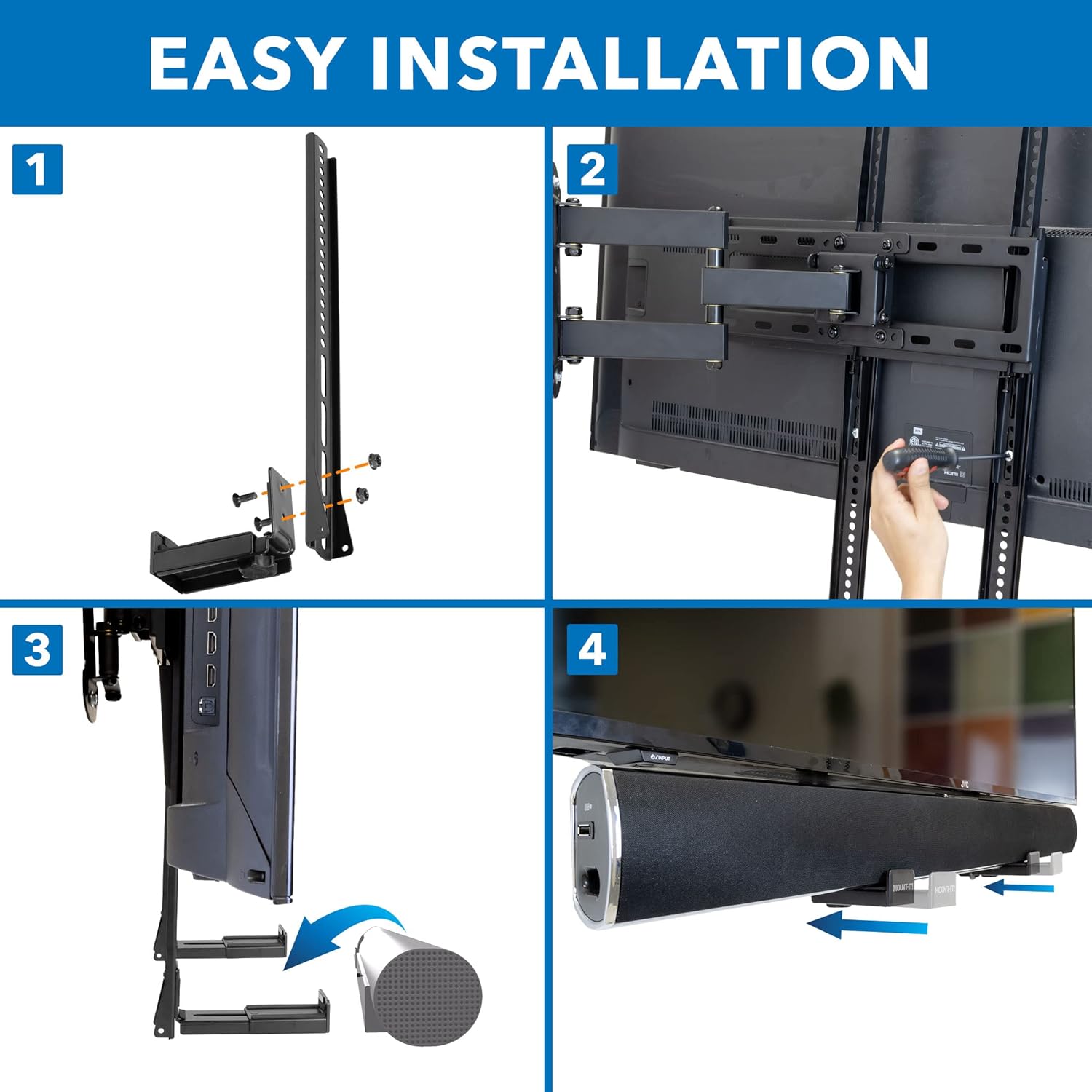
Image: Visual guide demonstrating the steps for TV mounting, including attaching brackets and placing the soundbar.
Wall Mounting Installation
- Detach Brackets: If previously assembled for TV mounting, detach the soundbar cradles from the vertical uprights.
- Mark Pilot Holes: Hold the soundbar cradles against the wall at your desired height and level them. Mark the pilot holes. For concrete walls, use the provided anchors.
- Drill Holes: Drill pilot holes into the marked locations.
- Secure Brackets: Use the provided screws to securely attach the soundbar cradles to the wall.
- Adjust Depth: Adjust the depth of the cradles to fit your soundbar.
- Place Soundbar: Carefully place your soundbar into the adjusted cradles.

Image: Illustration of the soundbar mount installed directly on a wall, showcasing its low-profile design.
Installation Video
Video: Official installation guide for the Mount-It! MI-SB50 Universal Soundbar Mount, demonstrating both TV and wall mounting procedures.
Operating and Adjustments
Once installed, the Mount-It! MI-SB50 allows for several adjustments to optimize your soundbar's position and performance.
Soundbar Movement with TV
When mounted to the back of a TV that is on a swivel or articulating mount, the soundbar will move in conjunction with the TV. This ensures that the audio is always directed towards the viewer, regardless of the TV's angle, providing a consistent and immersive sound experience.
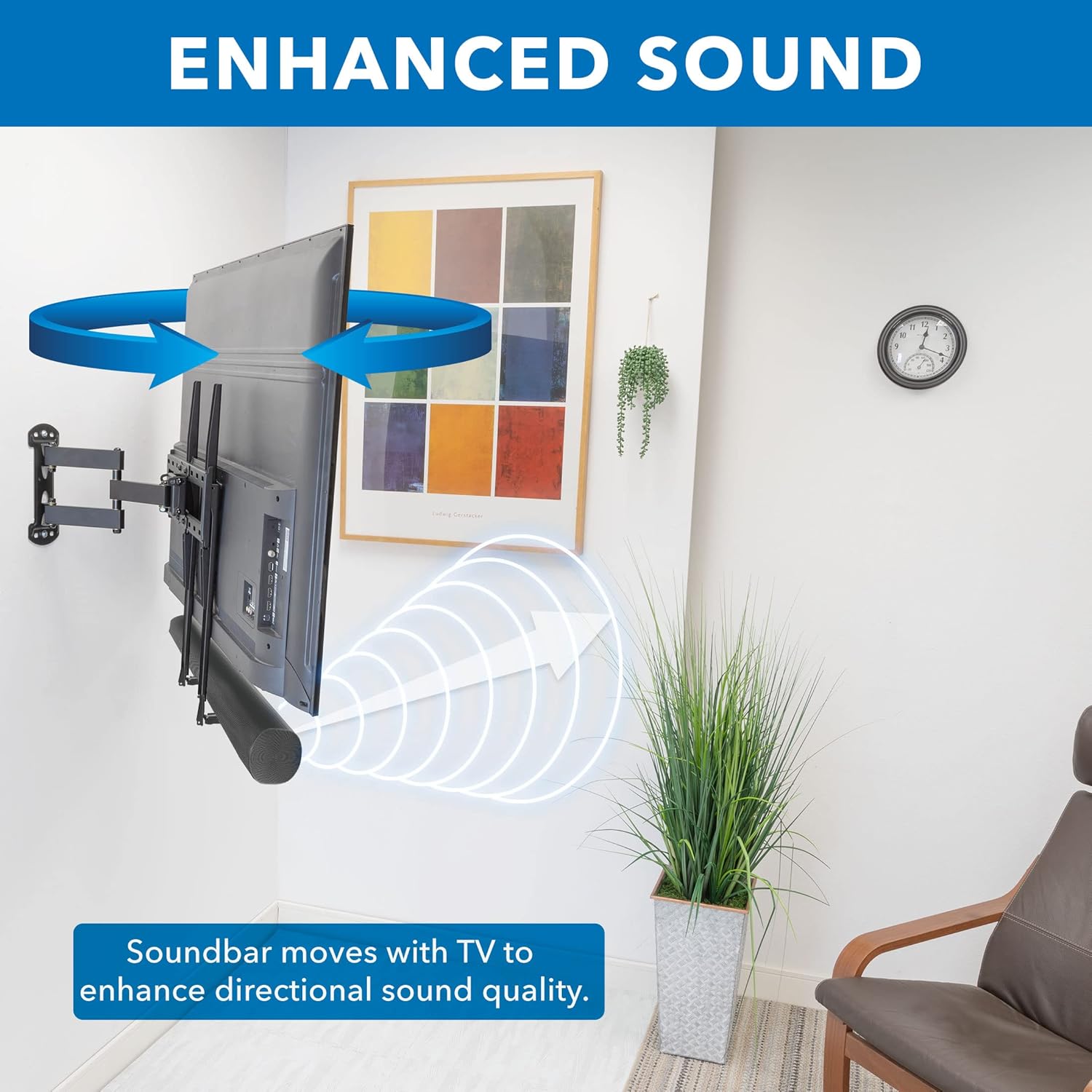
Image: A soundbar mounted to an articulating TV, illustrating how it moves with the TV to enhance directional sound quality.
Adjustable Depth and Height
The soundbar cradles feature an adjustable depth mechanism, allowing them to accommodate soundbars with varying widths (3.5 to 6.1 inches). Additionally, the vertical uprights provide multiple mounting points for height adjustment, ensuring the soundbar can be positioned for a clean, integrated look with your TV.
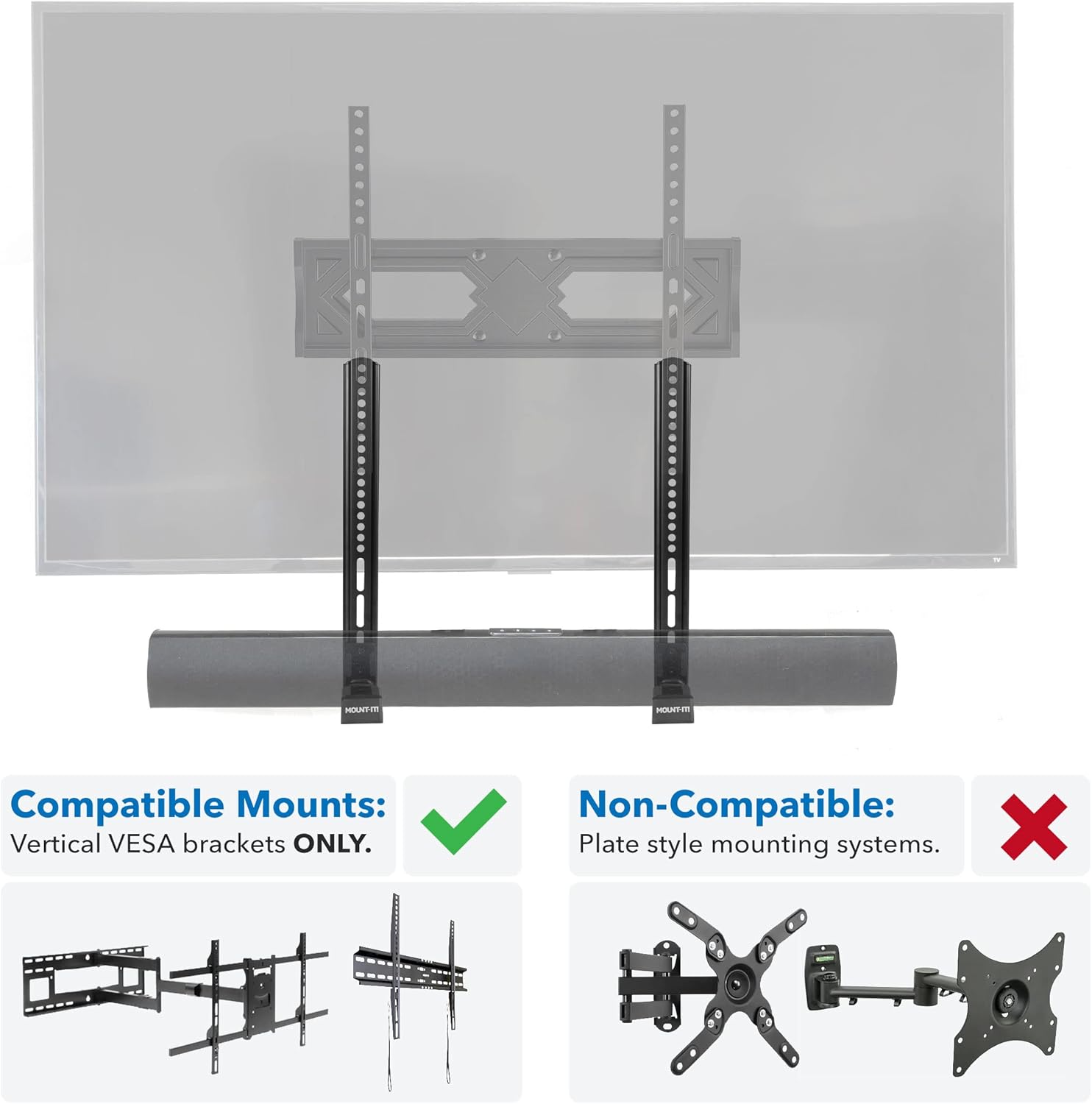
Image: Close-up view of the soundbar mount's adjustable depth feature, allowing it to fit various soundbar sizes.
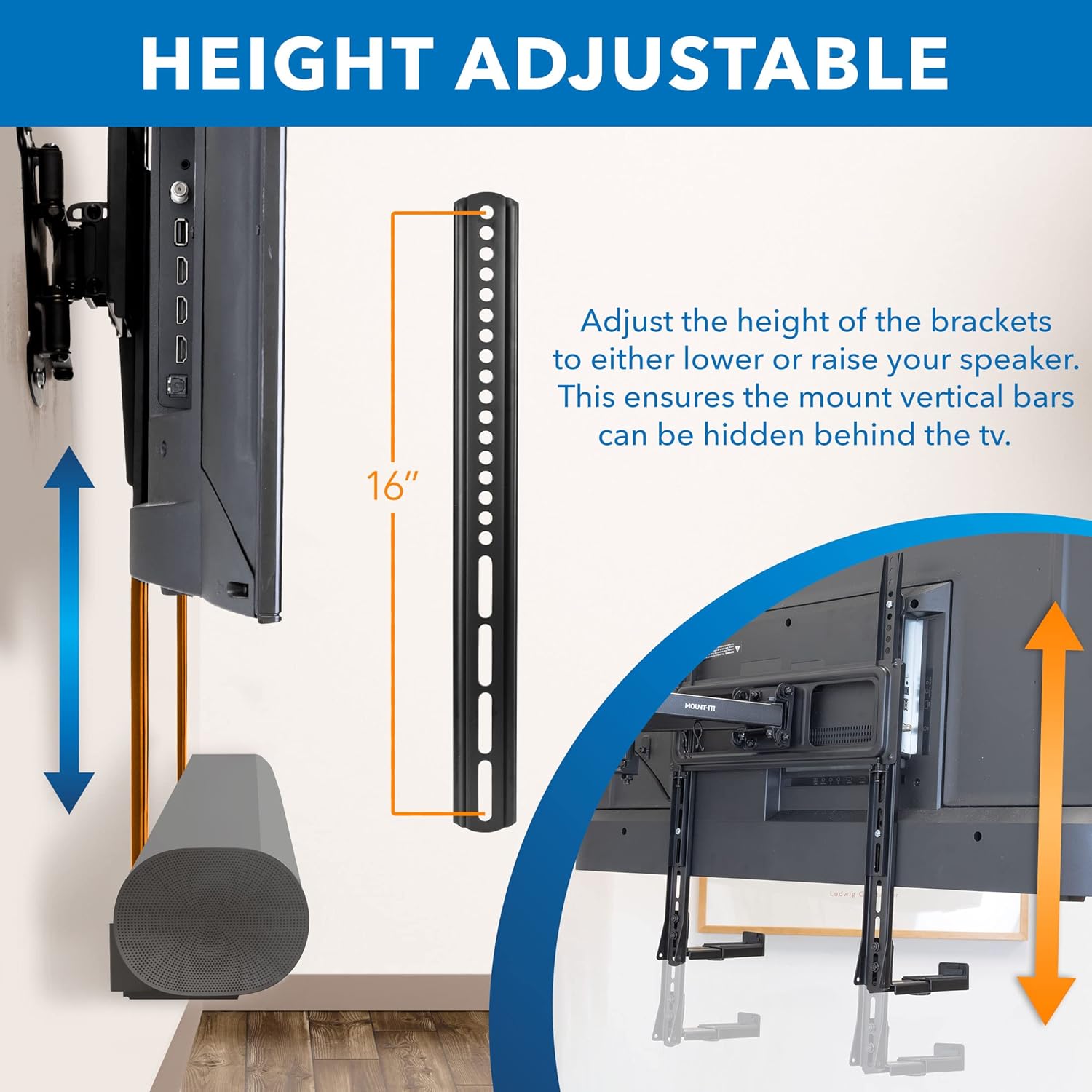
Image: Illustration demonstrating the height adjustment capability of the soundbar mount, allowing for optimal positioning.
Maintenance
To ensure the longevity and continued performance of your Mount-It! MI-SB50 soundbar mount, follow these simple maintenance guidelines:
- Regular Cleaning: Wipe the mount with a soft, dry cloth to remove dust and debris. Avoid using abrasive cleaners or solvents.
- Check Connections: Periodically inspect all screws and connections to ensure they remain tight and secure. Retighten if necessary.
- Inspect for Damage: Check for any signs of wear, corrosion, or damage to the mount components. If any damage is found, contact customer service for assistance.
Troubleshooting
If you encounter any issues during or after installation, refer to the following common troubleshooting tips:
- Soundbar Not Secure: Ensure the adjustable cradles are tightened correctly to match your soundbar's depth. Verify all mounting screws are securely fastened.
- Mount Appears Loose: Recheck all screws connecting the mount to the TV or wall. Ensure the wall anchors (if used) are properly installed and suitable for your wall type.
- Difficulty Adjusting: Loosen adjustment screws slightly before attempting to reposition the soundbar or adjust its height/depth. Retighten once the desired position is achieved.
- Incompatible TV Mount: This soundbar mount is compatible with vertical VESA brackets only. It is not compatible with plate-style mounting systems. Refer to the compatibility image for clarification.
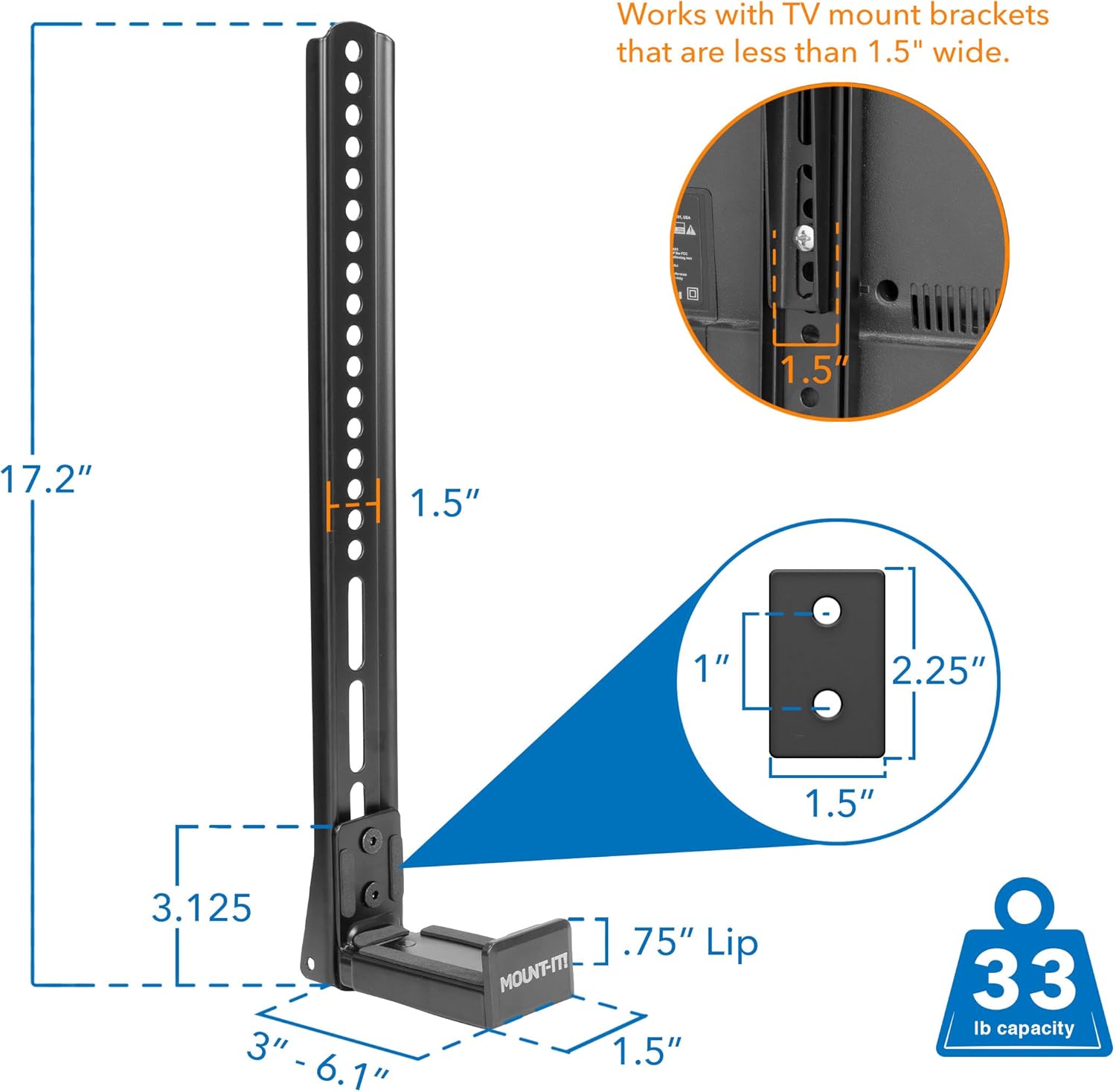
Image: Visual guide distinguishing between compatible vertical VESA TV mounts and non-compatible plate-style mounts.
Specifications
| Feature | Detail |
|---|---|
| Model Number | MI-SB50 |
| Mounting Type | TV and Wall |
| Material | Alloy Steel |
| Color | Black |
| Item Weight | 4.11 pounds |
| Package Dimensions | 17.68 x 5.43 x 2.32 inches |
| Maximum Weight Capacity | 33 Pounds |
| Item Depth | 6.1 inches |
| Special Features | Adjustable |
| UPC | 810041733740 |
Warranty and Support
The Mount-It! MI-SB50 Universal Soundbar Mount is supported by our 10-year warranty, ensuring peace of mind regarding its quality and durability.
Should you have any questions, require technical assistance, or need support with your product, please do not hesitate to contact Mount-It!'s in-house Customer Service Specialists. Our team is ready to provide expert guidance.
For more information and to explore other Mount-It! products, visit the Mount-It! Store.