1. Introduction
This manual provides detailed instructions for the installation, operation, and maintenance of your LANMODO Vast Pro Dash Cam system. The system includes a front camera with an 8-inch FHD IPS display and an IP67 waterproof rear camera, designed to enhance driving safety and record incidents.
2. Important Safety Information
- The system's operating voltage is 12V. For vehicles with a 24V output, the system cannot be directly connected to the OBD port for power. It must be connected via a car charger with a voltage converter from 24V to 12V.
- The Vast Pro system requires minimal light to form a clear image. In completely dark environments, some image noise may be present. Strong light sources may cause overexposure.
- Always format the Micro SD card before initial use. To prevent damage to the card or loss of files, ensure the device is turned off before inserting or removing the Micro SD card.
- For optimal stability and to minimize image vibration, mount the system on the windshield. To ensure a firm mount, clean the suction cup with soap and water, dry it thoroughly, and wipe the windshield with isopropyl alcohol before attachment.
- If a LANMODO rear camera is connected to an inverted signal, the Vast Pro will automatically display the rear view when reverse gear is engaged.
- The real-time clock maintains the current time for 7 to 15 days when the system is powered off. After this period, the time will need to be reset upon reconnecting the system to power.
- The Vast Pro is a driving assistance system and does not fully replace human vision. Always pay attention to both the display screen and road conditions.
3. Package Contents
Verify that all items are present in the package:
- Night Vision Camera for Car with Screen (Front Camera) x1
- IP67 Waterproof Rear Camera x1
- 8.5m Extension Cable Kit for Rear Camera x1
- Dashboard Base x1
- Suction Cup x1
- Installation Tool Kit (includes screwdriver)
- 3.5m Car Charger and Extension Cable Kit x1
- 3.0m OBD Adapter and Extension Cable Kit x1
- User Manual x1

Image 1: LANMODO Vast Pro Dash Cam system components, including the main unit, suction cup mount, and waterproof rear camera.
4. Features Overview
- Dual Super Night Vision: Equipped with a Sony CMOS imaging sensor and F1.0 aperture, the system provides clear, full-color footage in low-light conditions, balancing exposure for optimal clarity.
- Extended Night Vision Range: Offers a night vision distance of up to 1350 feet (411 meters), allowing drivers to perceive road conditions further ahead than standard headlights.
- IP67 Waterproof Rear Camera: The rear camera features a weatherproof full metal housing, ensuring reliable operation in various weather conditions including rain, snow, and sleet.
- Audio and Video Loop Recording: Automatically overwrites older recordings with new footage when the memory limit is reached. Files are saved in 1/3/5 minute segments. H.265+ video compression optimizes storage. Supports Micro SDXC cards up to 128GB (not included).
- Adjustable G-Sensor: Detects sudden impacts or collisions and automatically triggers an event recording, locking the video to prevent overwriting. Sensitivity can be adjusted (Low/Medium/High).
- Parking Monitor: Provides 24-hour surveillance when the vehicle is parked. Automatically records emergency videos upon collision detection by the motion sensor. Requires OBD power connection for this feature.
- Super Capacitor: Ensures reliable operation in extreme temperatures, from -4℉ to 158℉ (-20℃ to 70℃), protecting the device in various climates.
- Universal Compatibility: Designed to fit 99% of vehicle models, including cars, trucks, RVs, ATVs, UTVs, buses, minivans, motorcycles, and tractors.
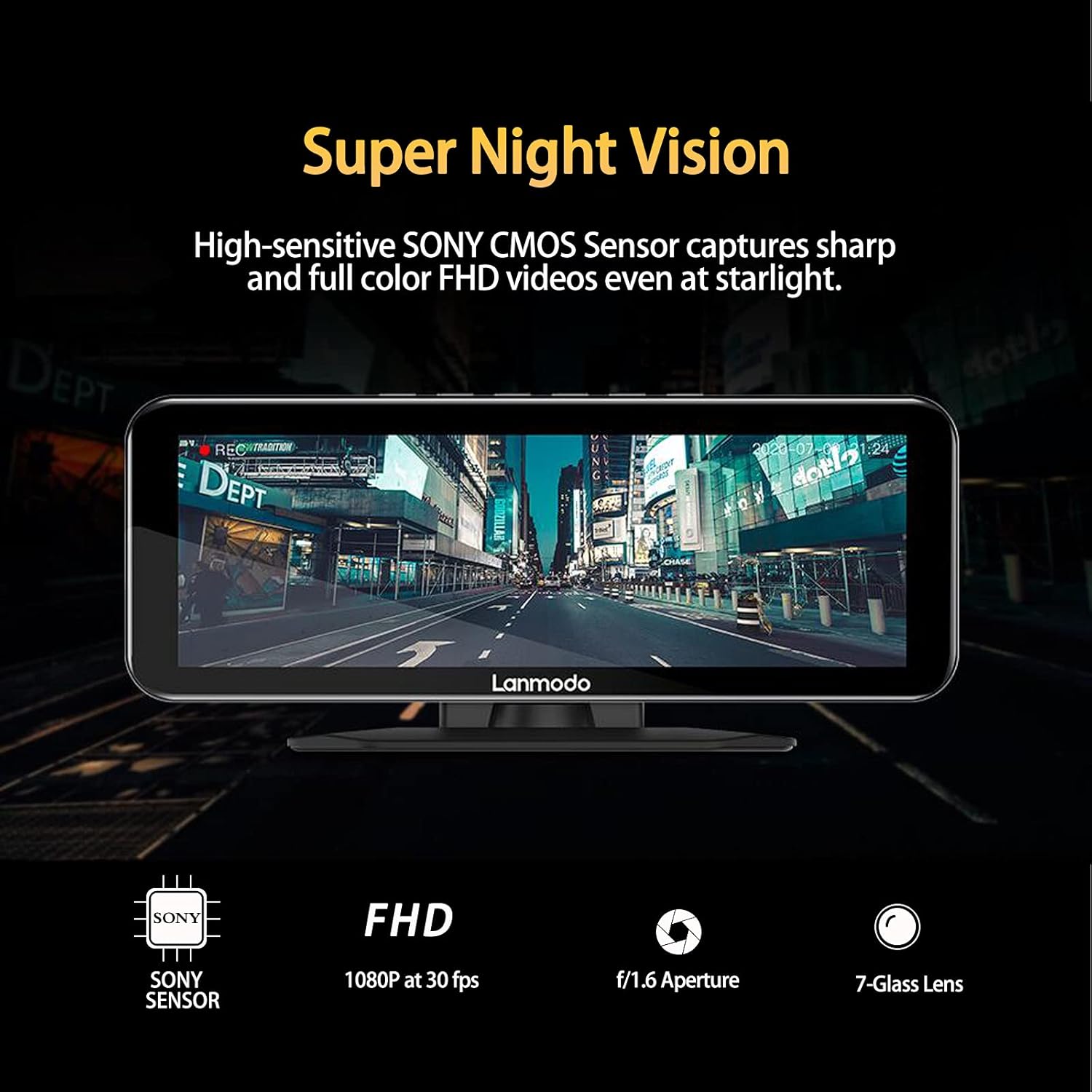
Image 2: The LANMODO Vast Pro display showcasing its Super Night Vision capability with a clear, full-color night scene.

Image 3: Examples of the LANMODO Vast Pro's performance in various challenging driving conditions, including rainy days, dark roads, foggy weather, and snowy nights.

Image 4: A detailed view of the SONY CMOS sensor, a key component for the system's advanced imaging capabilities.

Image 5: An illustration of the multi-layer lens structure, contributing to optimized brightness and image detail.
5. Setup and Installation
5.1 Mounting the Front Camera
The front camera can be mounted on either the windshield or the dashboard using the provided suction cup or dashboard base. For optimal stability and to minimize image vibration, windshield mounting is recommended. Ensure the mounting surface is clean and dry. For suction cup mounting, clean the suction cup with soap and water, dry it, and wipe the windshield with isopropyl alcohol for a secure attachment.
5.2 Power Connection
Connect the front camera to your vehicle's power source using either the 3.5m car charger cable or the 3.0m OBD adapter cable. Ensure the operating voltage is 12V. If your vehicle has a 24V output, use a car charger with a voltage converter to avoid damage.

Image 6: Illustration of power connection options: via OBD port (left) or car charger (right).
5.3 Micro SD Card Installation
Insert a Micro SDXC card (up to 128GB, not included) into the designated slot. Before inserting or removing the card, always turn off the device to prevent data corruption or card damage. Format the card through the device's settings before first use.
5.4 Rear Camera Connection
Connect the IP67 waterproof rear camera to the front camera using the provided 8.5m extension cable. Route the cable carefully to avoid interference with vehicle operation. If connected to an inverted signal, the rear view will automatically display when reversing.

Image 7: The LANMODO Vast Pro display showing simultaneous real-time loop recording from both the front and rear cameras.
6. Operating Instructions
6.1 Power On/Off
The device will typically power on automatically when the vehicle starts and power off when the vehicle is turned off, provided it is connected to a switched power source.
6.2 Night Vision and Display Modes
The 8-inch FHD IPS screen allows drivers to switch between WDR (Wide Dynamic Range) and HDR (High Dynamic Range) modes to enhance image resolution and contrast, especially in varying light conditions. The system automatically balances exposure for clear footage in low light.
6.3 Loop Recording
The system continuously records video in segments (1, 3, or 5 minutes). When the memory card is full, the oldest files are automatically overwritten by new recordings. This ensures continuous recording without manual intervention.
6.4 G-Sensor Functionality
The G-sensor detects sudden impacts or collisions. Upon detection, it automatically triggers an event recording and locks the corresponding video file to prevent it from being overwritten by loop recording. The sensitivity of the G-sensor can be adjusted in the settings (Low, Medium, High).

Image 8: The LANMODO Vast Pro display indicating G-sensor activation during a simulated collision, with a lock icon signifying protected footage.
6.5 Parking Monitor
When connected via the OBD adapter, the Parking Monitor feature provides 24-hour surveillance. It automatically powers on the dash cam and records emergency videos if motion or impact is detected while the vehicle is parked. This feature includes low voltage protection to prevent draining the car battery.

Image 9: An overhead diagram illustrating the detection zones of the Parking Monitor feature around a vehicle.
6.6 Audio Recording
The system supports audio recording. This feature can be enabled or disabled through the device settings.

Image 10: Icon representing the audio recording function of the dash cam.
7. Maintenance
- Cleaning: Use a soft, dry cloth to clean the device's screen and lens. Avoid abrasive cleaners or solvents.
- Micro SD Card: Regularly format the Micro SD card (e.g., monthly) to maintain optimal performance and prevent data errors. Always turn off the device before inserting or removing the card.
- Firmware Updates: Check the manufacturer's website periodically for any available firmware updates to ensure the device operates with the latest features and improvements.
8. Troubleshooting
- Bouncy or Unstable Pictures: Ensure the mounting mechanism (suction cup or dashboard base) is securely attached. Clean the mounting surface and suction cup as described in Section 5.1.
- Micro SD Card Not Detected/Recording Issues: Ensure the Micro SD card is correctly inserted and formatted. Try formatting the card again through the device settings. If issues persist, try a different compatible Micro SDXC card. Remember to turn off the device before handling the card.
- Device Not Powering On: Check all power connections. If using in a 24V vehicle, confirm that a 24V to 12V converter is in use with the car charger.
- Incorrect Time Display: If the device has been powered off for more than 15 days, the real-time clock may need to be reset. Connect the system to power and adjust the time in the settings.
- Image Noise in Dark Environments / Overexposure in Strong Light: This is normal behavior for the system as it optimizes for low light. The system is designed to enhance visibility in faint light but may show noise in complete darkness or overexposure with direct strong light sources.
9. Product Specifications
| Specification | Detail |
|---|---|
| Brand | LANMODO |
| Model Name | Vast Pro |
| Product Dimensions | 7.48 x 9.65 x 5.71 inches |
| Item Weight | 2.64 pounds |
| Color | Black |
| Connectivity Technology | Auxiliary |
| Video Capture Resolution | 1080p |
| Mounting Type | Dashboard Mount, Windshield Mount |
| Field Of View | 300 Meters (Night Vision) |
| Special Features | Built-In Display, Supercapacitor, Microphone, G-Sensor, Motion Sensing, Automatic Incident Detection, Loop Recording, Night Vision x 2, IP67 Waterproof Rear Camera, Parking Monitor |
| Vehicle Service Type | ATV, Bus, Car, Minivan, Motorcycle, RV, Tractor, Truck, UTV |
10. Warranty and Support
Your LANMODO Vast Pro Dash Cam comes with a 12-month warranty. For any inquiries or assistance, customer service is available 7 days a week, 24 hours a day. Please refer to the contact information provided in your product packaging or on the official LANMODO website for support.


