
1. Important Safety Information
WARNING:
- Always unplug the vacuum cleaner before performing any maintenance or cleaning.
- Do not use the vacuum cleaner on wet surfaces or to pick up liquids.
- Keep hair, loose clothing, fingers, and all parts of body away from openings and moving parts.
- Do not pick up anything that is burning or smoking, such as cigarettes, matches, or hot ashes.
- Do not use without dust cup and/or filters in place.
- Inspect the power cord for damage before each use. Do not use if the cord is damaged.
- This appliance is for household use only.
2. Product Overview
The Eureka FloorRover Elite NEU630 is a powerful upright vacuum cleaner designed for effective cleaning on various floor types, including carpets and hard floors. It features a bagless design, swivel steering, and Tangle-Free Technology for convenient use.
Included Components:
- FloorRover Elite Vacuum Unit
- 7" Crevice Tool
- Dusting Brush
- Pet Tool
- Quick Release Handle

Figure 2.1: Eureka FloorRover Elite NEU630 with its standard attachments.
3. Assembly and Initial Setup
The Eureka FloorRover Elite NEU630 requires minimal assembly. Follow these steps to prepare your vacuum for first use:
- Unpack Components: Carefully remove all parts from the packaging.
- Attach Handle: Insert the quick-release handle into the main vacuum body until it clicks securely into place.
- Store Tools: Attach the 7" crevice tool, dusting brush, and pet tool to the onboard storage locations for easy access during cleaning.
- Power Cord: Unwind the power cord and plug it into a suitable electrical outlet.
4. Operating Instructions
Power and Brushroll Control:
The vacuum features intuitive controls for power and brushroll activation.
- Power Button: Press the power button (marked with a circle and vertical line) to turn the vacuum on or off.
- Brushroll On/Off: Use the brushroll button to activate or deactivate the brushroll. Turn the brushroll ON for carpets and OFF for bare floors to prevent scattering debris and protect delicate surfaces.
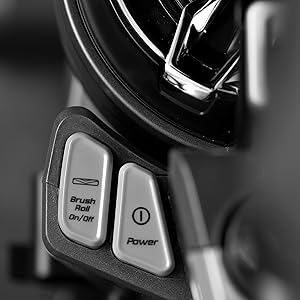
Figure 4.1: Power and Brushroll Controls.
Cleaning Different Surfaces:
The FloorRover Elite NEU630 is designed for versatile cleaning.
- Carpets: For deep cleaning carpets, ensure the brushroll is ON. The powerful suction and brushroll agitation effectively lift embedded dirt and pet hair.
- Hard Floors: When cleaning hard floors (tile, hardwood, laminate), turn the brushroll OFF to prevent scratching and scattering debris.

Figure 4.2: Effective cleaning on multiple floor types.
Swivel Steering:
The advanced swivel steering allows for smooth movement and superior maneuverability around furniture and obstacles.

Figure 4.3: Swivel steering for enhanced maneuverability.
Using Attachments:
The vacuum comes with several tools for specialized cleaning tasks.
- Pet Tool: Ideal for removing pet hair from upholstery, stairs, and pet beds.
- Crevice Tool: Perfect for reaching tight corners, edges, and narrow spaces.
- Dusting Brush: Use for delicate surfaces, blinds, and vents.

Figure 4.4: Using the Pet Tool on upholstery.

Figure 4.5: Extended reach with the crevice tool.
5. Maintenance
Regular maintenance ensures optimal performance and extends the life of your vacuum cleaner.
Emptying the Dust Cup:
The bagless design allows for easy and hygienic disposal of collected debris.
- Ensure the vacuum is turned OFF and unplugged.
- Press the dust cup release button and lift the dust cup from the vacuum.
- Position the dust cup over a trash receptacle.
- Press the bottom release latch to open the dust cup and empty its contents.
- Close the dust cup bottom and reattach it to the vacuum until it clicks into place.
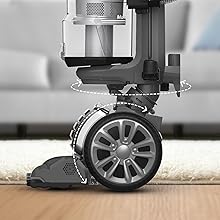
Figure 5.1: Emptying the dust cup.
Filter Cleaning:
The vacuum features a multi-cyclone filtration system with HEPA filters to capture 99.9% of dust. Regular cleaning of filters is essential for maintaining suction power.
- Pre-Motor Filter: This filter is located inside the dust cup. Remove it and tap off loose dirt. Rinse with water if necessary and allow to air dry completely before reinserting.
- HEPA Filter: The HEPA filter is also located within the filtration system. It is washable. Rinse with water and allow to air dry completely for at least 24 hours before reinserting.

Figure 5.2: Multi-cyclone HEPA filtration system.

Figure 5.3: Washable HEPA filter.
Brushroll and Belt Cleaning:
To prevent malfunction and maintain cleaning efficiency, it is recommended to clean the roller brush and the belt every 2 weeks, especially if pet hair is frequently vacuumed.
- Ensure the vacuum is turned OFF and unplugged.
- Carefully turn the vacuum head over.
- Remove any hair, string, or debris wrapped around the brushroll. You may need scissors to cut through tangled hair.
- Inspect the belt for any signs of wear or damage. Replace if necessary.
- Ensure the brushroll spins freely after cleaning.

Figure 5.4: Anti-Tangle Brushroll technology minimizes hair wrap.
6. Specifications
| Feature | Specification |
|---|---|
| Brand | Eureka |
| Model Name | FloorRover Elite NEU630 |
| Style | Upright |
| Color | Red |
| Power Source | Corded Electric |
| Capacity | 1.5 Liters |
| Item Weight | 15.8 Pounds |
| Product Dimensions | 13.4 x 12.4 x 44.7 inches |
| Form Factor | Upright |
| Assembly Required | No |
| Batteries Required | No |
7. Warranty Information
The Eureka FloorRover Elite NEU630 comes with a 5-year limited warranty. This warranty covers defects in material and workmanship under normal household use. Please retain your proof of purchase for warranty claims. For full terms and conditions, refer to the warranty card included with your product or contact customer support.
8. Customer Support
If you have any questions, require assistance, or need to make a warranty claim, please contact Eureka Customer Service:
- Phone: 1-800-282-2886
- Online: Visit the official Eureka website for FAQs and additional support resources.