
Meaco Arete One 20L
Meaco Dry Arete® One 20L Dehumidifier and HEPA Air Purifier User Manual
Model: Arete One 20L
Introduction
Thank you for choosing the Meaco Dry Arete® One 20L Dehumidifier and HEPA Air Purifier. This 2-in-1 appliance is designed to effectively control humidity levels in your home while simultaneously purifying the air. It is engineered for quiet operation and energy efficiency, making it an ideal solution for managing condensation, mold, and dampness, and improving indoor air quality by filtering out common allergens and particles.
This manual provides essential information for the safe and efficient use, maintenance, and troubleshooting of your new Meaco appliance. Please read it thoroughly before operation and retain it for future reference.

Front view of the Meaco Dry Arete One 20L Dehumidifier, showcasing its sleek white design and integrated water tank window.
Safety Information
To ensure safe operation and prevent damage to the unit or injury to yourself and others, please observe the following safety precautions:
- Placement: Always place the unit on a stable, level surface. Ensure adequate clearance around the unit for proper airflow (at least 20cm from walls or furniture).
- Power Supply: Connect the unit only to a grounded power outlet with the correct voltage as specified on the rating label. Do not overload the power outlet.
- Power Cord: Do not damage, modify, or place heavy objects on the power cord. Do not pull the power cord to disconnect the plug. Always grasp the plug firmly.
- Water Tank: Do not drink the water collected in the tank. Empty the water tank regularly.
- Children and Pets: Keep the appliance out of reach of children and pets. Do not allow children to play with the unit.
- Maintenance: Always unplug the unit before cleaning or performing any maintenance. Do not attempt to repair the unit yourself; contact qualified service personnel.
- Usage Environment: Do not use the unit in bathrooms, laundry rooms, or other excessively wet areas where water may splash onto the unit. Do not expose the unit to direct sunlight or extreme temperatures.
- Refrigerant: This appliance contains R290 refrigerant. Allow the unit to stand upright for at least 6 hours before initial use or after transport to allow the refrigerant to settle.
Product Components
Familiarize yourself with the main components of your Meaco Dry Arete® One 20L dehumidifier:
- Control Panel: Located on the top surface, with touch-sensitive buttons and a digital display.
- Air Outlet: Top grille for purified and dehumidified air release.
- Air Intake: Side grille for drawing in air.
- Water Tank: Front-loading, removable tank for collected water. Features a handle for easy carrying.
- Continuous Drainage Outlet: Located at the back for connecting a hose for continuous drainage (hose not included).
- HEPA Filter Compartment: Located behind the air intake grille.
- Castors: Hidden wheels at the base for easy movement.
- Carrying Handle: Retractable handle on top for portability.

Top angled view of the dehumidifier with its retractable carrying handle extended, showing the control panel.

Rear view of the dehumidifier, illustrating the power cord and the side air intake grille.
Setup
Follow these steps for initial setup of your dehumidifier:
- Unpacking: Carefully remove the unit from its packaging. Retain the packaging for future storage or transport.
- Refrigerant Settling: Place the dehumidifier upright in its desired location. Allow it to stand undisturbed for a minimum of 6 hours before plugging it in. This allows the refrigerant gas to settle, ensuring optimal performance and longevity.
- Placement: Position the unit in an area where air can circulate freely around it. Avoid placing it directly against walls or furniture. The hidden castors allow for easy repositioning.
- Power Connection: Once the settling period is complete, firmly insert the power plug into a suitable grounded electrical outlet.
- HEPA Filter Installation (if not pre-installed): Open the filter compartment (usually behind the side air intake grille). Remove the HEPA filter from its protective plastic bag and insert it correctly into the compartment. Close the compartment cover securely.

Side view of the dehumidifier, highlighting the air intake grille where the HEPA filter is located.
Operating Instructions
Your Meaco Dry Arete® One 20L features an intuitive control panel with various modes to suit your needs.

A hand interacting with the touch control panel of the Meaco Dry Arete One 20L dehumidifier.
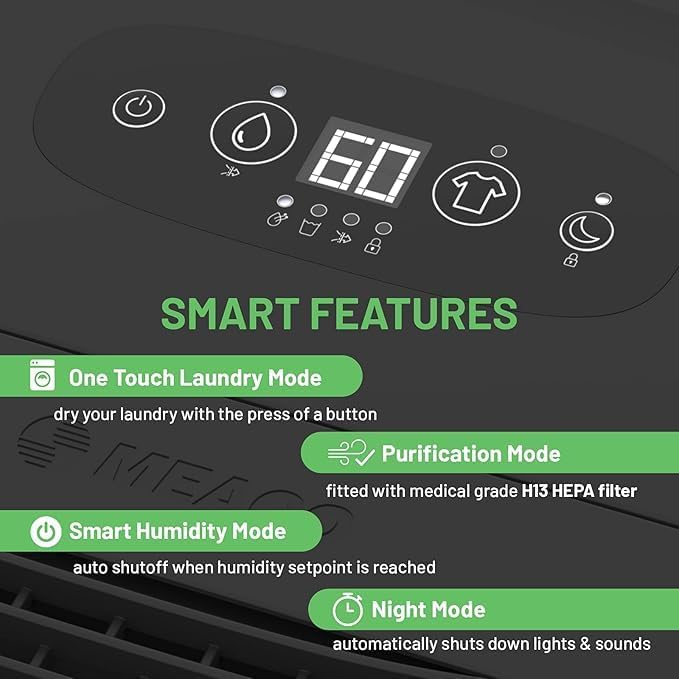
Graphic illustrating the smart features of the Meaco Dry Arete One 20L, including One Touch Laundry Mode, Purification Mode, Smart Humidity Mode, and Night Mode.
Control Panel Functions:
- Power Button (⏻): Press to turn the unit On or Off.
- Humidity Setting Button (💧): Adjusts the target humidity level (e.g., 40%, 50%, 60%). The unit will operate until this level is reached.
- Laundry Mode Button (👕): Activates a dedicated mode for drying laundry. The unit will run continuously for 6 hours at a high fan speed to efficiently dry clothes, then automatically shut off.
- Night Mode Button (🌛): Dims the display lights and reduces fan speed for quieter operation during sleep.
- Purification Mode Button (✨): Activates the air purification function using the HEPA filter, without active dehumidification.
- Display: Shows the current humidity level or selected settings.
Operating Modes:
- Smart Humidity Mode: The unit automatically maintains your set humidity level, turning on and off as needed. This is the most energy-efficient mode for general use.
- Laundry Mode: Ideal for drying clothes indoors. Place the laundry near the unit and activate this mode. The unit will run for a set period to remove moisture from the air, aiding in faster drying.
- Night Mode: For undisturbed sleep, select this mode to reduce operational noise and dim indicators.
- Purification Mode: When humidity control is not needed, use this mode to continuously filter the air using the H13 HEPA filter, removing dust, pollen, pet dander, and other allergens.

Graphic highlighting the unit's ability to extract up to 14 liters of water per day and its suitability for various home areas, with auto shutoff at 4.8L tank capacity.
Maintenance
Regular maintenance ensures the longevity and efficient operation of your dehumidifier.
1. Water Tank:
- Emptying: When the water tank is full, the unit will automatically stop and an indicator light will illuminate. Carefully pull out the front-loading water tank using its handle.
- Disposal: Dispose of the collected water. Do not use it for drinking or watering plants.
- Cleaning: Clean the water tank regularly with mild soap and water to prevent mold and mildew growth. Rinse thoroughly.
- Reinsertion: Slide the clean, empty tank back into the unit until it clicks into place.
2. Air Filters:
Your unit has two filters: a washable dust filter and a replaceable H13 HEPA filter.
- Dust Filter: This filter is washable. Remove it from the unit (usually located behind the air intake grille). Clean it with a soft brush or vacuum cleaner. If heavily soiled, wash with warm, soapy water, rinse thoroughly, and allow to air dry completely before reinserting. Clean every 2-4 weeks depending on usage.
- HEPA Filter: The H13 HEPA filter is not washable and should be replaced every 6-12 months, or more frequently if the unit is used in a dusty environment or if you notice a decrease in air purification effectiveness. Refer to the manufacturer's website for replacement filters.
3. Exterior Cleaning:
- Cleaning: Wipe the exterior of the unit with a soft, damp cloth. Do not use harsh chemicals, abrasive cleaners, or solvents, as these can damage the surface.
- Storage: If storing the unit for an extended period, ensure it is clean and dry. Empty the water tank and store the unit upright in a cool, dry place.

Graphic detailing how the unit purifies and protects, including keeping dampness from damaging homes, protecting surfaces, repelling mold, and the H13 HEPA filter's effectiveness against dust, pet dander, spores, and allergens.
Troubleshooting
If you encounter issues with your dehumidifier, refer to the table below for common problems and solutions.
| Problem | Possible Cause | Solution |
|---|---|---|
| Unit does not turn on. | No power supply; power cord not plugged in; power outage. | Check power plug and outlet; ensure power is available. |
| No water collected. | Humidity level is too low; water tank full or incorrectly inserted; temperature too low. | Adjust target humidity lower; empty and reinsert tank; ensure room temperature is above 5°C. |
| Unit is noisy. | Unit not on a level surface; air filter clogged; fan obstruction. | Place on a flat surface; clean or replace air filter; check for obstructions. |
| Airflow is weak. | Air filter clogged; air intake/outlet blocked. | Clean or replace air filter; ensure no obstructions around air intake/outlet. |
| Unit runs continuously. | Target humidity not reached; room is too large or too humid. | Ensure doors/windows are closed; consider a larger capacity unit for very large spaces. |
Specifications
Technical specifications for the Meaco Dry Arete® One 20L Dehumidifier and HEPA Air Purifier:
| Feature | Detail |
|---|---|
| Brand | Meaco |
| Model Number | Arete 20L (AreteOne-20L-86m²) |
| Dehumidification Capacity | 20 Litres/day |
| Water Tank Volume | 4.8 Litres (approx. 1.27 Gallons) |
| Power Consumption | 204 Watts |
| Dimensions (L x W x H) | 27.2 x 36.6 x 61.8 cm |
| Weight | 15 Kilograms |
| Recommended Floor Area | 80 square meters |
| Air Filtration | H13 HEPA Filter |
| Noise Level | 40 dB (approx.) |
| Automatic Shutoff | Yes (when tank is full) |
| Special Features | Child Safety Lock, Laundry Mode, Adjustable Humidity Control, Continuous Drainage Option |
Warranty and Support
Meaco is committed to providing high-quality products and excellent customer service.
Warranty Information:
The Meaco Dry Arete® One 20L Dehumidifier comes with a comprehensive five-year warranty as standard. This warranty covers defects in materials and workmanship under normal use. Please retain your proof of purchase for warranty claims.

The Meaco Dry Arete One 20L has received the T3 Platinum Award, recognizing its outstanding performance and design.

Recognized as a 'Best Buy' by Which? for Dehumidifiers in November 2021, affirming its quality and value.
Customer Support:
For technical assistance, warranty claims, or to purchase replacement parts (such as HEPA filters), please visit the official Meaco website or contact their customer service department. Contact details can typically be found on the Meaco website or on the product packaging.
Related documentsArete One 20L


Ask a question about this manual
Ask about setup, troubleshooting, compatibility, parts, safety, or missing instructions. Manuals+ will review the question and use this page’s manual context to help answer it.