1. Product Overview
The JYX Karaoke System JYX-69BT is a portable and versatile audio system designed for entertainment. It features high-quality sound output, wireless microphones, and multiple connectivity options, making it suitable for various occasions. This manual provides detailed instructions for setting up, operating, and maintaining your karaoke system.
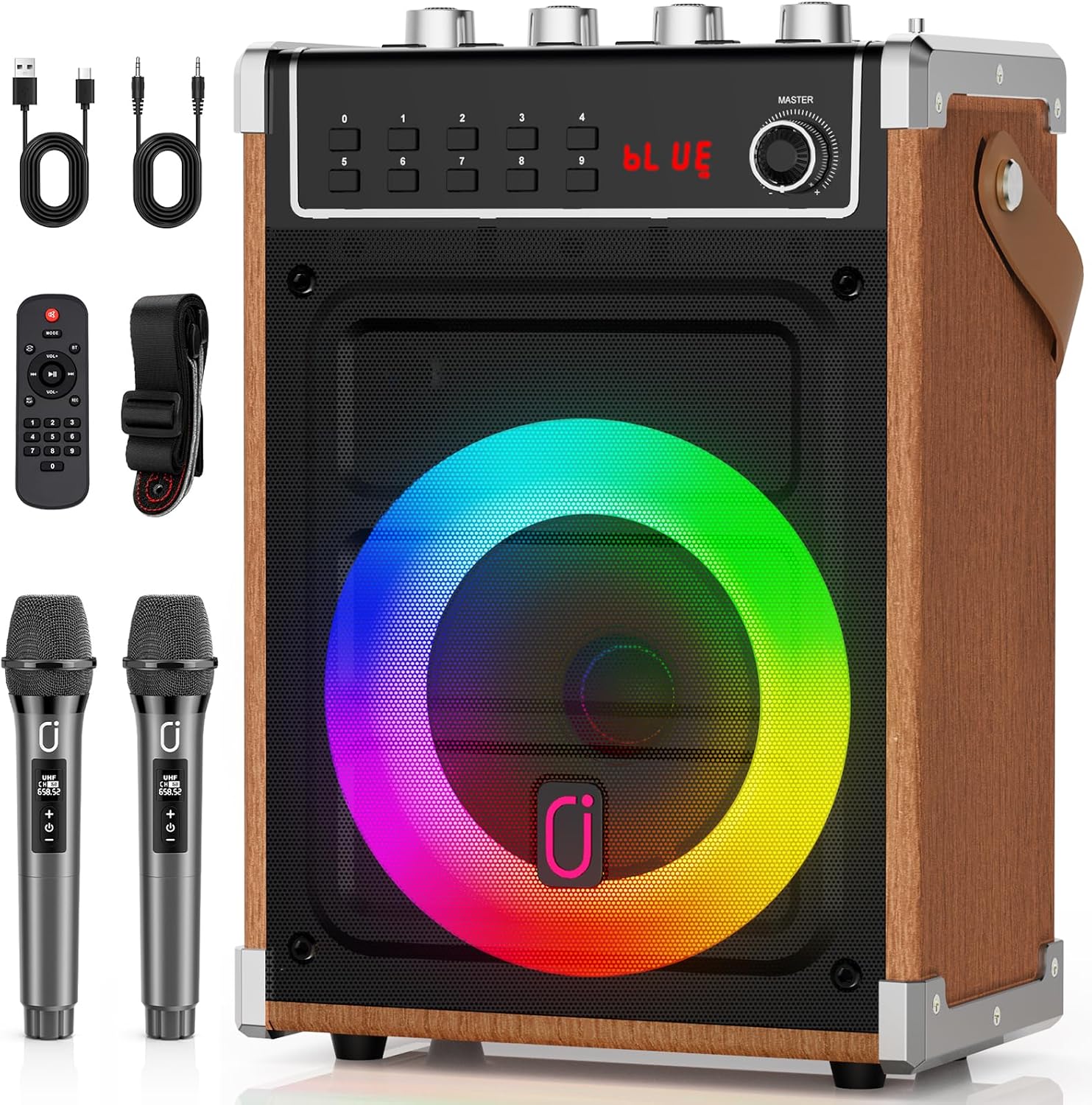
Image 1.1: The JYX Karaoke System JYX-69BT, showcasing the main unit, two wireless microphones, remote control, and charging cables.
Key Features:
- Portable Design: Equipped with a durable shoulder strap for easy transport.
- High-Quality Audio: Features a superior subwoofer and Bluetooth 5.0 for clear sound.
- Dual Wireless Microphones: Includes two wireless microphones for duets and interactive performances.
- Long Battery Life: Rechargeable battery provides up to 8 hours of operation.
- TWS Stereo Surround: Connect two JYX-69BT units for an immersive stereo experience.
- Multi-functional Connectivity: Supports Bluetooth, AUX, USB, TF Card, and FM radio.
- Dynamic DJ Lights: Integrated disco lights synchronize with music for an enhanced atmosphere.
- Infrared Remote Control: Allows convenient control of functions from a distance.
2. Setup
2.1 Unboxing and Contents
Carefully remove all components from the packaging. Ensure the following items are present:
- JYX Karaoke System JYX-69BT Main Unit
- 2 Wireless Microphones
- Remote Control
- USB Charging Cable
- AUX Cable
- Shoulder Strap
- User Manual (this document)
2.2 Charging the Unit
Before first use, fully charge the karaoke system. Connect the provided USB charging cable to the 5V-1A POWER port on the unit and to a compatible USB power adapter (not included). The charging indicator light will show the charging status. A full charge provides up to 8 hours of playtime.
2.3 Microphone Setup
The wireless microphones are pre-paired with the main unit. Ensure the microphones have batteries installed (if required, check microphone compartment) and are powered on. They will automatically connect to the karaoke system when both are active.

Image 2.1: A user operating the wireless microphone with the JYX Karaoke System.
3. Operating Instructions
3.1 Power On/Off
To power on the unit, locate the POWER switch, usually on the control panel, and slide it to the 'ON' position. To power off, slide it to 'OFF'.

Image 3.1: Detailed view of the JYX-69BT control panel, showing input ports, volume knobs, and function buttons.
3.2 Mode Selection
Press the MODE button on the control panel or remote control to cycle through available input modes: Bluetooth, AUX, USB, TF Card, and FM Radio. The current mode will be displayed on the LED screen.
3.3 Bluetooth Connection
- Power on the JYX-69BT unit.
- Select Bluetooth mode using the MODE button. The LED display will show "BLUE" and a blinking Bluetooth icon, indicating it's ready for pairing.
- On your mobile device (smartphone, tablet, etc.), enable Bluetooth and search for available devices.
- Select "JYX-69BT" from the list of devices.
- Once connected, the unit will emit a confirmation sound, and the Bluetooth icon will stop blinking. You can now play audio from your device through the karaoke system.

Image 3.2: Demonstrating Bluetooth connectivity and dynamic lighting effects.
3.4 TWS (True Wireless Stereo) Connection
To achieve a stereo sound experience, you can connect two JYX-69BT units wirelessly:
- Ensure both JYX-69BT units are powered on and in Bluetooth mode, but not yet connected to any mobile device.
- On one of the units (this will be the primary unit), press and hold the TWS button. The unit will emit a pairing sound.
- The primary unit will automatically search for and connect to the second unit. Once connected, both units will play audio in stereo.
- Now, connect your mobile device to the primary JYX-69BT unit via Bluetooth as described in Section 3.3.

Image 3.3: Visual representation of the TWS connection mode for enhanced stereo audio.
3.5 Playing Music from USB/TF Card
Insert a USB flash drive or TF (Micro SD) card containing MP3 audio files into the respective USB or TF Card slot. The system will automatically switch to the corresponding mode and begin playing music. Use the PREV/NEXT buttons to skip tracks and PLAY/PAUSE to control playback.
3.6 AUX Input
Connect an external audio device (e.g., MP3 player, computer) to the AUX IN port using the provided AUX cable. Select AUX mode using the MODE button. Audio from the connected device will play through the karaoke system.
3.7 FM Radio
In FM Radio mode, press the PLAY/PAUSE button to auto-scan and save available radio stations. Use the PREV/NEXT buttons to navigate between saved stations.
3.8 Microphone and Karaoke Functions
Adjust microphone volume using the MIC VOL knob. The ECHO knob controls the echo effect for vocals. Use the BASS and TREBLE knobs to fine-tune the overall sound output. Ensure microphones are powered on and connected.
To record your performance, press the REC button. A USB drive or TF card must be inserted to save recordings.
3.9 DJ Lighting Effects
The integrated DJ lights automatically synchronize with the music rhythm. There are various lighting effects that can be cycled through or turned off using a dedicated button (if available) or the remote control.
3.10 Remote Control Usage
The infrared remote control allows you to manage playback, volume, mode selection, and other functions from a distance. Point the remote control directly at the unit's infrared receiver for optimal performance.
4. Maintenance
4.1 Cleaning
Wipe the unit with a soft, dry cloth. Do not use abrasive cleaners, waxes, or solvents as they may damage the finish. Keep the speaker grille free from dust and debris.
4.2 Storage
When not in use for extended periods, store the karaoke system in a cool, dry place away from direct sunlight and extreme temperatures. Ensure the unit is fully charged before storing to prolong battery life.
4.3 Battery Care
To maintain the rechargeable battery's health, avoid completely draining it frequently. Recharge the unit regularly, even if not in constant use. Do not expose the battery to high temperatures.
5. Troubleshooting
| Problem | Possible Cause | Solution |
|---|---|---|
| No power | Battery is depleted. | Charge the unit using the provided USB cable. |
| No sound from speaker | Volume is too low; incorrect mode selected; audio source issue. | Increase MASTER volume. Ensure correct input mode (Bluetooth, AUX, USB, TF). Check audio source device volume and connection. |
| Microphone not working | Microphone is off; batteries are low; MIC VOL is low. | Ensure microphone is powered on. Replace microphone batteries. Increase MIC VOL knob. |
| Bluetooth connection fails | Unit not in pairing mode; device too far; interference. | Ensure unit is in Bluetooth pairing mode ("BLUE" blinking). Move device closer. Disconnect other Bluetooth devices. |
| TWS connection fails | Units not in correct mode; TWS pairing not initiated correctly. | Ensure both units are in Bluetooth mode and not connected to a phone. Press and hold TWS button on one unit to initiate pairing. |
| Remote control not working | Remote batteries low; line of sight blocked. | Replace remote control batteries. Ensure clear line of sight to the unit's IR receiver. |
6. Specifications
| Feature | Detail |
|---|---|
| Model Number | JYX-69BT |
| Brand | JYX |
| Dimensions (L x W x H) | 17 x 28 x 40 cm (approximately 6.7 x 11 x 15.7 inches) |
| Weight | 2.96 Kilograms (approximately 6.5 lbs) |
| Connectivity Technology | Bluetooth 5.0 |
| Audio Input Options | Bluetooth, AUX, USB, TF Card |
| Number of Channels | 2 |
| Power Source | Battery Powered |
| Battery Type | 1 Lithium-ion battery (rechargeable) |
| Recommended Use | Sound System |
| Material | Metal (frame/accents) |
| Compatible Devices | Laptop, Smartphone, Tablet |
| UPC | 797442539389 |

Image 6.1: Internal components of the JYX-69BT speaker, highlighting the tweeter and subwoofer.
7. Warranty and Support
7.1 Manufacturer's Warranty
The JYX Karaoke System JYX-69BT comes with a 12-month manufacturer's warranty from the date of purchase. This warranty covers defects in materials and workmanship under normal use. It does not cover damage caused by misuse, accidents, unauthorized modifications, or normal wear and tear.
Please retain your proof of purchase for warranty claims.
7.2 Customer Support
For technical assistance, troubleshooting beyond this manual, or warranty inquiries, please contact JYX customer support. Refer to the contact information provided with your product packaging or visit the official JYX website for support details.
When contacting support, please have your product model number (JYX-69BT) and proof of purchase readily available.


