
1. Introduction
This manual provides essential information for the safe and efficient operation of your Luminous Eco Volt Neo 1550 Pure Sine Wave Inverter. Please read these instructions carefully before installation and use to ensure optimal performance and longevity of the product. The Luminous Eco Volt Neo 1550 is designed to provide reliable power backup for homes, offices, and shops, featuring a 1400VA/12V capacity and pure sine wave output for sensitive electronics.
2. Safety Information
Adhering to safety guidelines is crucial for preventing injury and damage to the inverter. Always follow these precautions:
- Installation: Ensure installation is performed by a qualified technician.
- Ventilation: Install the inverter in a well-ventilated area to prevent overheating.
- Water and Moisture: Keep the inverter away from water, moisture, and high humidity.
- Flammable Materials: Do not place the inverter near flammable liquids or gases.
- Children and Pets: Keep the inverter out of reach of children and pets.
- Grounding: Ensure the inverter is properly grounded.
- Battery Safety: Handle batteries with care. Wear protective gear when working with batteries.
- Servicing: Do not attempt to open or service the inverter yourself. Refer all servicing to authorized personnel.
3. Product Overview
The Luminous Eco Volt Neo 1550 is a pure sine wave inverter designed for efficient and reliable power backup. Its key features include:
- Pure Sine Wave Output: Provides stable and clean power, suitable for sensitive electronic appliances.
- 1400VA/12V Capacity: Offers robust power backup for medium to large appliance loads.
- Minimal Maintenance: Engineered for reduced upkeep requirements.
- Easy Installation: Designed for straightforward setup in various environments.
Components Included:
- 1 x Luminous Eco Volt Neo 1550 Inverter Unit

Figure 3.1: Front view of the Luminous Eco Volt Neo 1550 inverter, showing the control panel with indicator lights and power button.
4. Setup and Installation
The Luminous Eco Volt Neo 1550 inverter is designed for easy installation. However, for safety and optimal performance, it is recommended that installation be carried out by a certified electrician or authorized service personnel.
General Installation Steps:
- Unpacking: Carefully unpack the inverter and inspect for any shipping damage.
- Placement: Choose a dry, well-ventilated area, away from direct sunlight, heat sources, and moisture. Ensure sufficient clearance around the unit for airflow.
- Battery Connection: Connect the inverter to a compatible 12V battery. Ensure correct polarity (red to positive, black to negative). Secure all connections tightly.
- Mains Input: Connect the inverter's AC input cable to a properly grounded wall outlet.
- Load Connection: Connect your appliances to the inverter's output sockets. Do not overload the inverter beyond its rated capacity.
- Initial Power-Up: Follow the operating instructions to power on the inverter for the first time.

Figure 4.1: The Luminous Eco Volt Neo 1550 inverter, highlighting its robust design for efficient power delivery, suitable for various installation environments.

Figure 4.2: An illustration of the inverter providing uninterrupted power, enabling continued daily activities during power outages.
5. Operating Instructions
Once properly installed, operating your Luminous Eco Volt Neo 1550 inverter is straightforward.
Powering On/Off:
- To Power On: Press and hold the power button located on the front panel until the inverter powers on and the indicator lights illuminate.
- To Power Off: Press and hold the power button until the inverter shuts down.
Indicator Lights (Refer to Figure 5.1):
- MAINS: Indicates that the inverter is receiving AC power from the utility grid.
- CHARGING: Indicates that the battery is currently being charged.
- ECO: Indicates the inverter is operating in Eco mode for energy efficiency.
- UPS: Indicates the inverter is operating in UPS mode, providing backup power.
- LOW BATT: Illuminates when the battery charge is low, signaling a need for charging.
- OVERLOAD: Illuminates if the connected load exceeds the inverter's capacity. Disconnect some appliances immediately.

Figure 5.1: The Luminous Eco Volt Neo 1550 inverter, illustrating its key features including Pure Sine Wave output, fast battery charging, appliance safety, and reliable performance, with visible indicator lights.
6. Maintenance
The Luminous Eco Volt Neo 1550 inverter is designed for minimal maintenance. Regular checks can help ensure its long-term performance.
- Cleaning: Keep the inverter's exterior clean and free from dust. Use a dry cloth for cleaning. Do not use liquid cleaners.
- Ventilation: Ensure that the ventilation openings are not blocked to allow proper heat dissipation.
- Battery Check: Periodically check battery terminals for corrosion. Clean them if necessary. For lead-acid batteries, ensure electrolyte levels are maintained (if applicable to your battery type).
- Connections: Periodically check all electrical connections to ensure they are secure and free from damage.
- Professional Inspection: Consider a professional inspection annually to ensure all components are functioning correctly.
7. Troubleshooting
This section addresses common issues you might encounter with your Luminous Eco Volt Neo 1550 inverter. For problems not listed here, contact customer support.
Common Issues and Solutions:
- Inverter Not Turning On:
- Check battery connections for tightness and correct polarity.
- Ensure the battery is charged.
- Verify the power button is pressed correctly.
- No Output Power:
- Check if the inverter is overloaded (OVERLOAD indicator). Reduce the connected load.
- Ensure the inverter is powered on and not in a fault state.
- Check output cable connections.
- Low Battery Indicator On Constantly:
- Ensure the mains input is connected and power is available for charging.
- Check if the battery is faulty or has reached the end of its life.
- Verify charging settings (if adjustable).
- Overload Indicator On:
- Immediately disconnect some appliances to reduce the load.
- Restart the inverter after reducing the load.
8. Technical Specifications
| Specification | Detail |
|---|---|
| Model Number | Eco Volt Neo-1550 |
| Brand | Luminous |
| VA Rating | 1400VA |
| System Voltage | 12V |
| Output Waveform | Pure Sine Wave |
| Wattage | 1176 Watts |
| Power Source | Battery Powered |
| Recommended Uses | Home, Office, Shop |
| Item Weight | 13 kg 500 g |
| Item Dimensions (LxWxH) | 27.5 x 13 x 30.5 Centimeters |
| Included Components | 1 Inverter |
| Country of Origin | India |
| Manufacturer | Luminous Power Technologies Private Limited |

Figure 8.1: A guide table for selecting the appropriate inverter and battery capacity based on home size (BHK), appliance types, and desired backup time.
9. Warranty and Support
Your Luminous Eco Volt Neo 1550 Inverter comes with a 36-month warranty, ensuring continued reliability and support. For any technical assistance, service requests, or warranty claims, please contact Luminous customer support.
Customer Support:
- Refer to the contact information provided with your product packaging or visit the official Luminous website for the latest support details.
- Luminous offers 24/7 support and on-site service in many regions.
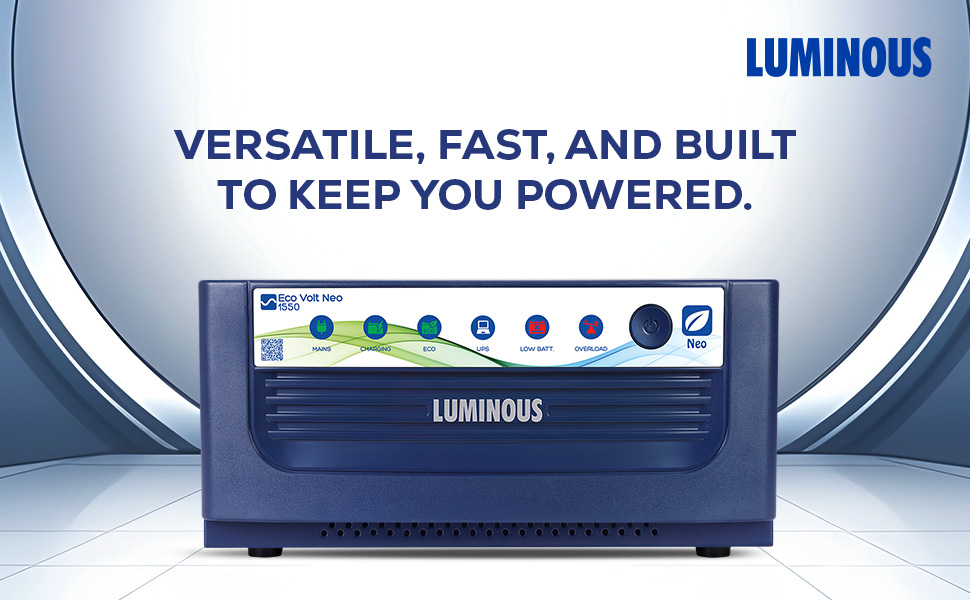
Figure 9.1: Map illustrating the widespread service network for Luminous products across India, emphasizing 24/7 support and on-site assistance.


