
1. Introduction
Thank you for choosing the DHG Portable Bluetooth Speaker. This powerful and versatile speaker is designed for outdoor use, offering a range of connectivity options including Bluetooth, USB, and TF card. It also features an FM radio tuner and a convenient handle for easy transport. Enjoy clear, powerful, and high-quality sound wherever you go.
Key features include:
- Wireless Bluetooth connectivity.
- Supports USB and TF cards (up to 32 GB).
- Integrated FM radio tuner.
- 5 watts of clear and powerful audio output.
- Portable design with a convenient carrying handle.
- Bluetooth connection range of up to 10 meters.

Figure 1: Front view of the DHG Portable Bluetooth Speaker in blue, showcasing its robust design and speaker grille.
2. Getting Started: Setup
2.1. Charging the Speaker
Before first use, fully charge the speaker. Connect the included charging cable to the speaker's charging port and a compatible USB power source (e.g., a USB wall adapter or computer USB port). The charging indicator light will typically show red while charging and turn off or change color when fully charged. A full charge provides approximately 8 hours of battery life.
2.2. Powering On/Off
To power on the speaker, locate the power button (usually a switch or a press-and-hold button) and activate it. You will hear an audible prompt indicating the speaker is on. To power off, repeat the action.
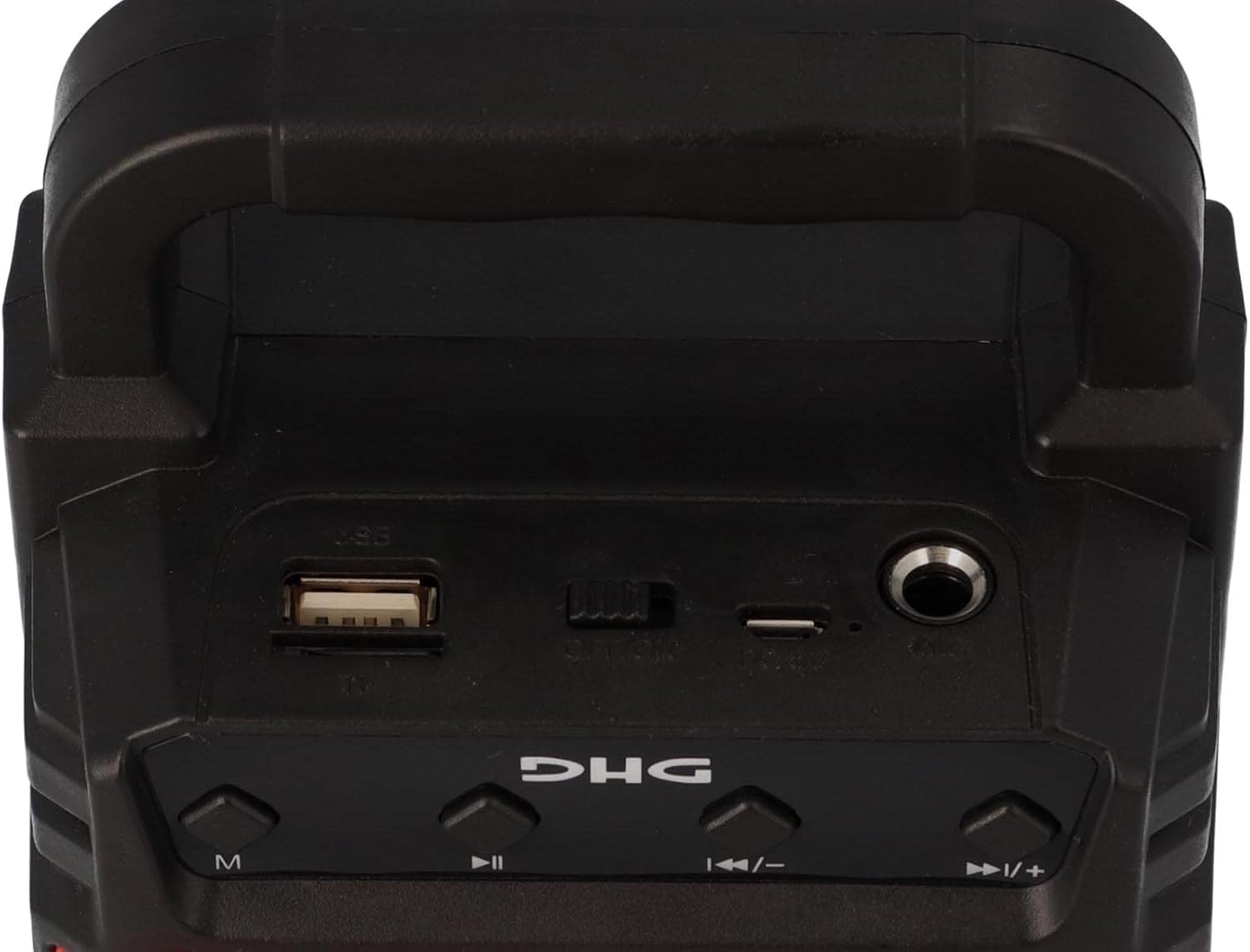
Figure 2: Top view of the speaker, highlighting the USB port, TF card slot, and charging port for easy access.
3. Operating Instructions
3.1. Bluetooth Connection
- Ensure the speaker is powered on and in Bluetooth pairing mode (indicated by a flashing LED or audible prompt).
- On your smartphone, tablet, or other Bluetooth-enabled device, go to the Bluetooth settings.
- Search for available devices. The speaker will typically appear as "DHG Speaker" or a similar name.
- Select the speaker from the list to pair. Once connected, you will hear a confirmation sound.
3.2. USB/TF Card Playback
Insert a USB flash drive or a TF (microSD) card (up to 32GB) containing MP3 audio files into the respective port on the speaker. The speaker will automatically detect the storage device and begin playing the audio files. Use the playback control buttons (play/pause, next/previous track) on the speaker to manage your music.
3.3. FM Radio Tuning
To use the FM radio function:
- Press the "M" (Mode) button to switch to FM radio mode.
- Press and hold the Play/Pause button to initiate an automatic scan for available FM stations. The speaker will save detected stations.
- Use the Next/Previous track buttons to navigate between saved stations.
3.4. Volume Control
The speaker features dedicated volume control buttons. Use the '+' button to increase volume and the '-' button to decrease volume. Note that some users have reported the speaker starting at maximum volume; please adjust to a comfortable level upon powering on.
4. Maintenance
To ensure the longevity and optimal performance of your DHG Portable Bluetooth Speaker, follow these maintenance guidelines:
- Cleaning: Use a soft, dry cloth to wipe the speaker's exterior. Do not use abrasive cleaners, solvents, or harsh chemicals.
- Storage: Store the speaker in a cool, dry place away from direct sunlight and extreme temperatures when not in use for extended periods.
- Battery Care: To preserve battery life, avoid fully discharging the battery frequently. Charge the speaker regularly, even if not in constant use.
- Water Resistance: This speaker is NOT waterproof. Avoid exposing it to rain, splashes, or submerging it in water.
5. Troubleshooting
If you encounter issues with your speaker, please refer to the following common problems and solutions:
| Problem | Possible Cause / Solution |
|---|---|
| Speaker does not turn on. | Battery might be depleted. Connect the speaker to a power source and charge it for at least 30 minutes before attempting to turn it on again. |
| Cannot connect via Bluetooth. |
|
| Poor FM radio reception or interference. |
|
| Short battery life. |
|
| Sound distortion or low quality. |
|
6. Specifications
| Feature | Detail |
|---|---|
| Brand | DHG |
| Model Name | Altavoz Bluetooth Portátil (Portable Bluetooth Speaker) |
| ASIN | B093Q9C5LK |
| Connectivity Technology | Bluetooth, USB |
| Compatible Devices | Smartphone, Tablet |
| Speaker Type | Outdoor |
| Maximum Speaker Output Power | 10 Watts |
| Audio Output Mode | Stereo |
| Subwoofer Diameter | 6 Centimeters |
| Tuner Technology | FM |
| Power Source | Battery |
| Battery Life | 8 Hours |
| Battery Composition | Alkaline |
| Product Dimensions | 9f. x 11an. x 18al. centimeters (approx. 3.5 x 4.3 x 7.1 inches) |
| Product Weight | 175 Grams (approx. 0.39 lbs) |
| Color | Blue |
| Included Components | Charging cable, USB / TF Card |
| Is Waterproof | False |
Note: Some specifications may vary slightly. The "Included Components" lists "Tarjeta USB / TF" which refers to support for these cards, and they are listed in "whats_in_the_box" as included. The "Potencia eléctrica" is 10 watts, while the feature bullet mentions 5 watts. We have used the higher value from the detailed specifications.
7. Warranty and Support
For warranty information and customer support, please refer to the purchase documentation or contact your retailer. DHG is committed to providing quality products and assistance.
For further assistance, you may visit the official DHG store on Amazon: DHG Amazon Store.