
1. Introduction
Thank you for choosing the Brightever 2-Pack Dusk to Dawn Outdoor Wall Lantern. This manual provides essential information for the safe installation, operation, and maintenance of your new outdoor lighting fixtures. Please read these instructions thoroughly before installation and retain them for future reference.
These outdoor wall lanterns feature a sophisticated photocell sensor for automatic dusk-to-dawn operation, durable construction, and a unique waterfall glass design, suitable for various outdoor applications.

Image: The Brightever 2-Pack Dusk to Dawn Outdoor Wall Lanterns, showcasing their design and integrated sensors.
2. Product Overview
Key Features:
- Dusk to Dawn Photocell Sensor: Automatically turns the light on at dusk and off at dawn, optimizing energy efficiency.
- Durable Construction: Features sturdy, thick waterfall glass and an anti-corrosion pure aluminum framework with a black alloy finish.
- Weather Resistant: Designed to withstand various weather conditions including rain, snow, and extreme temperatures.
- Open Bottom Design: Facilitates easy bulb replacement and maintenance.
- Standard E26 Base: Compatible with a variety of E26 Edison bulbs (LED, CFL, Incandescent). Bulbs are not included.

Image: Key features including unique waterfall glass, upgraded photocell sensor, E26 standard base, and corrosion-resistant aluminum construction.

Image: Illustration of the fixture's weather resistance, including sunproof, windproof, snowproof, and waterproof capabilities.
What's in the Box:
- 2 x Brightever Outdoor Wall Lanterns
- 1 x Instruction Manual
- Mounting Hardware (including 3x 10AWG Wire Connectors, 2x M4-25 Phillips' Head Screws per fixture)

Image: Product dimensions and included mounting hardware. Each fixture includes wire connectors and screws.
3. Safety Information
WARNING: To avoid the risk of fire, electric shock, or personal injury, always follow these safety guidelines:
- Always turn off the power at the main circuit breaker or fuse box before beginning installation, maintenance, or bulb replacement.
- Consult a qualified electrician if you are unsure about the installation process.
- Ensure all electrical connections are made in accordance with local codes and ordinances.
- Use only bulbs of the specified type and wattage. Refer to the "Specifications" section for details.
- Do not install on a dimmer switch if using the dusk-to-dawn feature, as it may interfere with the sensor's operation.
- Handle glass components with care to prevent breakage.
4. Installation Instructions
This fixture is designed for wall-mount installation. All necessary mounting hardware is included.
Tools Required (Not Included):
- Phillips head screwdriver
- Wire strippers
- Electrical tape
- Safety glasses
Installation Steps:
- Turn Off Power: Before starting, ensure the power supply to the junction box is turned off at the circuit breaker.
- Prepare Mounting Plate: Attach the mounting plate (pre-assembled with the fixture) to the junction box using the provided screws. Ensure it is securely fastened.
- Make Electrical Connections:
- Connect the black wire from the fixture to the black (hot) wire from the junction box using a wire connector.
- Connect the white wire from the fixture to the white (neutral) wire from the junction box using a wire connector.
- Connect the ground wire from the fixture to the ground wire from the junction box (or to the green ground screw on the mounting plate) using a wire connector.
- Ensure all connections are tight and secure. Wrap connections with electrical tape if desired for added insulation.
- Mount the Fixture: Carefully align the fixture with the mounting plate and secure it with the provided screws.
- Install Bulb: Insert an E26 base bulb (not included) into the socket. Do not exceed the maximum wattage specified in the "Specifications" section.
- Restore Power: Turn the power back on at the circuit breaker.

Image: Product dimensions for reference during installation. Height: 12.6 inches, Width: 8.07 inches, Depth from wall: 8.07 inches.
5. Operation
The Brightever Outdoor Wall Lantern is equipped with a built-in dusk-to-dawn photocell sensor for automatic operation.
- Automatic On/Off: The sensor detects ambient light levels. The fixture will automatically turn on when it gets dark (dusk) and turn off when it becomes light (dawn).
- Sensor Placement: Ensure the photocell sensor (located on the top of the fixture) is not obstructed by eaves, trees, or other objects that could block natural light. Avoid installing the fixture near other light sources (e.g., streetlights, floodlights) that could interfere with the sensor's ability to detect darkness, causing it to turn off prematurely.
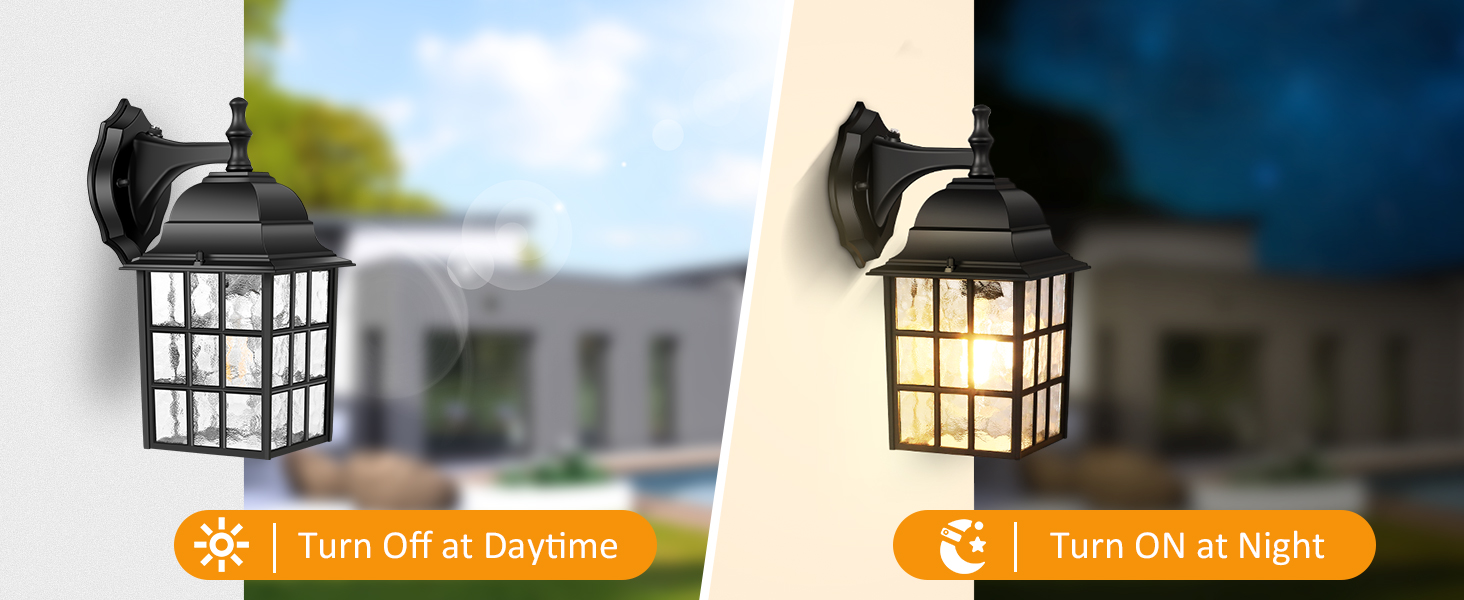
Image: Illustration of the light turning off automatically during the day and turning on automatically at night due to the photocell sensor.
6. Maintenance
Bulb Replacement:
- Turn Off Power: Always turn off the power to the fixture at the circuit breaker before replacing the bulb.
- Access Bulb: The fixture features an open bottom design. Simply reach into the bottom of the lantern to unscrew the old bulb.
- Install New Bulb: Screw in a new E26 base bulb. Ensure the new bulb's wattage does not exceed the maximum specified (refer to "Specifications").
- Restore Power: Turn the power back on at the circuit breaker.
Cleaning:
- Ensure the power is off and the fixture is cool before cleaning.
- Wipe the fixture with a soft, damp cloth. Do not use abrasive cleaners or solvents, as these may damage the finish or glass.
- Regularly clean the photocell sensor to ensure optimal performance.
7. Troubleshooting
| Problem | Possible Cause | Solution |
|---|---|---|
| Light does not turn on at night. |
|
|
| Light stays on during the day. |
|
|
| Light flickers. |
|
|
8. Specifications
| Feature | Detail |
|---|---|
| Brand | Brightever |
| Model Number | 9033-BK |
| Color | Black |
| Material | Metal (Aluminum), Waterfall Glass |
| Product Dimensions (L x W x H) | 8.07" x 8.07" x 12.6" |
| Item Weight | 5.7 Pounds (per 2-pack) |
| Power Source | Corded Electric |
| Voltage | 120 Volts |
| Bulb Base | E26 (Bulb not included) |
| Max Wattage (LED) | 14W |
| Max Wattage (Incandescent) | 100W |
| Special Features | Dusk to Dawn Sensor, Waterproof, Anti-Rust, Energy Efficient |
| Indoor/Outdoor Usage | Outdoor |
| Assembly Required | Yes |

Image: Various E26 base bulb types compatible with the fixture. Bulbs are not included.
9. Warranty and Support
Brightever stands behind the quality of its products. While specific warranty details are not provided in this manual, we encourage customers to contact us directly for any product-related inquiries or support needs.
For assistance, please refer to the contact information provided on the product packaging or visit the official Brightever store online. Your satisfaction is our top concern.
Optional protection plans may be available for purchase separately to extend coverage beyond the manufacturer's standard policy.