
Beca BHT-8000GCLW
Beca BHT-8000GCLW WiFi Thermostat User Manual
Model: BHT-8000GCLW | Brand: Beca
1. Product Overview
1.1 Introduction
The Beca BHT-8000GCLW WiFi Thermostat is designed for intelligent control of gas boiler heating systems. It allows users to manage their heating based on temperature settings or weekly programming schedules. The thermostat supports synchronization with local weather data for optimized performance. Featuring an intuitive 4.8-inch color LCD screen, it provides clear and simple access to all necessary information. Its elegant, modern, and discreet design has a slim wall thickness of only 1.4 cm. Programming can be done via the SmartLife application or through the convenient capacitive touch buttons. Certified for integration with Amazon Alexa, Google Home, and IFTTT, this thermostat enables constant control over your heating system, ensuring comfortable temperatures while promoting energy efficiency.
1.2 Key Features
- WiFi Thermostat for Gas Boiler Control
- Remote Temperature Control via WiFi (Android & iOS App)
- 5+2 Programmable Periods for Comfort and Economy; Device Sharing Support
- High Accuracy: ±0.5°C Temperature Control
- Data Memory (Power Off Retention); Celsius/Fahrenheit Selectable; Smart Scene Support
- Intuitive 4.8-inch Color LCD Touch Screen Display
- Compatible with Amazon Alexa, Google Home, and IFTTT

Figure 1.1: Front view of the Beca BHT-8000GCLW WiFi Thermostat display, showing temperature readings and control icons.
2. Safety Information
Please read all safety warnings and instructions carefully before installing or operating this device. Failure to follow these instructions may result in electric shock, fire, or damage to the product.
- Always disconnect power at the circuit breaker before installing or servicing the thermostat.
- Installation should be performed by a qualified electrician or trained professional.
- Do not expose the thermostat to water or excessive humidity.
- Ensure all wiring connections are secure and comply with local electrical codes.
- Do not attempt to disassemble or repair the thermostat yourself. Refer to qualified service personnel.
- Keep out of reach of children.
3. Package Contents
Verify that all items are present in the package:
- Beca BHT-8000GCLW WiFi Thermostat Unit
- Installation Screws
- User Manual (this document)
- (Optional, depending on model) External Sensor
4. Installation
4.1 Wiring Diagram
Before wiring, ensure the main power supply to your heating system is turned off at the circuit breaker. Refer to the diagram below for correct wiring connections for your gas boiler system.
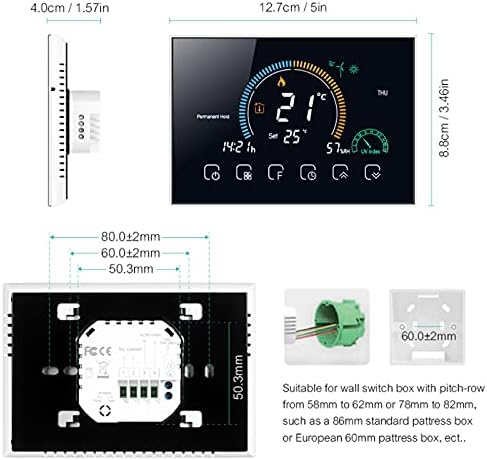
Figure 4.1: Rear view of the thermostat with wiring terminals and product dimensions. Suitable for 86x86mm square or European 60mm round pattress boxes.
Wiring Terminals: The thermostat uses terminals for 2 x 1.5 mm² or 1 x 2.5 mm² wires. Ensure proper insulation and secure connections.
4.2 Mounting
Choose a suitable location on an interior wall, away from direct sunlight, drafts, or heat sources that could affect temperature readings. The thermostat is designed for standard wall boxes (86x86mm square or European 60mm round).
- Turn off power to the heating system at the main circuit breaker.
- Separate the front panel from the backplate of the thermostat.
- Mount the backplate to the wall box using the provided screws.
- Complete the wiring connections as per Figure 4.1.
- Carefully attach the front panel to the mounted backplate, ensuring it clicks securely into place.
- Restore power to the heating system.

Figure 4.2: The thermostat seamlessly installed on a wall, demonstrating its discreet design.
5. Operation
5.1 Display Overview
The 4.8-inch color LCD provides comprehensive information at a glance. Key indicators include current temperature, set temperature, time, operating mode, and WiFi status.

Figure 5.1: Detailed view of the thermostat's display, emphasizing its accuracy, vibrant backlit LCD, and user-friendly interface.
5.2 Basic Controls
The thermostat features capacitive touch buttons for easy interaction. Common controls include power on/off, mode selection, temperature adjustment, and programming access.
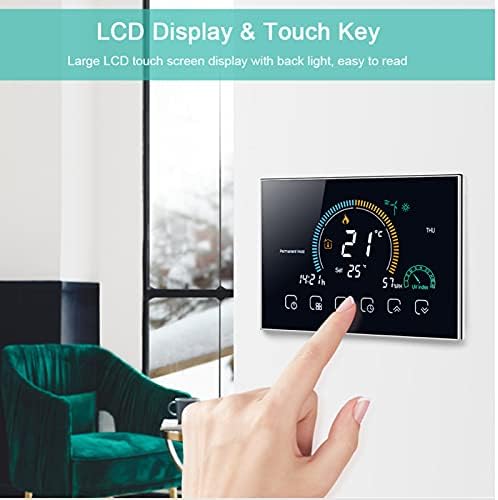
Figure 5.2: User interaction with the thermostat's touch-sensitive display.
- Power Button: Press to turn the thermostat on or off.
- Mode Button: Cycle through different operating modes (e.g., Manual, Auto, Holiday).
- Up/Down Arrows: Adjust the set temperature or navigate menu options.
- Clock/Program Button: Access programming settings for weekly schedules.
5.3 WiFi Connectivity and App Control
The BHT-8000GCLW can be controlled remotely via the SmartLife application (available for Android and iOS). This allows you to manage your home's temperature from anywhere.
- Download the "SmartLife" app from your device's app store.
- Register or log in to your SmartLife account.
- Follow the in-app instructions to add your BHT-8000GCLW thermostat. This typically involves putting the thermostat into pairing mode and connecting it to your home WiFi network.
- Once connected, you can control settings, view temperature, and set schedules directly from the app.

Figure 5.3: Remote control of the thermostat via the dedicated mobile application.
5.4 Programming Modes
The thermostat supports 5+2 programmable periods, allowing you to set different temperature schedules for weekdays and weekends to maximize comfort and energy savings.
- Manual Mode: Maintains a constant temperature set by the user.
- Automatic (Program) Mode: Follows the pre-set weekly schedule.
- Holiday Mode: Allows setting a constant temperature for an extended period, overriding the schedule.
Refer to the in-app instructions or the thermostat's on-screen menu for detailed steps on setting up your personalized schedules.
6. Maintenance
The Beca BHT-8000GCLW thermostat requires minimal maintenance to ensure optimal performance.
- Cleaning: Gently wipe the screen and casing with a soft, dry, lint-free cloth. Do not use abrasive cleaners, solvents, or chemical sprays, as these can damage the surface.
- Avoid Obstructions: Ensure that the thermostat's vents (if any) are not blocked by furniture, curtains, or other objects, as this can affect temperature sensing accuracy.
- Software Updates: Periodically check the SmartLife app for any available firmware updates for your thermostat to ensure you have the latest features and improvements.
7. Troubleshooting
If you encounter issues with your Beca BHT-8000GCLW thermostat, refer to the following common problems and solutions:
| Problem | Possible Cause | Solution |
|---|---|---|
| Thermostat not powering on. | No power supply; incorrect wiring. | Check circuit breaker. Verify wiring connections as per Section 4.1. |
| Temperature reading is inaccurate. | Thermostat exposed to direct sunlight, drafts, or heat sources. | Relocate thermostat if possible, or shield it from external influences. Ensure no vents are blocked. |
| Cannot connect to WiFi. | Incorrect WiFi password; weak signal; router issues. | Double-check WiFi password. Ensure thermostat is within WiFi range. Restart your router. Try re-pairing via the SmartLife app. |
| Heating system not responding. | Incorrect wiring; boiler issue; thermostat in wrong mode. | Verify wiring. Check if the boiler is functioning correctly. Ensure thermostat is in an active heating mode (e.g., Manual or Auto with a set temperature higher than ambient). |
| App control not working. | No internet connection; app not updated; thermostat offline. | Check your phone's internet connection. Update the SmartLife app. Verify the thermostat's WiFi connection status on its display. |
If the problem persists after trying these solutions, please contact customer support.
8. Specifications
| Feature | Detail |
|---|---|
| Brand | Beca |
| Model Number | BHT-8000GCLW |
| Power Supply | 95 ~ 240 V AC, 50 ~ 60 Hz |
| Accuracy | ±0.5°C or ±1°F |
| Set Temperature Range | 5-35°C |
| Display Temperature Range | 5 ~ 99°C |
| Storage Temperature | -5 ~ 45°C |
| Shell Material | PC + ABS (Flame Retardant) |
| Installation Box | 86 x 86 mm Square or European 60 mm Round Box |
| Wire Terminals | 2 x 1.5 mm² or 1 x 2.5 mm² Wire |
| Protection Class | IP20 |
| Buttons | Capacitive Touch Buttons |
| Connectivity Technology | Wi-Fi |
| Special Feature | Programmable |
| Product Weight | 1.5 Kilograms |
9. Warranty and Support
This Beca BHT-8000GCLW WiFi Thermostat comes with a standard manufacturer's warranty. Please refer to the warranty card included in your product packaging for specific terms and conditions, including warranty duration and coverage details.
For technical support, troubleshooting assistance beyond this manual, or warranty claims, please contact your retailer or the manufacturer's customer service. Contact information can typically be found on the product packaging or the manufacturer's official website.
Related documentsBHT-8000GCLW


Ask a question about this manual
Ask about setup, troubleshooting, compatibility, parts, safety, or missing instructions. Manuals+ will review the question and use this page’s manual context to help answer it.