
1. Introduction
Thank you for purchasing the Samsung SWA-9100S/ZA Wireless Rear Speaker Kit. This kit is designed to enhance your audio experience by adding wireless surround sound capabilities to compatible Samsung soundbars. Please read this manual carefully before using the product to ensure proper setup, operation, and maintenance. Keep this manual for future reference.
2. Safety Information
To reduce the risk of electric shock, fire, or injury, always follow these basic safety precautions:
- Do not expose this apparatus to rain or moisture.
- Do not open the cabinet. There are no user-serviceable parts inside. Refer all servicing to qualified service personnel.
- Ensure proper ventilation. Do not block any ventilation openings.
- Place the unit on a stable, level surface.
- Protect the power cord from being walked on or pinched, particularly at plugs, convenience receptacles, and the point where they exit from the apparatus.
- Unplug this apparatus during lightning storms or when unused for long periods of time.
- Only use attachments/accessories specified by the manufacturer.
3. Package Contents
Verify that all components are present in your package:
- Samsung SWA-9100S Wireless Receiver Module
- 2x Rear Speakers
- Power Cable for Wireless Receiver Module
- 2x Speaker Cables
- Instruction Manual (this document)

Image: Rear view of the wireless receiver module and two rear speakers, illustrating the connection points for the speaker cables.
4. Setup
Follow these steps to set up your wireless rear speaker kit:
- Connect the Rear Speakers to the Wireless Receiver Module:
Connect the speaker cables to the corresponding color-coded terminals on the back of the wireless receiver module and the rear speakers. Ensure positive (+) and negative (-) terminals are matched correctly. - Connect Power to the Wireless Receiver Module:
Plug the power cable into the wireless receiver module and then into a wall outlet. The STANDBY indicator on the module will blink blue. - Connect to your Samsung Soundbar:
With your Samsung soundbar powered off, press and hold the 'ID SET' button on the back of the wireless receiver module for at least 5 seconds until the STANDBY indicator blinks blue and red alternately. Then, power on your Samsung soundbar. The soundbar will automatically search for the wireless receiver module. Once connected, the LINK indicator on the wireless receiver module will turn solid blue. - Placement:
Position the rear speakers behind your listening area, ideally at ear level. The speakers are keyhole wall-mountable for flexible placement.

Image: Front view of one of the rear speakers.
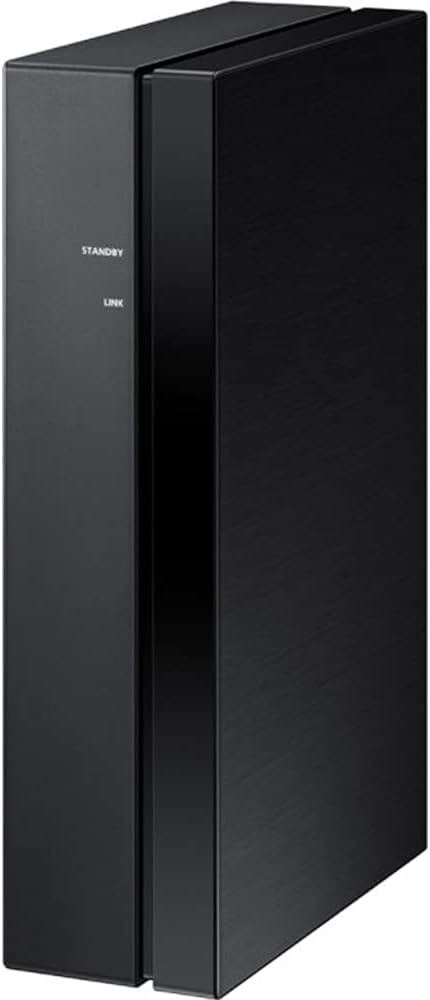
Image: Side view of the wireless receiver module, showing the STANDBY and LINK indicators.
5. Operating
Once successfully paired, the wireless rear speakers will automatically connect to your soundbar when both devices are powered on. The LINK indicator on the wireless receiver module will illuminate solid blue, indicating an active connection.
- Power On/Off: The wireless receiver module powers on and off automatically with your connected Samsung soundbar.
- Status Indicators:
- STANDBY (Blinking Blue): Module is powered on and ready to connect.
- LINK (Solid Blue): Module is successfully connected to the soundbar.
- STANDBY (Blinking Blue/Red): Module is in ID SET mode, searching for a soundbar.
- STANDBY (Solid Red): Connection failed or module is in error state.
6. Maintenance
Proper care ensures the longevity and performance of your speaker kit.
- Cleaning: Use a soft, dry cloth to clean the surfaces of the speakers and wireless receiver module. Do not use liquid cleaners, aerosols, or solvents, as they may damage the finish.
- Ventilation: Ensure the wireless receiver module has adequate ventilation. Do not cover its vents.
- Storage: If storing the kit for an extended period, disconnect it from power and store it in a cool, dry place away from direct sunlight and extreme temperatures.
7. Troubleshooting
If you encounter issues, refer to the table below for common problems and solutions:
| Problem | Possible Cause | Solution |
|---|---|---|
| No sound from rear speakers. | Wireless connection lost or not established. Speaker cables incorrectly connected. | Check the LINK indicator on the wireless receiver module (should be solid blue). Re-establish connection if necessary (refer to Setup section). Verify speaker cable connections. |
| LINK indicator is solid red. | Connection failed or error. | Unplug the power cord from the wireless receiver module and plug it back in. Repeat the ID SET process. Ensure the soundbar is compatible. |
| Sound is distorted or intermittent. | Interference from other wireless devices. Wireless receiver module too far from soundbar. | Move the wireless receiver module closer to the soundbar. Ensure no large metal objects are between them. Minimize interference from other 2.4 GHz wireless devices. |
| Wireless receiver module does not power on. | Power cable not connected or power outlet issue. | Check if the power cable is securely connected to the module and the wall outlet. Test the outlet with another device. |
8. Specifications
| Feature | Specification |
|---|---|
| Model Number | CRTSAMSWA9100S |
| Brand | Samsung |
| Audio Output Mode | Surround |
| Mounting Type | Wall Mount (Keyhole) |
| Speaker Type | Rear Surround Sound |
| Additional Features | Two-Channel Wireless Amplifier; Compact Design |
| Number of Audio Channels | 2.0 |
| Impedance | 3 Ohms |
| Item Weight | 6.5 Pounds (approx.) |
| Power Source | AC |
| Subwoofer Connectivity Technology | Wireless (for connection to soundbar) |
9. Warranty and Support
This Certified Refurbished product includes a 90-day warranty. For warranty claims or technical support, please refer to the documentation provided with your purchase or visit the official Samsung support website for your region. Ensure you have your product model number (CRTSAMSWA9100S) and proof of purchase available when contacting support.